
- Catalogs
- Shenzhen Ruicom Technology Co., Ltd.
- RUICOM GMU200-BL Bluetooth attitude sensor


- Company
- Products
- Catalogs
- News & Trends
- Exhibitions
RUICOM GMU200-BL Bluetooth attitude sensor
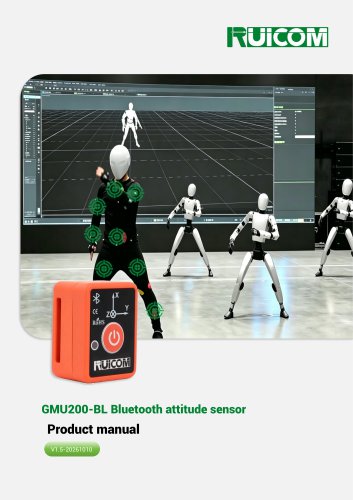
RUICOM GMU200-BL Bluetooth attitude sensor
The GMU200-BL is a compact and cost-effective Attitude and Heading Reference System (AHRS) designed for dynamic applications like model aircraft and robotics. It features a Kalman filter algorithm and provides real-time attitude data using a three-axis accelerometer, magnetometer, and gyroscope. The device supports Bluetooth 5.1 for wireless data transmission up to 40 meters and allows firmware upgrades via BLE DFU.
- Medical rehabilitation equipment monitoring
- Limb rehabilitation monitoring
- Human body capture
- Posture angle monitoring
- Integrated nine-axis sensor and temperature sensor
- Bluetooth 5.1 wireless transmission
- Supports VRU and AHRS
- Real-time 3D dynamic measurement
- Compact structure, easy installation
The GMU200-BL offers a measurement range of Roll ±180°, Pitch ±90°, and Azimuth ±180°. It features adjustable gyroscope and accelerometer ranges, with high accuracy and stability. The device complies with EN61000 and GBT17626 standards for electromagnetic compatibility.
The device has a nominal capacity of 100mAh, operates at 3.7V, supports Type-C charging, and offers continuous operation for 6 hours.
Proper installation is crucial to avoid measurement errors. The device supports various installation directions, including horizontal and vertical setups. Indicator lights provide status updates for power and connectivity.
Calibration is necessary if sensor accuracy is compromised or if magnetic interference is present. The process involves rotating the sensor in specific orientations for at least 20 seconds.
The GMU200-BL uses BLE for data acquisition and transmission, following the GATT model with the device acting as a GATT server. The protocol supports bidirectional communication and remote parameter adjustments.
The BLE data protocol uses a specific frame format with synchronization words, class and ID fields, and a CRC16 checksum for data integrity.
This document provides technical specifications and procedures for configuring and querying various parameters of an IMU device. It includes details on data output mapping, setting operational modes, and calibration routines.
- OUTMAP_TC (0x10): Temperature
- OUTMAP_BAT (0x20): Battery level
- OUTMAP_STS (0x40): IMU status
- OUTMAP_TPS (0x80): Time
- 0x07: Euler angles, accelerometer readings, and gyro angular velocity
- Default MAP=0xFF outputs all data items.
- Set Current Acceleration Output Type: 0x00 for Linear Acceleration (default), 0x01 for Volume Acceleration.
- Manual Gyro Zero Bias Clear: 0x00 to stop, 0x01 to start.
- Set Data Output Frequency: Options range from 0Hz to 100Hz, with 25Hz as default.
- Set Operating Mode: Options include IMU, VRU (default), and AHRS.
- Set Acceleration Range: Options include 2g, 4g (default), 8g, and 16g.
- Set Angular Velocity Range: Options include 125deg/sec to 2000deg/sec.
- Set 3dB Bandwidth: Options include 25Hz to 249Hz.
- Set Operating Platform: Options include various applications like construction, AGV, shipborne, etc.
- Horizontal and Vertical Rotation Calibration: Commands to start and stop calibration routines.
- Set Magnetic Declination: Allows setting of magnetic declination in degrees.
- Data is parsed based on the OUTMAP value, with specific byte offsets for each data type such as Euler angles, acceleration, gyro velocity, magnetometer readings, temperature, battery percentage, IMU status, and local time.
- Includes a routine for CRC16 checksum calculation to ensure data integrity during transmission.
The document provides technical details on functions related to data processing and communication for an AH100B device. It includes functions for unpacking float data into uint8_t format, handling BLE communication, and parsing data from the AH100B device.
This function converts a float value to a uint8_t array. It takes a pointer to a uint8_t array and a float value as inputs, and stores the float value in the array in a byte-wise manner.
This function manages the automatic output of data over BLE. It constructs a data packet based on a mask that specifies which data types to include (e.g., Euler angles, acceleration, gyroscope data, etc.). The function calculates a checksum for data integrity and enables BLE transmission.
The GetAH100BMapData function extracts data from a byte array based on a specified map. It updates the imuData structure with parsed values such as Euler angles, acceleration, gyroscope data, magnetic data, temperature, battery voltage, status, and elapsed time.
The AH100B_Command_Check function verifies and processes commands received by the AH100B device. It checks the command class and ID, and processes the data if the command is valid.
This section outlines the steps for manually clearing the gyroscope zero-bias. It involves sending specific commands to the device, waiting for the process to complete, and preserving the zero-bias settings.
The document mentions calibration procedures for magnetic field horizontal and vertical rotation in AHRS mode, although details are not provided in the excerpt.
Catalog excerpts

GMU200-BL Bluetooth attitude sensor
Open the catalog to page 1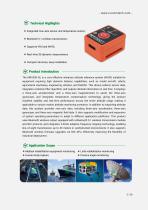
❖ Integrated nine-axis sensor and temperature ❖ Bluetooth 5.1 wireless transmission; ❖ Real-time 3D dynamic measurement; ❖ Compact structure, easy installation. The GMU200-BL is a cost-effective miniature attitude reference system (AHRS) suitable for equipment requiring high dynamic balance capabilities, such as model aircraft, robots, agricultural machinery, engineering vehicles, and forklifts. This device collects sensor data, integrates a Kalman filter algorithm, and outputs attitude information in real time. It employs a three-axis accelerometer and a three-axis magnetometer to assist the...
Open the catalog to page 2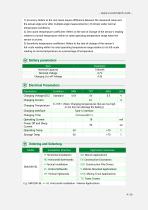
1) Accuracy: Refers to the root mean square difference between the measured value and the actual angle error after multiple angle measurements (>16 times) under normal temperature conditions. 2) Zero-point temperature coefficient: Refers to the rate of change of the sensor's reading relative to normal temperature within its rated operating temperature range when the sensor is at zero. 3) Sensitivity temperature coefficient: Refers to the rate of change of the sensor's full-scale reading within its rated operating temperature range relative to its full-scale reading at normal temperature as a...
Open the catalog to page 4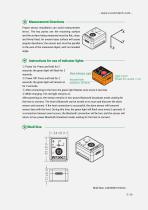
Measurement Directions Proper sensor installation can avoid measurement errors. The key points are: the mounting surface and the surface being measured must be flat, close, and firmly fixed. An uneven base surface will cause angular deviations; the sensor axis must be parallel to the axis of the measured object, with no included angle. Instructions for use of indicator lights ① Power On: Press and hold for 2 seconds; the green light will flash for 2 seconds. ② Power Off: Press and hold for 2 seconds; the green light will remain on for 2 seconds. ③ After connecting to the host, the green light...
Open the catalog to page 5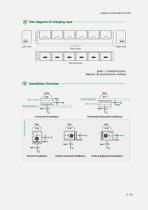
Size diagram of charging case Shell: L172×W30×H22mm Material: 3D printed plastic material Installation Direction
Open the catalog to page 6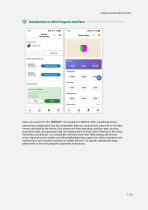
Introduction to Mini Program Interface Users can search for the "瑞惯传感" mini program in WeChat. After completing device networking configuration and link handshake, they can continuously subscribe to the data stream uploaded by the device, fully obtain real-time operating condition data, sensing acquisition data, and operation logs, and display them in local cache. Relying on the cloud forwarding mechanism, it is compatible with both local near-field reading and remote cross-regional access modes, providing lightweight data support for device operation and maintenance and condition analysis on...
Open the catalog to page 7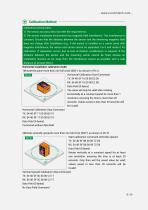
Calibration Method Calibration prerequisites: 1) The sensor accuracy does not meet the requirements; 2) The sensor installation environment has magnetic field interference. This interference is constant. Ensure that the distance between the sensor and the interfering magnetic field does not change after installation (e.g., if the sensor is installed on a carrier (iron) with magnetic interference, the sensor and carrier cannot be separated. Fix it and rotate it for calibration. If separation occurs due to lack of fixation, recalibration is required. If the distance between the sensor and the mounting...
Open the catalog to page 8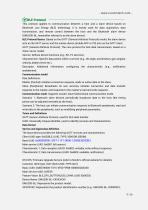
BLE Protocol This protocol applies to communication between a host and a slave device based on Bluetooth Low Energy (BLE) technology. It is mainly used for data acquisition, data transmission, and remote control between the host and the Bluetooth slave device (GMU200-BL, hereinafter referred to as the slave device). BLE Protocol Basics: Based on the GATT (General Attribute Protocol) model, the slave device acts as the GATT server, and the master device (mobile APP or PC) acts as the GATT client. GATT (General Attribute Protocol): The core protocol for BLE data transmission, based on a client-server...
Open the catalog to page 9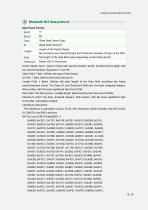
Data Frame Format: Frame Header Syncl, Sync2: Frame start synchronization words. All data frames begin with two synchronization characters 'T' and 'M'. Class Field: 1 Byte. Defines the type of data frame. ID Field: 1 Byte. Defines the frame function ID. Length Field: 2 Bytes. Defines the byte length of the Data field, excluding the frame synchronization words. The Class, ID, and Checksum fields are: two-byte unsigned integers, little-endian, with the least significant byte first (LCM). Data Field: The data portion, variable length, determined by the Class and ID fields. Checksum Field: Two-byte...
Open the catalog to page 10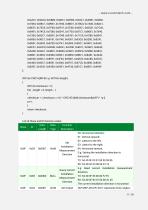
INT16U checksum = 0; for(; length > 0; length--) return checksum; List of Class and ID function codes:
Open the catalog to page 11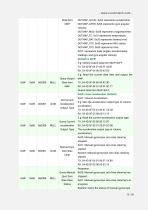
Data Item OUTMAP_ACCEL: 0x02 represents acceleration; MAP OUTMAP_GYRO: 0x04 represents gyro angular velocity; OUTMAP_MAG: 0x08 represents magnetometer; OUTMAP_TC: 0x10 represents temperature; OUTMAP_BAT: 0x20 represents battery level; OUTMAP_STS: 0x40 represents IMU status; OUTMAP_TPS: 0x80 represents time; 0x07: represents Euler angles, accelerometer readings, and gyro angular velocity; E.g: Setting output data item MAP=0xFF: TX: 54 4D 0F 04 01 00 FF 44 B1 RX: 54 4D0F04 00 00 42 D5 E.g: Read the current data item and output the Query Output MAP. Set Current Acceleration Output Type Output data...
Open the catalog to page 12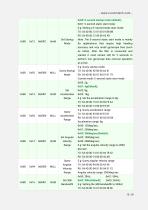
0x01: 5-second static start mode; E.g: Setting a 5-second static start mode: Set Startup Note: The 5-second static start mode is mainly Mode for applications that require high heading accuracy and very small gyroscope bias (such as AGVs). After the IMU is connected and started, it must remain still for 5 seconds to perform one gyroscope bias removal operation at a time. E.g: Query startup mode: Current mode: 5-second static start mode 0x00: 2g; E.g: Set the angular velocity range to 2000 dec/sec:
Open the catalog to page 15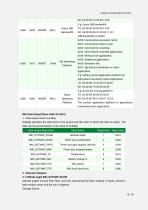
0x01: Construction tower crane; 0x03: AGV/vehicle-mounted application; 0x04: Mining truck application; 0x07: Agricultural machinery or robot application; E.g: Setting up the application platform for agricultural machinery/robot application: Platform The current application platform is agricultural machinery/robot application 1. Data output items Out Map OutMap specifies the data items to be output and the order in which the data is output. The data can be parsed based on the value of OutMap. 2. Data Item Analysis 2.1 Attitude angle IMU_OUTMAP_EULER Attitude angles include Roll, Pitch, and Yaw,...
Open the catalog to page 16All Shenzhen Ruicom Technology Co., Ltd. catalogs and technical brochures




























- Industrial display panel
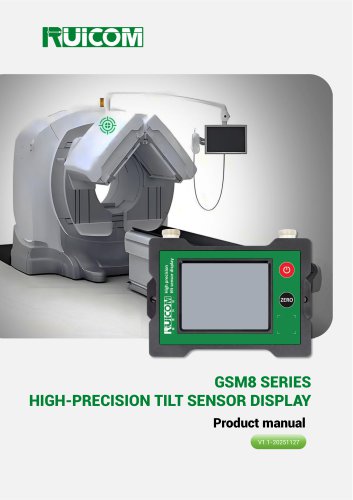
- Color display panel
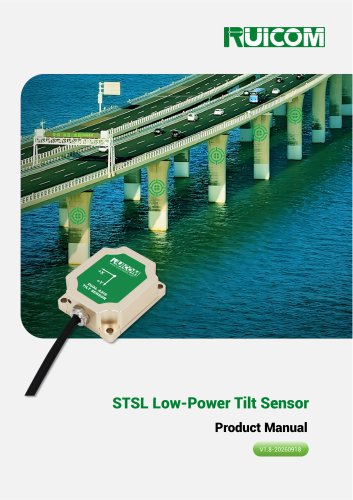
- Tilt sensor
- Digital inclination sensor
- Triaxial acceleration sensor
- Built-in display
- 2-axis tilt sensor
- MEMS inclination sensor
- Multi-axis tilt sensor
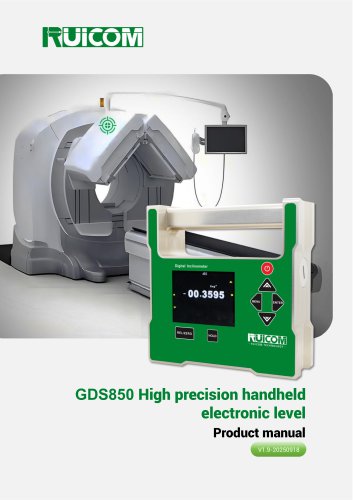
- High-precision tiltmeter
- Analog inclination sensor
- IP67 inclination sensor
- Industrial accelerometer
- 1-axis tilt sensor
- MEMS accelerometer
- RS-485 display panel
- Accelerometer with built-in electronics
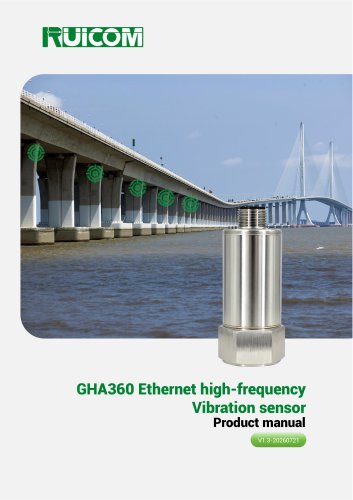
- Vibration sensor