
- Catalogs
- Shenzhen Ruicom Technology Co., Ltd.
- RUICOM GKM3 MEMS Digital Vibration sensor


- Company
- Products
- Catalogs
- News & Trends
- Exhibitions
RUICOM GKM3 MEMS Digital Vibration sensor

RUICOM GKM3 MEMS Digital Vibration sensor
The GKM3 is a triaxial vibration sensor by RUICOM Technology, designed for applications like vibration and impact testing. It supports digital interface outputs (RS232/485/TTL) and allows for long-distance series connections of multiple sensors for synchronized measurement and centralized data analysis. The sensor uses single-crystal silicon capacitive sensing technology and includes a micromachined silicon chip, a low-power ASIC signal conditioning circuit, a microprocessor for compensation data storage, and an integrated temperature sensor. It features low power consumption, high structural strength, and stable output, with overcurrent protection for safe operation. The sensor maintains long-term stability with a deviation value better than 0.1% across its measurement range.
The sensor is suitable for applications such as flight data recording, structural health monitoring, vehicle vibration testing, wind turbine monitoring, and early warning systems for large machinery.
Key technical highlights include selectable RS232/485/TTL signal output, a vibration measurement range of 10~2000Hz, 10g, and shock resistance of 100g@11ms. It offers excellent mechanical strength and long-term stability.
Measurement ranges are available from ±2g to ±40g, with bias calibration under 1mg and nonlinearity under 1% FS. The sensor operates with a bandwidth of 500Hz and a noise density of 21 to 86.6 μg/√Hz. It supports automatic output rates from 5Hz to 1000Hz and uses RS232, TTL, or RS485 output interfaces.
The sensor is housed in an aluminum alloy shell with a magnetic base made of carbon steel and magnet. It is available in various models based on measurement range, signal output protocol, and installation method.
The sensor supports serial communication and MODBUS RTU protocols. The serial communication protocol includes data frame formats and command word parsing for various operations such as reading acceleration data and setting communication rates. The MODBUS protocol requires specific timing between data frames and supports broadcast address operations.
Parameters such as baud rate, address code, and output frequency can be set but must be saved to FLASH to persist after power loss. The MODBUS protocol requires commands to be sent twice consecutively for reliability.
Acceleration data can be read from holding or input registers using MODBUS function codes. The data is represented in a point-based notation, with conversion processes detailed for obtaining final sensor readings.
- Command Example: Host sends 01H 06H 00H 11H 00H 04H D8H 0CH.
- Response: Slave echoes the command.
- Details: 0011H is the register address for the sensor address. The example changes the sensor address to 0004H. The last two bytes are the CRC checksum.
- Default: 9600bps.
- Command Example: Host sends 01H 06H 00H 12H 00H A2H A8H 76H.
- Response: Slave echoes the command.
- Details: 0012H is the register address for baud rate. The example sets the baud rate to 19200. The last two bytes are the CRC checksum.
- Baud Rate Options: A0H:4800, A1H:9600, A2H:19200, A3H:38400, A4H:115200.
- Default: Even parity.
- Command Example: Host sends 01H 06H 00H 09H 00H 01H 98H 08H.
- Response: Slave echoes the command.
- Details: 0009H is the register address for character format. The example sets the format to one start bit + 8 data bits, no parity, and 1 stop bit. Takes effect after a power cycle.
- Format Options: 0000H: Even parity, 0001H: No parity.
- Default: 0Hz.
- Command Example: Host sends 01H 06H 00H 13H 00H A2H A8H 76H.
- Response: Slave echoes the command.
- Details: 0013H is the register address for output frequency. The example sets the frequency to 25Hz in format two. The last two bytes are the CRC checksum.
- Frequency Options: 0HZ, 10HZ, 25HZ, 50HZ.
- Method: Upon power-up, the host sends 0xAA continuously. A successful switch is indicated by the sensor replying with 0XAA, 0XAA, 0XBB, 0XBB.
Catalog excerpts

Vibration sensor
Open the catalog to page 1
❖ RS232/485/TTL signal output selectable; ❖ Shock: 100g@11 ms, triaxial (half-sine wave); ❖ Excellent mechanical strength and long-term stability. Product Introduction- The GKM3 triaxial Vibration sensor is an independently developed Vibration sensor sensor series by RUICOM Technology, suitable for applications such as vibration testing and impact testing. This product supports digital interface output (RS232/485/TTL optional) and can achieve long-distance series connection of multiple sensors via address code settings, facilitating multi-point synchronous measurement and centralized data analysis....
Open the catalog to page 2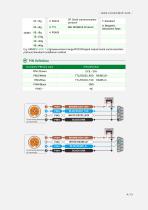
E.g: GKM302-2SP-T: ±2gmeasurement range/RS232Ssignal output/serial communication protocol/standard installation method. PIN Definition Connector PIN/line color
Open the catalog to page 4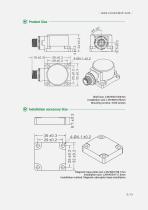
Product Size Shell size: L36×W32×H24mm Installation size: L29×W25×H4mm Mounting screws: 4 M4 screws Installation accessory Size Magnetic base plate size: L36×W32×H8.1mm Installation size: L29×W25×H11.6mm Installation method: Magnetic adsorption base installation
Open the catalog to page 5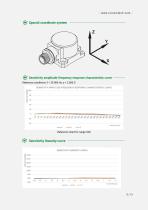
Sensitivity amplitude-frequency response characteristic curve Reference conditions: f = 20.000 Hz, a = 2.000 G SENSITIVITY AMPLITUDE-FREQUENCY RESPONSE CHARACTERISTIC CURVE Reference chart for range ±8G Sensitivity linearity curve SENSITIVITY LINEARITY GRAPH
Open the catalog to page 6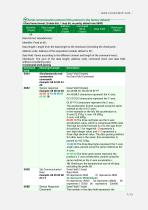
£vfserial communication protocol (this protocol is the factory default)' Identifier (1 byte) Data format: Hexadecimal; Data length: Length from the data length to the checksum (including the checksum); Address code: Address of the acquisition module, default is 00; Data field: Varies according to the different content and length of the command word; Checksum: The sum of the data length, address code, command word, and data field, without considering carry. Simultaneously read acceleration commands Example: 68 04 00 04 08 Sensor response Sensor Response Command Data Field (0 bytes) No Data Field...
Open the catalog to page 7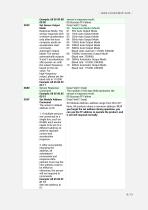
Set Sensor Output Mode Response Mode: The sensor responds with a relative acceleration only after the host computer sends an acceleration read command. Automatic Output Mode: The sensor automatically outputs X and Y accelerations after power-on, with the output frequency based on the set value. For high-frequency output, please set the baud rate to 115200. Example: 68 05 00 0C Sensor Response Command Set Module Address Command The sensor's default address is 00. 1. If multiple sensors are connected to a single bus, such as RS485, each sensor needs to be set to a different address to achieve separate...
Open the catalog to page 8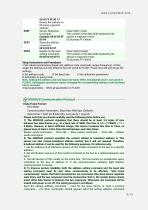
Setup Instructions and Procedures 1 .Set relevant parameters (baud rate, address code, automatic output frequency). At this stage, the settings are only effective but not saved to FLASH. Power loss will also erase the settings; A Set address code B Set baud rate C Set calibration parameters D Automatic or query mode Note: Setting the address code and baud rate takes effect immediately (but is not saved to FLASH). Subsequent operations require changing the corresponding address code and baud rate to succeed. 2.Save parameters. Write all parameters to FLASH. MODBUS Communication Protocol-1.Data...
Open the catalog to page 9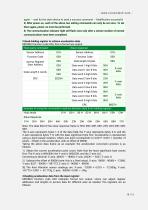
again -- wait for the slave device to send a success command -- Modification successful 2.Read holding register to retrieve acceleration data. MODBUS function code 03H, this is format one output. Note: The data field of the slave response frame is 50H, 46H, 00H, 00H, 23H, 20H, 00H, 00H, 00H. The X-axis represents bytes 1-3 of the data field, the Y-axis represents bytes 4-6, and the Z-axis represents bytes 7-9, with the least significant byte first. Acceleration is represented using a point-based notation, where one point corresponds to 0.001°. 0.001 x (number of points - offset) is the acceleration,...
Open the catalog to page 10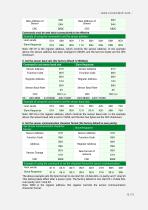
The above example sets the byte format to one start bit + 8 data bits, no parity, and 1 stop bit. This setting takes effect after a power cycle. The factory default is one start bit + 8 data bits, even parity, and 1 stop bit. Note: 0009 is the register address; this register controls the sensor communication character format.
Open the catalog to page 12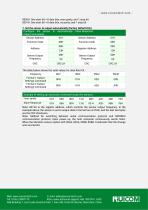
0000H: One start bit + 8 data bits, even parity, and 1 stop bit 0001H: One start bit + 8 data bits, no parity, and 1 stop bit 7. Set the sensor to output automatically (factory default 0Hz) Note: 0013H is the register address, which controls the sensor output frequency. In the example above, the sensor is set to output data in format two at 25Hz, and the last two bytes are the CRC checksum. Note: Method for switching between serial communication protocol and MODBUS communication protocol: Upon power-up, the host computer continuously sends 0xAA. When the Vibration sensor replies with 0XAA, 0XAA,...
Open the catalog to page 13All Shenzhen Ruicom Technology Co., Ltd. catalogs and technical brochures




































- Display module
- Industrial display panel
- Acceleration sensor
- Color display panel
- Tilt sensor
- Digital inclination sensor
- Triaxial acceleration sensor
- Built-in display
- 2-axis tilt sensor
- MEMS inclination sensor
- Multi-axis tilt sensor
- High-precision tiltmeter
- Analog inclination sensor
- IP67 inclination sensor
- Industrial accelerometer
- 1-axis tilt sensor
- MEMS accelerometer
- RS-485 display panel
- Accelerometer with built-in electronics