
- Catalogs
- Shenzhen Ruicom Technology Co., Ltd.
- RUICOM GDS610 High-Precision Digital Inclinometer


- Company
- Products
- Catalogs
- News & Trends
- Exhibitions
RUICOM GDS610 High-Precision Digital Inclinometer
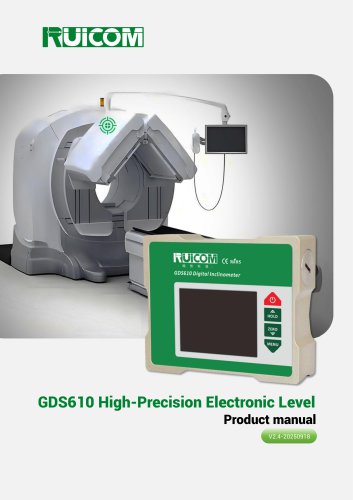
RUICOM GDS610 High-Precision Digital Inclinometer
The GDS610 is a high-precision digital tilt measuring instrument designed for industrial applications. It uses advanced MEMS sensing technology with cross-axis compensation and temperature drift correction to ensure stability and repeatability. It features a single-axis measurement range of ±90°, a resolution of 0.001°, and a three-dimensional magnetic mounting design for flexible installation. The device supports multiple measurement units and offers data storage capabilities.
Application Scope
The GDS610 is suitable for architectural engineering surveying, roadbed and pavement slope monitoring, vehicle positioning, industrial equipment level control, heavy equipment leveling, rotary platform accuracy testing, precision machining, and medical equipment posture correction.
Technical Highlights
- Accuracy: <0.02°
- Repeatability: 0.004°
- Angular resolution: 0.001°
- Data storage function
- Strong magnetic mounting
- Automatic angle interpolation compensation
Specifications
- Angle Measurement Range: ±90° (single-axis), ±30° (dual-axis)
- Accuracy: <0.02° (single-axis), <0.005° (dual-axis)
- Measurement Modes: Degrees, minutes, seconds, angles, mm/m
- Display: 64-color true-color luminous screen
- Operating Temperature: -10℃ to +70℃
- Battery: AA or AA NiMH rechargeable, 6 hours operation
- Vibration and Shock Resistance: 10g@11ms, 10grms/10~100Hz
- Waterproof Rating: IP54
- Material: Abrasion-resistant aluminum alloy
- Dimensions: 115x95x32mm
Function Menu Operation Instructions
- Metal Wear-Resistant Housing with magnetic surfaces
- Battery Slot for AA batteries
- Power Button for on/off
- HOLD and ZERO buttons for screen lock and zero point settings
- MENU button for accessing and confirming menu options
- Installation direction and data saving instructions
Settings and Calibration
- AUTO ON/OFF: Automatic power-off settings
- CALI: Zero-point calibration for vertical and horizontal positions
- LATITUDE: Local latitude setting for accuracy
- DATE: Date and time settings
- FAC.RESET: Factory reset options
- LINEARITY: Linearity correction settings
- Data unit mode settings: Switch between degree, degree-minute-second, and mm/m
Product Maintenance
- Use AA batteries
- Avoid dropping the instrument
- Contact manufacturer for repairs
Warnings
- Handle with care to avoid damage
- Do not press multiple buttons simultaneously
- Keep out of reach of children
Catalog excerpts
GDS610 High-Precision Electronic Level
Open the catalog to page 1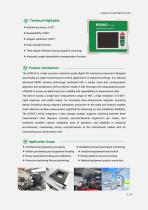
Technical Highlights ❖ Data storage function; ❖ Three-plane reference strong magnetic mounting; ❖ Automatic angle interpolation compensation function. Product Introduction - The GDS610 is a high-precision industrial-grade digital tilt measuring instrument designed specifically for angle monitoring and control applications in industrial settings. It is utilizing advanced MEMS sensing technology, combined with a unique cross-axis compensation algorithm and temperature drift correction model, it fully leverages the computational power of MEMS to ensure excellent long-term stability and repeatability...
Open the catalog to page 2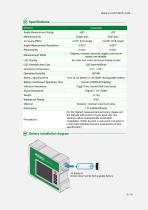
Battery installation diagram kel-Metal Hydride Rechargeable Battery.
Open the catalog to page 3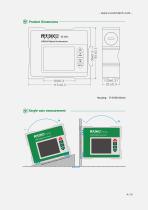
Product Dimensions Single-axis measurement
Open the catalog to page 4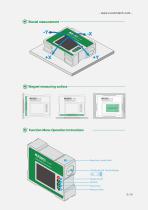
[v> Magnet measuring surface Function Menu Operation Instructions
Open the catalog to page 5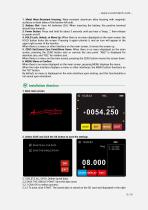
1. Metal Wear-Resistant Housing: Wear-resistant aluminum alloy housing with magnetic surfaces on both sides of the bottom left side. 2. Battery Slot: Uses AA batteries (2A). When inserting the battery, the positive terminal should face inwards. 3. Power Button: Press and hold for about 3 seconds until you hear a "beep...", then release to power on/off. 4. HOLD Lock, Unlock, or Move Up: When there is no menu displayed on the main screen, the HOLD button locks the screen. Pressing it again unlocks it, and an icon will appear in the upper right corner of the monitor. When there is a menu or other...
Open the catalog to page 6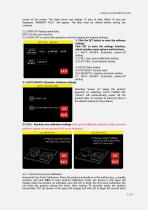
corner of the screen. The right corner can display 10 sets of data. When 10 sets are displayed, "MEMORY FULL!" will appear. The data must be cleared before saving can continue. 2.2.3 REPLAY: Replay saved data; EIXT: Exit the save function; 2.2.4 Click EXIT to cancel the operation and exit, keeping the original settings; 3. Click the SET button to enter the software settings. Click SET to enter the settings interface, which includes seven options and functions. 3.1 AUTO ON/OFF: Automatic power-off setting 3.2 CALI: Zero-point calibration setting 3.3 LATITUDE: Local latitude setting 3.4 DATE: Date...
Open the catalog to page 7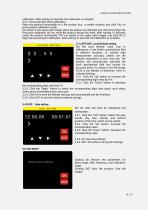
- www.ruicomtech.com -calibration. After waiting 10 seconds, the calibration is complete. 3.2.2. Horizontal Zero Point Calibration: Place the product horizontally on a flat surface (e.g., a marble surface), and click CALI to enter product calibration mode. (As shown in the upper right image), place the product as indicated, and click OK to begin the first point calibration (do not move the product during this time). After waiting 10 seconds, rotate the product horizontally 180° (as shown in the upper right image), and click OK to begin the second point calibration. After waiting 10 seconds, the...
Open the catalog to page 8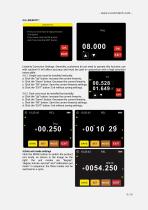
First you must have a high precision Turntable!! If you have,click the OK button and if not,click the EXIT button Linearity Correction Settings: Generally, customers do not need to operate this function; use with caution!! It will affect accuracy and must be used in conjunction with a high-precision rotary table; 3.6.1. Single-axis must be installed vertically: a: Click the "Up" button: Increase the current linearity; b: Click the "Down" button: Decrease the current linearity; c: Click the "OK" button: Save the current linearity settings; d: Click the "EXIT" button: Exit without saving settings;...
Open the catalog to page 9
1. The digital angle meter uses AA batteries (2A). 2. This instrument is highly reliable and can be used in vibrating environments, but please do not drop it from a height, as this will cause permanent damage. 3. If you find the instrument damaged, please do not disassemble it yourself. Please contact our company immediately for professional guidance and repair. Any instrument disassembled by an individual will be refused repair by the manufacturer. 1. This product contains high-precision sensors and information processing circuits. Dropping, impacts, or unauthorized disassembly are strictly...
Open the catalog to page 10All Shenzhen Ruicom Technology Co., Ltd. catalogs and technical brochures



































- Industrial display panel
- Acceleration sensor
- Color display panel
- Tilt sensor
- Digital inclination sensor
- Triaxial acceleration sensor
- Built-in display
- 2-axis tilt sensor
- MEMS inclination sensor
- Multi-axis tilt sensor
- High-precision tiltmeter
- Analog inclination sensor
- IP67 inclination sensor
- Industrial accelerometer
- 1-axis tilt sensor
- MEMS accelerometer
- RS-485 display panel
- Accelerometer with built-in electronics
- Vibration sensor