
- Catalogs
- Shenzhen Ruicom Technology Co., Ltd.
- RUICOM GCM508 3D Electronic Compass with Analog Output


- Company
- Products
- Catalogs
- News & Trends
- Exhibitions
RUICOM GCM508 3D Electronic Compass with Analog Output
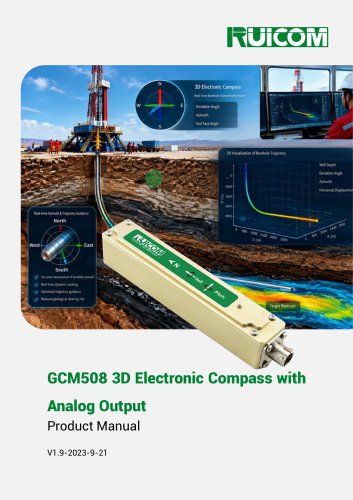
RUICOM GCM508 3D Electronic Compass with Analog Output
The GCM508 3D electronic compass by Ruicom Technology is a high-precision sensor designed for attitude measurement. It features RS232 digital and 4–20mA analog outputs and has an IP67 ingress protection rating, making it ideal for drilling measurement applications. The compass employs calibration algorithms to reduce magnetic field interference, providing accurate heading data across a full 360° range of roll angles.
The GCM508 is suitable for use in marine navigation, GPS-integrated systems, antenna servo control, infrared imager integration, laser ranging equipment, and specialized robotics.
- Azimuth accuracy: 0.3°–0.5°
- Roll angle measurement range: ±180°
- Analog 4–20 mA output
- Optional RS232/RS485/TTL output interfaces
- Includes hard-iron, soft-iron, and tilt compensation
- Optimal Heading Accuracy: 0.3°
- Resolution: 0.1°
- Pitch and Roll Accuracy: Varies with measurement range
- Calibration: 24-Point 3D Calibration
- Physical Characteristics: Dimensions L125×W22×H24mm, Weight 90g
- Interface: 5-Pin Aviation Connector, Startup Delay <50ms, Maximum Output Rate 20Hz/s
- Power Supply: DC 12V, Maximum Current 40mA
- Environmental: Operating Range -40℃ to +85℃, Vibration Resistance 2500g
Models are defined by enclosure type, signal output, and installation method. For example, GCM508-232-H indicates enclosure housing with RS232 and horizontal installation.
To ensure accuracy, the compass should be installed away from magnetic interference sources. Use non-magnetic screws and keep cables short to minimize signal noise.
Calibration is necessary if accuracy specifications are not met or if constant magnetic interference is present. The process involves connecting the compass, sending calibration commands, and rotating the device to collect data points. A minimum of 12 points is required, with up to 50 points recommended for improved accuracy.
The data frame format includes an identifier, data length, address code, command code, data field, and checksum. Commands are parsed to read pitch, roll, and heading angles simultaneously.
The sensor uses packed BCD format for angle values. For example, the Pitch angle is represented by three bytes where the first byte's high bit indicates the sign, the next byte represents the integer part, and the last byte represents the fractional part. The parsing method is consistent across Pitch, Roll, and Heading angles.
- Set Magnetic Declination: Command 0X06 sets the magnetic declination with a two-byte data field indicating the sign and value. A successful setting returns a response code of 00.
- Read Magnetic Declination: Command 0X07 reads the current magnetic declination without a data field. The response includes the declination value.
- Start Calibration: Command 0X08 initiates calibration. The sensor will return data for each calibration point sampled until stopped.
- Save Calibration: Command 0X0A saves the calibration settings. A response code of 00 indicates success.
- Set Communication Baud Rate: Command 0X0B sets the baud rate with options ranging from 2400 to 19200, with 9600 as default.
- Set Module Address: Command 0X0F allows setting a module address within a specified range. The universal address FF can be used if the configured address is forgotten.
- Set Angle Output Mode: Command 0X0C configures the output mode to either Request-Response or Automatic.
- Set Mounting Mode: Command 0X2A sets the mounting mode to horizontal or vertical, affecting the roll and pitch outputs.
- Query Commands: Commands 0X41 and 0X42 query the current mounting and output modes, respectively.
Each command has a corresponding sensor response code indicating success (00) or failure (FF).
The document provides contact details for further inquiries or support.
Catalog excerpts
RmWimr Ajmiulh ITrjjfcIfr-y fcutdinir North South V A^,-:.■:- y,' fit*ilHdj**ntf.l i« kVig ■J OjJ'.i?-HurrfljJ^:ttH]f ju+ii-<■.■: ID Electronic: Compass fr«l-^L-T4 Efli(^|[ Ar.mtfh | iOViiuahulflOrt « tortfhu# TrauctPY Well Ocplh GCM508 3D Electronic Compass with Analog OutputProduct Manual V1.9-2023-9-21
Open the catalog to page 1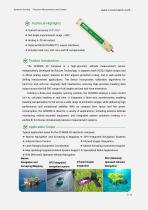
Dynamic Sensing • Precision Measurement and Control Technical Highlights ❖ Roll angle measurement range: ±180°; ❖ Optional RS232/RS485/TTL output interfaces; ❖ Includes hard-iron, soft-iron, and tilt compensation. Product Introduction- The GCM508 3D compass is a high-precision attitude measurement sensor independently developed by Ruicom Technology. It supports both RS232 digital output and 4-20mA analog output, features an IP67 ingress protection rating, and is well-suited for drilling measurement applications. The device incorporates calibration algorithms for hard-iron and soft-iron magnetic...
Open the catalog to page 2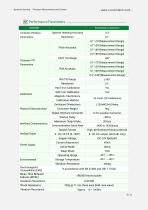
Dynamic Sensing • Precision Measurement and Control
Open the catalog to page 3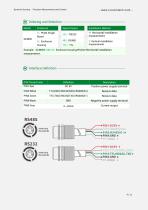
Dynamic Sensing • Precision Measurement and Control - www.ruicomtech.com -
Open the catalog to page 4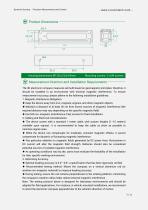
Dynamic Sensing • Precision Measurement and Control Measurement Direction and Installation Requirements The 3D electronic compass measures azimuth based on geomagnetic principles; therefore, it should be installed in an environment with minimal magnetic interference. To ensure measurement accuracy, please adhere to the following installation guidelines: 1. Magnetic Interference Mitigation: ♦ Keep the device away from iron, magnets, engines, and other magnetic objects. ♦ Maintain a distance of at least 30 cm from known sources of magnetic interference (the required distance may vary depending...
Open the catalog to page 5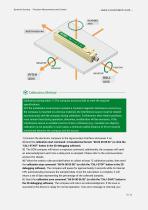
Dynamic Sensing • Precision Measurement and Control NORTH HEADING Calibration prerequisites: 1) The compass accuracy fails to meet the required specifications; 2) If the installation environment contains a constant magnetic interference source (e.g., the compass is mounted on a ferrous material), the interference source must be rotated synchronously with the compass during calibration. Furthermore, their relative positions must remain fixed during operation; otherwise, recalibration will be necessary. If the interference source is variable in terms of size or distance (e.g., movable iron objects),...
Open the catalog to page 6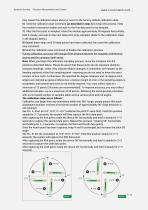
Dynamic Sensing · Precision Measurement and Control may repeat the calibration steps above or revert to the factory-default calibration data. 6)Send the calibration start command (as described in step 2) to begin the process. Keep the module's orientation stable and wait for the first data point to be sampled. 7)After the first point is sampled, rotate the module approximately 90 degrees horizontally, hold it steady, and wait for the next data point to be sampled. (Refer to the calibration steps in the diagram below.) 8) Repeat these steps until 24 data points have been collected, then send the...
Open the catalog to page 7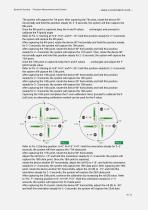
Dynamic Sensing · Precision Measurement and Control The system will capture the 7th point. After capturing the 7th point, rotate the device 90° horizontally and hold this position steady for 2–3 seconds; the system will then capture the 8th point. Once the 8th point is captured, keep the H and R values unchanged, and proceed to calibrate the P (pitch) angle. Refer to Pic. C: Starting at H=0°, R=0°, and P=-15°, hold this position steady for 2–3 seconds; the system will capture the 9th point. After capturing the 9th point, rotate the device 90° horizontally and hold this position steady for 2–3...
Open the catalog to page 8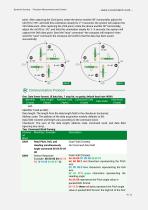
Dynamic Sensing · Precision Measurement and Control point. After capturing the 22nd point, rotate the device another 90° horizontally, adjust the roll (R) to +55°, and hold this orientation steady for 2–3 seconds; the system will capture the 23rd data point. After capturing the 23rd point, rotate the device another 90° horizontally, adjust the roll (R) to -55°, and hold this orientation steady for 2–3 seconds; the system will capture the 24th data point. Send the "stop" command—the compass will respond—then send the "save" command; the compass will confirm that the data has been saved successfully!...
Open the catalog to page 9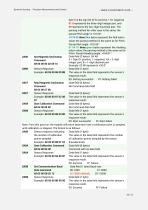
Dynamic Sensing • Precision Measurement and Control Set Magnetic Declination Command Read Magnetic Declination Command byte 0 is the sign bit (0 for positive, 1 for negative) 01 0 represents the three-digit integer part, and 50 represents the two-digit fractional part. The parsing method for other axes is the same; the parsed Pitch angle is +10.50°. 10 10 05 three blue bytes represent the Roll return value; the parsing method is the same as for Pitch. Parsed Roll angle: -010.05°. 01 04 01 three green bytes represent the Heading return value; the parsing method is the same as for Pitch. Parsed...
Open the catalog to page 10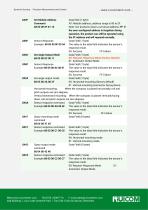
Dynamic Sensing • Precision Measurement and Control Command XX: Module address; address range is 00 to EF. 68 05 00 OF 01 15 Note: Our products share a universal address: FF. If 0X8F Sensor Response Data Field (1 byte) Example: 68 05 00 8F 00 94 The value in the data field indicates the sensor's response result. 01: Automatic Output Mode 0X8C Sensor Response Data Field (1 byte) Example:68 05 00 8C 00 91 The value in the data field indicates the sensor's response result. 0X2A Set angle output mode Data Field (1 byte) 01: Vertical mounting (connector facing down) Horizontal mounting: When the compass...
Open the catalog to page 11All Shenzhen Ruicom Technology Co., Ltd. catalogs and technical brochures






- Tilt sensor
- Digital inclination sensor
- 2-axis tilt sensor
- MEMS inclination sensor
- Multi-axis tilt sensor
- High-precision tiltmeter
- Analog inclination sensor
- IP67 inclination sensor
- 1-axis tilt sensor
- Vibration sensor
- Rugged inclination sensor
- Waterproof tiltmeter
- Angle measurement inclination sensor
- High-resolution inclinometer
- Tilt switch
- RS-485 inclinometer
- Inclination sensor with aluminum housing
- RS-232 inclinometer
- Anti-vibration inclinometer
- CAN inclination sensor