
- Catalogs
- Shenzhen Ruicom Technology Co., Ltd.
- GDS850 High precision handheld electronic level

GDS850 High precision handheld electronic level
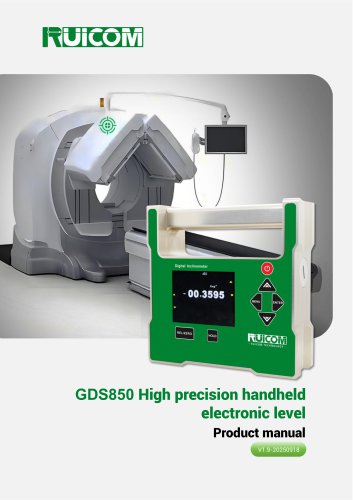
GDS850 High precision handheld electronic level
The GDS850 is a high-precision handheld electronic level developed by RUICOM Technology. It utilizes a MEMS sensor to measure tilt angles with an accuracy of 0.002° and a resolution of 0.0005°. The device supports data saving and playback, making it suitable for various high-precision applications.
Application Scope
- Architectural surveying
- Vehicle alignment and calibration
- Road and slope gradient detection
- Medical equipment measurement
- Tooling and fixture leveling
- Camera angle calibration
- Mechanical equipment installation
- Pipeline laying and angle control
Technical Highlights
- Measurement range: ±30°
- Optimal accuracy: <0.002°
- Angular resolution: 0.0005°
- Data recording capability
- User-calibrated zero point
- Dual magnetic measuring surfaces
Specifications
- Angle Measurement Range: ±30°
- Single axis measurement
- Accuracy: <0.002° (<5°), <0.003° (5°-30°)
- Resolution: 0.0005°
- Operating Temperature: -10°~ +70℃
- Power Supply: 2 AA batteries
- Battery Life: 6 hours
- Weight: 1200g
- Waterproof Rating: IP54
- Material: Anodized aluminum alloy
- Dimensions: 140×140×45mm
Operating Instructions
- Power on by holding the power button for three seconds.
- Use the MENU button to access options like saving data, calibration, and settings.
- Data can be saved to an SD card, with a maximum of ten sets.
- Settings include auto power-off, zero-point calibration, latitude adjustment, date setting, factory reset, and linearity correction.
Product Maintenance
- Uses two AA batteries.
- Check battery installation if the display does not turn on.
- Avoid dropping the device to prevent damage.
- Contact the manufacturer for repairs; do not disassemble the device yourself.
Warnings
- Handle with care to avoid damage to sensors and circuits.
- Avoid pressing multiple buttons simultaneously.
- Keep out of reach of children.
Catalog excerpts
GDS850 High precision handheld electronic level Product manual V1.9-20250918
Open the catalog to page 1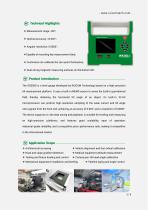
Technical Highlights ❖ Capable of recording key measurement data; ❖ Customers can calibrate the zero point themselves; ❖ Dual strong magnetic measuring surfaces on the bottom left. The GDS850 is a level gauge developed by RUICOM Technology based on a high-precision tilt measurement platform. It uses a built-in MEMS sensor to sense the Earth's gravitational field, thereby obtaining the horizontal tilt angle of an object. Its built-in 32-bit microprocessor can perform high-resolution sampling of the weak current and tilt angle ratio signals from the front end, achieving an accuracy of 0.002° and...
Open the catalog to page 2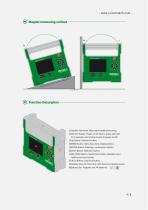
Magnet measuring surface [Vy Function Description ®Handle: Aluminum alloy metal handle and casing; ©ON/OFF Button: Power on/off button, press and hold for 3 seconds until a beep sounds to power on/off; ©Up Button: Selection button; ©MENU Button: Menu key, menu display button; ©ENTER Button: Enter key, confirmation button; ©Down Button: Selection button; ©REL/ZERO Button: Switch/Zero button, absolute zero/ relative zero/zero button; ©HOLD Button: Data lock button; ©Display Area: 64-color true-color luminous display screen; ©Battery Slot: Requires two AA batteries. ij+ - |c[|
Open the catalog to page 4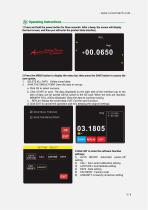
Operating Instructions 1.Press and hold the power button for three seconds. After a beep, the screen will display the boot screen, and then you will enter the product data interface; 2.Press the MENU button to display the menu bar, then press the SAVE button to access the save option; 1. DELETE ALL DATA Delete saved data; 2. SAVE THE SINGLE POINT Save the data in one go; a. Click OK to select success, b. Click START to save. The data displayed on the right side of the interface (up to ten sets of data can be saved) will be saved to the SD card. When ten sets are reached, MEMORY FULL will be displayed....
Open the catalog to page 5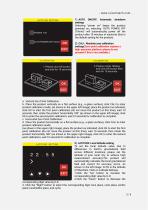
1) AUTO ON/OFF: Automatic shutdown settings Selecting "power on" keeps the product powered on; selecting "AUTO POWER OFF (10min)" will automatically power off the product after 10 minutes of inactivity (this is the default setting for the product). 2) CALI.: Absolute zero calibration settings(Zero-point calibration requires a high-precision platform; please do not proceed if this is not available.) 2.Please rotate 180deg and click OK button then wait for 10 seconds a. Vertical Zero Point Calibration: b. Place the product vertically on a flat surface (e.g., a glass surface), click CALI to enter...
Open the catalog to page 6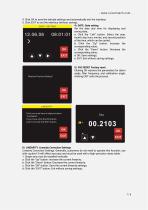
4. Click OK to save the latitude settings and automatically exit the interface; 5. Click EXIT to exit the interface (without saving); 4) DATE: Date setting Set the date and time for displaying and saving data; a: Click the "Left" button: Select the year, month, day, hour, minute, and second position of the time, which can be cycled; b: Click the "Up" button: Increase the corresponding value; c: Click the "Down" button: Decrease the corresponding value; d: OK: Save settings; e: EXIT: Exit without saving settings; Restore Factory Setting? Clicking OK restores the parameters for alarm angle, filter...
Open the catalog to page 7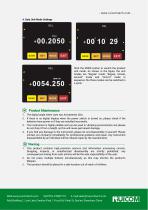
Click the MODE button to switch the product unit mode. As shown in the figure, the unit modes are "degree" mode, "degree, minute, second" mode and "mm/m" mode in sequence; the three modes can be switched in a cycle. Product Maintenance- 1. The digital angle meter uses two AA batteries (2A). 2. If there is no digital display when the power switch is turned on, please check if the batteries have power or if they are installed incorrectly. 3. This instrument is highly reliable and can be used in vibrating environments, but please do not drop it from a height, as this will cause permanent damage....
Open the catalog to page 8All Shenzhen Ruicom Technology Co., Ltd. catalogs and technical brochures
 STSL Low-Power Tilt Sensor
21 Pages
 STS STANDARD OUTPUT TILT SENSOR
13 Pages
 HTS3D High-Precision Tilt Sensor
15 Pages
 GDS8 Series Digital inclinometer
13 Pages






- Industrial display panel
- Color display panel
- Tilt sensor
- Digital inclination sensor
- Built-in display
- 2-axis tilt sensor
- MEMS inclination sensor
- Multi-axis tilt sensor
- Analog inclination sensor
- RS-485 display panel
- High-precision tiltmeter
- IP67 inclination sensor
- 1-axis tilt sensor
- Vibration sensor
- Rugged inclination sensor
- High-resolution inclinometer
- 2" display
- Angle measurement inclination sensor
- RS-485 inclinometer