
- Catalogs
- Shenzhen Ruicom Technology Co., Ltd.
- GDS8 Series Digital inclinometer

GDS8 Series Digital inclinometer
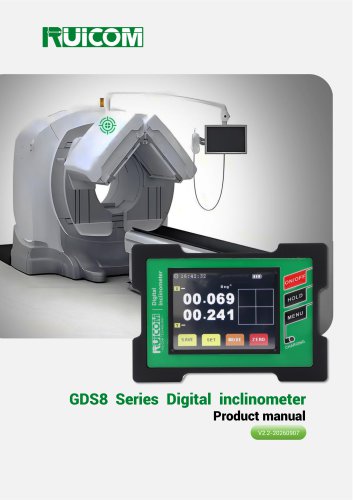
GDS8 Series Digital inclinometer
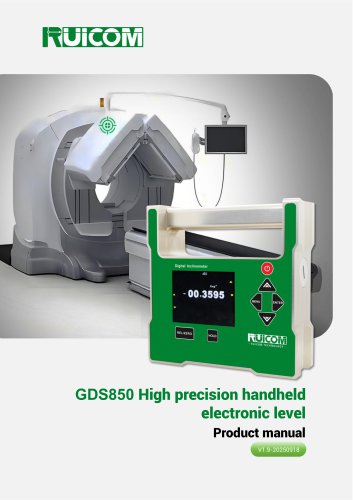
The GDS8 series digital inclinometer by RUICOM Technology is a high-precision angle measurement device designed for industrial applications. It features dual measurement cores and employs micro-mechanical sensing technology, dynamic compensation, and proprietary algorithms to enhance accuracy and stability.
Product Features
- Supports single/dual-axis measurement with a range of ±45°.
- Resolution of 0.001° and full-range accuracy of <0.005°.
- Fast-response design with stable data output.
- Innovative magnetic structure for multi-directional installation.
- Data storage with unit switching capabilities.
Application Scope
- Architectural surveying
- Vehicle alignment
- Road gradient detection
- Pipeline laying
- Mechanical equipment leveling
- Camera calibration
- Medical equipment measurement
Technical Highlights
- Accuracy better than 0.005°.
- Repeatability error ≤0.003°.
- Supports absolute/relative measurement switching.
- Angle over-limit alarm feature.
Performance Parameters
The device offers different models (GDS810 and GDS820) with varying measurement ranges and accuracies. It operates within a temperature range of -10℃ to +70℃ and has a waterproof rating of IP54.
Function Description
- Durable metal casing with a touchscreen display.
- Buttons for power, data hold, and menu navigation.
- Type-C port for charging and data output.
- Magnetic attachments for mounting.
Operating Instructions
- Power on/off by holding the button for 3 seconds.
- Data lock and menu navigation via dedicated buttons.
- Touchscreen calibration and data saving options.
Settings and Calibration
- Alarm angle settings for dual-axis products.
- Filter frequency and date settings.
- Factory reset and local latitude adjustments.
- Automatic shutdown settings.
Communication Protocol
The device uses a data frame format with a baud rate of 115200. It supports various command words for operations like angle reading and zero-point setting.
Product Maintenance
- Use a 3.7V rechargeable lithium battery.
- Avoid dropping or unauthorized disassembly.
- Contact the manufacturer for repairs.
Warnings
- Handle with care to avoid damage to sensors.
- Avoid pressing multiple buttons simultaneously.
- Keep out of reach of children.
Catalog excerpts
GDS8 Series Digital inclinometer Product manual V2.2-20260907
Open the catalog to page 1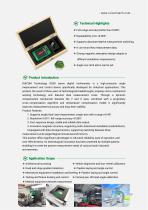
❖ Full-range accuracy better than 0.005°; ❖ Supports absolute/relative measurement switching; ❖ It can record key measurement data; ❖ Strong magnetic adsorption design adapts to different installation requirements; ❖ Angle over-limit alarm can be set. RUICOM Technology GDS8 series digital inclinometer is a high-precision angle measurement and control device specifically developed for industrial applications. This product, the result of three years of technological breakthroughs, employs micro-mechanical sensing technology and features dual measurement cores. Through a dynamic compensation mechanism...
Open the catalog to page 2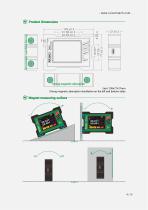
Product Dimensions Shell: 109×77×27mm Strong magnetic adsorption installation on the left and bottom sides Magnet measuring surface
Open the catalog to page 4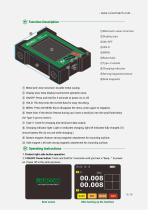
©Metal anti-wear structure ©Display area ©Reset hole ©Type-C socket ©Charging indicator ©Strong magnetic bottom ©Side magnetic © Metal anti-wear structure: Durable metal casing; (2 Display area: Data display touchscreen operation area; (3 ON/OFF: Press and hold for 3 seconds to power on or off; @ HOLD: This key locks the current data for easy recording; © MENU: Press the MENU key to disappear the menu, press again to reappear; © Reset hole: If the device freezes during use, insert a small pin into the small hole below the Type-C port to reset it; @ Type-C: Used for charging and serial port data...
Open the catalog to page 5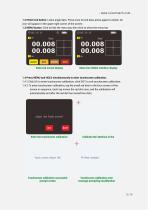
- www.ruicomtech.com 1.2 HOLD lock button: Locks angle data. Press once to lock data, press again to unlock. An icon will appear in the upper right corner of the screen. 1.3 MENU button: Click to hide the menu bar, then click to show the menu bar. Data lock screen display Menu bar hidden interface display 1.4 Press MENU and HOLD simultaneously to enter touchscreen calibration. 1.4.1 Click OK to enter touchscreen calibration, click EXIT to exit touchscreen calibration; 1.4.2 To enter touchscreen calibration, tap the small red dots in the four corners of the screen in sequence. Each tap moves the...
Open the catalog to page 6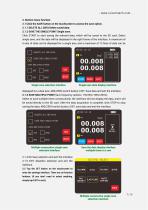
- www.ruicomtech.com -2. Bottom menu function: 2.1 Click the SAVE button on the touchscreen to access the save option. 2.1.1 DELETE ALL DATA Delete saved data; 2.1.2 SAVE THE SINGLE POINT Single save; Click START to start saving the relevant data, which will be saved to the SD card; Select single save, and the data will be displayed in the right frame of the interface. A maximum of 6 sets of data can be displayed for a single axis, and a maximum of 12 lines of data can be SAVE THE SINGLE POINT SAVE MULTIPLE POINT Single save selection interface Single save data display interface displayed for...
Open the catalog to page 7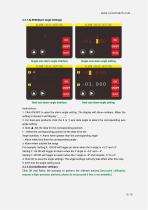
- www.ruicomtech.com 2.2.1 ALARM(Alarm Angle Settings) Single-axis alarm angle interface Single-axis alarm angle setting Dual-axis alarm angle interface Dual-axis alarm angle setting Instructions: 1. Click ON/OFF to open the alarm angle setting. The display will show numbers. When the setting is closed, it will display "_ _ . _ _". 2. For dual-axis products, click the X or Y axis data angle to select the corresponding axis angle setting. 3. Click ▲: Set the data for the corresponding position. ▶ : Select the corresponding position of the data to be set. Angle symbols: +: Alarm when greater than...
Open the catalog to page 8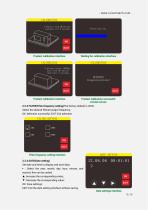
Product calibration interface Product calibration successful prompt screen 2.2.3 FILTER(Filter frequency setting)The factory default is 20Hz. Select the desired filtered output frequency; OK: Selection successful; EXIT: Exit selection. FILTER SETTING Set date and time to display and save data; ► : Select the year, month, day, hour, minute, and second; this can be cycled; ▲ : Increase the corresponding value; ▼: Decrease the corresponding value; EXIT: Exit the date setting interface without saving. DATE SETTING Date settings interface
Open the catalog to page 9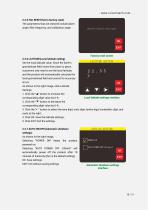
2.2.5 FAC.RESET(Set to factory reset) The parameters that are restored include alarm angle, filter frequency, and calibration angle. Restore Factory Settings? 2.2.6 LATITUDE(Local latitude setting) Set the local latitude value. Since the Earth's gravitational field varies from place to place, customers only need to set the local latitude, and the product will automatically calculate the local gravitational field and correct for accuracy errors. As shown in the right image, click Latitude Settings. 1. Click the "A" button to increase the corresponding digit value by 0-9; 2. Click the "▼" button...
Open the catalog to page 10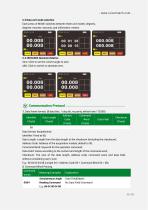
2.3 Data unit mode selection Each press of MODE switches between three unit modes: degrees, degrees-minutes-seconds, and millimeters-meters. [Vj Communication Protocol- 1. Data frame format: (8 data bits, 1 stop bit, no parity, default rate 115200)
Open the catalog to page 11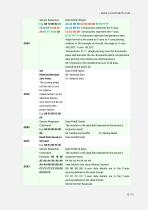
- www.ruicomtech.com Sensor Response AA AA BB BB: 4 characters represent the X-axis; CC CC DD DD: 4 characters represent the Y-axis; EE EE FF FF: 4 characters represent temperature data; Angle format is the same as X-axis or Y-axis parsing method: In the example on the left, the angle is: X-axis +00.200°, Y-axis -00.252°; Temperature: 37.7°. (Angle parsing uses the thousands place and discards the ten-thousands place; temperature data parsing only retains one decimal place.) 0A: Checksum, the hexadecimal sum of all data, excluding the prefix 68. Set Zero Point: The current angle can be set to...
Open the catalog to page 12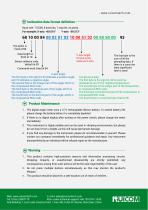
[vf Inclination data format definition- Baud rate: 115200, 8 data bits, 1 stop bit, no parity. For example: X-axis: +02.010° Y-axis: -00.513° Y-axis angle: Format is the same as X-axis. The last byte is the sum of all the preceding data. If there is a carry, the least significant byte is used. Data length is fixed at 10. \ Sensor address code, default is 00 Command word, fixed at 84 Temperature data: The first byte is the sign bit, 00 for positive temperature and 10 for negative temperature; The second byte is the integer part of the temperature, in compressed BCD code; The third byte is the...
Open the catalog to page 13All Shenzhen Ruicom Technology Co., Ltd. catalogs and technical brochures
 STSL Low-Power Tilt Sensor
21 Pages
 STS STANDARD OUTPUT TILT SENSOR
13 Pages
 HTS3D High-Precision Tilt Sensor
15 Pages






- Industrial display panel
- Color display panel
- Built-in display
- 2-axis tilt sensor
- MEMS inclination sensor
- Multi-axis tilt sensor
- Analog inclination sensor
- RS-485 display panel
- High-precision tiltmeter
- IP67 inclination sensor
- 1-axis tilt sensor
- Vibration sensor
- Rugged inclination sensor
- High-resolution inclinometer
- 2" display
- Angle measurement inclination sensor
- RS-485 inclinometer