
- Catalogs
- SHENZHEN RION TECHNOLOGY CO.,LTD
- RION DMI850 inclinometer


RION DMI850 inclinometer
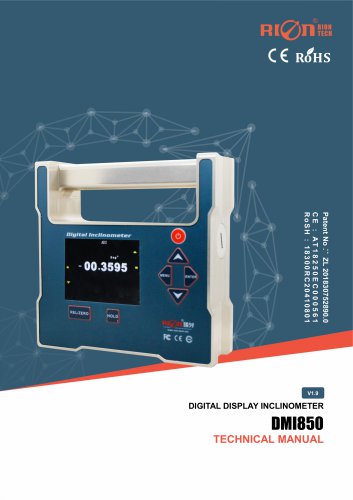
RION DMI850 inclinometer
The DMI850 is a single-axis digital inclinometer developed by RION TECHNOLOGY. It utilizes a quartz pendulum slice for precise angle measurement, achieving an accuracy of 0.002° and a resolution of 0.0005°. It is designed for high-precision platform leveling and measurement, featuring on-site data playback and chart analysis capabilities.
Key Features
- Accuracy: <0.002°
- Resolution: 0.0005°
- Measurement Range: ±30°
- IP54 Protection Class
- Operating Temperature: -10℃ to +70℃
- Data Storage and Night Vision Screen
- Automatic Angle Interpolation Compensation
- Self-calibration for Zero Point
Specifications
- Measurement Range: ±30°
- Single-axis Measurement
- Operating Temperature: -10° to +70℃
- Power Supply: 2 AA batteries
- Weight: 1200g
- Material: Anodized Aluminum Alloy
Operating Instructions
- Power on by holding the power button for three seconds.
- Use the MENU button to access settings and data storage options.
- Calibration involves vertical and horizontal zero calibration procedures.
- Set local latitude for accurate measurements.
- Factory reset and linearity correction settings are available but should be used cautiously.
Maintenance and Warnings
- Uses two AAA batteries; ensure correct installation.
- Avoid dropping or disassembling the instrument.
- Keep out of reach of children.
Catalog excerpts
DMI850 DIGITAL DISPLAY INCLINOMETER DIGITAL DISPLAY INCLINOMETER
Open the catalog to page 1
DMI850 DIGITAL DISPLAY INCLINOMETER ○ CE certification: AT18250EC000561 ○ RoHS certification: 18300RC20410801 ○ Chinese National Intellectual Property Appearance Patent (Patent No .: 201730609544.2) ○ Date of revision: 2024-08-07 Note: The product functions, parameters, appearance, etc. will be adjusted with the technical upgrade. Please contact our pre-sales business to confirm when purchasing. Disclaimer This product is developed exclusively for commercial applications and is prohibited from being used for illegal purposes, such as military activities, research related to nuclear, chemical,...
Open the catalog to page 2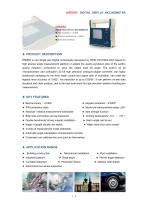
DM1850 DIGITAL DISPLAY INCLINOMETER ► PRODUCT DESCRIPTION DMI850 is one Single axis Digital Inclinometer developed by RION TECHNOLOGY based on high precise angle measurement platform, it adopts the quartz pendulum slice of the earth's gravity induction component to solve the object level tilt angle. The built-in 32 bit microprocessor and collocation 32 bit high precision analog-to-digital converter, can highly subdivision sampling for the front weak current and signal ratio of inclination, can meet the highest level accuracy of 0.002°, the resolution is up to 0.0005°. It can perform on-site data...
Open the catalog to page 3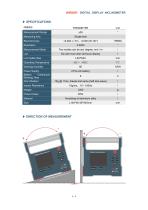
DM1850 DIGITAL DISPLAY INCLINOMETER
Open the catalog to page 4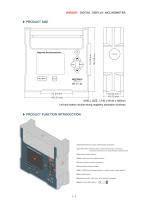
DM1850 DIGITAL DISPLAY INCLINOMETER Left and bottom double strong magnetic adsorption surfaces (T)Handle:Aluminum alloy metal handle and shell; ©On/Off button:switch button, press and hold for 3 seconds, the machine will turn on and off after a beep sound; ©Menu:the menu bar display button; ©Down button:select button; ©REL/ZERO buttomabsolute zero / relative zero / clear button; ©Data lock button; ©Display area:64-color true color luminous display; ©Battery slot {AA battery) l| + - |cW
Open the catalog to page 5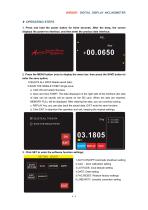
DM1850 DIGITAL DISPLAY INCLINOMETER 1. Press and hold the power button for three seconds. After the beep, the screen displays the power-on interface, and then enter the product data interface; 2. Press the MENU button once to display the menu bar, then press the SAVE button to enter the save option; 1 .DELETE ALL DATA Delete saved data; 2.SAVE THE SINGLE POINT Single save; a. Click OK and select Success. b. Save and click START. The data displayed on the right side of the interface (ten sets of data can be saved) will be saved on the SD card. When ten sets are reached, MEMORY FULL will be displayed....
Open the catalog to page 6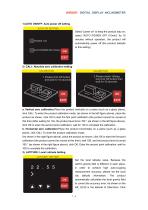
1)AUTO ON/OFF: Auto power off setting AUTO ON SETTING _|aUTO POWER OFF(IOmin) Select "power on" to keep the product stay on; select "AUTO POWER OFF (10min)" for 10 minutes without operation, the product will automatically power off (the product defaults to this setting) 2) CALI.: Absolute zero calibration setting CALIBRATION 1 .Please click OK button and wait for 10 seconds 2.Please rotate 180deg and click OK button then wait for 10 seconds EXIT a. Vertical zero calibration:Place the product vertically on a plane (such as a glass plane), click CALI. To enter the product calibration mode; (as...
Open the catalog to page 7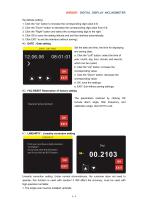
DMI850 DIGITAL DISPLAY INCLINOMETER the latitude setting. 1. Click the "Up" button to increase the corresponding digit value 0-9; 2. Click the "Down" button to decrease the corresponding digit value from 0-9; 3. Click the "Right" button and select the corresponding digit to the right. 4. Click OK to save the setting latitude and exit the interface automatically; 5. Click EXIT: to exit the interface (without saving); 4) DATE:Date setting Set the date and time, the time for displaying and saving data; a: Click the "Left" button: select the time of year, month, day, hour, minute, and second, which...
Open the catalog to page 8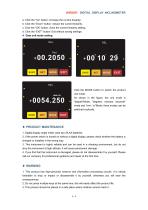
a: Click the "Up" button: increase the current linearity; b: Click the "Down" button: reduce the current linearity; c: Click the "OK" button: Save the current linearity setting; d: Click the "EXIT" button: Exit without saving settings; 4. Data unit mode setting EXIT MODE EXIT Click the MODE button to switch the product unit mode. As shown in the figure, the unit mode is "degree"Mode, "degrees, minutes, seconds" mode and "mm / m"Mode; three modes can be switched cyclically. 1. Digital display angle meter uses two 2A AA batteries. 2. If the power switch is turned on without a digital display, please...
Open the catalog to page 9All SHENZHEN RION TECHNOLOGY CO.,LTD catalogs and technical brochures
 RION HDA436T TILT SENSOR
14 Pages
 RION SMI815 SMI825
5 Pages
 RION WCA300A
3 Pages
 RION PSI-25M
1 Page
 Rion inclinometer SDA118T
10 Pages
 SDA116T/SDA126T
16 Pages
 RION SDA116T/SDA126T-CAN OPEN
11 Pages
 Rion SDA110T inclinometer
9 Pages
 Rion inclinometer SCA118T
10 Pages
 Rion inclinometer SCA116
16 Pages
 Rion inclinometer SCA110
10 Pages
 Rion inclinometer PCA826T
21 Pages
 Rion inclinometer MCA418T
2 Pages
 Rion inclinometer MCA416T
2 Pages
 Rion inclinometer MCA416LD
10 Pages
 Rion inclinometer MCA416L
10 Pages
 Rion inclinometer MCA416
2 Pages
 Rion inclinometer MCA410T
2 Pages
 Rion inclinometer MCA-85
12 Pages
 Rion inclinometer LCA318T
10 Pages
 Rion HCA518T inclinometer
9 Pages
 Rion inclinometer HCA510T-N
11 Pages
 Rion inclinometer HCA510T
8 Pages
 Rion inclinometer HCA396B
11 Pages
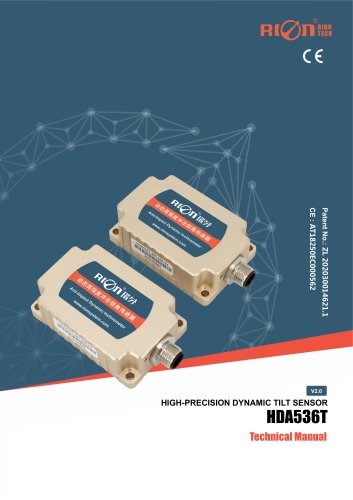 RION HDA536T INCLINOMETER
25 Pages
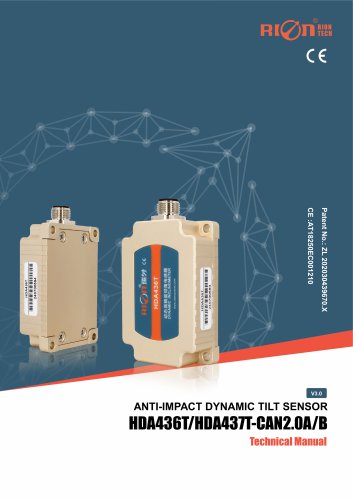 HDA437T/HDA437T-CAN2.0A/B
14 Pages
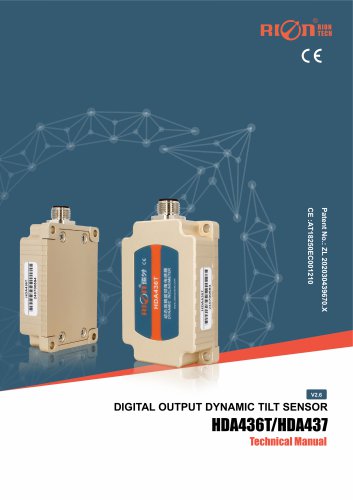 HDA437T/HDA437
25 Pages
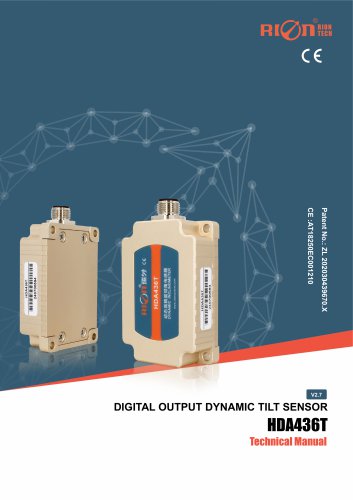 HDA436T
25 Pages
 HDA436T-CANOpen
28 Pages
 ACA816T/ACA826T
17 Pages
 ACA618T/ACA628T-N
9 Pages
 Rion inclinometer ACA610T
9 Pages
 Rion electronic compass DDM350B
11 Pages
 Rion electronic compass DCM301B
11 Pages
 Rion electronic compass DCM250B
12 Pages
 Rion AKM398 Vibration Sensor
6 Pages
 Rion AKM392 Vibration Sensor
15 Pages
 Rion AKM390 Vibration Sensor
6 Pages
 Rion Vibration Sensor AKG392
17 Pages



Archived catalogs
 SCA116T/SCA126T
9 Pages
- LCD screen
- Industrial monitor
- Panel-mount screen
- Pressure probe
- High-brightness monitor
- TFT-LCD monitor
- Analog pressure sensor
- Relative pressure sensor
- Stainless steel pressure sensor
- RION 2-axis inclinometer
- RION MEMS inclinometer
- RION multi-axis inclinometer
- Absolute pressure sensor
- Gas pressure sensor
- RION IP67 inclinometer
- RION high-precision inclinometer
- Sensitive element pressure sensor
- Liquid pressure sensor