
- Catalogs
- SHENZHEN RION TECHNOLOGY CO.,LTD
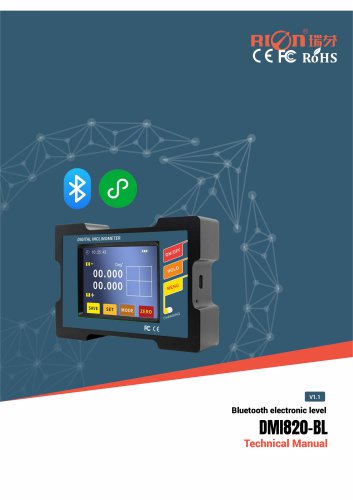
- Rion digital display inclinometer DMI810/DMI820


Rion digital display inclinometer DMI810/DMI820

Rion digital display inclinometer DMI810/DMI820
Catalog excerpts

DMI810/DMI820 DIGITAL DISPLAY INCLINOMETER DIGITAL DISPLAY INCLINOMETER TECHNICAL MANUAL
Open the catalog to page 1
DMI810/DMI820 DIGITAL DISPLAY INCLINOMETER ○ CE certification number: ATGZAHS190115001 ○ FCC certification number: AT011611740E ○ RoHS certification number: 18300RC20410801 ○ China National Intellectual Property Appearance Patent (Patent No.: ZL 201830753146.2) ○ Revision time:2024-08-07 ○ Product functions, parameters, appearance, etc. will be adjusted with technology upgrades, please contact the company's pre-sales business to confirm when buying. Disclaimer This product is developed exclusively for commercial applications and is prohibited from being used for illegal purposes, such as military...
Open the catalog to page 2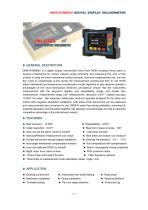
DMI810/DMI820 DIGITAL DISPLAY INCLINOMETER ▶ GENERAL DESCRIPTION DMI810/DMI820 is a digital display inclinometer which took RION company three years to develop professional for various industry angle controling and measuring.The core of this product is using the micro-mechanical control principle, dual-core measurement unit, can use the Y-axis to compensate X-axis during the measurement process,and then to use RION patent interleaved and temperature compensation model algorithm to play absolute operation advantages of the micro-mechanical electronic principles,to ensure that the instruments measurement...
Open the catalog to page 3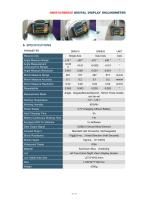
DMI810/DMI820 DIGITAL DISPLAY INCLINOMETER Meausre Axis Single Axis Daul Axis Angle Measure Range Angle Measurement Accuracy(Full Range) Angle Measure Resolution Measurement Mode Angle、Degree/Minute/Second、Mm/m Three modes can be set Working Temperature Working Humidity Power Supply 3.7V Charging Lithium Battery Ideal Charging Time Battery Continuous Working Time Equipped With Pc Software Data Output Signal Connect Plug In Shock Resistance USB2.0 (Virtual Serial Device) Standard Usb Connector, Rechargeable 10g@11ms、3 Axial Direction (Half Sinusoid) 10grms、10~100Hz Shock Impact Waterproof Grade...
Open the catalog to page 4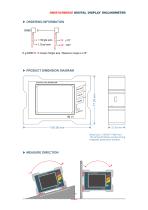
DMI810/DMI820 DIGITAL DISPLAY INCLINOMETER Measure range Measure axis E.g:DMI810-15:means Single axis / Measure range is ±15°. ▶ PRODUCT DIMENSION DIAGRAM
Open the catalog to page 5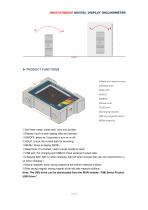
DMI810/DMI820 DIGITAL DISPLAY INCLINOMETER ①Anti-wear metal: metal shell, hard and durable; ②Display: touch screen display data and operate; ③ON/OFF: press for 3 seconds to turn on or off; ④HOLD: to lock the current data for recording; ⑤MENU: Press to display MENU; ⑥Reset hole: If it crashed, insert a small needle to reset; ⑦USB jack: For charging and USB2.0 virtual serial port output data; ⑧Charging light: light on when charging, light off when charged fully (do not recommend to u se when charging.) ⑨Strong magnetic base: strong magnet at the bottom measure surface; ⑩Side strong magnet: strong...
Open the catalog to page 6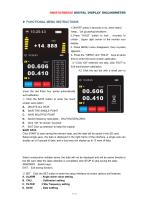
DMI810/DMI820 DIGITAL DISPLAY INCLINOMETER ▶ FUNCTIONAL MENU INSTRUCTIONS 1.ON/OFF press 3 seconds or so, when heard “beep...”Let go,startup/shutdown . 2..Press “HOLD” button to lock , re-press to unlock , Upper right corner of the monitor icon display. 3. Press MENU menu disappears, then re-press appears.。 4.Press the “ MENU” and “HOLD” time to enter the touch screen calibration. 4.1 Click “OK” enterinto nex step ,click “EXIT” to Exit touchscreen calibration. 4.2 Click the red dot with a small pen to move the red finish four points automatically exit calibration. ① Click the SAVE button to enter...
Open the catalog to page 7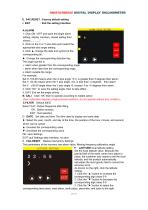
DMI810/DMI820 DIGITAL DISPLAY INCLINOMETER E. FAC.RESET : Factory default setting F. EXIT : Exit the setting interface A.ALARM 1. Click ON / OFF and open the angle alarm setting, display numbers, closed setting then shows“_ _ . _ _”. 2. Click on the X or Y axis data point select the appropriate axis angle setting. 3. Click ▲: change the data and symbol of the corresponding bit. ▶: Change the corresponding direction key. The angle symbol is +: alarm when greater than the corresponding angle -: alarm when less than the corresponding angle ±: Alarm outside the range For example: Set X: +03.00 means...
Open the catalog to page 8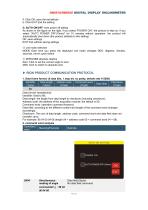
DMI810/DMI820 DIGITAL DISPLAY INCLINOMETER 4. Click OK: save the set latitude 5. Click EXIT: Exit the setting G. AUTO ON/OFF: Auto power off setting As shown in the figure on the right, if you select "POWER ON", the product is kept on; if you select "AUTO POWER OFF(10min)" for 10 minutes without operation, the product will automatically shut down (the product defaults to this setting). OK: save settings EXIT: Exit without saving settings ③ unit mode selection MODE Each time you press the displayed unit mode changes DEG, degrees, minutes, seconds, mm/m cycle switch ④ ZERO/ABS absolute relative...
Open the catalog to page 9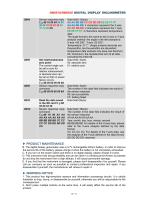
DMI810/DMI820 DIGITAL DISPLAY INCLINOMETER 0X84 Set relative/absolute zero point: The current angle can be set to zero for relative measurement, or absolute zero can be set so that no power failure occurs. E.g:68 05 00 05 00 0A Sensor response reply command E.g:68 05 00 85 00 8A Read the data saved in the SD card:E.g:68 04 00 32 36 Sensor response reply command E.g:68 18 00 A2 AA AA AA AA AA AA AA BB BB BB BB CC CC CC CC DD DD DD DD CS Data field (12byte) AA AA BB BB CC CD DD DD EE EE FF FF AA AA BB BB: 4 characters represent the X axis; CC CC DD DD: 4 characters represent the Y axis; EE EE FF...
Open the catalog to page 10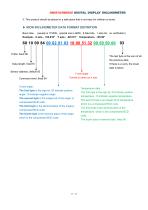
DMI810/DMI820 DIGITAL DISPLAY INCLINOMETER 3. This product should be placed in a safe place that is not easy for children to touch. ▶ RION INCLINOMETER DATA FORMAT DEFINITION Baud rate: (usually is 115200,special one is 9600 , 8 data bits,1 stop bit,no verification) Example:X axis:+02.010° The last byte is the sum of all the previous data. If there is a carry, the lower data is taken. Sensor address ,default 00 Command word ,fixed 84 Y axis angle : Format is same as X axis X axis angle : The first byte is the sign bit, 00 indicate positive angle ,10 indicate negative angle . The second byte is...
Open the catalog to page 11All SHENZHEN RION TECHNOLOGY CO.,LTD catalogs and technical brochures
 RION HDA436T TILT SENSOR
14 Pages
 RION SMI815 SMI825
5 Pages
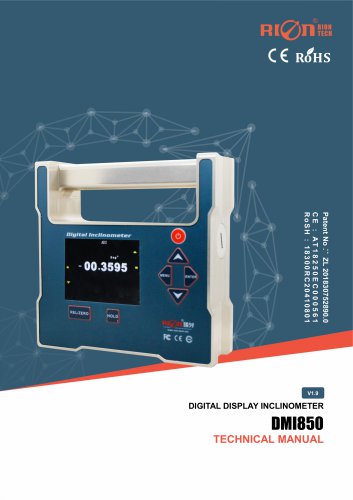 RION DMI850 inclinometer
9 Pages
 RION WCA300A
3 Pages
 RION PSI-25M
1 Page
 Rion inclinometer SDA118T
10 Pages
 SDA116T/SDA126T
16 Pages
 RION SDA116T/SDA126T-CAN OPEN
11 Pages
 Rion SDA110T inclinometer
9 Pages
 Rion inclinometer SCA118T
10 Pages
 Rion inclinometer SCA116
16 Pages
 Rion inclinometer SCA110
10 Pages
 Rion inclinometer PCA826T
21 Pages
 Rion inclinometer MCA418T
2 Pages
 Rion inclinometer MCA416T
2 Pages
 Rion inclinometer MCA416LD
10 Pages
 Rion inclinometer MCA416L
10 Pages
 Rion inclinometer MCA416
2 Pages
 Rion inclinometer MCA410T
2 Pages
 Rion inclinometer MCA-85
12 Pages
 Rion inclinometer LCA318T
10 Pages
 Rion HCA518T inclinometer
9 Pages
 Rion inclinometer HCA510T-N
11 Pages
 Rion inclinometer HCA510T
8 Pages
 Rion inclinometer HCA396B
11 Pages
 RION HDA536T INCLINOMETER
25 Pages
 HDA437T/HDA437T-CAN2.0A/B
14 Pages
 HDA437T/HDA437
25 Pages
 HDA436T
25 Pages
 HDA436T-CANOpen
28 Pages
 ACA816T/ACA826T
17 Pages
 ACA618T/ACA628T-N
9 Pages
 Rion inclinometer ACA610T
9 Pages
 Rion electronic compass DDM350B
11 Pages
 Rion electronic compass DCM301B
11 Pages
 Rion electronic compass DCM250B
12 Pages
 Rion AKM398 Vibration Sensor
6 Pages
 Rion AKM392 Vibration Sensor
15 Pages
 Rion AKM390 Vibration Sensor
6 Pages
 Rion Vibration Sensor AKG392
17 Pages



Archived catalogs
 SCA116T/SCA126T
9 Pages
- LCD screen
- Industrial monitor
- Panel-mount screen
- Pressure probe
- High-brightness monitor
- TFT-LCD monitor
- Analog pressure sensor
- RION digital inclinometer
- Stainless steel pressure sensor
- Relative pressure sensor
- RION 2-axis inclinometer
- RION MEMS inclinometer
- RION multi-axis inclinometer
- Absolute pressure sensor
- RION analog inclinometer
- Gas pressure sensor
- Sensitive element pressure sensor
- RION high-precision inclinometer
- Liquid pressure sensor
- VirtualExpo Group
- Our Partners
- Recruitment
- Testimonials