
- Catalogs
- Shenzhen HTI Sanjiang Electronics Co., Ltd.
- SEC1000 fire alarm system leaflet


- Company
- Products
- Catalogs
- News & Trends
- Exhibitions
SEC1000 fire alarm system leaflet
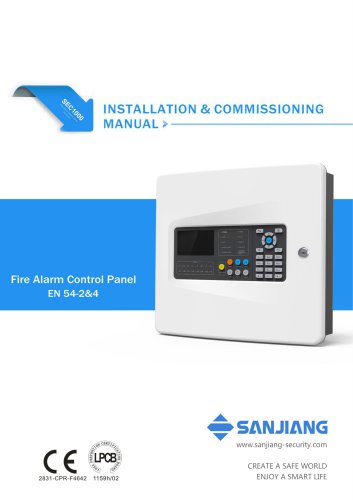
SEC1000 fire alarm system leaflet
This manual is intended for personnel involved in the installation and commissioning of the SEC1000 Fire Alarm Control Panel. It includes information on connections, programming, and technical aspects, excluding operational instructions, which are found in a separate Operating Manual.
Overview: The SEC1000 Fire Alarm Control Panel (FACP) monitors input signals, provides indications, and activates outputs as programmed. It complies with EN 54-2 standards, is easy to install, operate, and maintain, and is addressable with one loop of 120 addressable points, expandable, and compatible with Sanjiang peripherals.
Technical Specifications: Operates on 110V/230V AC with a maximum current of 0.8A, supports a 7Ah VRLA battery, and has a maximum loop length of 2000m for Class A connections.
The panel features a detachable exterior door, metal back box, and functional PCBs, accommodating VRLA backup batteries and an optional communication board.
Panel’s Interior: Divided into two sections: the left with the CB-Board (main processor, buttons, LEDs) and the right with the MB-Board (I/O communication, power supply, battery compartment).
Internal Wiring: Detailed wiring instructions are provided.
Mounting: Can be surface or semi-flush mounted.
Mains and Battery Connection: Instructions emphasize the sequence of connections.
Points Connection to the Loop: Supports Class A and B types, with isolator installation recommendations to limit short circuit faults.
Maximum Loop Cable Length Recommendations: A table provides guidance based on current loads and cable gauges.
LED Indicators: Provide status updates such as fire condition, test state, faults, and power status.
Button Controls: Include evacuation, panel reset, and sounder silencing.
Details on common operations during commissioning and functions available at access level 3, including C&E programming, system setup, bus setup, and advanced functions.
Guidelines for calculating battery capacity to ensure adequate backup power.
Instructions for regular maintenance and troubleshooting common issues.
A list of device types compatible with the SEC1000 panel.
Includes LOGIN for accessing user menus, directional buttons for navigation, numeric keys for input, and zone indicators for alarm status.
2.1 Common Operations: Involves setup post-installation, including login, loop learning, and zone setup at access level 3.
2.2 Zone Setup: Configure zones for effective alarm response management.
2.3 Loop Learn: Automatically detects devices on the loop, updating configurations.
Configure detectors and modules, assign to zones, and set product types. Supports various detector types.
4.1 Default C&E: Activates zonal sounders during a fire alarm with optional delay settings.
4.2 General, Zonal, and Specific C&E: Allows detailed programming of alarm responses based on conditions and device addresses.
5.1 Network Setup: Supports networking of up to 20 panels via CAN bus.
5.2 Bus Setup: Includes zone naming, device registration, and system detail reading.
Ensure consistent transmission rates across networked panels and use series connections for networking.
Essential setup operations include detector/module setup, batch setup, and bus setup. Default bus type is Class A.
Disable/Test Functions: At access level 3, perform tests such as point tests and duplicate address checks.
Advanced Functions: Include loop learning, data load/backup, file reset, and system updates.
Battery Capacity Calculation: Calculated using a formula considering standby and alarm hours, currents, and a multiplier for capacity loss.
Maintenance and Troubleshooting: Regular maintenance includes checking battery connections and replacing batteries every five years. Troubleshooting solutions are provided for common issues.
Annex - Device Type List: Includes a list of device types and abbreviations used in the system.
Catalog excerpts
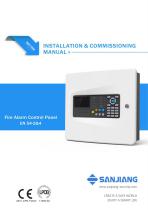
INSTALLATION & COMMISSIONING MANUAL >- SANJIANG www.sanjiang-security.com CREATE A SAFE WORLD ENJOY A SMART LIFE
Open the catalog to page 1
SEC1000 FIRE ALARM CONTROL PANEL DOC NO. EM390046220805/V2.0
Open the catalog to page 2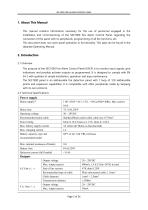
SEC1000 FIRE ALARM CONTROL PANEL This manual contains information necessary for the use of personnel engaged in the installation and commissioning of the SEC1000 Fire Alarm Control Panel, regarding the connection of the panel with its peripherals, programming of all the functions, etc. This document does not cover panel operation or functionality. This data can be found in the separate Operating Manual. The purpose of the SEC1000 Fire Alarm Control Panel (FACP) is to monitor input signals, give indications and possibly activate outputs as programmed. It is designed to comply with EN 54-2 with...
Open the catalog to page 3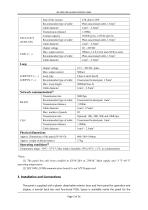
SEC1000 FIRE ALARM CONTROL PANEL Loop LOOP OUT (+, -) LOOP IN (+, -) Approx. Dimensions of the panel (WXH*D) 400x360x104mm Approx. weight (without battery) 3.7kg Temperature range: -10°C~ 55°C*; Max relative humidity: 95% (45°C ± 2°C, no condensation) [1 ] The panel has only been certified to EN54-2&4 at 230VAC Main supply and -5 °C~40 °C operating temperature. [2] SEC1000_COM(communication board) is not LPCB approved. The panel is supplied with a plastic detachable exterior door and front panel for operation and display, a mental back box and functional PCBs. Space is available inside the panel...
Open the catalog to page 4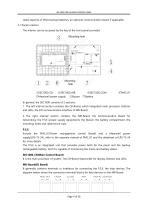
SEC1000 FIRE ALARM CONTROL PANEL rated capacity of VRLA backup batteries, an optional communication board if applicable. 3.1 Panel’s interior The interior can be accessed by the key of the front panel provided. Mounting hole Mounting hole ①SEC1000_CB ②SEC1000_MB ⑤Meanwell power supply ⑥Buzzer In general, the SEC1000 consists of 2 sections: 1. The left internal section contains the CB-Board, which integrated main processor, Buttons and LEDs, the I/O communication interface of MB-Board. 2. The right internal section contains the MB-Board, the Communication Board for networking, the P.S.E (power...
Open the catalog to page 5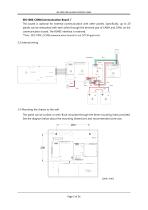
SEC1000 FIRE ALARM CONTROL PANEL SEC1000_COM(Communication Board )* This board is optional for external communication with other panels. Specifically, up to 20 panels can be networked with each other through the terminal pair of CANH and CANL on the communication board; The RS485 interface is reserved. *Note: SEC1000_COM(communication board) is not LPCB approved. 3.2 Internal wiring 250V 10A 3.3 Mounting the chassis to the wall The panel can be surface or semi-flush mounted through the three mounting holes provided. See the diagram below about the mounting dimensions and recommended screw size....
Open the catalog to page 6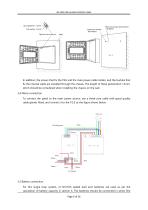
SEC1000 FIRE ALARM CONTROL PANEL In addition, the screws that fix the PSU and the main power cable holder, and the buckles that fix the internal cable are installed through the chassis. The length of these penetration≤3mm, which should be considered when installing the chassis on the wall. 3.4 Mains connection To connect the panel to the main power source, use a three-core cable with good quality cable glands fitted, and connect it to the P.S.E as the figure shows below. Red Red Black Black Black 3.5 Battery connection For this single loop system, 2×12V/7Ah sealed lead acid batteries are used...
Open the catalog to page 7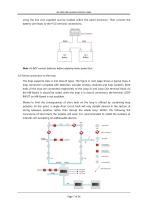
SEC1000 FIRE ALARM CONTROL PANEL using the link wire supplied and be located within the panel enclosure. Then connect the battery wire leads to the P.S.E terminal connections. Note: Do NOT connect batteries before applying mains power first. 3.6 Points connection to the loop The loop supports class A and Class B types. The figure in next page shows a typical Class A loop connection complete with detectors, sounder strobes, modules and loop isolators. Both ends of the loop are connected respectively to the Loop In and Loop Out terminal block on the MB-Board. It should be noted, when the loop is...
Open the catalog to page 8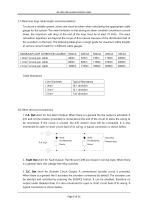
SEC1000 FIRE ALARM CONTROL PANEL 3.7 Maximum loop cable length recommendations To ensure a reliable system, some care must be taken when calculating the appropriate cable gauge for the system. The main limitation is that during an alarm condition (maximum current draw), the maximum volt drop at the end of the loop must be at least 19 Volts . The exact calculation equations are beyond the scope of this manual, because of the distributed load of the sounders on the loop. The following table gives a rough guide for maximum cable lengths at various current loads for 3 different cable gauges. 3.8...
Open the catalog to page 9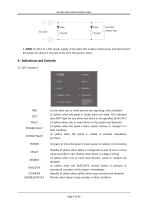
SEC1000 FIRE ALARM CONTROL PANEL 4. 24VK: It refers to a 24V power supply. It provides 24V output continuously and disconnects the power for about 4 seconds at the time the panel is reset. POWER FAULT SYSTEM FAULT SOUNDER DISABLED — FAULT--- POWER FAULT SYSTEM FAULT Lit red when one or more devices are reporting a fire condition Lit yellow when the panel is under zone test state. This indicator does NOT light for any other test which is not specified by EN 54-2 Lit yellow when one or more faults on the system are detected Lit yellow when the panel's mains power, battery or charger is in fault...
Open the catalog to page 10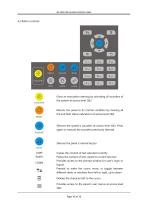
SEC1000 FIRE ALARM CONTROL PANEL Gives an evacuation warning by activating all sounders of the system at access level 2&3 Returns the panel to its normal condition by clearing all fire and fault status indications at access level 2&3 Silences the system’s sounders at access level 2&3. Press again to resound the sounders previously silenced Silences the panel’s internal buzzer COPY PASTE LOGIN Copies the content of text selected currently Pastes the content of text copied to current text box Provides access to the prompt window for user’s login or logout Pressed to make the cursor move, or toggle...
Open the catalog to page 11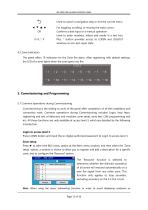
SEC1000 FIRE ALARM CONTROL PANEL SEC1000 FIRE ALARM CONTROL PANEL Used to cancel a navigation step or exit the current menu For toggling, scrolling, or moving the input cursor Confirms a text input or a manual operation Used to enter numbers, letters and marks in a text box. Plus, * button provides access to LOGIN and LOGOUT windows at non-text-input state The panel offers 16 indicators for the Zone fire alarm. After registering with default settings, the LED of a zone lights when the zone goes into fire. Commissioning is the setting to work of the panel after completion of all the installation...
Open the catalog to page 12All Shenzhen HTI Sanjiang Electronics Co., Ltd. catalogs and technical brochures
 Instruction Manual
1 Page
 Fire Alarm System
18 Pages
- DC power supply
- AC/DC power supply
- Temperature probe
- LED lighting
- Resistance temperature sensor
- Digital I/O
- IO module
- Push-button switch
- Power supply for industrial applications
- Digital IO module
- Waterproof temperature sensor
- Signal amplifying integrated circuit
- Industrial detector
- Power supply with overload protection
- Emergency telephone
- Analog telephone
- Programmable power supply
- LED indicator light
- Power amplifying integrated circuit