
- Catalogs
- Shenzhen HTI Sanjiang Electronics Co., Ltd.
- GB9221 series fire alarm broadcast amplifier


- Company
- Products
- Catalogs
- News & Trends
- Exhibitions
GB9221 series fire alarm broadcast amplifier

GB9221 series fire alarm broadcast amplifier
The GB9221 series fire alarm broadcast amplifiers are designed for emergency broadcasts during fire or other accidents, requiring integration with the GB9242 Fire Broadcasting Host. They can also play background music from external sources when no emergency is present. The amplifiers feature built-in LED indicators for operational and fault conditions, and are available in 150W, 300W, and 500W power outputs. They include high-quality power transformers with low static power consumption and high overload capability, along with overload and over-temperature protection circuits.
Main Specifications
- Power Supply: AC220V with a tolerance of +10% to -15%, 50Hz
- Line Input Sensitivity: 300mV to 775mV
- Line Output Level: 500mV ± 100mV
- Frequency Range: 80Hz to 8kHz
- Total Harmonic Distortion: < 5%
- Signal-to-Noise Ratio: > 70dB
- Monitor Power: 3W
- Fixed Output Voltage: 120V
- Rated Output Power: 150W/300W/500W
- Operating Environment: Temperature 0℃-40℃, Humidity <92%
- Insulation Resistance: >20MΩ for backup power input and chassis
- Electrical Strength: No breakdown between AC input and chassis, leakage current <5mA
Function Buttons and Indicator LEDs
The front panel includes power on/off, volume adjustment, self-test, silence, and monitor buttons, along with LED indicators for power, output level, overload, and over-temperature faults. The back panel features terminals for AC power input, backup power input, and music source input/output.
Appearance, Mounting Dimensions & Weight
- Dimensions: 482.6mm x 345mm x 132.5mm
- Weight: <18kg
Wiring Instructions
Instructions are provided for connecting power cables, input cables, and output lines, emphasizing the importance of using high-quality shielded cables and observing polarity.
Installation and Debug
Ensure correct connections before debugging. The power LED should light up when powered on. Test for shorts before connecting external circuits. Set the preset volume after debugging.
Instructions for Use
Verify correct line connections before use. Adjust output volume using the front panel knob, but do not change it during emergency broadcasts. Preset the emergency broadcast volume before use. Faults such as overtemperature, overload, and short circuits trigger alarms and can be reset manually.
Common Troubleshooting
Guidance is provided for issues like no power response, overtemperature, overvoltage, and overload or short circuits, with suggested solutions.
Points for Attention
Ensure the machine casing is grounded, use high-quality cables, and observe a minimum on/off interval of 10 seconds. Replace fuses with the same specifications and avoid parallel connections at the output terminal.
Equipment Models and Parameter Comparison
A table compares models GB9221/500W, GB9221/300W, and GB9221/150W, detailing rated power, backup power input voltage, and fuse specifications.
Attached Parts and Components
The manual includes a list of attached parts such as instruction manuals, fuses, audio cables, and certificates.
Catalog excerpts
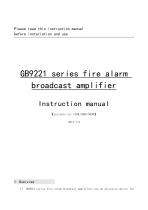
Please read this instruction manual before installation and use GB9221 series fire alarm broadcast amplifier Instruction manual 【suitable for 150W/300W/500W】 2017/1.0 1 Overview 1) GB9221 series fire alarm broadcast amplifiers are an extension device
Open the catalog to page 1
GB9221 series instruction manual emergency broadcast at fire or other accident scenes.In the field of fire broadcast, GB9221 must be used with the GB9242(Fire Broadcasting Host)to complete the fire broadcast. Background music broadcast can be directly played by external input source signals (such as CD/MP3 player, tuner, etc.) when there’s no accident event. 2) The display of GB9221 series fire alarm broadcast amplifiers is built-in LED indicator lights.These built-in LED indicator lights can indicate various operating conditions and fault conditions.All the functions can be set up with light...
Open the catalog to page 2
GB9221 series instruction manual no breakdown between AC input&the chassis leakage current<5mA(AC2000V) 3 Function buttons and Indicator LEDs 1) Front panel(figure 4-1): 10 POWER AMPLIFIER POWER OUTPUT LEVEL MUTE TEST front panel diagram(take 500W as an example) 1. power on/off 2. volume adjustment LED indicator 3. volume adjustment knob 4.button【self test】 5.button【silence】 6.button【monitor】 7.over temperature fault LED indicator 8.overload fault LED indicator 9.output level LED indicator 10.power LED indicator 2) back panel(figure 4-2): EMERGENCY INPUT back panel diagram(take 500W as an example)...
Open the catalog to page 3
GB9221 series instruction manual 4.Music source input/output terminal a) Connect from 220V terminal to ~220V terminal using one 3-cores sheathed cable. Pay attention to the order of N/L/E. b) Connect the backup power supply that meets the nominal requirements to the "Standby Power" terminal. Pay attention to positive and negative polarity. c) Power cable diameter requirement input cables connection: a) Connect the external source signal cable to the “Line input I” on the rear panel. Please use high quality shielded cable. b) Connection of fire trigger signal: connect the 24V level signal given...
Open the catalog to page 4
GB9221 series instruction manual by the alarm controller or provided by the output module. a) Line output This interface is used to extend power amplifier or transfer audio signal to other audio equipment. When the machine cannot meet the needs of field application, power amplifier can be extended through this interface. The connection line with the power amplifier should adopt high-quality shielded wire. b) Fixed voltage output Fixed voltage output is power amplifier output, which can be directly connected with fixed voltage speaker or broadcast circuit through GB9231/GB9232 broadcast divider....
Open the catalog to page 5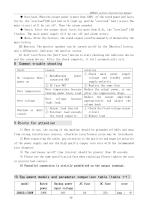
GB9221 series instruction manual ♦ Overload: When the output power is more than 120% of the rated power and lasts for 2s, the "overload"LED (yellow) will light up, and the "overload" fault occurs. The main circuit will be cut off. Then the alarm sounded. ♦ Short: After the output short lasts for more than 0.5s, the "overload" LED flashes. The main power supply will be cut off and alarm occurs. ♦ Mute: After the failure, the sound signal could be manually eliminated by the mute button. 5) Monitor: The monitor speaker can be turned on/off by the [Monitor] button, and a LED(green) indicates the...
Open the catalog to page 6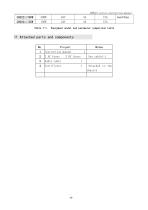
GB9221 series instruction manual
Open the catalog to page 7All Shenzhen HTI Sanjiang Electronics Co., Ltd. catalogs and technical brochures
 Instruction Manual
1 Page
 Fire Alarm System
18 Pages


- DC power supply
- AC/DC power supply
- Temperature probe
- LED lighting
- Resistance temperature sensor
- Digital I/O
- IO module
- Push-button switch
- Power supply for industrial applications
- Digital IO module
- Waterproof temperature sensor
- Signal amplifying integrated circuit
- Industrial detector
- Power supply with overload protection
- Emergency telephone
- Analog telephone
- Programmable power supply