

LF 40

LF 40
This manual is crucial for the installation, operation, and maintenance of the pH/Redox/ISE Meter TM 40, Oxygen Meter AM 40, and Conductivity Meter LF 40. Users must thoroughly read it before use, emphasizing user qualifications, proper installation, and adherence to safety standards.
The instruments have sockets for sensor connection and an 'Interface HMG USB'. Only original cables should be used to prevent moisture and corrosion. The battery compartment is at the back, and specific alkaline manganese batteries (AA, IEC R6, LR6) are required.
The manual details operation elements, menu structure, and password protection. Basic settings include backlight, password, clock, language, and off-time configurations. A data logger function is available.
- TM 40: For pH, Redox, and ISE measurements, with temperature and sensor type configuration, and calibration procedures.
- AM 40: For oxygen measurement, with temperature and main value configuration, and calibration procedures.
- LF 40: For conductivity measurement, with temperature and measuring range configuration, and calibration procedures.
Includes detailed specifications, delivery volume, accessories, maintenance, disposal, guarantee, recycling, and service information. Proper usage ensures operational safety and longevity.
The device includes a battery indicator. If no bar is shown, the battery must be changed immediately. The main printed board contains a lithium battery, which should not be disposed of with domestic waste. The manufacturer will recycle or dispose of it properly at no cost.
After changing the battery or sensor, a new calibration is recommended due to sensor polarization interruption.
The instrument is operated using five buttons and a plain text menu structure. The device can be switched on/off using the "ON/OFF" button.
The display shows navigation options, battery status, measurement values, date/time, and temperature information.
Calibration and configuration menus are password-protected, with a default password of 1.
Under the "General" menu, users can configure display settings, password, clock, language, and off time. The backlight can be enabled or disabled, and the password can be changed.
The device includes a data logger capable of storing approximately 4,000 data sets. Data can be displayed on the device or transferred via USB.
For data logger reading and device configuration, "DinModule" software can be downloaded, and "Interface HMG USB" is required for PC connection.
The TM 40 measures pH, Redox, and ISE potential, suitable for field and laboratory use, with automatic temperature compensation.
Supports various calibration methods, including two-point and automatic calibration for pH, Redox, and ISE measurements.
If calibration values are out of predefined ranges, an error message will appear, but values will still be stored.
Outlines the calibration process for sensors using calibration solutions or known set point values. Users can choose any sequence for calibration.
Application Fields: Measures dissolved oxygen in water, wastewater, and sludge, adhering to DIN EN ISO 5814:2013 standards.
Application Fields: Measures electrical conductivity, salinity, and temperature, suitable for field and laboratory use.
Oxygen Calibration: Includes data input, temperature offset settings, single-point, and automatic calibration methods.
Features a graphic LCD display with a resolution of 128 x 64 pixels and backlight. Operates within an ambient temperature range of -10 to 55°C and a relative humidity of less than 95% (non-condensing).
The TM 40 measures pH from 0 to 14.00 and temperature from -10.0 to 100.0°C. The AM 40 measures oxygen levels from 0 to 200.0% and temperature from -10.0 to 100.0°C.
The TM 40, AM 40, and LF 40 models are available in sets that include the respective pocket meter, sensors, batteries, and manuals.
A variety of electrodes and sensors with BK-connectors are available, along with a USB interface cable and PC software for configuration and data transfer.
The device requires minimal maintenance, with cleaning restricted to the exterior using a wet cloth. Proper disposal and recycling are emphasized.
A two-year guarantee is provided, covering manufacturing faults. Improper handling or unauthorized opening voids the guarantee.
Service and returns are handled by Xylem Analytics Germany Sales GmbH & Co. KG, with contact details provided for further assistance.
Catalog excerpts

pH/Redox/ISE Meter TM 40 Oxygen Meter AM 40 Conductivity Meter LF 40
Open the catalog to page 1
Safety This Operating Instructions Manual contains fundamental information that should be observed in connection with the installation, start-up, operation and maintenance of the instrument in connection with the sensor. Therefore, it is absolutely vital for the user to read this manual completly prior to working with it. The symbol "General Warning" indicates special warnings in the manual. User qualification The meter has been designed for analytical measurements. It is assumed that the user/operator and the maintenance personnel have the proper professional skills and experience to know the...
Open the catalog to page 4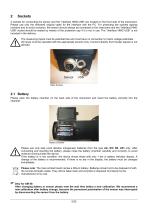
2 sockets for connecting the sensor and the” Interface HMG USB” are located on the front side of the instrument. Please use only the delivered original cable for the interface with the PC. For protecting the sockets against moisture and to avoid corrosion, the sensor should always be connected to the instrument and the “Interface HMG USB” socket should be sealed by means of the protection cap if it is not in use. The “Interface HMG USB” is not included in the delivery. The measuring inputs must be potential-free and must have no connection to mains voltage potentials. All inputs must be operated...
Open the catalog to page 5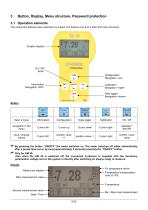
3 Button, Display, Menu structure, Password protection 3.1 Operation elements The instrument features easy operation by means of 5 buttons only and a plain text menu structure. Configuration Navigation <up> Calibration Navigation <right> Data logger Navigation <down> ^ By pressing the button “ON/OFF“ the meter switches on. The meter switches off either automatically after a preset time-out or by long (approximately 3 seconds) pressing the “ON/OFF“ button. ^ Only for AM 40: Also when the AM 40 is switched off, the connected O2-Sensor is supplied with the necessary polarisation voltage and so the...
Open the catalog to page 6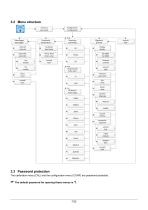
Datenlogger data logger Allgemein general Intervall intervall Festtemp. fixed temp. Automatik automatic Temp.-Wert temp.-value zurueck back Hauptanzeige main value Reset reset pass word zurueck back M-Bereich meas.range Ansprechv. response
Open the catalog to page 7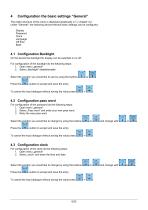
Configuration the basic settings “General” The entire structure of the menu is displayed graphically in chapter 3.2. Under "General", the following device-relevant basic settings can be configured: Display Password Clock Language Off time Back 4.1 Configuration Backlight On the device the backlight for display can be switched on or off. For configuration of the backlight do the following steps: 1. Open menu „general“ 2. Select „Backlight“ disable/enable Select the position you would like to use by using the buttons Press the -button to accept and save the entry. To cancel the input dialogue...
Open the catalog to page 8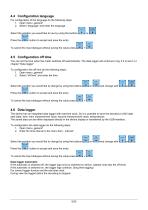
For configuration of the language do the following steps: 1. Open menu „general“ 2. Select “language" and enter the language Select the position you would like to use by using the buttons -button to accept and save the entry. To cancel the input dialogue without saving the value 4.5 Configuration off time You can set the time when the meter switches off automatically. The data logger will continue to log, if it is set in ffl chapter “Data logger”. To configuration the off time do the following steps: 1. Open menu „general“ 2. Select “off time“ and enter the time Select the position you would...
Open the catalog to page 9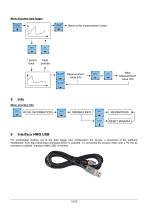
Menu structure data logger Back to the measurement value Next periode Measurement value Info Next Measurement value Info Menu structure Info MIN/MAX INFO MESSMODUS RESET MIN/MAX For comfortable reading out of the data logger and configuration the device, a download of the software “DinModule” from http://download.meinsberg.de/en/ is possible. To connected the pocked meter with a PC the as accessory available “Interface HMG USB“ is needed.
Open the catalog to page 10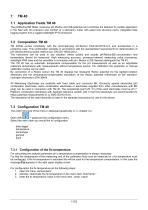
7.1 Application Fields TM 40 The pH/Redox/ISE Meter measures pH,/Redox and ISE-potential and combines the features for mobile application in the field with the precision and comfort of a laboratory meter with plaint text structure menu, integrated data logging system and a rugged watertight IP 65 enclosure. 7.2 Composition TM 40 TM 40/Set comes completely with the accompanying pH-Sensor EGA142-K010-U-X and accessories in a protective case. This combination operates in accordance with the standardized requirements for determination of pH; electrochemical probe method acc. EN ISO 10523:2012. The...
Open the catalog to page 11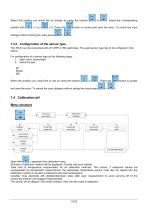
Select the position you would like to change by using the buttons position with dialogue without saving the value press -button to accept and save the entry. To cancel the input . 7.3.2 Configuration of the sensor type The TM 40 can be connected with pH, ORP or ISE electrodes. The used sensor type has to be configured in the device. For configuration of a sensor type do the following steps: 1. open menu „sensortype“ 2. select the type pH Redox ISE Select the position you would like to use by using the buttons and save the entry. To cancel the input dialogue without saving the value press 7.4...
Open the catalog to page 12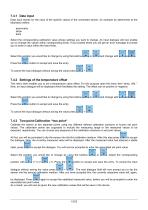
7.4.1 Data input Data input stands for the input of the specific values of the connected sensor, for example as determined at the laboratory before. asymmetry slope back Select the corresponding calibration value whose settings you want to change. An input dialogue will now enable you to change the values within corresponding limits. If you exceed these you will get an error message to prompt you to enter a value within the fixed limits. Select the position you would like to change by using the buttons Press the -button to accept and save the entry. CONF LOGS To cancel the input dialogue without...
Open the catalog to page 13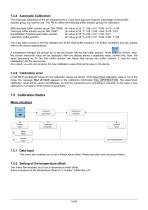
7.4.4 Automatic Calibration The automatic calibration of the pH measurement is a two-point type and requires knowledge of what buffer solution group you want to use. The TM 40 offers the following buffer solution groups for calibration: NBS standard buffer solution as per DIN 19266: pH value at 25 °C 1.68 / 4.01 / 6.86 / 9.18 / 12.45 Technical buffer solution as per DIN 19267: pH value at 25 °C 1.09 / 3.06 / 4.65 / 6.79 / 9.23 Knick/Mettler-Toledo/Ingold buffer solution: pH value at 25 °C 2.00 / 4.01 / 7.00 / 9.21 You must take a choice in the first dialogue...
Open the catalog to page 14All Sensortechnik Meinsberg GmbH catalogs and technical brochures
 MV 3000 /4000
6 Pages
 MV 5000
2 Pages
 KM 3000
4 Pages
 KMZ 5 und KMZ 3
2 Pages
 KM 2000
2 Pages
 PS 2000
2 Pages
 LM 2000
2 Pages
 TM 39
TM 392 Pages
 LF 39
LF 392 Pages
 AM 39 und AM 39-K
2 Pages
 TM 40
TM 402 Pages
 AM 40
AM 402 Pages

- Temperature probe
- Measuring device
- Resistance temperature sensor
- Pt100 temperature transducer
- Portable gauge
- Pt1000 temperature transducer
- Process temperature sensor
- Temperature measuring module
- Automatic measuring module
- Electrochemical electrode
- Oxygen meter
- Laboratory measuring instrument
- Conductivity sensor
- USB measuring module
- Electrochemical oxygen sensor
- Measuring instrument with data logger
- Concentricity measuring instrument
- Glass electrochemical electrode
- Conductivity measuring instrument
- PH measuring instrument