
- Catalogs
- Schneider Electric
- Catalogue Human Machine Interfaces

- Products
- Catalogs
- News & Trends
- Exhibitions
Catalogue Human Machine Interfaces

Catalogue Human Machine Interfaces
- Human/Machine Interfaces: Includes operator interface terminals, industrial PCs, and HMI software. The Magelis series is highlighted, offering small and advanced panels with various display sizes and functionalities.
- Global Detection Solutions: Features photo-electric, proximity, capacitive, ultrasonic sensors, and more. These are essential for detecting and monitoring various parameters in industrial settings.
- Automation Platforms: Discusses Modicon Momentum, Quantum, Premium, and M340 platforms, focusing on distributed I/O, control solutions, and communication capabilities.
- Controllers and PLCs: Covers Twido programmable controllers and associated software, emphasizing discrete and analogue I/O solutions.
- Safety Functions: Details safety PLCs, controllers, and solutions using Preventa, including safety switches, light curtains, and emergency stops.
- Motion Control: Describes Lexium motion controllers and servo drives, highlighting their role in precise motion control applications.
- Power Supplies and Transformers: Includes Phaseo switch mode power supplies and transformers, essential for stable power distribution in automation systems.
- Communication Systems: Discusses industrial communication standards like Ethernet TCP/IP and CANopen, crucial for integrating various automation components.
- Magelis Panels: Offer a range of display options and configurations, supporting various communication protocols like Modbus and Uni-TE.
- Safety Solutions: Emphasize the importance of safety in automation with products like safety PLCs and emergency stop systems.
- Software Solutions: Vijeo Designer and other configuration software are highlighted for programming and managing automation systems.
- All terminals have a configurable touch screen and service keys for user interaction. The XBT N and XBT R models have additional customizable function keys.
- Terminals are configured using Vijeo Designer Lite software, compatible with Windows environments, allowing for the import of symbol databases from TwidoSoft, PL7, and Concept applications.
- Communication with PLCs is facilitated through integrated serial links, supporting protocols like Uni-TE and Modbus.
- Function keys on the terminals can be programmed for various tasks such as accessing pages, pulsed control, and toggle commands.
- The XBT RT model features a matrix touch screen that can be used for accessing pages, latching/toggling memory bits, and modifying numeric fields.
- Service keys include ESC, DEL, MOD, and ENTER, which are used for modifying system parameters, confirming selections, and navigating menus.
- XBT N Terminals: Feature a communication monitoring lamp, backlit LCD display, and customizable service keys. They support both point-to-point and multidrop serial links.
- XBT R Terminals: Include a keypad with function or numeric entry keys, a communication monitoring lamp, and customizable labels.
- XBT RT Terminals: Equipped with a touch screen and keypad, these terminals offer a larger display and additional lamps for PLC control.
- All terminals conform to standards such as IEC 61131-2 and UL 508, with certifications for various environmental conditions.
- They are designed for operation in temperatures ranging from 0 to 55°C and storage from -20 to 60°C, with a maximum relative humidity of 85%.
- Terminals are flush-mounted and constructed with durable materials like polyester and polycarbonate.
- Power supply options include 5V via PLC terminal port or 24V external supply, with a maximum consumption of 5W.
- Displays are backlit LCDs with varying capacities depending on the model, supporting multiple character fonts.
- Memory capacity is 512 KB Flash, with support for asynchronous serial link communication.
- Various accessories are available, including protective sheets, mounting kits, and connection cables.
- Configuration software is compatible with Windows 2000, XP, and Vista.
- Screen Types: Available in sizes ranging from 5.7” to 15” with options for monochrome or color TFT displays.
- Connectivity: Includes Ethernet TCP/IP, RS 232C/RS 422/485 serial links, USB ports, and slots for Compact Flash memory cards.
- Power Supply: Operates on 24 V DC with specific voltage limits and inrush current specifications.
- Environmental Standards: Conforms to various international standards such as EN 61131-2, IEC 61000-6-2, and UL 508, ensuring reliability in industrial environments.
- Protection and Durability: Front panels have IP 65 protection, while rear panels have IP 20, with resistance to shock, vibration, and electromagnetic interference.
- Touch Screen: High-resolution touch-sensitive areas with adjustable brightness and contrast.
- Memory and Processing: Equipped with 32 MB Flash EPROM for applications and 512 KB SRAM for data backup, powered by a 266 MHz RISC CPU.
- Protocols Supported: Compatible with Schneider Electric protocols like Modbus and third-party protocols from Mitsubishi, Omron, Rockwell Automation, and Siemens.
- Real-time Clock: Integrated for time-sensitive operations.
- XBT GT5230 & GT5340: Features include a 10.4” screen, multicolor lamp indicators, and various connectivity options including USB and Ethernet.
- XBT GT6330 & GT7340: Larger screens (12.1” and 15”), with enhanced resolution and color capabilities.
- XBT GK2120 & GK2330: Smaller 5.7” screens with dynamic and static keys, suitable for compact installations.
- Magelis Smart BOX: Features a Celeron M 600 MHz processor, 1 GB Compact Flash storage, and Windows XPe operating system. It is optimized for harsh environments with diagnostic functions for maintenance.
- Magelis Compact PC BOX: Equipped with a Celeron M 1 GHz processor, 80 GB hard disk, and Windows XP Pro. It includes PCI expansion slots and is suitable for both standard and harsh environments.
- Magelis Flex PC BOX: Offers high-end processing with options for Celeron M 1.86 GHz or Core Duo processors. It supports extensive PCI expansion and is available in General Purpose and Heavy Duty versions.
- All models support integration into distributed architectures with client/server capabilities and network access.
- Diagnostic functions include CPU temperature monitoring, fan speed, and supply voltage checks.
- Flex PC BOX models offer RAID 1 configuration for data redundancy and system monitoring for alerts and maintenance.
- All models comply with various industrial standards such as EN 61131-2, IEC/EN 60950, and UL 508.
- They are designed to operate within specific temperature ranges and vibration conditions, ensuring reliability in different industrial settings.
- Choose the appropriate model based on environmental conditions and processing needs.
- Utilize diagnostic and monitoring features for proactive maintenance and system reliability.
Catalog excerpts

Colby Filling Lines 2008.indd tr.row {} td.cell {} div.block {} div.paragraph {}
Open the catalog to page 1
Human/Machine interfaces Catalogue 2009
Open the catalog to page 2
& Global Detection Electronic and electromechanical sensors n° 960262 MKTED208052EN Photo-electric sensors Proximity sensors Capacitive proximity sensors Ultrasonic sensors Limit switches Pressure switches Rotary encoders Radio frequency identification Machine cabling accessories & Modicon Momentum distributed I/O and control n° 807861 MKTED205061EN & Modicon Quantum automation platform, Unity, Concept & ProWORX 32 n° 960237 MKTED208011EN & Modicon Premium and Unity - PL7 software n° 960268 MKTED208054EN & Modicon M340 and Unity software n° 960303 DIAED2081007EN PLCs Discrete, analogue I/O and...
Open the catalog to page 3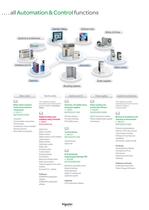
. . . . all Automation & Control functions & Motor starter solutions Control and protection components n° 814711 MKTED205103EN Contactors Circuit-breakers, fuse carriers Thermal relays Combinations, motor controllers Mounting solutions Motor starter mounting kits This catalogue contains Automation and Control function products relating to machines Safety & Safety functions and solutions using Preventa n° 960260 MKTED208051EN Safety PLCs Safety controllers Safety monitors Safety solutions on AS-Interface cabling system Safety switches Safety light curtains Safety mats Emergency stops Control stations...
Open the catalog to page 4
Colby Filling Lines 2008.indd tr.row {} td.cell {} div.block {} div.paragraph {}
Open the catalog to page 5
General contents 0 Human/Machine Interfaces 1 – Operator dialogue terminals Small Panels Magelis Small Panels Magelis, Selection guide. page 1/2 Small Panels Magelis XBT N . . . . . . . . . . page 1/12 Small Panels Magelis XBT R . . . . . . . . . . . . page 1/15 Small Panels Magelis XBT RT . . . . . . . . . page 1/19 Advanced Panels Magelis Advanced Panels Magelis, Selection guide. page 1/24 Advanced Panels Magelis XBT GT 3.8”, 5.7”, 7.5”, 10.4”, 12.1”, 15”. . . page 1/46 Advanced Panels Magelis XBT GK 5.7”, 10.4”. . . . . . . . page 1/47 Advanced Panels Magelis XBT GTW 8.4”, 15”. . . . . . ....
Open the catalog to page 6
1/2 Selection guide Applications Display of text messages Terminal type Small Panels with keypad Display Type Green backlit LCD, height 5.5 mm or Green, orange or red backlit LCD, height 4.34…17.36 mm Capacity 2 lines of 20 characters or 1 to 4 lines of 5 to 20 characters Data entry Via keypad with 8 keys (4 customizable) Memory capacity Application 512 KB Flash Expansion by PCMCIA type II – Functions Maximum number of pages 128/200 application pages 256 alarm pages Variables per page 40…50 Representation of variables Alphanumeric Recipes – Curves – Alarm logs Depending on model Real-time clock...
Open the catalog to page 9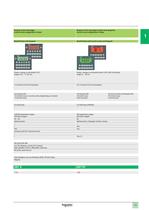
1/3 Display of text messages Control and configuration of data Display of text messages and/or semi-graphics Control and configuration of data Small Panels with keypad Small Panels with touch screen and keypad Green, orange or red backlit LCD, height 4.34…17.36 mm Green, orange or red backlit matrix LCD (198 x 80 pixels) height 4…16 mm 1 to 4 lines of 5 to 20 characters 2 to 10 lines of 5 to 33 characters Via keypad with 12 function keys or numeric entry (depending on context) + 8 service keys Via keypad with 4 function keys 8 service keys Via touch screen and keypad with 10 function keys 2 service...
Open the catalog to page 10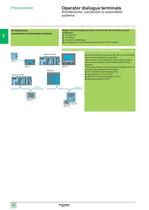
1/4 Operator dialogue terminals 1 Architectures, connection to automation systems Architectures, connection to automation systems Magelis operator dialogue terminals communicate with automation system equipment: Via serial link Via fieldbus In network architectures By integration in an architecture with Ethernet TCP/IP network b b b b Point-to-point or multidrop connection with PLC via serial link All the terminals incorporate an RS 232 C or RS 422/485 asynchronous serial link as standard. Use of the Uni-TE or Modbus protocol makes it easy to set up communication with Schneider Electric PLCs:...
Open the catalog to page 11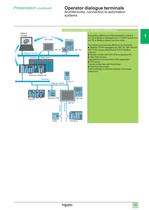
1/5 Operator dialogue terminals 1 Architectures, connection to automation systems Integration in an architecture with Ethernet TCP/IP network Automation platforms provide transparent routing of UniTE or Modbus messages from a TCP/IP network to a Uni-TE or Modbus network and vice versa. The following services are offered for the terminals: Modbus TCP/IP messaging (for XBT GT, XBT GK and XBT GTW, access with Ethernet TCP/IP Modbus protocol) Browse function with XBT GTW or standard PC. Web Gate function: Diagnostics for remote control of the application FTP server: Transfer of data files with the...
Open the catalog to page 12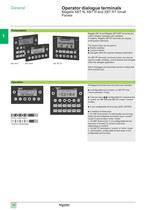
1/6 General Presentation XBT R411 XBT N400 XBT RT511 Magelis XBT N and Magelis XBT R/RT terminals are used to display messages and variables. In addition, Magelis XBT RT terminals can display small graphic elements. The various keys can be used to: Modify variables Control a device Navigate within the operator dialogue application On XBT RT terminals, the touch screen can also be used to modify variables, control devices and navigate within the dialogue application. Alarm messages can be printed out from models that have a printer port. b b b Operation All Magelis terminals have the same user...
Open the catalog to page 13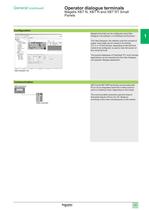
1/7 General (continued) Configuration Magelis terminals can be configured using Vijeo Designer Lite software, in a Windows environment. The Vijeo Designer Lite software uses the concept of pages: each page can be viewed in its entirety. A 2, 4, or 10-line window, depending on the terminal model to be configured, is used to view the screen of this virtual terminal. The symbol databases of TwidoSoft, PL7 and Concept applications can be imported into the Vijeo Designer Lite operator dialogue application. Communication XBT N and XBT R/RT terminals communicate with PLCs via an integrated serial link...
Open the catalog to page 14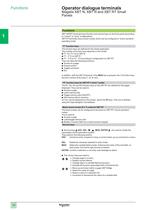
1/8 Functions Functions XBT N/R/RT terminals have function and service keys on the front panel (according to “control” or “entry” configuration). XBT RT terminals have a touch screen which can be configured in “touch-sensitive” operating mode. “F” function keys The function keys are defined for the whole application. The number of function keys depends on the model: F1, F2, F3, F4 on XBT N F1…F12 on XBT R F1…F10 or F1...F4 according to configuration on XBT RT They can take the following functions: Access to a page Pulsed control Toggle command Etc. In addition, with the XBT R terminal, if the...
Open the catalog to page 15All Schneider Electric catalogs and technical brochures
 CFT34A
2 Pages
 IMT30A
2 Pages
 15607
156072 Pages
 IMV25
IMV252 Pages
 Evolis 24kV catalogue
80 Pages
 NEX 24 catalogue 2010
56 Pages
 ICatalogue CT VT
52 Pages
 Fuses catalogue 2012
24 Pages
 RM6 Catalogue
76 Pages
 Osiswitch XCK_N catalogue
16 Pages
 Catalogue Osisense XG
26 Pages


- Flowmeter
- DC power supply
- AC/DC power supply
- Volume flow monitor
- Liquid flow monitor
- Ethernet switch
- Concentration analyzer
- Automation software solution
- Schneider pressure transmitter
- Industrial network switch
- Liquids analyzer
- Windows software
- Cloud-based software
- Analog pressure transmitter
- Gas flow monitor
- Push-button switch
- Stainless steel flow monitor
- Managed switch
- RJ45 network switch