
- Catalogs
- Schick Industrie
- Schick IQ3

Schick IQ3
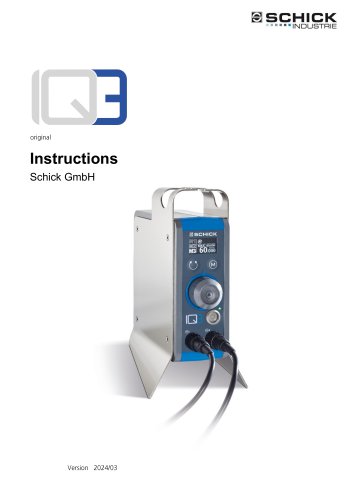
Schick IQ3
This section provides an overview of the document structure, including general information, further documentation, and the signs and symbols used. It also explains the structure of warnings, detailing different levels of severity such as DANGER, WARNING, and ATTENTION.
General Safety Regulations
This section outlines the principles of safe operation, intended use, foreseeable misuse, and the selection and qualification of personnel. It emphasizes the importance of safety devices, fire protection, safety signs, and personal protective equipment. Specific safety regulations are provided for transportation, installation, operation, maintenance, and structural changes.
Scope of Delivery
Details the items included with the Schick IQ3, ensuring users verify all components are present upon receipt.
Technical Description
Provides an overview of the Schick IQ3's functionality, interfaces, and tool features. It includes a description of the type label for identification purposes.
Transport and Storage
Outlines the requirements for transporting and storing the device, including conditions for the installation site and storage location.
Installation and Commissioning
Describes the steps for installing the Schick IQ3, including safety precautions and establishing supply connections.
Functions and Operation
Explains how to operate the IQ3 controller, including turning it on/off, using the OLED display, and operating the handpiece. It also covers the use of multiple handpieces and changing the direction of rotation.
Troubleshooting
Provides procedures for addressing malfunctions or errors, including a list of potential error messages and their meanings.
Maintenance and Control Work for Operators
Offers guidance on routine maintenance and control tasks to ensure the device operates efficiently.
Technical Specifications
Lists the dimensions, speed range, drive system, weight, operating voltage, and power of the Schick IQ3.
Appendix
Includes the service address, declaration of conformity, and legal disclaimers regarding the use and duplication of the documentation.
Catalog excerpts
Instructions Schick GmbH
Open the catalog to page 1
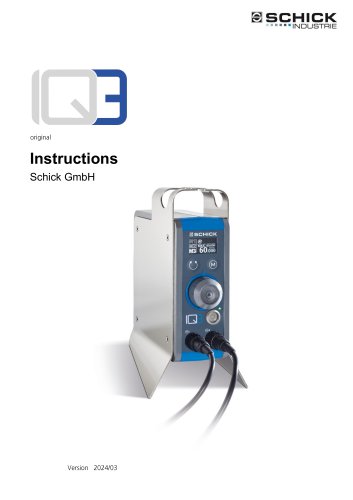
We are pleased that you have decided in favor of a technically high-quality device from SCHICK and wish you every success with your new IQ3 control device and that you enjoy working with it. We have compiled these operating instructions to familiarize you with your new device and to provide you with the necessary information for operation and maintenance. Trade name: Schick IQ3Serial number: Axxx xxxItem number: 10700 Type: Industrial control unit for handpieces and spindles
Open the catalog to page 2
About these operating instructions 1
Open the catalog to page 3
1 About these operating instructions
Open the catalog to page 4
About these operating instructions 1
Open the catalog to page 5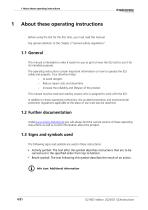
1 About these operating instructions Before using the IQ3 for the first time, you must read this manual. Pay special attention to the chapter 2"General safety regulations" This manual is intended to make it easier for you to get to know the IQ3 and to use it for its intended purposes. The operating instructions contain important information on how to operate the IQ3 safely and properly. Your attention helps: Reduce repair costs and downtime increase the reliability and lifespan of the product This manual must be read and used by anyone who is assigned to work with the IQ3 In addition to these...
Open the catalog to page 6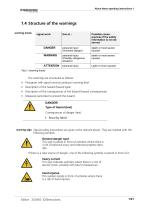
About these operating instructions 1 warning levels The warnings are structured as follows: Pictogram with signal word according to warning level Description of the hazard (hazard type) Description of the consequences of the hazard (hazard consequences) Measures (activities) to prevent the hazard DANGER! Type of hazard (text) Consequences of danger (text) following symbols. This sign is placed in front of activities where there is a risk of personal injury and extensive property damage. If there is a clear source of danger, one of the following symbols is placed in front of it heavy current This...
Open the catalog to page 7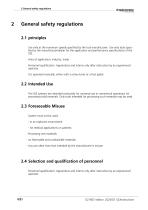
2 General safety regulations Use only at the maximum speeds specified by the tool manufacturer. Use only tools specified by the manufacturer/dealer for the application and performance specifications of the IQ3. Area of application: industry, trade Personnel qualification: Apprentices and interns only after instruction by an experienced operator It is operated manually: either with a rotary knob or a foot pedal. The IQ3 systems are intended exclusively for universal use in commercial operations for processing solid materials. Only tools intended for processing such materials may be used System...
Open the catalog to page 8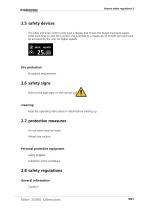
General safety regulations 2 The table and knee control units have a display that shows the preset maximum speed. After switching on, the foot control unit is limited to a maximum of 30,000 rpm and must be activated by the user for higher speeds. Fire protection No special requirements Note on the type plate on the control uni Read the operating instructions in detail before starting up Do not wear long hair loose Always use suction. safety goggles extraction at the workplace.
Open the catalog to page 9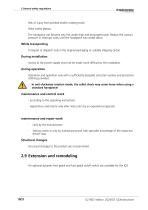
2 General safety regulations Risk of injury from pointed and/or rotating tools! Wear safety glasses. The handpiece can become very hot under high and prolonged loads. Reduce the contact pressure or interrupt work until the handpiece has cooled down. Transport or dispatch only in the original packaging or suitable shipping carton. Access to the power supply must not be made more difficult by the installation. Operation and operation only with a sufficiently designed extraction system and protective clothing provided. |\ In anti-clockwise rotation mode, the collet chuck may come loose when using...
Open the catalog to page 10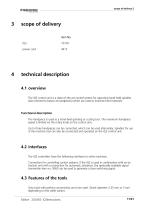
power cord The IQ3 control unit is a state-of-the-art control system for operating hand-held spindles (also referred to below as handpieces) which are used to machine hard materials. Functional description The handpiece is used as a hand-held grinding or cutting tool. The maximum handpiece speed is limited via the rotary knob on the control unit. Up to three handpieces can be connected, which can be used alternately. Spindles for use in the machine tool can also be connected and operated on the IQ3 control unit. The IQ3 controllers have the following interfaces to other machines: Connection for...
Open the catalog to page 11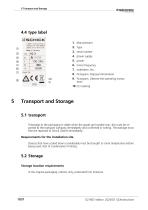
(6)(7) D 88413 Scfwmmcrhoten Telefon +49 7356 9500-0 www.sc.hi-k dental df* Made in Germany serial number power supply power mains frequency Pictogram: Disposal Pictogram: Observe tions 5 Transport and Storage5.1 transport If damage to the packaging is visible when the goods are handed over, this must be reported to the transport company immediately and confirmed in writing. The damage must then be reported to Schick GmbH immediately. Devices that have cooled down considerably must be brought to room temperature before being used. Risk of condensation forming. In the original packaging, indoors...
Open the catalog to page 12
When working on the electrical installation, pull out the mains plug > Connect existing handpieces/spindles to sockets Ml, M2 or M3. > Optional: Connect a foot pedal to the foot pedal jack > Plug the mains adapter plug into the power supply socket on the control unit
Open the catalog to page 13
Switching on/off takes place via the main switch on the front of the control unit. Readi ness indication via display or LED on the main switch. The IQ3 control unit may only be switched off using the main switch when the handpiece is stationary. 7.2 Operating concept and OLED display After switching on, the OLED display of the IQ3 control unit provides information about all operating states of the device. The following parameters are displayed in detail: operational readiness. Display shows the selected/connected handpiece, the preselected maximum speed, the maximum possible speed for the handpiece...
Open the catalog to page 14
The inverted display shows the handpiece is running! With dynamic control with dyn. After starting the handpiece, the previously set maximum speed is displayed in the display line "LIM." (abbreviation LIMIT). When using the optional pedal switch item no. 6370/2 the symbol is displayed only when the pedal is pressed. 7.3 Operate handpiece and controller Starting the handpiece Variable speed control via optional dynamic foot pedal item no. 9440 up to the maximum speed set via the rotary knob. Static handpiece start by pressing the rotary knob (►) to the speed set via the ro tary knob. Static handpiece...
Open the catalog to page 15All Schick Industrie catalogs and technical brochures
 MT A
MT A23 Pages
 Schick IQ1
20 Pages
 Schick IQ3
21 Pages
Archived catalogs
 Precision technology
12 Pages
- LED lighting
- Dust collector
- Control pedal
- Single pedal pedal
- Electronic pedal
- Filter dust collector
- Motorized spindle
- Lamp
- Milling spindle
- Deburring tool
- Compact dust collector
- Suction unit
- Machining spindle
- Digital control unit
- Grinding spindle
- High-efficiency lighting
- Energy saving lighting
- Automatic control unit
- Metal deburring tool
- Industrial suction unit