

MT A
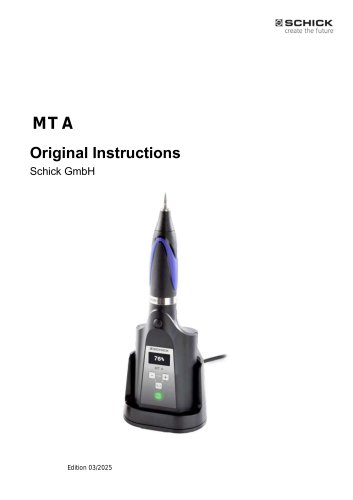
MT A
The document serves as the operating manual for the Schick MT A handpiece, a device designed for dental laboratories. It provides crucial information for its operation and maintenance.
General Safety Regulations
The MT A is intended for dry processing in dental labs and should not be used in explosive atmospheres or for medical use on patients. It is essential that personnel are trained and use safety equipment like protective goggles and extraction systems.
Technical Description
The MT A is a mobile, rechargeable handpiece for grinding or separating materials. It features a tool-free quick-clamping system, a removable battery, and allows speed and rotation direction preselection via a control panel.
Transport and Storage
The device should be transported in its original packaging and stored in a suitable site. It must be charged using the specified charger.
User Interface
The MT A includes an LCD display for speed and rotation direction, with instructions for operation, tool changes, and battery separation.
Troubleshooting
The manual provides fault and error messages to assist in troubleshooting.
Care and Maintenance
Regular care includes dismantling and cleaning the chuck. Maintenance should be performed by trained personnel.
Optional Accessories
Available accessories include a tool belt and connecting cable.
Specifications and Components
The MT A includes a handpiece, control unit, and charging dock. It supports tools with shaft diameters of 2.35 mm or 3 mm.
Installation and Charging
The device is delivered ready to use with a partially charged battery. Ensure mains voltage compatibility before charging.
User Interface and Operation
The MT A features an LCD display, speed selection, and rotation controls. It supports both right-hand and left-hand rotation.
Troubleshooting
Intelligent electronics detect faults, displayed on the screen. In case of overload, the device may switch off and needs resetting.
Maintenance
Regular cleaning and lubrication of the chuck are recommended. Avoid aggressive cleaning agents.
Technical Data
The handpiece operates at speeds between 3,000 and 30,000 RPM with a maximum torque of 5.5 Ncm. It features a brushless DC motor and a quick-release tool change system.
Compliance and Warranty
The MT A complies with EU directives and standards. Schick GmbH provides repair services using original spare parts.
Catalog excerpts
MT AOriginal InstructionsSchick GmbH Edition 03/2025
Open the catalog to page 1
Thank you for purchasing a high-quality technical device from SCHICK Gm bH. e hope you will enjoy working with your new MT A handpiece and wish you the best of success. Ve have prepared this operating manual in order to acquaint you with your new device and to provide the necessary information for operation and maintenance. Project data, Serial number: Axxx xxx
Open the catalog to page 2
1 About this operating manual Original Instructions
Open the catalog to page 3
1 About this operating manual K SCHICK create the future
Open the catalog to page 4
1 About this operating manual S SCHICK create the future
Open the catalog to page 5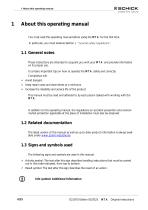
1 About this operating manual About this operating manual You must read this operating manual before using the MT A for the first time. In particular, you must observe Section 1.1 General notes These instructions are intended to acquaint you with your MT A and provide information on its proper use. It contains important tips on how to operate the MT A safely and correctly. Compliance will: Avoid dangers Keep repair costs and downtimes to a minimum Increase the reliability and service life of the product This manual must be read and adhered to by each person tasked with working with the MT A...
Open the catalog to page 6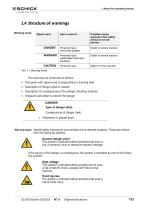
1 About this operating manual 1.4 Structure of warnings Warning levels Signal word The warnings are structured as follows, Pictogra m with signal word corresponding to warning level Description of danger (type of hazard) Description of consequences of the danger (resulting hazards) M easures (activities) to prevent the danger DANGER!Type of danger (text) Consequences of danger (text) ^ Prevention of danger (text) Warning signs S pecial safety instructions are provided at the relevant locations. These are marked with the following symbols. This symbol is indicated before activities that may result...
Open the catalog to page 7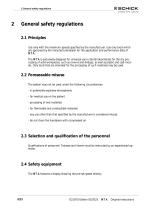
2 General safety regulations General safety regulations 2.1 Principles Use only with the maximum speeds specified by the manufacturer. Use only tools which are approved by the manufacturer/dealer for the application and performance data of MT A. The MT A is exclusively designed for universal use in dental laboratories for the dry processing of solid workpieces, such as crowns and bridges, as well as plastic and cast-models. Only tools that are intended for the processing of such materials may be used. 2.2 Foreseeable misuse The system may not be used under the following circumstances: - in potentially...
Open the catalog to page 8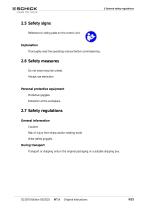
2 General safety regulations \eference to rating plate on the control unit. Thoroughly read the operating manual before com missioning, Do not wear long hair untied, Protective goggles, Risk of injury from sharp and/or rotating tools! Transport or shipping only in the original packaging or a suitable shipping box,
Open the catalog to page 9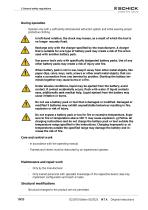
2 General safety regulations During operation Operate only with a sufficiently dimensioned extraction system and while wearing proper protective clothing. In left-hand rotation, the chuck may loosen, as a result of which the tool is no longer securely fixed. Recharge only with the charger specified by the manufacturer. A charger that is suitable for one type of battery pack may create a risk of fire when used with another battery pack. Use power tools only with specifically designated battery packs. Use of any other battery packs may create a risk of injury and fire. When battery pack is not...
Open the catalog to page 10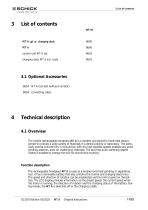
List of contents art.no. charging dock MT A incl. tools 3.1 Optional Accessories 9654 MT A tool belt (without content) 9604 connecting cable Technical description 4.1 Overview The mobile rechargeable handpiece MT A is a modern and powerful hand-held electric grinder to process a wide variety of materials in a dental practice or laboratory. The particularly precise concentricity in conjunction with the high possible speeds enables very good grinding patterns, even on challenging materials. The tool-free quick-clamping system makes it possible to change the tool for economical working. Function...
Open the catalog to page 11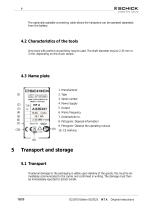
Th e optionally available connecti ng cable allows the handpiece can be operated separately from the battery. Only tools with perfect concentr icity may be used. The shaft diameter may be 2.35 3 m m, depending on the chuck variant. 8. P ictogram: Disposal information 9. P ictogram: Observe the operating If external damage to the packaging is visible upon delivery of the goods, this must be immediately com municated to the carrier and confirmed in writing. The damage must then be immediately reported to Schick GmbH. D21870 Edition 03/2025 MT A O riginal Instructions
Open the catalog to page 12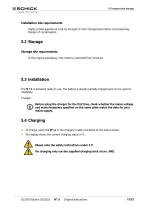
Installation site requirements Highly cooled appliances must be brought to room temperature before commissioning. Danger of condensation. 5.2 Storage Storage site requirements In the original packaging, only indoors, protected from moisture. 5.3 Installation The MT A is delivered ready to use. The battery is already partially charged and can be used immediately. Charger: Before using the charger for the first time, check whether the mains voltage and mains frequency specified on the name plate match the data for your mains supply. 5.4 Charging To charge, place the MT A in the charging cradle...
Open the catalog to page 13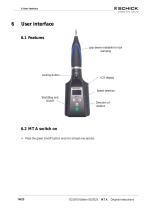
User interface 6.1 Features grip sleeve rotatable for tool clamping Locking button Speed selection Start/Stop and On/off 6.2 MT A switch on Press the green On/off button once for at least one second. Original Instructions
Open the catalog to page 14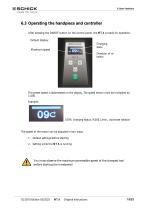
6.3 Operating the handpiece and controller After pressing the ON/OFF button on the control panel, the MT A is ready for operation. Default display: Charging statu Maximum speed The preset speed is abbreviated on the display. The speed shown must be multiplied by 1,000. Example: 100% charging status, 9,000 1/min., clockwise rotation The speed of the motor can be adjusted in two ways: 1. Default settings before starting 2. Setting while the MT A is running You must observe the maximum permissible speed of the clamped tool before starting the handpiece! Original Instructions
Open the catalog to page 15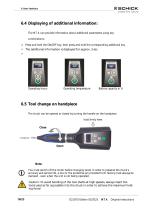
6.4 Displaying of additional information: The MT A can provide information about additional parameters using key combinations: Press and hold the ON/OFF key, then press and hold the corresponding additional key. The additional information is displayed for approx. 3 sec. Operating hours Operating temperature 6.5 Tool change on handpiece The chuck can be opened or closed by turning the handle on the handpiece. hold firmly here Close Note: You must switch off the motor before changing tools! In order to preserve the chuck's accuracy and service life, a tool or the protective pin provided from...
Open the catalog to page 16All Schick Industrie catalogs and technical brochures
 Schick IQ1
20 Pages
 Schick IQ3
21 Pages
Archived catalogs
 Precision technology
12 Pages
- LED lighting
- Dust collector
- Control pedal
- Single pedal pedal
- Electronic pedal
- Filter dust collector
- Motorized spindle
- Lamp
- Milling spindle
- Deburring tool
- Compact dust collector
- Suction unit
- Machining spindle
- Digital control unit
- Grinding spindle
- High-efficiency lighting
- Energy saving lighting
- Automatic control unit
- Metal deburring tool
- Industrial suction unit