1. Catalogs
  2. SATEL IBERIA
  3. MISSION-CRITICAL CONNECTIVITY

MISSION-CRITICAL CONNECTIVITY
MISSION-CRITICAL CONNECTIVITY
1 / 154 PagesView full catalog

MISSION-CRITICAL CONNECTIVITY

Product catalog summary
Important Notice: The document is proprietary to SATEL Oy and includes a disclaimer about the use of SATELLAR products in life-support systems.
Product Conformity: The SATELLAR Central Unit complies with Directive 1999/5/EC for electromagnetic compatibility and electrical safety, marked with CE certification.
Warranty and Safety Instructions: The warranty is void if the product is misused or tampered with. Proper handling and installation are crucial for safe operation, requiring a separation distance of at least 44 cm from the antenna.
Introduction to SATELLAR Product Family: SATELLAR is a modular radio modem system comprising a Central Unit (CU), Radio Unit (RU), and Expansion Units (XU). It supports various network topologies and offers data security with 128-bit and 256-bit encryption.
Technical Specifications: The CU features an ARM 9 CPU, 64 MB RAM, and 128 MB ROM. It includes a 2.4” display, USB interfaces, and an Ethernet interface. It operates within a temperature range of -25 to +55 °C and complies with several IEC standards.
Typical Setup: A typical setup involves transferring IP data through the CU with a recommended minimum distance of 2 meters between the antenna and CU to avoid interference.
Mechanical Assembly: The modular construction allows for the attachment of expansion units between the RU and CU. Proper assembly is crucial for optimal performance.
Interfaces: The CU includes Ethernet, USB, diagnostic, and monitoring interfaces. It features LED indicators and a function button for status and configuration.
Data Transmission: The CU supports various protocols, including Internet Protocol, Proxy ARP, and DHCP, with detailed instructions for setting IP routes and addresses.
Settings: The guide provides comprehensive instructions for modem settings, routing, VLAN, WLAN, and redundant routing, including QoS and bridge mode configurations.
Applications: The CU supports diagnostics, SNMP, firmware updating, remote settings, encryption, and logging. It includes tools for administration and network management.
Troubleshooting: The guide includes a section on error codes and troubleshooting procedures.
Open Source Statements: Information on LGPL and GPL software used in the product is provided, along with a written offer for source code.
Mechanical Assembly and Modular Construction: The document describes the modular construction of the SATELLAR system, allowing for the connection of an expansion unit (XU) between the Radio Unit (RU) and Central Unit (CU).
Interfaces: The Central Unit (CU) offers three data interfaces: Ethernet, USB host, and USB device.
LED Indicators: The CU has four LED indicators for USB, Ethernet, STAT, and PWR, each indicating different operational statuses.
Function Button: A function button below the LED indicators allows control over USB and Ethernet interface settings.
Graphical User Interface (GUI): The CU is equipped with an LCD display and keypad, allowing users to change settings and access applications.
WWW User Interface: The WWW interface can be accessed via a web browser using the modem's IP address.
SATEL NMS: SATEL NMS is a Network Management System for configuring and monitoring devices using external software like SATEL NMS PC or NETCO.
Connection Options: The SATELLAR Central Unit (CU) supports various connection methods including TCP/IP via Port 55555, USB in Virtual Serial port mode, and remote connections via radio network.
SSH Access: The SATELLAR's Linux command line is accessible via SSH using a client like putty.exe, with default credentials provided.
Data Transmission: The CU facilitates data transfer over IP protocols such as TCP/IP, UDP, and ICMP.
IP Address Configuration: IP addresses for eth0 and tun0 interfaces are determined based on station addresses (RMAC).
Routing and Proxy ARP: IP routes must be defined for each CU, specifying destination subnets and gateways.
DHCP Support: The CU can operate in DHCP Server or Client mode, though static IP configurations are recommended for reliable remote access.
Settings Management: The CU offers various settings affecting IP routing and other operations, accessible through multiple interfaces.
Modem Settings Overview: The document provides an example of using carrier timeout and fast RSSI for antenna adjustment.
Modem Info: This section details the modem's status, including temperature, voltage, data transmission, and reception statistics.
Services: This section lists the services running on the Central Unit (CU) and provides information on service restarts or device reboots.
Radio Unit: Information about the Radio Unit (RU) is provided, with further details available in the Radio Unit User Guide.
Central Unit: This section includes hardware and firmware details of the CU, such as FPGA watchdog restarts, firmware version, model, Ethernet MAC address, and kernel version.
Routing: The routing application allows modification of packet routing tables, IP settings, and routes.
IP Settings: This section covers Internet Protocol settings, including IP address configuration, DHCP state, Ethernet speed, and IP queue settings.
IP Queue Handling: The document discusses the management of IP queues during heavy radio channel traffic.
IP Address Management: Users can add additional IP addresses through the GUI by selecting the plus symbol.
IP Routes: The document explains the addition, modification, and removal of IP routes.
Routing Tables: Detailed routing tables are provided, showing the target network, gateway, and notes for each device.
Serial IP Configuration: This section covers the conversion of serial data to IP packets and vice versa.
Key Tables and Figures: The document includes several tables and figures illustrating routing configurations, IP address assignments, and examples of automatic route creation.
Overview: This document is a user guide for the SATELLAR Central Unit, focusing on network configurations and protocols.
1. TCP and UDP Protocols: TCP and UDP are part of the Internet Protocol suite used for data transmission.
2. Ethernet to Serial Converter: The SATELLAR unit can function as an Ethernet/Serial converter.
3. VLAN Settings: VLANs allow a physical LAN to be divided into separate networks.
4. WLAN Configuration: SATELLAR can act as a WLAN device with an attached USB WLAN adapter.
5. Redundant Routing: SATELLAR supports redundant routing to ensure network reliability.
Key Considerations: The document highlights the importance of matching protocols, modes, ports, and addresses for successful connections.
Route Monitoring and Failover: Route monitoring involves checking the availability of network gateways.
Virtual Router Redundancy Protocol (VRRP): VRRP assigns a virtual IP address to one machine in a network, allowing seamless failover to backup routers if the master router fails.
Building Redundant Networks: Several examples illustrate how to build redundant networks using SATELLAR devices.
Network Configuration and Routing: The document provides detailed instructions on network configuration and routing.
Redundancy and SNMP Notifications: SNMP notifications can be enabled for redundancy events.
Application Routing: Supported protocols include DNP3, Modbus RTU/TCP, NMEA 0183, IEC101, Custom Protocol, and SINAUT ST1/ST7.
OSPF Configuration: The document outlines the configuration of OSPF (Open Shortest Path First) on a SATELLAR device.
Quality of Service (QoS): QoS in SATELLAR allows classification and prioritization of IP traffic using DSCP marking and traffic control.
Creating QoS Rules: QoS rules are created via the web UI, allowing users to set DSCP marking based on criteria like interface, protocol, and IP addresses.
Bridge Mode: Bridge mode aggregates networks without IP routing, using Ethernet and radio ports.
Ethernet Firewall: The Ethernet firewall blocks traffic at the Ethernet level, with rules for INPUT, FORWARD, and OUTPUT traffic.
Firewall Configuration: The document outlines the use of ebtables for configuring Ethernet firewall rules.
Bridge Mode Configuration: Guidelines are provided for configuring devices in bridge mode.
TCP/UDP Proxy: The document describes setting up a TCP-UDP proxy to improve latency and bandwidth over radio networks.
IEC 104-101 Protocol: This section explains the IEC 60870 standards for telecontrol in power systems.
VPN Configuration: The document briefly mentions the use of VPNs for secure communication over SATELLAR radio networks.
Diagnostics Application: The diagnostics application allows users to view various performance metrics such as CPU load, RAM usage, signal strength, and more.
SNMP: The document introduces SNMP as a protocol for managing devices on IP networks.
Overview: This document is a user guide for the SATELLAR Central Unit, focusing on the SNMP (Simple Network Management Protocol) application and firmware updating procedures.
SNMP Management: The SNMP protocol allows for both monitoring and active management of network devices.
SNMP Settings: Key settings include SNMP RO Community, SNMP RW Community, SNMP Notification IP, SNMPv3 User Name, and SNMPv3 Security Type.
MIB Files: The Management Information Base (MIB) is a database of parameters available for SNMP.
Reading and Writing with SNMP: SNMP operations are based on Get and Set requests.
Firmware Updating: Firmware updates can be performed via the SATELLAR GUI, USB stick, or over-the-air.
Conclusion: This guide provides comprehensive instructions for managing SNMP settings and updating firmware on SATELLAR devices.
Firmware Update Process: The document outlines the process for starting, processing, and completing firmware updates.
USB Stick Boot Update Method: Use RAW kernel and filesystem images on a USB stick for automatic updates.
Over-the-Air Firmware Update: The process involves preparation, transfer, update, and confirmation.
Verification of Update Integrity: After booting, a verification process ensures system functionality.
Remote Settings and NMS Import: Change settings of a remote SATELLAR over the air using the LCD GUI or WWW interface.
Overview: This document is a technical manual for the SATELLAR Central Unit, providing detailed instructions on exporting and importing settings, managing encryption, logs, administration, and network tools.
Export/Import Procedures: The document outlines the process of using transport files to export and import settings.
Importing via USB: Transport files on a USB stick are automatically imported during the SATELLAR boot process.
Encryption: The manual describes how to set encryption keys using either a password or manual entry.
Logs: Logs available through the web interface include kernel, system, service messages, and internal NMS traffic logs.
Administration: Access to advanced settings is restricted and requires a PIN code or admin password.
Network Tools: The manual details tools like Ping, Traceroute, and NMS Value for network diagnostics.
Firewall: Advanced users can configure a firewall using iptables commands.
Overview: This document is a user guide for the SATELLAR Central Unit, version 1.8, by SATEL OY.
1. SATELLAR CU Settings Wizard: The Settings Wizard is designed for creating small networks, with larger networks requiring external tools like Netco.
2. Type Designation: The type designation label is located on the back of the CU, providing model and serial number information.
3. Troubleshooting: Error codes are indicated by LEDs, with specific patterns representing different issues.
4. Open Source Software: The product includes open-source software under LGPL and GPL licenses.
5. Settings Selection Guide: Detailed settings for network protocol, radio frequency, modulation, serial data flow control, and more are provided.
Settings Overview: The document provides a comprehensive guide on configuring various settings for SATEL devices.
Communication Settings: Options include D9 and USB-A, with various baud rates from 1200 bps to 460800 bps.
Network Configuration: VRRP settings include state, virtual IP address, and priority.
Quality of Service (QoS): DSCP Marking and Traffic Rules are referenced for further details.
Administration: Admin PIN Code and Web GUI Admin Password are provided.
Additional Features: Options to enable or disable Bridge and Proxy, and IEC Settings.
Contact Information: SATEL Oy, Meriniitynkatu 17, P.O.Box 142, FI-24101 Salo, Finland. Tel. +358 2 777 7800, [email protected], www.satel.com.
See more

Catalog excerpts

MISSION-CRITICAL CONNECTIVITY-1

SATELLAR DIGITAL SYSTEM PART II: CENTRAL UNIT USER GUIDE VERSION 1.8 USER GUIDE MISSION- CRITICAL CONNECTIVITY

 Open the catalog to page 1

MISSION-CRITICAL CONNECTIVITY-2

Copyright: 2017 SATEL Oy No part of this document may be reproduced, transmitted or stored in a retrieval system in any form or by any means without the prior written permission of SATEL Oy. This document is provided in confidence and must not be distributed to third parties without the express permission of SATEL Oy.

 Open the catalog to page 2
MISSION-CRITICAL CONNECTIVITY-3

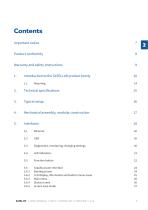
Important notice Product conformity Warranty and safety instructions 1. Introduction to the SATELLAR product family 4. Mechanical assembly, modular construction 5.3 Diagnostics, monitoring, changing settings 20 5.6 Graphical user interface 24 5.6.2 LCD display, information and button menu areas 25 5.6.5 Screen save mode 27 SATEL OY // SATELLAR MANUAL // PART II // CENTRAL UNIT // USER GUIDE // V. 1.8

 Open the catalog to page 3
MISSION-CRITICAL CONNECTIVITY-4

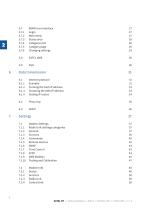
7.1.1 Radio Unit Settings categories SATEL OY // SATELLAR MANUAL // PART II // CENTRAL UNIT //

 Open the catalog to page 4
MISSION-CRITICAL CONNECTIVITY-5

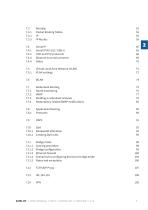
7.3.1 Packet Routing Tables 52 7.4.3 Ethernet to serial converter 69 7.5 Virtual Local Area Network (VLAN) 72 7.7.3 Building a redundant network 79 7.7.4 Redundancy related SNMP notifications 85 7.11.4 Scenarios for configuring devices to bridge mode 103 SATEL OY // SATELLAR MANUAL // PART II // CENTRAL UNIT // USER GUIDE // V. 1.8 5

 Open the catalog to page 5
MISSION-CRITICAL CONNECTIVITY-6

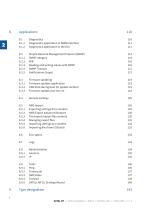
8.1.1 Diagnostics application in WWW interface 8.2 Simple Network Management Protocol (SNMP) 8.2.3 Reading and writing values with SNMP 8.3.1 Firmware updater application 8.3.2 USB Stick during boot CU update method 8.3.3 Firmware update over-the-air 8.5.1 Exporting settings from modem 8.5.2 NMS Export advanced features 8.5.3 The export/import file contents 8.5.4 Managing export files 8.5.5 Importing settings to a modem 8.5.6 Importing files from USB stick 8.9.5 SATELLAR CU Settings Wizard SATEL OY // SATELLAR MANUAL // PART II // CENTRAL UNIT // USER GUIDE // V. 1.8

 Open the catalog to page 6
MISSION-CRITICAL CONNECTIVITY-7

11.2 Written offer for LGPL and GPL source code 146 12. Settings selection guide 147 All rights to this manual are owned solely by SATEL OY (referred to in this user guide as SATEL). All rights reserved. The copying of this manual (without written permission from the owner) by printing, copying, recording or by any other means, or the full or partial translation of the manual to any other language, including all programming languages, using any electrical, mechanical, magnetic, optical, manual or other methods or devices is forbidden. SATEL reserves the right to change the technical specifications...

 Open the catalog to page 7
MISSION-CRITICAL CONNECTIVITY-8

Product conformity SATELLAR CU SATEL Oy hereby declares that SATELLAR Central Unit is in compliance with the essential requirements (electromagnetic compatibility and electrical safety) and other relevant provisions of Directive 1999/5/EC. Therefore the equipment is labelled with the following CE-marking. 8 SATEL OY // SATELLAR MANUAL // PART II // CENTRAL UNIT // USER GUIDE // V. 1.8

 Open the catalog to page 8
MISSION-CRITICAL CONNECTIVITY-9

Warranty and safety instructions Read these safety instructions carefully before using the product: –– The warranty will be void if the product is used in any way that is in contradiction with the instructions given in this manual, or if the housing of the radio modem has been opened or tampered with. The devices mentioned in this manual are to be used only according to the instructions described in this manual. Faultless and safe operation of the devices can be guaranteed only if the transport, storage, operation and handling of the device is appropriate. This also applies to the maintenance...

 Open the catalog to page 9
MISSION-CRITICAL CONNECTIVITY-10

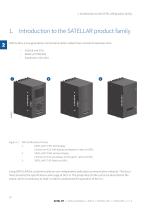
1. Introduction to the SATELLAR product family 1. Introduction to the SATELLAR product family SATELLAR is a new generation narrow band radio modem that consists of separate units: –– –– –– Central unit (CU) Radio unit 5W (RU) Expansion units (XU) SATELLAR product family: 1. SATELLAR XT 5RC with display: Central unit (CU) with display and keypad + radio unit (RU) 2. SATELLAR XT 5RC without display: Central unit (CU) w/o display and keypad + radio unit (RU) 3. SATELLAR XT 5R: Radio unit (RU) Using SATELLAR the customer builds an own independent radio data communication network. This document presents...

 Open the catalog to page 10
MISSION-CRITICAL CONNECTIVITY-11

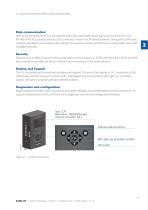
1. Introduction to the SATELLAR product family Data communication SATELLAR operates either as a transparent radio link, essentially replacing a wire, for classic RS-232, RS-485 or RS-422 based protocols, or as a wireless router in an IP-based network. Using SATELLAR many network topologies are possible, everything from a point-to-point connection to a nationwide chain with multiple branches. Security Data security is often a concern when using radio communication. In SATELLAR there are 128-bit and 256bit encryptions available on the air-interface ensures privacy in the radio network. Display...

 Open the catalog to page 11
MISSION-CRITICAL CONNECTIVITY-12

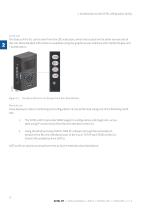
1. Introduction to the SATELLAR product family Local use The status of the CU can be seen from the LED indicators, which are located on the other narrow side of the unit. More detailed information is available using the graphical user interface with a QVGA display and 7 pushbuttons. The status of the CU can be seen from the LED indicators Remote use Once deployed, status monitoring and configuration can be performed using one of the following methods: 1. The SATELLAR CU provides WWW pages for configuration and diagnostic, accessible using IP connectivity (the Ethernet interface of the CU) Using...

 Open the catalog to page 12
MISSION-CRITICAL CONNECTIVITY-13

1. Introduction to the SATELLAR product family Flexible and expandable SATELLAR concept has been designed to be flexible and expandable both in terms of hardware and software functions. Software In the RU the modulation method, channel spacing (i.e. air interface data rate), and forward error correction can be selected by changing the modem settings by software. Also the RF output power can be set. Hardware Due to the modular mechanical structure of SATELLAR, it is possible to add hardware expansion units. The idea is that this could be done as an update after the initial deployment. At the moment,...

 Open the catalog to page 13
MISSION-CRITICAL CONNECTIVITY-14

1. Introduction to the SATELLAR product family The SATELLAR XT 5R and 5RC can be mounted as follows: • On a DIN-rail using SATELLAR specific DIN rail adapters (two pieces needed) connected at the other edge or at the bottom of the unit. • NOTE! The DIN rail adapters have to be ordered separately. Please contact manufacturer to get more information regarding mounting of the units. 1. The equipment must be installed in restricted access location due to high touch temperatures of metal enclosure. 2. The screen of coaxial antenna cable must be grounded to protect from over voltages from outdoor antenna....

 Open the catalog to page 14

All SATEL IBERIA catalogs and technical brochures
  1. GPSHPMIMO-LTW

    2  Pages

*Prices are pre-tax. They exclude delivery charges and customs duties and do not include additional charges for installation or activation options. Prices are indicative only and may vary by country, with changes to the cost of raw materials and exchange rates.