


Getting Started with an Upgrade to SAP ERP 6.0

Getting Started with an Upgrade to SAP ERP 6.0
This document serves as a comprehensive guide for upgrading to SAP ERP 6.0, targeting IT decision-makers and project leaders. It outlines the value potential, best practices, and SAP recommendations to assess, plan, and execute the upgrade effectively.
ERP upgrades are crucial for maximizing software value and extending its lifecycle. They should be integrated into an organization's IT strategy as part of the product lifecycle.
A six-step discovery process is outlined to assess the upgrade's value, including gathering information, involving stakeholders, determining business value, organizing workshops, testing new functions, and finalizing justification.
Common reasons include new functionality demands, process efficiency, IT infrastructure updates, and vendor support policies. The document stresses assessing risks of postponing upgrades.
This section covers assessing impacts on existing solutions, technical prerequisites, Unicode conversion, scheduling, and strategy determination. It also discusses cost estimation, project management, and success factors.
Key steps include IT infrastructure adjustments, resizing servers, deploying new components, and network adjustments. It also covers minimizing downtime, application adjustments, and user training.
SAP ERP 6.0 offers over 300 enhancements to improve process efficiency and user productivity, integrating industry solutions and simplifying business tasks.
The upgrade supports business strategy by enabling innovation and supporting new business models, addressing sustainability by reducing total cost of ownership through system consolidation and reduced customization.
Combining the upgrade with other IT initiatives can lower TCO. Insights are provided on how SAP ERP 6.0 can help achieve this.
The guide concludes with key messages for IT decision-makers and project managers, emphasizing the strategic importance of ERP upgrades and the potential benefits of SAP ERP 6.0.
- Financial Management: Enhancements in contract accounting, collections, and general ledger management.
- Human Resources: Focus on talent management and enhanced support for recruiters and HR services.
- Procurement and Sales: Improved purchasing self-services and e-procurement.
- Travel and Expense Management: Streamlined expense entry and travel planning.
- Corporate Real Estate and Compliance: Support for managing corporate property and enhanced compliance.
- Enterprise Service-Oriented Architecture (SOA): Shortens application innovation cycles and allows flexible business process design.
- Enhancement Packages: Simplify deployment of new software functions.
- Sustainability and Compliance: Integrates operations with financial and HR processes, covering legal and compliance requirements.
- System Stability and Maintenance: Ensures business continuity and system stability with a 5-1-2 maintenance strategy.
- Total Cost of Ownership (TCO): Reduces TCO by consolidating software landscapes and lowering operational costs.
- Planning and Evaluation: Discusses challenges and best practices for planning an upgrade.
Upgrading may require changes in hardware, operating systems, or database platforms. A Unicode conversion is necessary for certain systems, with limitations including country version availability and third-party compatibility issues.
A well-defined strategy consists of three phases: technical upgrade, functional enhancements, and strategic enhancements, each expanding functionality and business value while minimizing risk.
Involves considering internal and external costs, hardware adjustments, and additional license costs. A detailed system analysis and test upgrade are recommended for accurate estimations.
Establishing governance, allocating resources, and setting up a project kickoff meeting are essential. Success factors include appropriate governance, sufficient capacity, skilled teams, and adherence to standards.
Comprehensive standards and procedures are necessary for documentation, problem-solving, progress tracking, and testing and training strategies.
SAP Solution Manager and SAP Upgrade Road Map are recommended for managing documentation, business processes, and testing. Expert assistance may be required for complex upgrades.
The upgrade project is structured into five phases: Project Preparation, Blueprint, Realization, Final Preparation for Cutover, and Go-live and Support.
External assistance is often utilized to ensure projects stay on time and within budget. SAP offers tailored services to support customers.
SAP's system switch technology facilitates a one-step upgrade process, reducing technical downtime significantly.
Comprehensive testing is crucial to maintain high-quality business processes. SAP Solution Manager offers tools for organizing and automating tests.
The extent of training depends on the upgrade's functional scope. E-learning and train-the-trainer approaches are suggested for minimal interface changes.
Decision-makers should evaluate the benefits of upgrading holistically, ensuring alignment with business requirements and IT strategy.
Project managers should plan meticulously, conduct test upgrades early, and consider a multistep approach to reduce downtime and effort.
Potential IT infrastructure adjustments may be necessary, such as resizing servers and considering Unicode conversion.
Further information sources include SAP service briefs, upgrade guides, and online resources available on the SAP service marketplace.
Discusses SAP Note 623723 and the functionality of the SAP Test Data Migration Server software.
Emphasized as a tool to enhance efficiency in business-related upgrade aspects.
Lists several analyst reports and SAP presentations available online.
Concludes with legal disclaimers, noting SAP trademarks and the informational nature of the materials.
Catalog excerpts

VALUE POTENTIAL, BEST PRACTICES, AND SAP RECOMMENDATIONS >
Open the catalog to page 1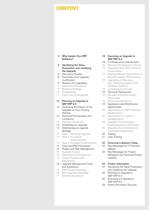
4 Why Update Your ERP Software? 5 Identifying the Value Proposition and Justifying the Upgrade 18 Executing an Upgrade to SAP ERP 6.0 18 IT Infrastructure Adjustments 18 Resizing the Application Server 18 Deploying New SAP Front-End Components 18 Making Network Adjustments to Maintain System Performance 18 Upgrading or Migrating Your Operating System and Database Platform 19 Converting to Unicode 5 Discovery Process 6 Essentials of an Upgrade Justification 6 Reasons for Upgrading 7 Operational Excellence 9 Business Strategy 10 Sustainability 11 Total Cost of Ownership 19 Technical Deployment...
Open the catalog to page 3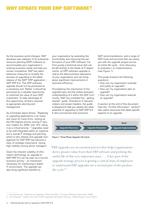
As the business world changes, SAP develops new releases of its enterprise resource planning (ERP) software to accommodate your organizations evolving business needs and help you remain competitive. SAP has taken extensive measures to simplify the process of upgrading to the latest release of the SAPҮ ERP application SAP ERP 6.0. This ERP software upgrade should not be perceived as a necessary evil. Rather, it should be perceived as a valuable opportunity to maximize the value of your SAP investment. To take advantage of this opportunity, all that֒s required is appropriate planning and management.As...
Open the catalog to page 4
SAP ERP 6.0 provides SAP customers with a wealth of opportunities for improv- ing their businesses. Based on customer experience during the ramp-up of this new release, SAP has determined that the following business scenarios are the most highly valued in the SAP community: > 2. Involving stakeholders The IT department and representatives of the various business units cooperate to assess the value proposition of an upgrade and build consensus. Since an upgrade justification is unique to each customer situation, SAP has developed a solution browser tool for SAP ERP that enables IT orga- nizations...
Open the catalog to page 5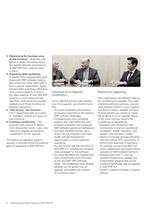
5. Test-drivingӔ new functions 6. Finalizing a justification The business units and the IT depart-ment discuss the merits, costs, and risks of an upgrade and produce a justification for the upgrade.This bottom-up approach helps to quantify in concrete terms the potential gains of upgrading to SAP ERP 6.0. ֖ The IT department sets up a demo or sandboxӔ system for trying out new functions. 3. Determining the business value of new functions 4. Organizing delta workshops IT departments organize delta work- shops with SAP software experts, who come from either SAP itself or from a partner organization....
Open the catalog to page 6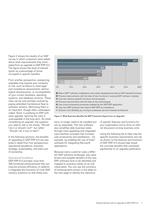
59%51%35%32%32%22%5% 60%50%40%30%20%10%0% Return SAP software modifications and custom developments back to SAP standard functions Process improvements with the help of new functions in existing SAP software modules Use new industry-specific functions and processes Process improvements with the help of new technologies Use cross-component processes enabled by the SAP ERP application Use new SAP products that require SAP ERP as a backbone Achieve more flexibility by moving to enterprise service-oriented architecture > Figure 2: What Business Benefits Do SAP Customers Expect from an Upgrade? 7Getting...
Open the catalog to page 7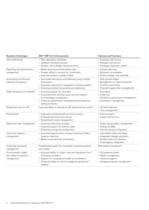
Business Challenges SAP ERP 6.0: Enhancements Features and Functions User productivity t New application interfaces t Employee self-service t Updated role-based access t Manager self-service t Greater use of Adobe interactive forms t Employee interaction centerReporting and performance management t Better planning and forecasting tools t Express planning t Greater ability to account for investments t Business consolidation t Improved product costing module t Product design cost estimateAccounting and financial reporting compliance t Automated allocations and balancing using multiple dimensions...
Open the catalog to page 8
Enhancement Package 1Enhancement Package 2Enhancement Package 3Enhancement Package 4*Enhancement Package 5*Role-based accessAdaptive manufac-turingHR shared servicesRetail Order to cashOrder to cashRecruitingService industries Procure to payProcure to payFast closingTrading industries Attract to performAccounting to reportingFinancial shared servicesTalent managementDiscrete industries Simplification Enterprise SOA Additional enterprise servicesTreasuryProcess industries Functionality Industries *Planned enhancement packages: subject to change > Figure 3: Road Map Showing Enhancement Packages...
Open the catalog to page 9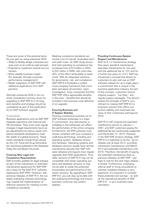
Providing Continuous System Support and Maintenance With its 5-1-2 maintenance strategy (five years standard maintenance, extended maintenance for one year with the additional fee of +2% and for a further two years at +4%), SAP has introduced a concept that allows its customers to plan and use an SAP software release for up to eight years a commitment that is unique in the business-application industry. As part of this concept, customers receive ongoing support, ֓hot fixes, and regular support packages. This demon-strates the strength of SAPԒs com- mitment to making SAP ERP 6.0 a long-term solution...
Open the catalog to page 10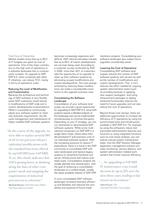
Lowering the Cost of Operations Consolidating SAP software land- scapes reduces the number of SAP software systems and servers as well as the number of modifications and custom developments. This, in turn, reduces the effort needed for ongoing system administration tasks (such as providing backups or applying new support packages). And using enhancement packages to deploy enhanced functionality reduces the need for future upgrades and can also reduce the cost of operations.Beyond those cost savings, there are additional opportunities to increase the efficiency of IT operations by using the synchronized...
Open the catalog to page 11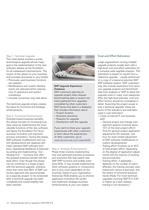
Step 1: Technical Upgrade > This initial phase involves a purely technological upgrade whose major goal is the implementation of the new software release as the foundation for all subsequent improvements. The impact of this phase on your business and business processes is very limited: Large organizations running multiple upgrade projects usually start with a high-level cost and effort estimation for a company-wide upgrade program. This estimation is based on results from a reference upgrade usually performed on a copy of a typical productive SAP ERP software system. SAP customers may also include...
Open the catalog to page 14Archived catalogs
 SAP Business Objects
16 Pages
 procurement-solutions-from-sap
12 Pages
 Asset Network
1 Page
 power your innovation
10 Pages
 SAP
SAP32 Pages
 mercedes
3 Pages
 SAP HANA®
7 Pages
 Debt investor Call First Quarter
19 Pages
 Responsive Manufacturing
1 Page
 Manufacturing Network
1 Page


- SAP management software
- SAP automation software
- SAP analysis software
- SAP process software
- SAP real-time software
- Windows software
- Computer-aided design software
- SAP cloud software
- SAP control software
- Design software solution
- SAP monitoring software
- Interface software
- Visualization software solution
- SAP quality software
- Simulation software solution
- Programming software solution
- SAP automated software
- Development software
- SAP network software
- SAP reporting software