
- Catalogs
- Runpotec GmbH
- RM35 Digital cable length measuring device

RM35 Digital cable length measuring device

RM35 Digital cable length measuring device
The RM35 is a digital device designed for measuring cable lengths. Users should inspect the measuring wheel for wear before use. The manual provides comprehensive instructions for safe operation and maintenance.
The RM35 can measure up to 99999.99 meters or feet, with a minimum display value of 0.01 meters. It accommodates cable diameters from 2 mm to 32 mm and operates at a maximum speed of 1 m/s. The measuring wheel has a diameter of 25 mm, and the device offers Class III accuracy with a deviation of >10 m ± 1%. It functions within a temperature range of -10°C to +40°C and has an IP 44 protection class.
The device includes a 1.5" LCD display, USB-C charging port, guide jaws for precision, an adjustable belt with a clip system, and multi-jaws for different cable shapes. It also features audible signals and display backlighting.
The RM35 can be used in stationary or portable modes. It includes a menu for adjusting settings like display backlighting, signal volume, and auto-off timing. The device enters standby mode after 1 minute of inactivity and shuts off after 10 minutes, adjustable in settings.
To measure, open the RM35, insert the cable, align it with the index mark, reset the measurement to zero, and pull the cable through to measure the desired length.
The RM35 complies with the MID 2014/32/EU directive and holds an EU type examination certificate. It should be used only for its intended purpose to avoid liability issues.
The RM35 complies with the MID 2014/32/EU directive, with a minimum measurable length of 5 meters. It has an EU type examination certificate number A 0445/2020-0.752.468/2021. The device is suitable for open locations and operates under ambient conditions of -10°C to +40°C, with no condensation, mechanical class M2, electromagnetic class E1, and protection class IP 44.
Activate the RM35 by pressing any button. It automatically switches off 10 minutes after the last interaction, adjustable in the menu. Standby mode activates after 1 minute of inactivity and can be reactivated by pressing any button or moving the measuring wheel. The menu allows adjustments for display intensity, backlighting duration, audible signal volume, standby time, auto-off time, unit of measure, and software version.
Select guide jaws based on cable diameter, insert them into designated holes, and align the cable with the index mark. Reset the measured value to zero by holding the RES button for 3 seconds, then pull the cable to the desired length.
The RM35 can be mounted on the RUNPOTEC system case for stationary use with a mounting plate, which can be locked or unlocked using an Allen screw. The device can be inserted or removed by pressing the red button, ensuring the Allen screw is correctly positioned for locking or unlocking.
Catalog excerpts

GEBRAUCHSANLEITUNG INSTRUCTION MANUAL RM 35 – Digitales Kabellängenmessgerät RM 35 – Digital cable length measuring device Naudojimo instrukcija Instrukcja obsługi Használati útmutató Kullanım Kılavuzu Instruction Manual Notice d'emploi
Open the catalog to page 1
Deutsch English Frangais Espanol Portugues Italiano Nederlands Dansk Svenska Norsk Suomi Polski Cesky Magyar PyccKuh Islenska Lietuviy K. Slovencina Slovenscina Hrvatski TOrkge EbArapcKM RUNPOTEC GmbH Irlachstrasse 31 A-5303 Thalgau Tel.: +43-6235-20335 Fax: +43-6235-20335-35 [email protected] www.runpotec.com STRONGEST CABLE PULLING
Open the catalog to page 2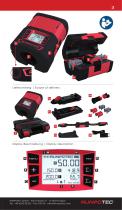
Lieferumfang | Scope of delivery 14 Display Beschreibung | Display description L M RUNPOTEC GmbH – Irlachstrasse 31 – A-5303 Thalgau Tel.: +43-6235-20 335 – Fax: DW 35 – [email protected]
Open the catalog to page 3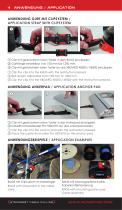
© Clip mit gedrOcktem roten Taster in den RM35 einclippen. © Gurtlange einstellbar von 750 mm bis 1200 mm. © Clip mit gedrOcktem roten Taster an das XBOARD XB300 / XB500 einclippen. © Clip the clip into the RM35 with the red button pressed. © Belt length adjustable from 750 mm to 1200 mm. ® Clip the clip into the XBOARD XB300 / XB500 with the red button pressed. ANWENDUNG ANKERPAD / APPLICATION ANCHOR PAD © Clip mit gedrOcktem roten Taster in das Ankerpad einclippen. © Kabeltrommelabroller Pro 530/670 auf das Ankerpad stellen. © Clip the clip into the anchor pad with the red button pressed. ©...
Open the catalog to page 4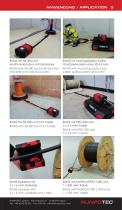
ANWENDUNG / APPLICATION 5 DEUTSCH 5 RM35 mit XB 300 und Multifunktionsdorn mit Einzelader RM35 with XB 300 and multi-function mandrel with individual wires RM35 mit Montageplatte-Koffer, Glasfasereinziehsystem Ø 4,5 mm RM35 with mounting plate-case, cable pulling system Ø 4,5 mm RM35 mit XB 500 und CAT Kabel RM35 with XB 500 and CAT Cable RM35 mit PRO 530 und 5 x 2,5 mm2 Kabel RM35 with PRO 530 and 5 x 2,5 mm2 Cable RM35 foldable with 5 x 16 mm2 underground cable RM35 with RUNPOLIFTER L1600 and 1 x 300 mm2 cable RUNPOTEC GmbH – Irlachstrasse 31 – A-5303 Thalgau Tel.: +43-6235-20 335 – Fax: DW...
Open the catalog to page 5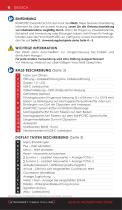
© EINFUHRUNG RUNPOTEC bedankt sich fOr den Kauf des RM35. Diese Gebrauchsanleitung informiert Sie Ober die sichere Nutzung. Lesen Sie die Gebrauchsanleitung vor Inbetriebnahme sorgfaltig durch. Wenn Sie Fragen zu Inbetriebnahme, Sicherheit und Anwendung oder Storungen haben, steht Ihnen Ihr Vertrags-handler oder die Firma RUNPOTEC zur VerfOgung. Unsere Kontaktdaten fin-den Sie auf Seite 2. Anwendungsbeispiele siehe Seite 4 - 5. /t\ WICHTIGE INFORMATION Der RM35 dient ausschlieBlich zur Langenmessung bei Kabeln und ahnlichem Messgut. Fur jede andere Verwendung wird eine Haftung ausgeschlossen!...
Open the catalog to page 6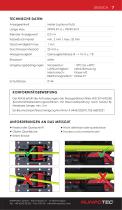
TECHNISCHE DATEN Anzeigeeinheit KONFORMITATSBEWERTUNG Der RM35 erfOilt die Anforderungen der Messgerdterichtlinie MID 2014/32/EU (Konformitdtsbewertungsverfahren mit BaumusterprOfung nach Modui B). Messbare Lange: min. 5 m EU-BaumusterprOfbescheinigung Nummer A 0445/2020-0.752.468/2021 ► Kreisrunder Querschnitt ► Nicht dehnbar oder quetschbar ► Giatte Oberfiache ► Trocken und unverschmutzt
Open the catalog to page 7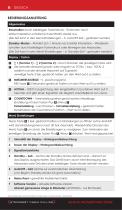
Alle Abbildungen sind Symbolfotos. Anderungen und Druckfehler vorbehalten. STRONGEST CABLE PULLING
Open the catalog to page 8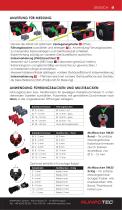
ANLEITUNG FUR MESSUNG Deckel des RM35 mit seitlichem VerriegelungstasteJT offnen. Fuhrungsbacken auswahlen und einlegenfM (s. Anwendung FOhrungsbacken). Zu messendes Kabel einlegen und Geratedeckel schlieBen. Kabel-Anfang bOndig an vorderer Gehauseflache ausrichten. Indexmarkierung (Pfeil) beachten! ^ Messwert auf 0 setzen (RES Taste ^3 Sekunden gedrOckt halten). Kabel langsam und gleichmaBig von Hand bis zur gewOnschten / zu messenden Lange durchziehen. Messwert ablesen/Kabel ablangen, vordere Gehauseflache ist Indexmarkierung Indexmarkierung W- Pfeil kennzeichnet vordere Gehauseflache des Gerates...
Open the catalog to page 9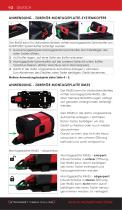
ANWENDUNG - ZUBEHÖR MONTAGEPLATTE-SYSTEMKOFFER 1 Der RM35 kann für stationären Betrieb mittels Montageplatte Sytemkoffer am RUNPOTEC Systemkoffer befestigt werden. 1 Zusammengeklappte Montageplatte-Systemkoffer durch Betätigen des roten Tasters öffnen. 2 Auf Koffer legen, auf einer Seite am Koffer einhaken. 3 Montageplatte-Systemkoffer auf der anderen Seite mit rotem KofferVerschluss fixieren. (Roten Verschluss nach oben klappen). 4 Gerät in die dafür vorgesehene Aufnahme einlegen / einhaken. Zum Abnehmen des Gerätes: roten Taster betätigen, Gerät abnehmen. Weitere Anwendungsbeispiele siehe Seite...
Open the catalog to page 10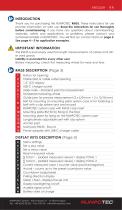
© INTRODUCTION Thank you for purchasing this RUNPOTEC RM35. These i nstructions for use provide information on safe use. Read the instructions for use thoroughly before commissioning. If you have any questions about commissioning, assembly, safety and applications, or problems, please contact your authorised retailer or RUNPOTEC. You will find our contact data on page 2. See page 4 - 5 for application examples. /t\ IMPORTANT INFORMATION The RM35 is exclusively used for length measurements of cables and other yard goods. Liability is excluded for every other use! Before measuring, check the measuring...
Open the catalog to page 11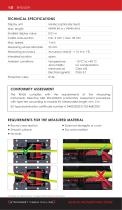
CONFORMITY ASSESSMENT The RM35 complies with the requirements of the Measuring Instruments Directive MID 2014/32/EU (conformity assessment procedure with type test according to module B). Measurable length: min. 5 m EU type examination certificate number A 0445/2020-0.752.468/2021 ► Round cross-section ► Does not elongate or crush ► Smooth surface ► Dry and unsoiled STRONGEST CABLE PULLING
Open the catalog to page 12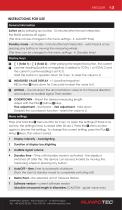
INSTRUCTIONS FOR USE General information RUNPOTEC GmbH - Irlachstrasse 31 - A-5303 Thalgau Tel.: +43-6235-20335 - Fax: DW 35 - [email protected]
Open the catalog to page 13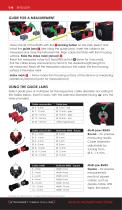
Open the lid of the RM35 with the i locking button on the side. Select and install the guide jawsHI (see Using the guide jaws). Insert the cable to be measured and close the instrument lid. Align cable start flush with front housing surface. Note the index mark (arrow)! ^ Reset the measured value to 0 (hold RES button ^down for 3 seconds). Pull the cable slowly and evenly by hand to the desired length/length to be measured. Read off the measured value/cut the cable, the front housing surface is the index mark Index mark Arrow marks front housing surface of the device as measuring reference (start/end...
Open the catalog to page 14All Runpotec GmbH catalogs and technical brochures
 CB 260
1 Page
 Data sheet XB 500
2 Pages
 RUNPOLIFTER 4500 - L1150
1 Page
 CABLE PULLING SYSTEM
4 Pages
 RUNPOMETER RM35 + XB 300 SET
2 Pages
 RC2 Inspection camera
2 Pages
 Data sheet GF3
1 Page
 PROMOTION CAPSTAN WINCH 2024
2 Pages
 Product catalog 2024
64 Pages
 CABLE PULLING SLEEVE RTG
1 Page
 CABLE LUBRICANT GEL
1 Page
 RM80
RM801 Page
 CABLE GUIDE ROLLER
1 Page
 PRO 530
1 Page


- Digital imager
- Visible imager
- Full-color camera system
- USB camera module
- Waterproof camera module
- Inspection imager
- Digital gauge
- Rugged camera
- High-performance imager
- Compact measuring module
- IP67 camera system
- Geometry measuring instrument
- Pipe camera system
- USB measuring module
- Rewinder-winder
- Manual unwinder
- Cable drum unwinder
- Length gauge
- Cable puller-tensioner