

AMS Alarm Management Software

AMS Alarm Management Software
The Alarm Management Software (AMS) is a comprehensive tool designed for the display, monitoring, and analysis of process alarms. It integrates with RTK's range of Alarm Annunciators and Alarm Systems, providing a powerful graphical Human Machine Interface (HMI) for users to view, store, print, and export alarm and event data.
Key Features
- Current Alarms: Displays active alarms with details such as channel, priority, time/date, and status. Alarms are sorted chronologically to the nearest millisecond.
- Alarm Activation: New alarms are highlighted with a flashing background and can trigger an audible alert. The system automatically switches to the Current Alarm Screen for immediate operator awareness.
- Alarm Priorities: Alarms are assigned priority levels (0-30) to help operators assess urgency and importance.
- History Screen: Allows analysis of past alarms to determine root causes, with filtering options by priority, time/date, channel, or text.
- System Events and Internal Errors: Monitors and records significant system events and faults, providing a comprehensive view for engineers.
- Archive and Backup: Alarm information can be archived and backed up on a network, with automatic processes based on defined schedules or triggers.
- User Configuration: Customizable visual parameters such as channel description, priority, and colors to suit user preferences.
- Multi-Level Access: Password protection limits feature access based on user roles like Supervisor, Engineer, and Operator.
- Operator Control: Bi-directional communication allows alarms to be acknowledged, muted, and reset from the AMS screen or Annunciator.
- Audit Trail: Records and archives critical alarm events for official audit purposes.
Advanced Features
- Graphical User Interface (GUI): Built-in graphics editor for creating detailed screens, supporting ActiveX objects and third-party images.
- Architecture: Based on a SCADA core with TCP/IP networking and redundancy management for high system availability.
- Remote Access: Systems can be designed for remote access via TCP/IP, allowing diagnostics and control from various devices.
- Time Stamp Events: Events are logged with a 1ms resolution for precise event sequencing.
- ODBC Link: Connects data to proprietary databases for detailed analysis.
- Import from Excel: Allows importing alarm channel information from Excel to avoid input errors.
- Auto-shelving: Automatically or manually inhibits alarms under certain conditions, logging the start and stop times.
- Compatibility: Can communicate with third-party products using various drivers and protocols.
Applications
The AMS is suitable for a wide range of alarm monitoring and analysis applications, with bespoke configurations available to meet specific industry requirements. It supports both digital and analogue input monitoring, making it versatile for different operational needs.
Catalog excerpts

AMS Alarm Management Software For display, monitoring and analysis of your process alarms View current or historical alarms Filter by time, text or priority in seconds Export facility to Access database User configurable for text, colour and priority Import all alarm settings from Excel spreadsheet Archive all alarms/events to computer system View and record system errors, inhibited alarms and configuration changes Designed to work in conjunction with the RTK range of Alarm Annunciators and Alarm Systems the AMS is a powerful graphical Human Machine Interface (HMI). The AMS Software is designed to provide the user with the ability to view, store, print and export alarm and event data dynamically or for later analysis. The operator can see the occurrence of new alarms clearly showing the channel, priority/group, time/date and when the alarm has returned to normal. The standard package will suit most alarm monitoring applications and bespoke configurations can be created to suit particular site or industry requirements. Following the initial handling of an alarm situation the software can then be used to analyse the details of alarm events by looking at the history for certain alarms, priorities or the events between a certain time/date.
Open the catalog to page 1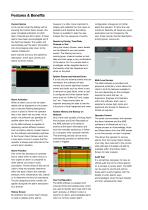
Features & Benefits Current Alarms In the normal mode the display will be showing the Current Alarm screen, this gives immediate indication of which alarm channels are still in alarm, if these alarms have been acknowledged and if the fault has cleared. The system will automatically sort the alarm information into chronological order down to the nearest millisecond. Each channel will show the date/time, description, event type, priority and status as shown below. Alarm Activation When an alarm occurs the full alarm details will be displayed on the screen and a coloured flashing background colour...
Open the catalog to page 2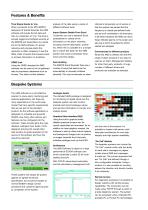
Features & Benefits analysis of the data using a variety of different software tools. Time Stamp Events to 1ms When connected to the RTK 9000TS Sequence of Events Recorder the AMS software will include the full date and time to a resolution of 1ms. This time is actually logged and buffered securely at the 9000TS and transmitted via a serial link to the AMS software. On power networks and process plants this resolution is often necessary to see the REAL chain of events that causes power or process interruption or shutdown. Import System Details From Excel Customers can use a standard Excel spreadsheet...
Open the catalog to page 3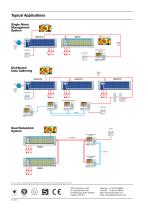
Typical Applications Single Alarm Management System Optional Display Alarm Management Software Local Printer Local Printer Optional Display Distributed Data Gathering Local Printer Optional Fibre Optics Multiple Display Screens Optional Control Room Local Printer Dual Redundant System Alarm Management Software Dual RS485 Alarm Management Software Due to our policy of continuous product development, we reserve the right to amend specifications without notice. RTK Instruments Limited St James Business Park, Knaresborough, North Yorkshire, England. HG5 8PJ Telephone: +44 (0)1423 580500 Facsimile:...
Open the catalog to page 4All RTK catalogs and technical brochures
 Multiplexers
2 Pages
 24V DC Power Supply Units
2 Pages
 PPM4-T Temperature Meter
2 Pages
 PPM4-P Process Meter
2 Pages
 Multiplexers
2 Pages
 Intrinsically Safe Relays
8 Pages
 P673 - Standby Power Supply
2 Pages
 SIL725 Safety Annunciator
8 Pages




Archived catalogs
 P766 Signal Isolator
2 Pages
 DF30 Display Facia
4 Pages


- Power supply unit
- DC power supply
- AC/DC power supply
- Switched-mode power supply
- Industrial software
- Warning light
- LED beacon light
- Strobe warning light
- Signal tower light
- Regulated power supply
- Visible LED
- LED stack light
- Alarm sounder
- Robust power supply
- Waterproof sounder
- 3-color stack light
- IP65 warning light
- Permanent stack light
- Digital clock