
- Catalogs
- RIFTEK EUROPE
- Wheel Diameter Measuring Gauge, IDK Series Manual


- Company
- Products
- Catalogs
- News & Trends
- Exhibitions
Wheel Diameter Measuring Gauge, IDK Series Manual
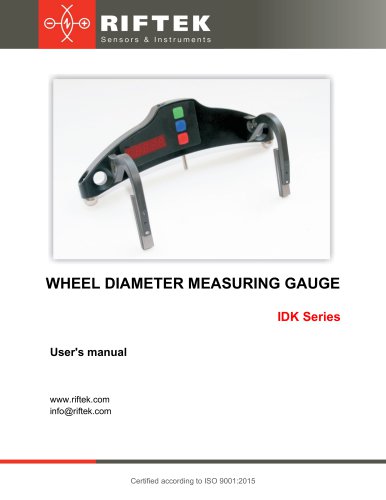
Wheel Diameter Measuring Gauge, IDK Series Manual
Ensure the wheel surface is clean and free from mud before using the gauge to maintain measurement accuracy. Avoid excessive force to prevent inaccuracies. Regularly inspect and clean gauge supports. The display will automatically turn off after 60 seconds of inactivity to conserve battery power.
The gauge adheres to EU directives on electromagnetic compatibility (2014/30/EU) and RoHS (2011/65/EU).
This electronic gauge measures the wheel rolling circle diameter of railway, metro, and tram wheels without needing to remove the wheelset from the rolling stock.
Measurement range: 400-1400 mm (or on request). Measurement error: ±0.2 mm. Indication discreteness: 0.1 mm, 0.01 mm, or 0.01 inch. Operating temperature: -15 to +55°C. Power supply: 2xAAA rechargeable batteries. Weight: 0.5 kg. Capable of at least 1000 measurements without recharging.
Item designation includes measurement position, base, and measurement range limits. Example: IDK-70/250-850/1260-A.
Includes the gauge, charger, manual, case, and optional calibration tools.
The gauge features ball supports, side supports, a measuring tip, a digital display, and control buttons. The charging connector is located on the top panel.
The gauge calculates diameter based on the segment chord length between ball bearings, measured by a displacement converter.
Turning On: Press the Red button. If the battery is low, "ErrP" is displayed.
Single Measurement: Place the gauge on the wheel, ensure proper contact, and press the Green button to display the diameter.
Measurement with Averaging: An averaging algorithm eliminates surface defects. Press the Green button for each measurement, and results are averaged.
Turning Off: The gauge turns off automatically after inactivity or can be manually turned off by holding the Red button.
Image Rotation: Allows viewing results regardless of gauge installation direction.
Image Brightness: Adjustable, but higher brightness increases power consumption.
Millimeters-Inches Display: Switch between metric and imperial units.
Calibration should only be performed by trained personnel. Calibration is necessary after production, repair, or failed checks. Device base calibration involves setting the gauge on a reference wheel and adjusting settings as needed.
To charge the batteries, connect the charging device to a 220 V mains supply and the battery compartment on the top panel of the gauge. Charging time is 15 hours.
The Wheel Diameter Measuring Gauge IDK Series comes with a warranty assurance of 18 months from the date of operation commencement and a warranty shelf-life of 12 months.
Catalog excerpts
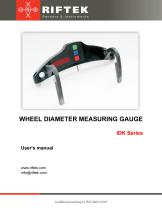
RIFTEK Sensors & Instruments WHEEL DIAMETER MEASURING GAUGEIDK SeriesUser's manual www.riftek.com [email protected]
Open the catalog to page 1
Wheel Diameter Measuring Gauge. IDK Series • The metering accuracy depends greatly on the wheel surface quality. Therefore, it is necessary to carry out the check and presorting of the wheel surface roughness and flaws before measuring the diameter. • Prior to place the gauge onto the wheel there is a need to clean the wheel parts that contact with gauge ball bearings, side supports and measuring tip, of the mud. • At arranging the gauge, do not allow hitting its supports on the wheel and any measuring tip side hitting. • At arranging the gauge, do not apply strong forcing in the direction of...
Open the catalog to page 3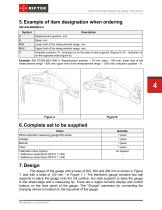
Wheel Diameter Measuring Gauge. IDK Series The design of the gauge with a base of 200, 250 and 300 mm is shown in Figure 1, and with a base of 122 mm - in Figure 1.1. The electronic gauge contains two ball supports to place the gauge onto the roll surface, two side supports to base the gauge to the wheel edge and a measuring tip. There are a digital numeric display and control buttons on the front panel of the gauge. The "Charge” connector for connecting the charging device is located on the top panel of the gauge.
Open the catalog to page 4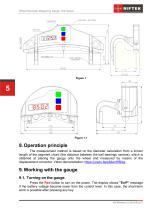
Wheel Diameter Measuring Gauge. IDK Series The measurement method is based on the diameter calculation from a known length of the segment chord (the distance between the ball bearings centers), which is obtained at placing the gauge onto the wheel and measured by means of the displacement converter. Video demonstration: https://youtu.be/pMienHfBizg. 9. Working with the gauge 9.1. Turning on the gauge Press the Red button to turn on the power. The display shows "ErrP" message if the battery voltage became lower than the control level. In this case, the short-term work is possible after pressing...
Open the catalog to page 5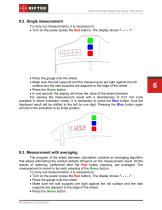
Wheel Diameter Measuring Gauge. IDK Series To carry out measurements, it is necessary to: • Turn on the power (press the Red button). The display shows " • Place the gauge onto the wheel. • Make sure the ball supports and the measuring tip are tight against the roll surface and the side supports are adjacent to the edge of the wheel. • Press the Green button. • In one second, the display will show the value of the wheel diameter. For viewing the measurement result with a discreteness of 0.01 mm (only available in direct indication mode), it is necessary to press the Blue button, thus the displayed...
Open the catalog to page 6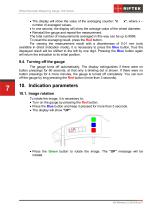
Wheel Diameter Measuring Gauge. IDK Series • The display will show the value of the averaging counter: "n x", where x -number of averaged values. • In one second, the display will show the average value of the wheel diameter. • Reinstall the gauge and repeat the measurement. The total number of measurements averaged in this way can be up to 9999. To reset the averaging result, press the Red button. For viewing the measurement result with a discreteness of 0.01 mm (only available in direct indication mode), it is necessary to press the Blue button, thus the displayed result will be shifted to...
Open the catalog to page 7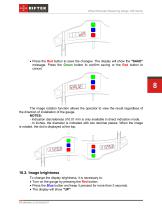
Wheel Diameter Measuring Gauge. IDK Series • Press the Red button to save the changes. The display will show the "SAUE" message. Press the Green button to confirm saving or the Red button to cancel. The image rotation function allows the operator to view the result regardless of the direction of installation of the gauge. - Indication discreteness of 0.01 mm is only available in direct indication mode. - In inches, the diameter is indicated with two decimal places. When the image is rotated, the dot is displayed at the top. 10.2. Image brightness To change the display brightness, it is necessary...
Open the catalog to page 8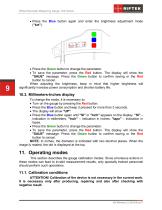
Wheel Diameter Measuring Gauge. IDK Series • Press the Blue button again and enter the brightness adjustment mode • Press the Green button to change the parameter. • To save the parameter, press the Red button. The display will show the "SAUE" message. Press the Green button to confirm saving or the Red button to cancel. When adjusting the brightness, keep in mind that higher brightness will significantly increase power consumption and shorten battery life. To change the mode, it is necessary to: • Turn on the gauge by pressing the Red button. • Press the Blue button and keep it pressed for more...
Open the catalog to page 9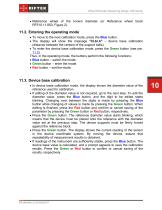
Wheel Diameter Measuring Gauge. IDK Series • Reference wheel of the known diameter (or Reference wheel block RF510.11.850, Figure 2). • To move to the next calibration mode, press the Blue button. • The display will show the message "CLbr.b" - device base calibration (distance between the centers of the support balls). • To enter the device base calibration mode, press the Green button (see par. 11.3). Thus, in the operating mode, the buttons perform the following functions: • Blue button - switch the mode. • Green button - enter the mode. • Red button - exit the mode. 11.3. Device base calibration...
Open the catalog to page 10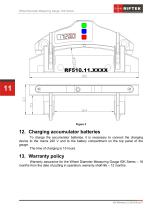
Wheel Diameter Measuring Gauge. IDK Series 12. Charging accumulator batteries To charge the accumulator batteries, it is necessary to connect the charging device to the mains 220 V and to the battery compartment on the top panel of the gauge. The time of charging is 15 hours. Warranty assurance for the Wheel Diameter Measuring Gauge IDK Series – 18 months from the date of putting in operation; warranty shelf-life – 12 months.
Open the catalog to page 11All RIFTEK EUROPE catalogs and technical brochures
 PRODUCT CATALOG 2025
44 Pages
 RF603 Series Manual
49 Pages
 RF602 Series Manual
33 Pages
 RF603HS Series Manual
36 Pages
 RF609 (RF609Rt) Series Manual
33 Pages
 RF600 Series Manual
46 Pages
 RF605 Series Manual
29 Pages
 RF60i Series Manual
46 Pages
 RF62x Manual
174 Pages
 RF25x Series Manual
34 Pages
 RF651 Series Manual
32 Pages
 RF656 Series Manual
32 Pages
 RF656XY Series Manual
32 Pages
 Laser probes Manual
14 Pages
 Pipe ID Control System Manual
18 Pages
 Edge Sensor RF659 Series Manual
25 Pages
 RF627Smart-Weld manual
103 Pages
 PRODUCT CATALOG 2024
40 Pages


- Measuring device
- RIFTEK measuring system
- Windows software
- Industrial software
- Measurement software
- Position transducer
- Sorting machine
- Linear position transmitter
- Digital gauge
- Displacement transducer
- Linear displacement sensor
- RIFTEK micrometer
- Automatic sorting system
- RIFTEK automatic measuring system
- Inspection machine
- RIFTEK optical measuring system
- Linear encoder
- No-contact position sensor
- High-precision measurement system
- RIFTEK 3D scanner