
- Catalogs
- RIFTEK EUROPE
- Tube Sheet Holes Measurement System Manual


- Company
- Products
- Catalogs
- News & Trends
- Exhibitions
Tube Sheet Holes Measurement System Manual

Tube Sheet Holes Measurement System Manual
Catalog excerpts

TUBE SHEET HOLE ID INSPECTION SYSTEM RF013 Series User's manual www.riftek.com [email protected]
Open the catalog to page 1
Tube Sheet Hole ID Inspection System
Open the catalog to page 2
Tube Sheet Hole ID Inspection System Safety precautions · Do not use the system in locations close to powerful light sources. The system has been developed for use in industry and meets the requirements of the following Directives: · EU directive 2014/30/EU. Electromagnetic compatibility (EMC). · EU directive 2011/65/EU, “RoHS“ category 9. Laser safety The sensors make use of a c.w. 660 nm wavelength semiconductor laser. The maximum output power is 1 mW. The sensors belong to the 2 laser safety class according to IEC/EN 60825-1:2014. The following warning label is placed on the housing: The following...
Open the catalog to page 3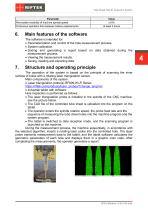
Tube Sheet Hole ID Inspection System Parameter Permissible instability of machine spindle speed Continuous operation time between battery replacements Value 10% at least 4 hours Main features of the software The software is intended for: · Parameterization and control of the hole measurement process. · System calibration. · Sorting and generating a report based on data obtained during the measurement process. · Viewing the measurement results. · Saving, reading and exporting data. Structure and operating principle The operation of the system is based on the principle of scanning the inner surface...
Open the catalog to page 4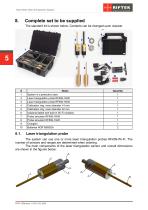
Tube Sheet Hole ID Inspection System Complete set to be supplied The standard kit is shown below. Contents can be changed upon request. Name System in a protective case Laser triangulation probe RF609-10/20 Laser triangulation probe RF609-16/45 Calibration ring, inner diameter 14 mm Calibration ring, inner diameter 32 mm Industrial tablet with built-in Wi-Fi modules Probe simulator RF609-16/45 Probe simulator RF609-10/20 Chargers Batteries NCR18650GA Laser triangulation probe The system can use one or more laser triangulation probes RF609-Wi-Fi. The number of sensors and ranges are determined...
Open the catalog to page 5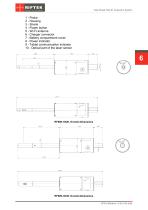
Tube Sheet Hole ID Inspection System 1 - Probe 2 - Housing 3 - Shank 4 - Power button 5 - Wi-Fi antenna 6 - Charger connector 7 - Battery compartment cover 8 - Power indicator 9 - Tablet communication indicator 10 - Optical part of the laser sensor
Open the catalog to page 6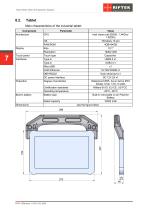
Tube Sheet Hole ID Inspection System Tablet Main characteristics of the industrial tablet: Component Architecture OS RAM/ROM Size Resolution Touch type Type-A Type-A MicroUSB RJ45 Ethernet DB9 RS232 DC power interface Degree of protection Built-in battery Certification standards Operating temperature Battery type Touch panel Interfaces Rated capacity Dimensions Value Intel cherry trail Z8350, 1.44Ghz1.92GHz Windows 10 pro 4GB+64GB 10.1" 1920x1200 Capacitive USB2.0 x1 USB.0 x1 x1 10/100/1000M x1 9-pin serial port x1 DC 12V 2A x1 Waterproof IP65, but in fact is IP67 design. Drop 1.2m, 6 sides Military...
Open the catalog to page 7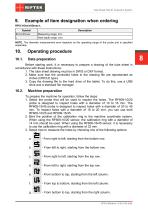
Tube Sheet Hole ID Inspection System Example of item designation when ordering Description Measuring range, mm. Hole depth range, mm. NOTE. The diameter measurement error depends on the operating range of the probe and is specified separately. Operating procedure Data preparation Before starting work, it is necessary to prepare a drawing of the tube sheet in accordance with these instructions: 1. The tube sheet drawing must be in DWG or DXF format. 2. Make sure that the controlled holes in the drawing file are represented as circles (CIRCLE type). 3. Copy the drawing file to the hard drive of...
Open the catalog to page 8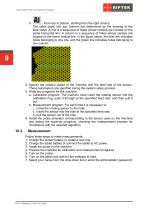
Tube Sheet Hole ID Inspection System - From top to bottom, starting from the right column. The sides (right, left, top, bottom) are determined by the drawing of the tube sheet. A row is a sequence of holes whose centers are located on the same horizontal line. A column is a sequence of holes whose centers are located on the same vertical line. In the figure below, the blue line indicates holes belonging to one row, and the green line indicates holes belonging to one column. 4. Specify the rotation speed of the machine and the feed rate of the sensor. These parameters are specified during the...
Open the catalog to page 9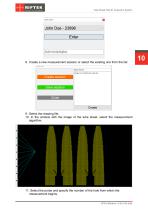
Tube Sheet Hole ID Inspection System 8. Create a new measurement session or select the existing one from the list: 9. Select the drawing file. 10. In the window with the image of the tube sheet, select the measurement algorithm. 11. Select the probe and specify the number of the hole from which the measurement begins. RF013 [Revision 1.0.0] 10.03.2024
Open the catalog to page 10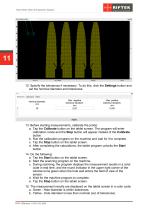
Tube Sheet Hole ID Inspection System 12. Specify the tolerances if necessary. To do this, click the Settings button and set the nominal diameter and tolerances. 13. Before starting measurements, calibrate the probe: a. Tap the Calibrate button on the tablet screen. The program will enter calibration mode and the Stop button will appear instead of the Calibrate button. b. Run the calibration program on the machine and wait for it to complete. c. Tap the Stop button on the tablet screen. d. After completing the calculations, the tablet program unlocks the Start button. 14. Do the following: a....
Open the catalog to page 11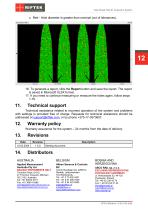
Tube Sheet Hole ID Inspection System c. Red - Hole diameter is greater than nominal (out of tolerances). 16. To generate a report, click the Report button and save the report. The report is saved in Microsoft XLSX format. 17. If you need to continue measuring or measure the holes again, follow steps 1-16. Technical support Technical assistance related to incorrect operation of the system and problems with settings is provided free of charge. Requests for technical assistance should be addressed at [email protected], or by phone +375-17-3573657. Warranty policy Warranty assurance for the system...
Open the catalog to page 12
Tube Sheet Hole ID Inspection System CAPI Controle e Automacao Ltda Rua Itororo, 121, CEP 13466-240 Americana-SP, Brazil Tel: +55 19 36047068 Fax: +55 19 34681791 [email protected] www.capicontrole.com.br EXCLUSIVE REPRESENTATIVE FOR RAILWAY EQUIPMENT ul. Wielowiejska 53, 44-120 Pyskowice, Poland Tel: +48 32 230 45 70 Fax: + 48 32 233 21 34 [email protected] [email protected] www.ascorail.pl EXCLUSIVE REPRESENTATIVE FOR RAILWAY EQUIPMENT Republica de Honduras 11936 Las Condes, Santiago de Chile Tel: +56 9 59200362 [email protected] www.molingenieria.com Beijing Haiwei Lutong Technology...
Open the catalog to page 13All RIFTEK EUROPE catalogs and technical brochures
 PRODUCT CATALOG 2025
44 Pages
 RF603 Series Manual
49 Pages
 RF602 Series Manual
33 Pages
 RF603HS Series Manual
36 Pages
 RF609 (RF609Rt) Series Manual
33 Pages
 RF600 Series Manual
46 Pages
 RF605 Series Manual
29 Pages
 RF60i Series Manual
46 Pages
 RF62x Manual
174 Pages
 RF25x Series Manual
34 Pages
 RF651 Series Manual
32 Pages
 RF656 Series Manual
32 Pages
 RF656XY Series Manual
33 Pages
 Laser probes Manual
14 Pages
 Pipe ID Control System Manual
18 Pages
 Edge Sensor RF659 Series Manual
25 Pages
 RF627Smart-Weld manual
103 Pages
 PRODUCT CATALOG 2024
40 Pages


- Measuring device
- RIFTEK measuring system
- Windows software
- Industrial software
- Measurement software
- Position transducer
- Sorting machine
- Linear position transmitter
- Digital gauge
- Displacement transducer
- Linear displacement sensor
- Automatic sorting system
- RIFTEK micrometer
- RIFTEK automatic measuring system
- Inspection machine
- RIFTEK optical measuring system
- No-contact position sensor
- Linear encoder
- RIFTEK 3D scanner
- High-precision measurement system