
- Catalogs
- RIFTEK EUROPE
- RF62x Manual


- Company
- Products
- Catalogs
- News & Trends
- Exhibitions
RF62x Manual

RF62x Manual
Catalog excerpts

2D LASER SCANNERS RF62x Series User's manual www.riftek.com [email protected]
Open the catalog to page 1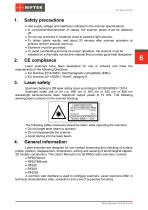
Safety precautions · Use supply voltage and interfaces indicated in the scanner specifications. · In connection/disconnection of cables, the scanner power must be switched off. · Do not use scanners in locations close to powerful light sources. · To obtain stable results, wait about 20 minutes after scanner activation to achieve uniform scanner warm-up. · Scanners must be grounded. · To avoid overheating and ensure proper operation, the scanner must be installed on a thermally conductive material that provides good heat dissipation Laser scanners have been developed for use in industry and meet...
Open the catalog to page 6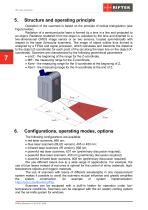
Structure and operating principle Operation of the scanners is based on the principle of optical triangulation (see Figure below). Radiation of a semiconductor laser is formed by a lens in a line and projected to an object. Radiation scattered from the object is collected by the lens and directed to a two-dimensional CMOS image sensor or on two sensors, located symmetrically with respect to the laser (binocular scanners). The image of object outline thus formed is analyzed by a FPGA and signal processor, which calculates and transmits the distance to the object (Z-coordinate) for each point of...
Open the catalog to page 7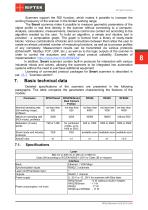
Scanners support the ROI function, which makes it possible to increase the working frequency of the scanner in the limited working range. The Smart scanners make it possible to measure geometric parameters of the object profile in real time directly in the scanner without connecting to a computer. Analysis, calculations, measurements, tolerance control are carried out according to the algorithm created by the user. To build an algorithm, a simple and intuitive tool is provided - a computation graph. The graph is formed from a library of ready-made blocks. Various combinations of blocks and connections...
Open the catalog to page 8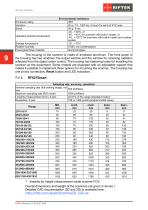
Enclosure rating Vibration Shock Operating ambient temperature Storage temperature Relative humidity Housing/windows material Environmental resistance IP67 20 g / 10...1000 Hz, 6 hours for each of XYZ axes 30 g / 6 ms -20…+40°С, or -40…+40°С for scanners with built-in heater, or -40…+120°С for scanners with built-in heater and cooling system -20…+70°С 5-95% (no condensation) aluminum/glass The housing of the scanner is made of anodized aluminum. The front panel of the housing has two windows: the output window and the window for receiving radiation reflected from the object under control. The...
Open the catalog to page 9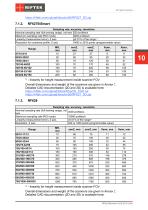
Sampling rate, accuracy, resolution Nominal sampling rate (full working range), not less 520 profiles/s Maximum sampling rate (ROI mode) 4200 profiles/s Linearity (measurement error), Z axis ±0.01% of the range 1) Resolution for combined profile, X axis 1456 or 2912 points (programmable value) Range 27/10-8/11 65/25-20/22 75/50-30/41 70/100-48/82 70/150-58/122 95/150-53/106 82/200-60/150 1) - linearity for height measurement inside scanner FOV. Overall dimensions and weight of the scanners are given in Annex 7. Detailed CAD documentation (2D and 3D) is available here: https://riftek.com/upload/iblock/0ba/2D_CAD.rar...
Open the catalog to page 10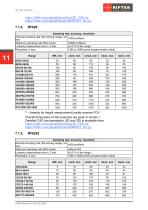
Sampling rate, accuracy, resolution Nominal sampling rate (full working range), not 1000 profiles/s less Maximum sampling rate (ROI mode) 16000 profiles/s Linearity (measurement error), Z axis ±0.01% of the range1) Resolution, X axis 1280 or 2560 points (programmable value) - linearity for height measurement inside scanner FOV. Overall dimensions of the scanners are given in Annex 7. Detailed CAD documentation (2D and 3D) is available here: https://riftek.com/upload/iblock/0ba/2D_CAD.rar https://riftek.com/upload/iblock/c80/RF627_3D.zip Sampling rate, accuracy, resolution Nominal sampling rate...
Open the catalog to page 11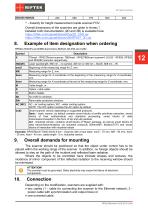
- linearity for height measurement inside scanner FOV. Overall dimensions of the scanners are given in Annex 7. Detailed CAD documentation (2D and 3D) is available here: https://riftek.com/upload/iblock/0ba/2D_CAD.rar https://riftek.com/upload/iblock/c80/RF627_3D.zip Example of item designation when ordering 7Smart - RF627Smart scanner; 7BiSmart - RF627BiSmart scanner4; 8,9,92 - RF628, RF629 and RF6292 scanners respectively. Laser wavelength. 660 nm – no symbol, 405 nm or 450 nm – BLUE, 808 nm – IR. Beginning of the measuring range for Z, mm. Xsmr Xemr Measuring range for X-coordinate at the...
Open the catalog to page 12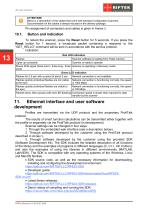
ATTENTION! Below is a description of the cables that come with standard configuration scanners. Documentation on the cables is always included in the delivery package. Pin assignment of connectors and cables is given in Annex 8. To reboot the scanner, press the Reset button for 5 seconds. If you press the Reset button for 1 second, a broadcast packet containing a response to the “GET_HELLO” command will be sent in accordance with the service protocol. Indication: Red LED indication Flashes Scanner software is loading from Flash memory Lights up constantly Scanner is ready to operate Shows SOS...
Open the catalog to page 13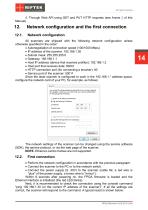
4. Through Web API using GET and PUT HTTP requests (see Annex 3 of this Manual). Network configuration and the first connection Network configuration All scanners are shipped with the following network configuration unless otherwise specified in the order: Autonegotiation of connection speed (100/1000 Mbps) IP address of the scanner: 192.168.1.30 Subnet mask: 255.255.255.0 · Gateway: 192.168.1.1 · Host IP address (device that receives profiles): 192.168.1.2 · Host port that receives data: 50001 · HTTP connection port (for connecting a browser): 80 · Service port of the scanner: 50011 Since...
Open the catalog to page 14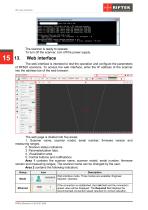
The scanner is ready to operate. To turn off the scanner, turn off the power supply. The web interface is intended to test the operation and configure the parameters of RF62Х scanners. To access the web interface, enter the IP address of the scanner into the address bar of the web browser: The web page is divided into five areas: 1. Scanner name, scanner model, serial number, firmware version and measuring ranges. 2. Scanner status indicators. 3. Parameterization tabs. 4. Visualization area. 5. Control buttons and notifications. Area 1 contains the scanner name, scanner model, serial number,...
Open the catalog to page 15All RIFTEK EUROPE catalogs and technical brochures
 PRODUCT CATALOG 2025
44 Pages
 RF603 Series Manual
49 Pages
 RF602 Series Manual
33 Pages
 RF603HS Series Manual
36 Pages
 RF609 (RF609Rt) Series Manual
33 Pages
 RF600 Series Manual
46 Pages
 RF605 Series Manual
29 Pages
 RF60i Series Manual
46 Pages
 RF25x Series Manual
34 Pages
 RF651 Series Manual
32 Pages
 RF656 Series Manual
32 Pages
 RF656XY Series Manual
33 Pages
 Laser probes Manual
14 Pages
 Pipe ID Control System Manual
18 Pages
 Edge Sensor RF659 Series Manual
25 Pages
 RF627Smart-Weld manual
103 Pages
 PRODUCT CATALOG 2024
40 Pages


- Measuring device
- RIFTEK measuring system
- Windows software
- Industrial software
- Measurement software
- Position transducer
- Sorting machine
- Linear position transmitter
- Digital gauge
- Displacement transducer
- Linear displacement sensor
- RIFTEK micrometer
- Automatic sorting system
- RIFTEK automatic measuring system
- Inspection machine
- RIFTEK optical measuring system
- No-contact position sensor
- Linear encoder
- RIFTEK 3D scanner
- High-precision measurement system