
- Catalogs
- RIFTEK EUROPE
- Pipe ID Control System Manual


- Company
- Products
- Catalogs
- News & Trends
- Exhibitions
Pipe ID Control System Manual

Pipe ID Control System Manual
Catalog excerpts
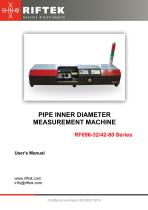
PIPE INNER DIAMETER MEASUREMENT MACHINE RF096-32/42-80 Series User's Manual www.riftek.com [email protected]
Open the catalog to page 1
Pipe Inner Diameter Measurement Machine, RF096-32/42-80 Series
Open the catalog to page 2
Pipe Inner Diameter Measurement Machine, RF096-32/42-80 Series Safety precautions · Use supply voltage and interfaces indicated in the machine specifications. · In connection/disconnection of cables, the machine power must be switched off. · Do not use the machine in locations close to powerful light sources. · To obtain stable results, wait about 20 minutes after the machine activation to achieve uniform warm-up of the laser sensor. The machine has been developed for use in industry and meets the requirements of the following Directives: · EU directive 2014/30/EU. Electromagnetic compatibility...
Open the catalog to page 3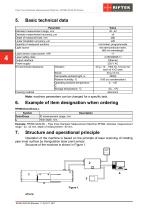
Pipe Inner Diameter Measurement Machine, RF096-32/42-80 Series Basic technical data Parameter Diameter measurement range, mm Diameter measurement accuracy, µm Depth of measured hole, mm Linear translation accuracy, µm Quantity of measured sections Light source Laser sensor output power, mW Laser safety class Output interface Power supply Environmental resistance Vibration Shock Permissible ambient light, lx Relative humidity, % Operating ambient temperature, ° С Storage temperature, °С ±20 not limited, programmable red semiconductor laser, 660 nm wavelength <1 2 (IEC60825-1) Ethernet 220 V AC...
Open the catalog to page 4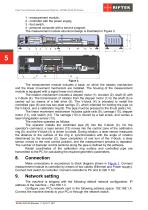
Pipe Inner Diameter Measurement Machine, RF096-32/42-80 Series 1 - measurement module, 2 - controller with the power supply, 3 - foot switch, 4 - personal computer with a service program. The measurement module structural design is illustrated in Figure 2. The measurement module includes a base, on which the rotation mechanism and the linear movement mechanism are installed. The housing of the measurement module is equipped with a signal tower (not shown). The rotation mechanism includes a stepper motor (1), encoder (2), shaft (3) with a V-block (4). The transmission of rotation from the stepper...
Open the catalog to page 5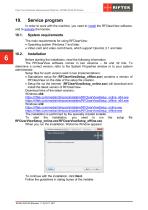
Pipe Inner Diameter Measurement Machine, RF096-32/42-80 Series Service program In order to work with the machine, you need to install the RFClearView software, and to activate the license. System requirements The main requirements for using RFClearView: · Operating system Windows 7 and later. · Video card and video card drivers, which support OpenGL 2.1 and later. Before starting the installation, read the following information. The RFClearView software comes in two versions – 64 and 32 bits. To determine a correct version, refer to the System Properties window or to your system administrator....
Open the catalog to page 6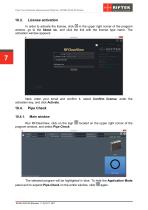
Pipe Inner Diameter Measurement Machine, RF096-32/42-80 Series License activation In order to activate the license, click in the upper right corner of the program window, go to the About tab, and click the link with the license type name. The activation window appears: Next, enter your email and confirm it, select Confirm license, enter the activation key, and click Activate. Pipe Check Main window Run RFClearView, click on the sign program window, and select Pipe Check: located on the upper right corner of the The selected program will be highlighted in blue. To hide the Application Mode panel...
Open the catalog to page 7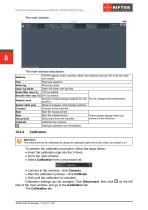
Pipe Inner Diameter Measurement Machine, RF096-32/42-80 Series 8 The main window description: TCP/IP address of the machine. Note: the machine and your PC must be in the one subnet. Pipe type selection. Pipe Write log option. Write log Open the folder with log files. Open log folder Noise filter size (%) 10% by default. Smooth filter size (%) 30% by default. Number of intermediate positions for one Do not change these parameters. Repeat count position. Distance between intermediate positions. Splash delta (µm) Connect to the machine. Connect Start the measurement. Start Stop the measurement....
Open the catalog to page 8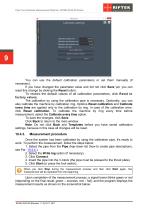
Pipe Inner Diameter Measurement Machine, RF096-32/42-80 Series 9 You can use the default calibration parameters or set them manually (if necessary). If you have changed the parameter value and did not click Save yet, you can reset this change by clicking the Reset button. To restore the default values of all calibration parameters, click Reset to factory values. The calibration by using the calibration pipe is necessary. Optionally, you can also calibrate the machine by calibration ring. Options Reset calibration and Calibrate every time are applied only to the calibration by ring. In case of...
Open the catalog to page 9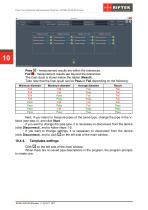
Pipe Inner Diameter Measurement Machine, RF096-32/42-80 Series 10 Pass - measurement results are within the tolerances. Fail - measurement results are beyond the tolerances. The final result is shown below the tables (Result). Take note that the final result can be Pass or Fail depending on the following: Minimum diameter Fail Fail Fail Fail Pass Pass Pass Pass Maximum diameter Fail Fail Pass Pass Fail Pass Fail Pass Average diameter Fail Pass Fail Pass Fail Fail Pass Pass Result Fail Fail Fail Fail Fail Pass Pass Pass Next, if you intend to measure pipes of the same type, change the pipe in...
Open the catalog to page 10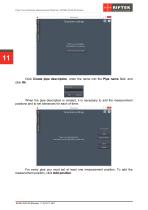
Pipe Inner Diameter Measurement Machine, RF096-32/42-80 Series 11 Click Create pipe description, enter the name into the Pipe name field, and click Ok. When the pipe description is created, it is necessary to add the measurement positions and to set tolerances for each of them. For every pipe you must set at least one measurement position. To add the measurement position, click Add position.
Open the catalog to page 11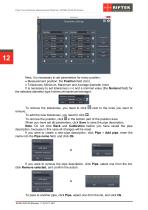
Pipe Inner Diameter Measurement Machine, RF096-32/42-80 Series 12 Next, it is necessary to set parameters for every position: · Measurement position: the Position field (mm) · Tolerances: Minimum, Maximum and Average diameter (mm) It is necessary to set tolerances (-/+) and a nominal value (the Nominal field) for the selected diameter type (minimum/maximum/average): To remove the tolerances, you need to click next to the ones you want to remove. To add the new tolerances, you need to click . To remove the position, click in the bottom part of the position area. When you have set all parameters,...
Open the catalog to page 12All RIFTEK EUROPE catalogs and technical brochures
 PRODUCT CATALOG 2025
44 Pages
 RF603 Series Manual
49 Pages
 RF602 Series Manual
33 Pages
 RF603HS Series Manual
36 Pages
 RF609 (RF609Rt) Series Manual
33 Pages
 RF600 Series Manual
46 Pages
 RF605 Series Manual
29 Pages
 RF60i Series Manual
46 Pages
 RF62x Manual
174 Pages
 RF25x Series Manual
34 Pages
 RF651 Series Manual
32 Pages
 RF656 Series Manual
32 Pages
 RF656XY Series Manual
33 Pages
 Laser probes Manual
14 Pages
 Edge Sensor RF659 Series Manual
25 Pages
 RF627Smart-Weld manual
103 Pages
 PRODUCT CATALOG 2024
40 Pages


- Measuring device
- RIFTEK measuring system
- Windows software
- Industrial software
- Measurement software
- Position transducer
- Sorting machine
- Linear position transmitter
- Digital gauge
- Displacement transducer
- Linear displacement sensor
- RIFTEK micrometer
- Automatic sorting system
- RIFTEK automatic measuring system
- Inspection machine
- RIFTEK optical measuring system
- No-contact position sensor
- Linear encoder
- RIFTEK 3D scanner
- High-precision measurement system