
- Catalogs
- RIFTEK EUROPE
- Disc Brakes Profile Gauge, IKD Series Manual 2018


- Company
- Products
- Catalogs
- News & Trends
- Exhibitions
Disc Brakes Profile Gauge, IKD Series Manual 2018

Disc Brakes Profile Gauge, IKD Series Manual 2018
Catalog excerpts

DISC BRAKES PROFILE GAUGE IKD Series User's manual www.riftek.com [email protected]
Open the catalog to page 1
Disc Brakes Profile Gauge. IKD Series
Open the catalog to page 2
Disc Brakes Profile Gauge. IKD Series
Open the catalog to page 3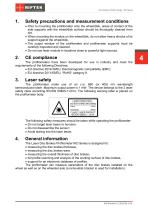
Disc Brakes Profile Gauge. IKD Series Safety precautions and measurement conditions · Prior to mounting the profilometer onto the wheel/disk, areas of contact of the side supports with the wheel/disk surface should be thoroughly cleaned from dirt. · When mounting the module on the wheel/disk, do not allow heavy shocks of its support against the wheel/disk. · The output window of the profilometer and profilometer supports must be carefully inspected and cleaned. · Do not use laser module in locations close to powerful light sources. The profilometers have been developed for use in industry and...
Open the catalog to page 4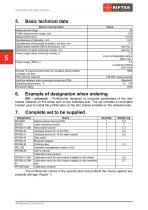
Disc Brakes Profile Gauge. IKD Series Basic technical data N am e of param eter Measurement range Profile measurement range, mm Measurement error Discreteness of indication, mm Discreteness of the profile formation, not less, mm Digital readout device (PDA) dimensions, mm Dimensions of laser scanning module, mm Power supply (laser scanning module), V Number of measurements that can be taken before battery recharge, not less PDA memory capacity Interface between laser scanning module and PDA Operating temperature, °С Enclosure rating Example of designation when ordering IKD - universal – Profilometer...
Open the catalog to page 5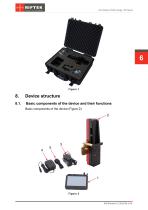
Disc Brakes Profile Gauge. IKD Series Device structure Basic components of the device and their functions Basic components of the device (Figure 2):
Open the catalog to page 6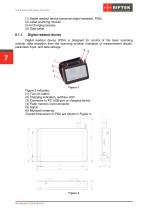
Disc Brakes Profile Gauge. IKD Series (1) Digital readout device (personal digital assistant, PDA) (2) Laser scanning module (3-4) Charging devices (5) Data cable Digital readout device Digital readout device (PDA) is designed for control of the laser scanning module, data reception from the scanning module, indication of measurement results, parameter input, and data storage. Figure 3 indicates: (1) Turn-on button (2) Charging indication, red/blue LED (3) Connector to PC USB-port or charging device (4) Flash memory card connector (5) Stylus (6) Bluetooth antenna Overall dimensions of PDA are...
Open the catalog to page 7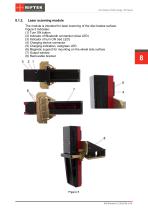
Disc Brakes Profile Gauge. IKD Series Laser scanning module The module is intended for laser scanning of the disc brakes surface. Figure 5 indicates: (1) Turn ON button (2) Indicator of Bluetooth connection (blue LED) (3) Indicator of turn ON (red LED) (4) Charging device connector (5) Charging indication, red/green LED (6) Magnetic support for mounting on the wheel side surface (7) Output window (8) Removable bracket
Open the catalog to page 8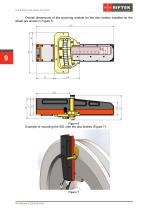
Disc Brakes Profile Gauge. IKD Series Overall dimensions of the scanning module for the disc brakes installed on the wheel are shown in Figure 6: Example of mounting the IKD onto the disc brakes (Figure 7):
Open the catalog to page 9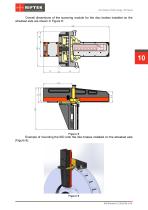
Disc Brakes Profile Gauge. IKD Series Overall dimensions of the scanning module for the disc brakes installed on the wheelset axle are shown in Figure 8: Example of mounting the IKD onto the disc brakes installed on the wheelset axle (Figure 9):
Open the catalog to page 10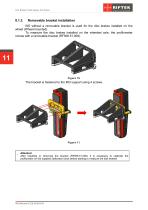
Disc Brakes Profile Gauge. IKD Series Removable bracket installation IKD without a removable bracket is used for the disc brakes installed on the wheel (Wheel-mounted). To measure the disc brakes installed on the wheelset axle, the profilometer comes with a removable bracket (RF506.51.008). The bracket is fastened to the IKD support using 4 screws. Attention! After installing or removing the bracket (RF506.51.008), it is necessary to calibrate the profilometer on the supplied calibration block before starting to measure the disk brakes!
Open the catalog to page 11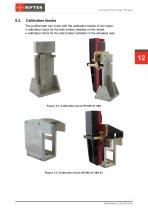
Disc Brakes Profile Gauge. IKD Series Calibration blocks The profilometer can come with the calibration blocks of two types: · calibration block for the disk brakes installed on the wheel, · calibration block for the disk brakes installed on the wheelset axle. Figure 12. C alibration block R F506.51.000 Figure 13. C alibration block R F506.41.000-01
Open the catalog to page 12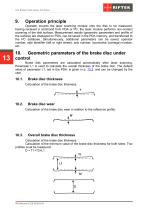
Disc Brakes Profile Gauge. IKD Series Operation principle Operator mounts the laser scanning module onto the disk to be measured. Having received a command from PDA or PC, the laser module performs non-contact scanning of the disk surface. Measurement results (geometric parameters and profile of the surface) are displayed on PDA, can be saved in the PDA memory, and transferred to the PC database. Simultaneously, additional parameters can be saved: operator number, side identifier (left or right wheel), axis number, locomotive (carriage) number, etc. 10. Geometric parameters of the brake disc...
Open the catalog to page 13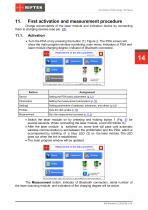
Disc Brakes Profile Gauge. IKD Series First activation and measurement procedure Charge accumulators of the laser module and indication device by connecting them to charging devices (see par. 25). Activation · Turn the PDA on by pressing the button (1), Figure 3. The PDA screen will show the main program window containing: main menu; indicators of PDA and laser module charging degree; indicator of Bluetooth connection. Setting the PDA basic parameters (p.12) Setting the measurement parameters (p.13) Setting parameters of database, tolerances, and others (p.14) View the disk profile (p.18) · Switch...
Open the catalog to page 14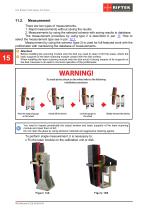
Disc Brakes Profile Gauge. IKD Series There are two types of measurements: 1. Rapid measurements without saving the results. 2. Measurements by using the selected scheme with saving results to database. The measurement procedure by using type 2 is described in par. 17. How to select the measurement type see in par. 12.1. Measurement by using the scheme (type 2) is used for full-featured work with the profilometer with maintaining the database of measurements. Attention! Before installing the scanning module onto the disk you need to clean of dirt the areas, where the basic supports of the laser...
Open the catalog to page 15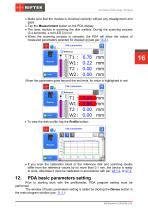
Disc Brakes Profile Gauge. IKD Series · Make sure that the module is mounted correctly without any misalignment and gaps. · Tap the Measurement button on the PDA display. · The laser module is scanning the disk surface. During the scanning process (3-4 seconds), a red LED (3) is lit. · When the scanning process is compete, the PDA will show the values of measured parameters selected for displaying (see par.13.2.). When the parameter goes beyond the set limits, its value is highlighted in red: · To view the disk profile, tap the Profile button: · If you scan the calibration block or the reference...
Open the catalog to page 16All RIFTEK EUROPE catalogs and technical brochures
 PRODUCT CATALOG 2025
44 Pages
 RF603 Series Manual
49 Pages
 RF602 Series Manual
33 Pages
 RF603HS Series Manual
36 Pages
 RF609 (RF609Rt) Series Manual
33 Pages
 RF600 Series Manual
46 Pages
 RF605 Series Manual
29 Pages
 RF60i Series Manual
46 Pages
 RF62x Manual
174 Pages
 RF25x Series Manual
34 Pages
 RF651 Series Manual
32 Pages
 RF656 Series Manual
32 Pages
 RF656XY Series Manual
33 Pages
 Laser probes Manual
14 Pages
 Pipe ID Control System Manual
18 Pages
 Edge Sensor RF659 Series Manual
25 Pages
 RF627Smart-Weld manual
103 Pages
 PRODUCT CATALOG 2024
40 Pages


- Measuring device
- RIFTEK measuring system
- Windows software
- Industrial software
- Measurement software
- Position transducer
- Sorting machine
- Linear position transmitter
- Digital gauge
- Displacement transducer
- Linear displacement sensor
- RIFTEK micrometer
- Automatic sorting system
- RIFTEK automatic measuring system
- Inspection machine
- RIFTEK optical measuring system
- No-contact position sensor
- Linear encoder
- RIFTEK 3D scanner
- High-precision measurement system