


- Company
- Products
- Catalogs
- News & Trends
- Exhibitions
RiPANO

RiPANO
- Project Creation: Users can acquire new scan projects using RIEGL VZ-400i, with options for automatic on-board registration and image inclusion. Projects can be imported into RiSCAN PRO, RiSOLVE, or RiMINING for further processing.
- Export Options: Existing projects can be exported for RiPANO using RiSCAN PRO, RiSOLVE, or RiMINING. A separate RiPANO license is required for RiSCAN PRO.
- Visualization Options: RiPANO offers various view options such as Side View, Section, and Plan View, which can be exported as PDF or DXF files for use in CAD software.
- Data Sharing: Projects can be shared via web or intranet servers, allowing multiple user access. They can also be shared on premises without additional software installation.
- Recommended Scan Pattern: For optimal presentation, a full field-of-view scan pattern like Panorama40 is recommended, with a horizontal FOV of 360° and a vertical FOV of 100°.
- Data Management: Users can navigate through projects, read coordinates, place markers, and measure distances.
Catalog excerpts

RiPANO is a software for fast and easy visualization of terrestrial laser scan projects. It allows CAD users to easily extract ortho views and plots for further use in CAD software. The software runs plugin-free in a browser or stand-alone on Windows or MacOS computer. Orthogonal view of 3D point cloud created in RiPANO Explore Your Project and Extract Plots in Your Browser 0 RIEGL RIEGL LMS GmbH, Austria | RIEGL USA Inc. | RIEGL Japan Ltd. | RIEGL China Ltd. | RIEGL Australia Pty Ltd.
Open the catalog to page 1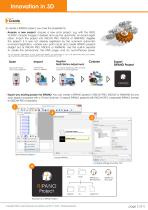
Create To create a RiPANO project, you have the possibility to: • Acquire a new project: Acquire a new scan project, e.g. with the RIEGL VZ-400i*, include images if desired and use the automatic on-board registration. Import the project into RiSCAN PRO, RiSOLVE or RiMINING. Register the project; if it was not already registered by the scanner's automatic on-board registration, colorize your point cloud and create RiPANO projects straight out of RiSCAN PRO, RiSOLVE or RiMINING. Use the built-in exporter to create the panoramas, the HTML page, and an out-of-the-box server. *For an optimum presentation...
Open the catalog to page 2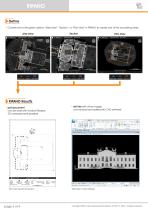
RiPANODefine • Choose one of the given options "Side View", "Section", or "Plan View" in RiPANO to create one of the according views: • dxf file (with ortho image) can be read and edited with CAD software RiPANO Results • pdf document can be read with Acrobat Reader, 2D measurements possible r a = Eckartoau Castle Side View l_2D.dxf [R2Q00 DXF] Const™ Utiliti Drawing t Contf TopoD | Search Ribbon (F4) Named Bour Saved Views View Groups Element Selection > Identify element to add I Side View in CAD software page 3 of 4 Copyright RIEGL Laser Measurement Systems GmbH © 2020- All rights reserved.
Open the catalog to page 3
RiSOLVE RiPANO RiSOFT WARE Inspect • Keep oversight and easily navigate through • Readout coordinates: Lat/Lon/Alt or user defined coordinate system (e.g., Gauss Krueger) • Place markers, measure distances and paths Top View with satellite image Panorama View of a colored point cloud Panorama View, reflectance coded: Set markers, measure distances and export them Share • Share via web- or intranet server: Upload the data folder to a web- or intranet server and RiPANO can be accessed by any browser. Each RiPANO project offers multiple user access. The data owner retains full access rights to the...
Open the catalog to page 4All RIEGL LMS catalogs and technical brochures
 RiLOC-F / RiLOC-F-inside
1 Page
 RIEGL RiLOC-E-25
1 Page
 RiACQUIRE
4 Pages
 RIEGL VMX-2HA
8 Pages
 RIEGL VZ-4000i-25
8 Pages
 RIEGL VQ-860-G
6 Pages
 RIEGL VQ-840-GL
6 Pages
 RIEGL VZ-2000i
10 Pages
 RIEGL VQX-1 Wing Pod
4 Pages
 RIEGL VQ-580 II-S
8 Pages
 RIEGL VQ-1560 III-S
10 Pages
 RIEGL VQ-1260
10 Pages
 RIEGL VQ-1460
10 Pages
 RIEGL VPX-1
2 Pages
 RIEGL Monitoring Apps
4 Pages
 RIEGL VMY-1
4 Pages
 RIEGL VQ-680
8 Pages
 RIEGL VMY-2
8 Pages
 RIEGL V-Line CB23
2 Pages
 RIEGL VMQ -1HA
6 Pages
 RIEGL LD05e-A30-PH67
5 Pages
 RIEGL VZ-600i
8 Pages
 RIEGL VZ-200
6 Pages
 RIEGL VQ-840-G
6 Pages
 RIEGL VQ-840-GE
6 Pages
 RiMINING
4 Pages
 RIEGL VUX-180-24
6 Pages
 RIEGL VUX-240-24
6 Pages
 VUX-160²³
6 Pages
 RIEGL VUX-120²³
8 Pages
 RIEGL miniVUX-3UAV
6 Pages
 RIEGL V-Line UB23
2 Pages
 RIEGL BLS Overview
1 Page
 LIS TreeAnalyzer Plugin
2 Pages
 RIEGL VZ-400i
10 Pages
 RIEGL VMX-RAIL
6 Pages
 LIS GeoTec Plugin
2 Pages
 RIEGL VQ-480 II
6 Pages
 RIEGL VMR
4 Pages
 RDBLib
2 Pages
 RiSOLVE
4 Pages
 RIEGL VQ-1560 II-S
10 Pages
 RIEGL VQ-780 II-S
8 Pages
 RIEGL VQ-780 II
8 Pages
 RIEGL LD05-A10GF
10 Pages
 LD05e-A10, LD05e-A30
4 Pages
 RIEGL VUX-240
6 Pages
 RIEGL VQ-580 II
6 Pages
 RiPROCESS
4 Pages
 RIEGL VQX-2 Helicopter Pod
4 Pages
 RIEGL ULS Overview
1 Page
 RIEGL ALS Overview
1 Page
 RIEGL VMX-2HA-BC
2 Pages
 RIEGL PH-VUX
2 Pages
 RIEGL Topo-Bathymetry
4 Pages
 RIEGL miniVUX-SYS
4 Pages
 RIEGL VUX-1UAV-22
6 Pages
 RIEGL VUX-1HA-22
4 Pages
 RIEGL VUX-1LR-22
6 Pages
 RIEGL UAV Sensors & Systems
2 Pages
 RiSCAN PRO
4 Pages
 RIEGL VUX-SYS
4 Pages
 RIEGL VZ-400i
2 Pages
 RIEGL miniVUX-1UAV
4 Pages
 RiVLib
4 Pages
 RiUNITE
4 Pages
 RIEGL VQ-1560i-DW
10 Pages
 RIEGL VMZ
4 Pages
 RIEGL VZ-6000
6 Pages
 RIEGL DR1560i
2 Pages
 RiHYDRO
2 Pages
 RIEGL LD05e-HT
4 Pages
 RIEGL LD05-HTGF
13 Pages
 RIEGL VZ-2000i
2 Pages


Archived catalogs
 RIEGL VZ-4000
6 Pages
 RIEGL miniVUX-1LR
4 Pages
 RIEGL miniVUX-2UAV
4 Pages
 RIEGL LD05-A80
5 Pages
- 3D scanning system
- Measurement scanner
- Laser scanner
- High-resolution scanner
- High-precision scanner
- XY scanner
- Compact scanner
- High-speed scanner
- Portable scanner
- Rangefinder
- Scanning system
- Laser rangefinder
- LIDAR sensor
- LIDAR scanner
- Non-contact scanner
- Integrated scanner
- Mobile scanner
- Wireless scanner
- Ethernet scanner
- Rugged scanner