- Catalogs
- Reece Safety Products
- LP550 Plug Lockouts

LP550 Plug Lockouts

LP550 Plug Lockouts
Reece Safety Products Ltd provides plug lockout devices designed to prevent unauthorized use of electrical plugs. The devices are suitable for different voltage ranges and can accommodate multiple lockouts.
Specifications
- LP110: Suitable for plugs from 110 volts.
- LP550: Suitable for plugs from 240 to 600 volts, allowing for multiple lockouts.
Assembly Instructions
- Insert the plug into the lockout device.
- Close the cover of the box and slide it laterally to secure.
- Align the lock holes and place one or more padlocks through the holes. The lock holes accept padlock shackles up to 9.5mm in diameter.
- Attach an identification tag through the indicated holes.
- Test to ensure the locked-out plug cannot be removed from the device.
Optional Storage
For optional storage, open the lockout device, remove the plug, and place the device on the cable. Close and slide to the closed position. Note that this is not a lockout condition.
Warning
The optional storage position does not constitute a lockout condition and should not be used as such.
Catalog excerpts
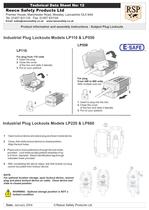
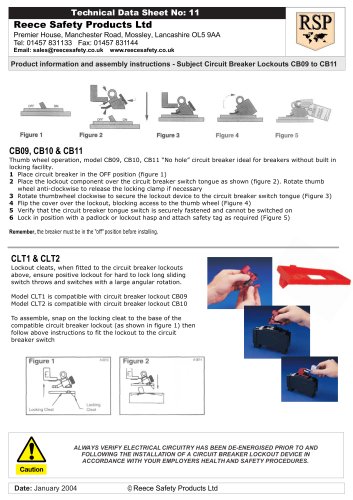
Reece Safety Products Ltd Premier House, Manchester Road, Mossley, Lancashire OL5 9AA Tel: 01457 831133 Fax: 01457 831144 Email: [email protected] www.reecesafety.co.uk Product information and assembly instructions - Subject Plug Lockouts Technical Data Sheet No: 12 Date: January 2004 © Reece Safety Products Ltd LP110 For plug from 110 volts 1 Insert the plug 2 Close the cover of the box and slide it laterally. 3 Put on your padlock LP550 For plug From 240 to 600 volts With multiple lock-out 1 Insert to plug into the box. 2 Close the cover of the box and slide it laterally 3 Put on your padlock 1 Open lockout device and place plug as shown inside device. 2 Close, then slide lockout device to closed position. Align the lock holes. 3 Place one or more padlock(s) through the lock holes provided. Lock holes accept padlock shackles of up to 9.5mm diameter. Attach identification tag through indicated holes provided 4 After completing the above steps, test that locked out plug cannot be pulled from lockout device. NOTE. For optional location storage, open lockout device, remove plug and place lockout device on cable. Close device and slide to closed position. WARNING: Optional storage position is NOT a lockout condition. Industrial Plug Lockouts Models LP220 & LP660 Industrial Plug Lockouts Models LP110 & LP550
Open the catalog to page 1All Reece Safety Products catalogs and technical brochures
 Power Protection Seal
2 Pages
 60kV Rescue Hook
1 Page
 ELE09 Switchboard Matting
4 Pages
 Lockable plug covers
1 Page
 Plug Block
1 Page
 Full 2015/16 Catalogue
100 Pages
 Electrical Safety Boots
1 Page
 Electrical Safety Gloves
1 Page
 RSPL1 Plug Lockout
1 Page
 ECBKIT MCB Lockout Kit
2 Pages
 Pneumatic Lockouts
1 Page
 Plug Lockouts
1 Page
 BS18 Cable Lockout
1 Page
 CB15 Breaker Blocker Kit
1 Page
 Fuse Lock / Blockouts
1 Page
 IEC 60320 Lockout
1 Page
 Power Protection Seal
2 Pages