
- Catalogs
- Pulsar Instruments
- User Manual for the Model 22 Personal Noise Dosemeter & Model 22R Reader Unit


User Manual for the Model 22 Personal Noise Dosemeter & Model 22R Reader Unit

User Manual for the Model 22 Personal Noise Dosemeter & Model 22R Reader Unit
This section stresses the importance of thoroughly reading the manual before using the instrument, highlighting warning symbols for critical instructions.
Users are advised to follow all instructions carefully to ensure safe and efficient use of the dosemeter.
The dosemeter requires calibration before each measurement and a post-measurement check, with detailed procedures in Appendix 3.
The Model 22 dosemeter can be configured to comply with various regulations, including OSHA and ISO standards, with verification before use.
The dosemeter uses a NiMH rechargeable battery, requiring initial charging of up to 3 hours with provided chargers.
Follow manual instructions for charging to ensure optimal operation, with the option for trickle charge when not in use.
Store the dosemeter fully charged; it enters sleep mode if unused for 1 hour.
The Pulsar Model 22 Personal Noise Dosemeter System measures personal noise exposure without controls or cables, suitable for confined spaces, using an infrared link for data transfer.
The system includes the MODEL 22 dosemeter and MODEL 22R Reader Unit, supporting dual-channel measurements and compatible with Pulsar AnalyzerPlus software.
The dosemeter operates over 20 hours per charge, requiring charging every 14 days for optimal performance.
Pulsar AnalyzerPlus software requires a PC with Microsoft XP SP3 or later and full administrative rights for installation.
The MODEL 22R Reader Unit features a keypad for various functions, with remote control via the RK1 Keyfob.
Ensure the dosemeter is fully charged and configured correctly before use, with data transferred to the Reader for analysis.
Regular calibration and servicing by Pulsar Instruments are essential for optimal performance.
The Pulsar Model 22 system offers a comprehensive solution for measuring personal noise exposure with flexible configuration options.
The Reader unit displays the current time and date, with adjustments detailed in Section 4.
The Reader downloads Time History data stored as 1 Minute LAeq samples for 3dB Exchange Rates.
Settings such as Criterion Time, Level, and Exchange Rate can be adjusted via the menu.
The device supports Dual Channel Measurement and indicates when the 100% Noise Dose value is exceeded.
The dosemeter enters Sleep mode after 1 hour of inactivity, lasting up to 28 days on a full charge.
Calibration requires insertion into the Acoustic Calibrator, with proper alignment for success.
The dosemeter is typically mounted on the shoulder, with an optional WS22 Windshield for protection.
Measurements are initiated and stopped using the Reader or Keyfob.
Measurements are downloaded to the Reader when in the Acoustic Calibrator cavity.
The document is a user manual for the Pulsar Model 22R Reader unit, detailing configuration, operation, and data management.
The Model 22R Reader has a memory capacity of 192kB and features a keypad with various function keys.
- Downloading Measurements: Measurements can be downloaded via USB connection to the Pulsar AnalyzerPlus software.
- Clearing Memory: Ensure all measurements are downloaded before clearing memory.
- Setting Clock: The Reader's clock and calendar must be correctly set for accurate time-stamping.
- Adjusting Display Contrast: The LCD contrast can be adjusted for different lighting conditions.
The Reader allows configuration of measurement parameters to comply with standards.
This mode can be toggled on or off, affecting download time.
Measurements can be reviewed on the display or downloaded to the software.
Pulsar AnalyzerPlus software is required for data analysis and report generation.
- Ensure correct configuration before measurements as data cannot be recalculated post-measurement.
- Dual Channel measurement is recommended to be left on.
- Incorrect settings can affect data accuracy.
The software must be installed with full administrative rights, and the Reader connects via USB for downloading measurements.
Annual verification and servicing are recommended, with cleaning using a damp cloth.
The CHR22 Charger Unit provides a Discharge/Charge cycle for battery maintenance.
Common issues include misalignment and flat batteries, with solutions provided.
Definitions for acoustic metrics such as LAeq and LAVG are provided.
The MODEL 22 and MODEL 22R comply with IEC and ANSI standards, with a measurement range of 70dB(A) to 130dB(A) RMS.
The dosemeter supports dual-channel measurements, storing various data including configuration and calibration records.
- LEP,d: Average of measured Leq over eight hours.
- LEX,8h: EU term for Daily Personal Noise Level.
- TWA: Time Weighted Average over eight hours.
- % Dose: Percentage of a fixed dose value.
- Estimated Dose: Projected % dose for the criterion time.
- Exposure: Noise exposure in linear terms.
- LAE or SEL: Sound energy level equivalent to one second of constant noise.
Calibration is crucial for accuracy, with offsets automatically applied.
Operating temperature ranges from -10°C to +50°C, with storage up to +60°C.
Measurement kits are available with different numbers of dosemeters.
Stabilize temperature, pressure, and humidity before calibration.
Charge, rest, calibrate, measure, and recharge the dosemeter for stability.
Instructions for resetting the dosemeter and Reader are provided.
The document includes a declaration of conformity for compliance with directives.
The warranty covers faults and minor accidental damage, with terms for new and used equipment.
Contact details for Pulsar Instruments plc are provided for support.
Catalog excerpts

Pulsar Model 22 User Manual User Manual for the Model 22 Personal Noise Dosemeter & Model 22R Reader Unit This manual, the software to which it relates, the program code and drawings are all: © Copyright Pulsar Instruments plc 2017 Version 1.0 Dual Channel
Open the catalog to page 1
Pulsar Model 22 User Manual The content of this manual, any illustrations, technical information and descriptions within this document were correct at the time of going to print. Pulsar Instruments plc reserves the right to make any changes necessary, without notice, in line with the policy of continuing product development and improvement. No part of this publication may be duplicated, reprinted, stored in a data processing system or transmitted by electronic, mechanical, photographic or other means, or recorded, translated, edited, abridged or expanded without the prior written consent of Pulsar...
Open the catalog to page 2
Pulsar Model 22 User Manual
Open the catalog to page 3
Pulsar Model 22 User Manual
Open the catalog to page 4
Pulsar Model 22 User Manual Preface Guidelines for Safe & Efficient Use Please read all sections of this manual before attempting to use the instrument. Warnings This symbol is used throughout the manual to indicate that special attention should be taken and any instructions followed carefully. Information covered in these sections relates to operations that are vital to the efficient use of the instrument. Calibration of the dosemeter The dosemeter should be calibrated before each measurement. It is also possible to carry out a second calibration check at the end of the measurement before the...
Open the catalog to page 5
Pulsar Model 22 User Manual Recharging the battery Ensure that the instructions detailed in this manual are followed carefully when charging the dosemeter units. To ensure optimum operation, the dosemeter may be left on trickle charge when not in use. Storage of the dosemeter The dosemeter should be stored in a fully charged state. If the MODEL 22 dosemeter is not used for 1 hour, it will shut down and go into sleep mode. To wake the dosemeter from the Sleep mode, shake the dosemeter until the indicator light shows. Refer to -toon Page 22 for detailed information about this function. MODEL 22...
Open the catalog to page 6
Pulsar Model 22 User Manual Please note that if you are running on a network, you may need to contact your network administrator to ensure that you have sufficient access rights to install this software. This software should be installed with full administration rights to ensure that the configuration of the software can be completed. Pulsar Instruments plc accepts no responsibility for the installation of this software on systems where full access rights are not available.
Open the catalog to page 7
Page 8 Pulsar Model 22 User Manual Section 1 Introduction Thank you for purchasing the Personal Noise Dosemeter System from Pulsar Instruments plc. The dosemeter is a unique solution to the problems associated with the measurement of Personal Noise Exposure. The dosemeter itself has no controls or cables which means that the unit can be used in situations where the wearer is working in confined spaces or where there is a risk of a cable being caught in machinery. Measurements are downloaded from the dosemeter to a Reader unit via an infra-red link which removes the need for keys or controls on...
Open the catalog to page 8
Pulsar Model 22 User Manual Page 9 Please note that the MODEL 22R Reader unit supports all previous versions of the Personal Noise Dosemeter. However some features and functions may not be available when using the MODEL 22R Reader with previous versions (Model 20, Model 20-TH) of the dosemeter. Please refer to "Checking the Configuration" on page 18 and "Configuration of the Measurement Parameters" on page 37 for more information. Also refer to Section 7 "Troubleshooting" on page 51.
Open the catalog to page 9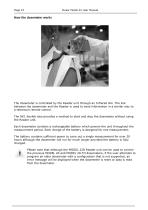
Page 10 Pulsar Model 22 User Manual Page 10 Pulsar Model 22 User Manual The dosemeter is controlled by the Reader unit through an Infrared link. The link between the dosemeter and the Reader is used to send information in a similar way to a television remote control. The RK1 Keyfob also provides a method to start and stop the dosemeter without using the Reader unit. Each dosemeter contains a rechargeable battery which powers the unit throughout the measurement period. Each charge of the battery is designed for one measurement. The battery contains sufficient power to carry out a single measurement...
Open the catalog to page 10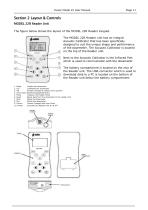
Pulsar Model 22 User Manual Page 11 The figure below shows the layout of the MODEL 22R Reader Keypad. The MODEL 22R Reader unit has an integral Acoustic Calibrator that has been specifically designed to suit the unique shape and performance of the dosemeter. The Acoustic Calibrator is located on the top of the Reader unit. Next to the Acoustic Calibrator is the Infrared Port which is used to communicate with the dosemeter. The battery compartment is located on the rear of the Reader unit. The USB connector which is used to download data to a PC is located on the bottom of the Reader unit below...
Open the catalog to page 11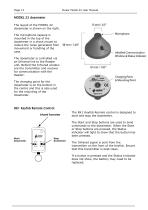
Page 12 Pulsar Model 22 User Manual The layout of the MODEL 22 dosemeter is shown on the right. The microphone capsule is mounted in the top of the dosemeter in a shock mount to reduce the noise generated from movement or handling of the case. The dosemeter is controlled via an Infrared link to the Reader unit. Behind the Infrared window are the transmitter and receiver for communication with the Reader. The charging point for the dosemeter is on the bottom in the centre and this is also used for the mounting of the dosemeter. RK1 Keyfob Remote Control Infrared Transmitter The RK1 Keyfob Remote...
Open the catalog to page 12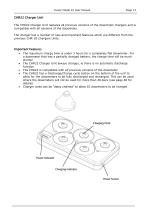
Pulsar Model 22 User Manual Page 13 CHR22 Charger Unit The CHR22 Charger Unit replaces all previous versions of the dosemeter chargers and is compatible with all versions of the dosemeter. The charger has a number of new and important features which are different from the previous CHR-20 Chargers Units. Important Features • The maximum charge time is under 3 hours for a completely flat dosemeter. For a dosemeter that has a partially charged battery, the charge time will be much shorter • The CHR22 Charger Unit always charges, ie there is no automatic discharge function • The CHR22 is compatible...
Open the catalog to page 13All Pulsar Instruments catalogs and technical brochures
 XD1+
XD1+20 Pages
 Model 106
2 Pages
 PulsarSafeEar
6 Pages
 Pulsar vB
3 Pages
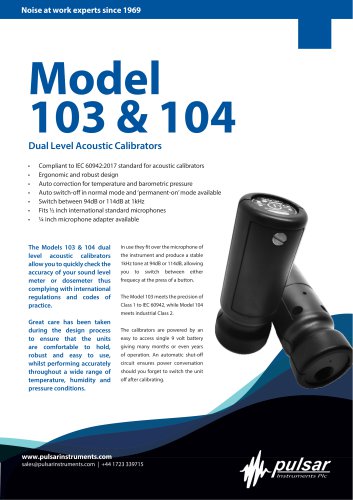 Model 103 & 104
2 Pages
 NoiseBadge
3 Pages
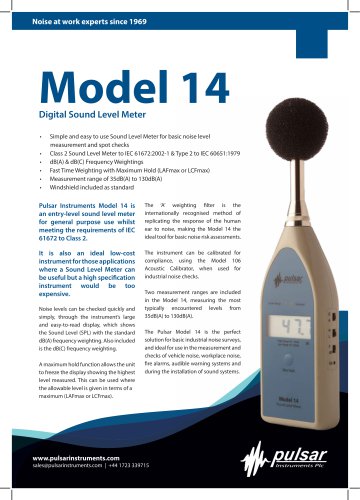 Model 14
2 Pages






Archived catalogs
 Hand-Arm Vibration Meter
4 Pages





- Portable calibrator
- Real-time monitoring module
- Precision calibration equipment
- Measurement monitoring module
- Environmental monitoring system
- Vibration analyzer
- Sound level meter
- Digital sound level meter
- Portable vibration meter
- Class 2 sound level meter
- Industrial calibration bench
- Standard calibration equipment
- Dosimeter
- Hand-held calibrator
- Integrating sound level meter
- Basic sound level meter
- Digital vibrometer
- Acoustic calibrator
- Data logging sound level meter