
- Catalogs
- PRÜFTECHNIK Alignment Systems GmbH
- ALIGNMENT CENTER - Set-up, Analyze, Organize and Archive measurement files

ALIGNMENT CENTER - Set-up, Analyze, Organize and Archive measurement files

1 / 2 PagesView full catalog
ALIGNMENT CENTER - Set-up, Analyze, Organize and Archive measurement files
Product catalog summary
Set-up
Create user-specific templates tailored to measurement tasks. Set up file information including file and user names, company, plant, area, and machine train. Prepare files on a PC and transfer them to the instrument using two-way communication.
Create user-specific templates tailored to measurement tasks. Set up file information including file and user names, company, plant, area, and machine train. Prepare files on a PC and transfer them to the instrument using two-way communication.
Analyze
Display results in 2-D or 3-D graphics based on application needs. Evaluate results using a measurement table and customize reports to include company information and logos. Simulate measurement results by entering manual values and optimize alignment by redefining fixed feet and editing dimensions. Customer-defined tolerances are supported.
Display results in 2-D or 3-D graphics based on application needs. Evaluate results using a measurement table and customize reports to include company information and logos. Simulate measurement results by entering manual values and optimize alignment by redefining fixed feet and editing dimensions. Customer-defined tolerances are supported.
Archiving
Create backups of measurement files and restore them as needed. Organize files in a tree structure with unlimited hierarchy, allowing any document type to be stored. The system supports comprehensive database searches and data import/export, managing measurement files and other file types efficiently.
Create backups of measurement files and restore them as needed. Organize files in a tree structure with unlimited hierarchy, allowing any document type to be stored. The system supports comprehensive database searches and data import/export, managing measurement files and other file types efficiently.
General Information
PRÜFTECHNIK Alignment Systems is a leader in precision laser alignment, offering high-tech measurement systems used globally. The ALIGNMENT CENTER software manages measurement files and data, supporting various alignment applications and instruments. It enhances efficiency and provides a platform for preparing, analyzing, organizing, and archiving measurement files. The software saves alignment specifications for future use and generates professional color reports.
PRÜFTECHNIK Alignment Systems is a leader in precision laser alignment, offering high-tech measurement systems used globally. The ALIGNMENT CENTER software manages measurement files and data, supporting various alignment applications and instruments. It enhances efficiency and provides a platform for preparing, analyzing, organizing, and archiving measurement files. The software saves alignment specifications for future use and generates professional color reports.
Technical Requirements
Recommended PC requirements include a display with a resolution of 1024 x 768 and 65,000 colors, a processor of Intel Pentium III 900 MHz or AMD Athlon or better, 512 MB RAM, and more than 200 MB of hard disk space. The interface depends on the instrument, requiring a USB or serial port. Supported operating systems are Windows 2000, Windows XP, Vista (32/64 Bit), and Windows 7 (32/64 Bit).
Recommended PC requirements include a display with a resolution of 1024 x 768 and 65,000 colors, a processor of Intel Pentium III 900 MHz or AMD Athlon or better, 512 MB RAM, and more than 200 MB of hard disk space. The interface depends on the instrument, requiring a USB or serial port. Supported operating systems are Windows 2000, Windows XP, Vista (32/64 Bit), and Windows 7 (32/64 Bit).
See more
Catalog excerpts
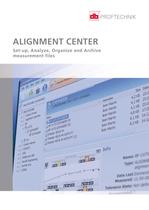
ALIGNMENT CENTER Set-up, Analyze, Organize and Archive measurement files
Open the catalog to page 1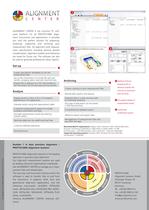
ALIGNMENT CENTER is the common PC soft- ware platform for all PRÜFTECHNIK Align- ment instruments and applications. It provides you with the perfect solution for preparing, analyzing, organizing and archiving your measurement files. All alignment and measure- ment specifications including thermal growth compensation, alignment presets and tolerances are saved for future use. The software can also be used to generate professional colour reports. Create user-specific templates to suit the Set up file information to include file and user names, company, plant, area and machine train Prepare file...
Open the catalog to page 2All PRÜFTECHNIK Alignment Systems GmbH catalogs and technical brochures
 SHAFTALIGN Touch
4 Pages
 OPTALIGN Touch
4 Pages
 ROTALIGN Touch
4 Pages
 PARALIGN in the wet end
2 Pages
 Brackets
5 Pages


Related Searches
- Analysis software solution
- Measuring machine
- Cloud-based software
- Monitoring software solution
- Balancer
- Reporting software
- EDM software
- Measurement monitoring module
- Continuous monitoring module
- Data management software
- Condition monitoring module
- Induction heating system
- Vibration analyzer
- Production monitoring system
- Online monitoring module
- Benchtop monitoring system
- Vibration monitoring device
- Compact monitoring module
- Machine monitoring module
*Prices are pre-tax. They exclude delivery charges and customs duties and do not include additional charges for installation or activation options. Prices are indicative only and may vary by country, with changes to the cost of raw materials and exchange rates.
About DirectIndustry
DirectIndustry is a marketplace that offers B2B players a complete experience, from product sourcing to purchase. DirectIndustry is an entity of VirtualExpo Group.
Are you a buyer?
Are you a supplier?