

PROSOFT.fdt

PROSOFT.fdt
- FDT Compatibility: Allows configuration of PROFIBUS DP devices from different manufacturers using a standard tool.
- Graphical Interface: Simplifies the creation and visualization of PROFIBUS networks.
- Generic Slave DTM: Automatically converts GSD files into DTMs, facilitating device integration.
- Master DTM: Configures the module and network, serving as a communication DTM for device DTMs.
- Diagnostics: Provides online diagnostic and statistical functions for network and module monitoring.
- PC with 1 GHz processor or higher
- Windows 2000 (SP2 or higher) or Windows XP
- Internet Explorer 5.5 or higher
- Adobe Acrobat Reader 4.0 or higher
- 10-15 MB free disk space
- CD ROM drive
- Minimum 256 MB RAM
- Minimum 1024 x 768 pixel resolution
- Master Settings: Includes auto-detection of configuration ports, master module scanning, and export options for configuration data.
- Slave Settings: Allows configuration of station addresses, parameters, and diagnostics using GSD files.
- Master Diagnostics: Monitors PROFIBUS Master status with graphical and color-coded displays.
- Slave Diagnostics: Provides detailed status displays and extended diagnostics using slave's GSD file.
Catalog excerpts
DATASHEET PROSOFT.fdt PS69 PROFIBUS DP Master Configuration Software PROSOFT.fdt is an FDT (Field Device Tool) compatible frame application that allows you to easily create, configure and monitor PROFIBUS networks using the PS69-DPM Master and any compatible PROFIBUS DP Slave device. Use the simple drag-and-drop interface to select PROFIBUS DP devices from the device catalog. Double-click on any selected device to configure device properties, device IDs and memory addresses. The diagnostic mode polls devices cyclically, and presents color-coded status. Double clicking on 'red' bus participants, to view the cause of any error in clear text. FDT (Field Device Tool) compatible frame application Configure communication-capable PROFIBUS DP devices from different manufacturers in a single, industry standard tool. Graphical slave input of the fieldbus system Easy to create, configure and visualize PROFIBUS networks using the PS69-DPM Master and any compatible PROFIBUS DP Slave device Configuration of the individual bus devices without DTM’s can be easily integrated. Turns any GSD into a DTM automatically when using the PROSOFT.fdt software. The module and network are configured using the master DTM as well as serve as a communication DTM for device DTM’s. The master DTM is automatically installed with PROSOFT.ftd On-line diagnostic and statistic functions The master DTM provides the module and network diagnostics when using any compatible FDT frame such as FieldCare or PACTware FDT Technology FDT Technology closes the fieldbus gap by providing a standard way for device vendors to create user interfaces for advanced device management. FDT helps fulfill the true promise of fieldbus setup and configuration and complements other technologies such as Electronic Device Description Language (EDDL). FDT allows device manufacturers to install a single DTM (Device Type Manager) driver for a device for use with multiple Windows software products such as Asset Management, PLC programming and device configuration and parameterization. FDT provides a workspace environment for the DTM’s to be configured and a method for communication (communication DTM or comDTM) to connect from the PC to the respective field device. ProSoft Technology, Inc is a member of the FDT JIG.
Open the catalog to page 1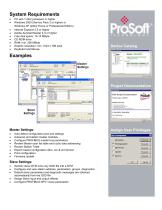
System Requirements • • • • • • • • • PC with 1 GHz processor or higher Windows 2000 (Service Pack 2 or higher) or Windows XP (either Home or Professional Edition) Internet Explorer 5.5 or higher Adobe Acrobat Reader 4.0 or higher Free disk space: 10-15 MByte CD ROM drive RAM: min. 256 MByte Graphic resolution: min. 1024 x 768 pixel Keyboard and Mouse Device Catalog Project Documentation Master Settings: • • • • • • • • Auto detect configuration port and settings Autoscan and detect master modules Configure PROFIBUS master bus parameters Review Master scan list table and cyclic data addressing...
Open the catalog to page 2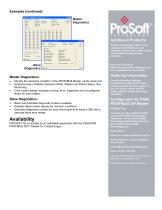
Examples (continued) Additional Products ProSoft Technology® offers a full complement of hardware and software solutions for a wide variety of industrial communication platforms. Visit our web site at http://www.prosoft-technology.com for a complete list of products. Master Diagnostics: • • • Monitor the operating condition of the PROFIBUS Master via the serial port Graphical view of Master Operation Mode, Master and Station Status, Bus Monitoring. Color coded display indicates running, error, diagnostic and unconfigured status for each station. Slave Diagnostics: • • • Basic and Extended diagnostic...
Open the catalog to page 3All PROSOFT catalogs and technical brochures
 Automotive Solutions
3 Pages
 Soluciones de Minerìa
5 Pages
 PSW-PWD
2 Pages
 5202-MNET-DFCM4
2 Pages
 PS-QS-1x10-0117
1 Page
 PTQ-PDPMV1
3 Pages
 PTQ-HART
3 Pages
 RLXIB-IHN
2 Pages
 RLXIB-IHN-W(C)
3 Pages
 RLXIB-IHW
2 Pages
 RLXIB-IHW-66
2 Pages
 RLXIC-EH
2 Pages
 RLXIC-EV
2 Pages
 RLXIC-SG
2 Pages
 RLXIC ST
2 Pages
 RLXIC-SV
2 Pages
 TermLinx
2 Pages
 ProSoft i-View
1 Page
 ProSoft Wireless Designer
2 Pages
 AFC Manager
2 Pages
 RadioLinx OPC Server
2 Pages
 ControlScape
2 Pages
 PROFIBUS comDTM
2 Pages
 EZ-ASCE
2 Pages
 WRC_CANR Series
2 Pages
 WRC_CANX Series
2 Pages
 PLX31-EIP-MBS4
3 Pages
 RLX2_IHW
2 Pages
 RLX2_IHNF
3 Pages
 IMC-BHx-AC
2 Pages
 WRC-CANR-DF
2 Pages
 The Camisea Pipeline Flyer
2 Pages
 Water Flows in Iraq
2 Pages
 Packaging Brochure
4 Pages
 Message Manager Flyer
1 Page
 Intelligent Cellular Flyer
2 Pages


- Automation software solution
- Computer-aided design software
- Cloud-based software
- Control software
- Benchtop analyser
- Design software solution
- Monitoring software solution
- Industrial software
- Communication gateway
- Interface software
- Industrial gateway
- Fieldbus gateway
- Ethernet gateway
- Simulation software solution
- Serial gateway
- Network software
- Wireless gateway
- Ethernet converter
- DIN rail gateway
- Test software