
- Catalogs
- PROCES-DATA A/S
- PD 385

PD 385

PD 385
The PD 340 Flow Transmitter with Profibus DP is designed for easy installation and integration into industrial systems. It includes a PD 385 Terminal Box, Meterhead, and PD 355 Electronic Module, requiring no configuration upon installation.
Installation Procedure
1. Install the flow transmitter in the pipework.
2. Connect power and Profibus cables.
3. Set the Profibus node address on the switch.
Once the Profibus master (PLC) initializes communication, the transmitter is automatically configured.
Specifications
- Power Supply: 24 V DC, Max. 6 W consumption
- Status Indicators: 3 x LED
- Communication: Profibus DP, DP-V0 profile, Max speed 12 Mbps, Address range 1 to 125
- GSD File Name: PD__0D18.GSD
- Environment: Ambient temperature -10 °C to +50 °C, Protection class IP 67
Optional Display
An optional PD 210 Display Unit can be connected to the PD 385 Terminal Box using a simple two-wire cable.
Contact Information
Proces-Data A/S, Navervej 8-10, DK-8600 Silkeborg, Denmark. Phone: +45 87 200 300, Email: [email protected], Website: www.proces-data.com
Catalog excerpts

PD 340 Flow Transmitter with Profibus DP
Open the catalog to page 1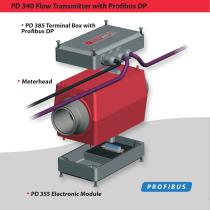
PD 340 Flow Transmitter with Profibus DP • PD 385 Terminal Box with Profibus DP
Open the catalog to page 2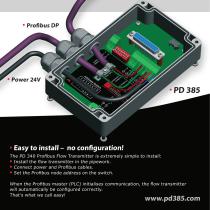
• Easy to install – no configuration! The PD 340 Profibus Flow Transmitter is extremely simple to install: Install the flow transmitter in the pipework. Connect power and Profibus cables. Set the Profibus node address on the switch. When the Profibus master (PLC) initialises communication, the flow transmitter will automatically be configured correctly. That’s what we call easy!
Open the catalog to page 3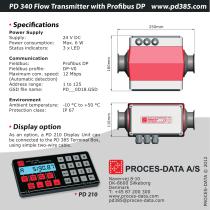
PD 340 Flow Transmitter with Profibus DP www.pd385.com • Specifications 24 V DC Max. 6 W 3 x LED Profibus DP DP-V0 12 Mbps Communication Fieldbus: Fieldbus profile: Maximum com. speed: (Automatic detection) Address range: GSD file name: Environment Ambient temperature: Protection class: Power Supply Supply: Power consumption: Status indicators: • Display option As an option, a PD 210 Display Unit can be connected to the PD 385 Terminal Box, using simple two-wire
Open the catalog to page 4All PROCES-DATA A/S catalogs and technical brochures


- Automation software solution
- Industrial display panel
- Digital I/O
- Process software
- Windows software
- IO module
- Computer-aided design software
- Control software
- Analog I/O
- Design software solution
- Digital IO module
- LED display panel
- Interface software
- Visualization software solution
- Control display system
- Motor controller
- Fieldbus I/O module
- Programmable display system
- Development software