


ProfiTrace

ProfiTrace
This section stresses the importance of following safety notices to ensure personal safety and equipment protection. It specifies that the device should only be used with compatible PROFIBUS and RS-485 interface devices and outlines conditions for safe operation.
The warranty is void if the device is opened. While the manual has been checked for accuracy, deviations may exist, and suggestions for improvements are welcome.
The manual provides guidance on using ProfiTrace 2.9, including recycling and disposal information, and contact details for PROCENTEC support.
ProfiTrace 2.9 is a comprehensive mobile analyzer for PROFIBUS networks, integrating tools like a busmonitor, oscilloscope, and DP Master. It simplifies troubleshooting and maintenance by reducing the need for multiple equipment pieces. It is suitable for both PROFIBUS DP and PA installations.
Details the internal structure, support-power connectors, and expansion connector of the ProfiCore Ultra.
Provides step-by-step instructions for installing the software on Windows 7, 8, and 10, including driver installation and language selection.
Explains the characteristics, storage, and acquisition of license files, including trial licenses.
Guides users on attaching ProfiCore Ultra to installations and starting ProfiTrace 2, covering bus monitoring, network condition indicators, and report generation.
Describes the message columns and file recording features.
Details measurement time, PROFIBUS traffic light warnings, and network summary.
Explains how to access and use the Wizard features for network information gathering and troubleshooting.
Covers acceptable signals and common issues like termination problems and short circuits for RS-485 and MBP-PA.
Describes how to edit station properties and view scope signals.
To activate a trial license, rename the existing license file, ensure internet connectivity, start ProfiTrace, and select 'Get trial activation'.
ProfiTrace offers various modes: Live List, ScopeWare, Bar graph, Topology scan, and ProfiCaptain, each providing specific functionalities.
Includes Live List, Statistics, and Message Recording for detailed network condition insights.
This tool continuously monitors and displays data for analysis, aiding in troubleshooting and ensuring network reliability.
A real-time oscilloscope for inspecting signal quality, allowing users to adjust time base and voltage levels.
Illustrates average signal strength from devices, indicating overall network signal quality.
Generates a network topology map without shutting down the installation.
Calculates the length of a PROFIBUS DP segment cable.
A tool for saving and loading oscilloscope measurements, bar graphs, and topology images.
A PROFIBUS DP master for I/O tests, commissioning, and parameterization.
Creates detailed reports on electrical signals, network topology, and faults.
Outlines the structure of messages in a PROFIBUS network, detailing various columns such as Source and Destination Addresses.
Lists potential abnormalities in messages, indicating communication issues.
PROFIBUS defines several message frames, each serving a distinct function within the network.
Request and response messages have specific service types.
Different message types are used for PROFIBUS DP, DP-V1, and DP-V2 protocols.
Explains how to log PROFIBUS messages using the File Recording option.
A traffic-light style overview indicates the health of the PROFIBUS system.
Describes a system where the Risk Margin is calculated based on the difference between a certain level and the 0-line.
Important statistics are listed next to the traffic light.
The ProfiTrace 2 software includes Wizards to automate tasks such as creating reports and troubleshooting PROFIBUS networks.
This Wizard generates a comprehensive report of the connected PROFIBUS segment.
This Wizard is designed for easy setup to capture network problems.
This Wizard identifies inactive network components.
Describes the use of oscilloscopes for measuring signal quality in PROFIBUS DP networks.
Focuses on AC and DC signal analysis in PROFIBUS PA networks.
A tool for saving and loading oscilloscope measurements, bar graphs, and topology images.
Instructions on using the Scope Image feature in the ScopeWare tab to view signals from individual stations.
Users can reset all measurements in the Network Manager.
Instructions for creating new measuring points and segments in a PROFIBUS network.
Users can manually delete stations from segments where they do not belong.
ProfiCaptain is a PROFIBUS DP master tool for I/O tests, commissioning, and parameterization.
Details manual and automatic methods for setting bus parameters.
Instructions for enabling the DP master and understanding different master modes.
ProfiCaptain offers class 2 commands for scanning and diagnosing devices.
Instructions for configuring slave devices, including setting up the address, modules, and parameters.
Check the device status by double-clicking it.
ProfiCaptain can take control of a slave from its master.
Once in Data Exchange, I/O data can be manipulated.
Supported data types include Boolean, Unsigned8/16/32, Int8/16/32, and Float.
The ProfiTrace OPC Server provides a standardized interface for integrating device status and statistics into OPC client applications.
The ProfiCore Ultra acts as a gateway for asset management using CommDTM.
Exercises include software installation, creating technical drawings of installations, and assessing connected devices.
This document provides detailed assignments and procedures for troubleshooting and analyzing PROFIBUS networks using ProfiTrace 2.9.
Tasks involve switching off slaves, changing network addresses, and creating configuration mismatches.
Focus on using statistics to identify missing devices and analyze syncs and station lost values.
Generate and identify double addresses using the Live List and statistics.
Measure cycle time before and after removing devices.
Generate diagnostic events and analyze statistics for diagnostic messages.
Start and stop message recording to analyze network messages.
Display input/output data and use ScopeWare for oscilloscope analysis.
Analyze voltage differences and generate reports for installations with and without faults.
Perform network scans and message traces in multi-master networks.
Detailed specifications for ProfiCore Ultra, PA Probe Ultra, and Tap Connector.
Checklists for preparing and creating reliable installations.
Addresses common issues such as signal quality and baudrate detection.
ProfiTrace supports GSD file version 3 and is compatible with Windows XP, 7, 8, and 10.
To resolve baudrate detection issues, increase the timeout setting in Preferences.
The topology scan cannot scan through repeaters but can identify devices behind them.
ProfiCore Ultra is designed to minimize bus load and can be used with PA segments using a PA probe.
License files are stored in a common application directory, which is hidden by default.
Diagnostic messages are crucial for identifying issues like module failures.
Device names in the Live List require diagnostic messages to be displayed.
ProfiTrace 2 offers integrated master functionality and supports DP-V2 message decoding.
The document includes a glossary explaining terms like DP-V0, DP-V1, DP-V2, and EMC.
This section describes the Frame Control field, which specifies message type, station type, priority, and acknowledgment status.
The Generic Station Description file is provided by device manufacturers and contains essential device characteristics for configuration tools.
This is the highest address a master will check for new masters.
A device that refreshes and distributes signals to all connected nodes.
Identification and Maintenance functions manage device profiles and aid in various lifecycle phases.
A unique 16-bit number for device identification.
Describes the ASIC used in a device.
A matrix displaying all available devices and their statuses.
An open fieldbus system for decentralized peripherals.
An application profile for process automation.
Details updates and changes across different versions of the manual.
Lists contact information for PROCENTEC's global offices and distributors.
Provides contact details for various international offices and distributors of PROCENTEC.
PROCENTEC specializes in PROFIBUS and PROFINET technology, offering products to optimize production processes in industrial automation.
PROCENTEC offers a range of products including ProfiTrace, ComBricks, ProfiHub, and PROFINET tools.
Catalog excerpts

ProfiTrace 2.9 User Manual
Open the catalog to page 1
Safety Guidelines This manual contains notices which you should observe to ensure your own personal safety, as well as to protect the product and connected equipment. These notices are highlighted in the manual by a warning sign and are marked as follows according to the level of danger: Draws your attention to important information on handling the product, a particular part of the documentation or the correct functioning of the product. Warning This device and its components may only be used for the applications described in this manual and only in connection with devices or components that...
Open the catalog to page 2
Purpose ofthe Manual This user manual provides information how to work with ProfiTrace 2. Recycling and Disposal The parts of the ProfiCore Ultra can be recycled. For further information about environment-friendly recycling and the procedure for disposing of your old equipment, please contact: PROCENTEC Klopperman 16 2292 JD WATERINGEN The Netherlands T: +31-(0)174-671800 F: +31-(0)174-671801 E: [email protected] Document Updates You can obtain constantly updated information on PROCENTEC products on the Internet at www.procentec.com You can also contact PROCENTEC Customer Support: • by phone...
Open the catalog to page 3
ProfiTrace 2.9 User Manual | January 18 | © PROCENTEC
Open the catalog to page 4
ProfiTrace 2.9 User Manual | January 18 | © PROCENTEC
Open the catalog to page 5
ProfiTrace 2.9 User Manual | January 18 | © PROCENTEC
Open the catalog to page 6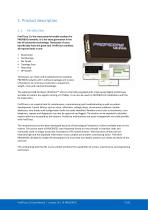
ProfiTrace 2 is the most powerful mobile analyzer for PROFIBUS networks. It is the latest generation in the line of busmonitor technology. Thousands of users benefit daily from this great tool. ProfiTrace combines all required tools in one: • • • • • • Busmonitor Oscilloscope Bar Graph Topology Scan Reporting DP Master Technicians can check and troubleshoot the complete PROFIBUS network with 1 software package and 1 piece of hardware. An enormous reduction in equipment, weight, costs and required knowledge. The advanced USB hardware (ProfiCore™ Ultra) is internally equipped with a high-speed...
Open the catalog to page 7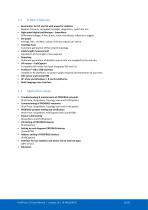
ProfiTrace 2.9 User Manual | January 1
Open the catalog to page 8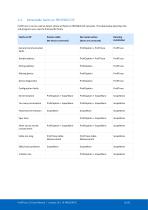
ProfiTrace 2 can be used to detect almost all faults in PROFIBUS DP networks. The table below describes the sub-programs you need to find specific faults. ProfiTrace 2.9 User Manual | January 18 | © PROCENTEC
Open the catalog to page 9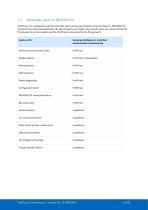
ProfiTrace 2 in combination with the PA Probe Ultra can be used to detect almost all faults in PROFIBUS PA networks. The table below describes the sub-programs you need to find specific faults (it is assumed that the PA network has a link+coupler and the ProfiTrace is connected to the PA segment): ProfiTrace 2.9 User Manual | January 18 | © PROCENTEC
Open the catalog to page 10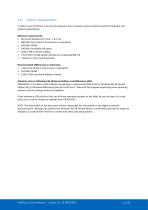
In order to use ProfiTrace 2 and all sub programs, your computer system should include the hardware and software listed below: Minimum requirements: • Microsoft Windows XP, Vista, 7, 8 or 10 • 600 MHz Intel Pentium III processor or equivalent • 256 MB of RAM • 100 MB of available disk space • 1 free USB 2.0 high-speed interface port supplying 400 mA • 1 Mouse or other pointing device Recommended (differences to minimum): • 1 GHz Intel Pentium III processor or equivalent • 512 MB of RAM • 1280 x 1024 resolution display or better Attention Users of Windows 98, 98 Second Edition and Millennium (Me)...
Open the catalog to page 11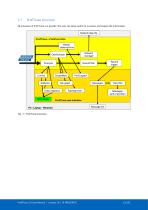
ProfiTrace structure All processes of ProfiTrace run parallel. The user can easily switch to a process and inspect the information. Network data file ProfiTrace + ProfiCore Ultra Master statemachine Network manager Live list Record filter Data inspection Record trigger Topology scan View filter Messages (with view filter) ProfiTrace user interface Message file ProfiTrace 2.9 User Manual | January 18 | © PROCENTEC
Open the catalog to page 12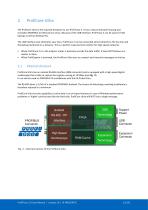
ProfiCore Ultra The ProfiCore Ultra is the required hardware to use ProfiTrace 2. It has a robust industrial housing and translates PROFIBUS to USB and vice versa. Because of the USB interface, ProfiTrace 2 can be used on field laptops as well as desktop PCs. The USB interface also eliminates spur lines. ProfiTrace 2 can be connected almost directly to the bus line and the laptop positioned on a distance. This is a perfect measurement solution for high-speed networks. • When ProfiTrace 2 is in the analyzer mode, it passively records the data traffic. It does NOT behave as a master or slave. •...
Open the catalog to page 13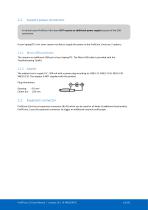
Support-power connectors In normal cases ProfiCore Ultra does NOT require an additional power supply because of the USB connection. If your laptop/PC is for some reason not able to supply the power to the ProfiCore, there are 2 options; 2.2.1. Micro-USB connection This requires an additional USB port of your laptop/PC. The Micro-USB cable is provided with the Troubleshooting Toolkit. 2.2.2. Adapter The adapter has to supply 9 V - 500 mA with a power plug according to: NES/J 21, NES/J 21 W, NES/J 210 XNES/J 210. The adapter is NOT supplied with the product. Plug information: Opening: Center pin:...
Open the catalog to page 14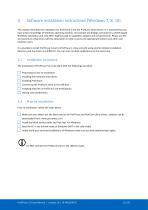
Software installation instructions (Windows 7, 8, 10) This chapter describes the installation for ProfiTrace 2 and the ProfiCore Ultra drivers. It is assumed that you have a basic knowledge of Windows operating systems. All example and dialogs are based on a US/UK based Windows installation and may differ slightly based on upgrades, updates and enhancements. Please use the screenshots in conjunction with the description in order to press the appropriate buttons and other user interface items. It is possible to install ProfiTrace 2 next to ProfiTrace 1, they are both using another default installation...
Open the catalog to page 15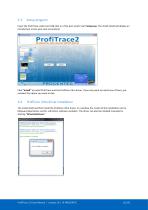
Setup program Insert the ProfiTrace credit card USB stick in a free port and/or start Setup.exe. The install shield will display an introduction screen (see next screenshot). Click “Install” to install ProfiTrace and the ProfiCore Ultra driver. If you only want to install one of them, just unselect the option you want to skip. ProfiCore Ultra driver installation The install shield will first install the ProfiCore Ultra driver. In a window the results of the installation can be followed. Blue letters are OK, red letters indicate a problem. The driver can also be installed manually by starting...
Open the catalog to page 16All PROCENTEC catalogs and technical brochures
 ProfiHub B4FO2+
61 Pages
 Profihub BxFOR+
60 Pages
 ProfiHub B5+R and B5+RD
60 Pages
 ComBricks
239 Pages
 VPSwitch
4 Pages
 Mercury
6 Pages
 Atlas
Atlas6 Pages
 ProfiHub BFO+
2 Pages
 101-201210
4 Pages
 PROCENTEC ComBricks HE+
2 Pages
 124-301030A
4 Pages
 VPGate
4 Pages
 ComBricks HE+
2 Pages
 Profi Hub B5+R
2 Pages
 ProfiHub A5
2 Pages
 Profi Switch X5
2 Pages
 SCOPE Repeater
2 Pages



Archived catalogs
 Com Bricks
2 Pages
 Profitrace
4 Pages
- Data connector
- Electrical power supply connector
- Automation software solution
- Analysis software solution
- Windows software
- Screw-in connector
- Industrial connector
- Touch screen tablet
- Wireless tablet
- Monitoring software solution
- Round plug
- Rugged tablet
- Industrial software
- Cable connector
- Threaded plug
- Industrial tablet
- Screw connector
- Windows tablet
- Network software