


ProfiHub B5+R and B5+RD
1 /60Pages

ProfiHub B5+R and B5+RD
1 /60Pages
Catalog excerpts

ProfiHub B5+R User manual
Open the catalog to page 1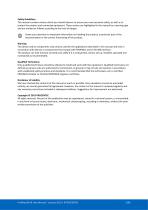
Safety Guidelines This manual contains notices which you should observe to ensure your own personal safety, as well as to protect the product and connected equipment. These notices are highlighted in the manual by a warning sign and are marked as follows according to the level of danger: Draws your attention to important information on handling the product, a particular part of the documentation or the correct functioning of the product. Warning This device and its components may only be used for the applications described in this manual and only in connection with devices or components that...
Open the catalog to page 2
Purpose of the Manual This manual explains how to put the ProfiHub B5+R / B5+RD into operation. Recycling and Disposal The parts of the ProfiHub can be recycled. For further information about environment-friendly recycling and the procedure for disposing your old equipment, please contact: PROCENTEC Klopperman 16 2292 JD WATERINGEN The Netherlands Tel.: +31-(0)174-671800 Fax: +31-(0)174-671801 Email: [email protected] Document Updates You can obtain constantly updated information on PROCENTEC products on the Internet at www.procentec.com You can also contact PROCENTEC Customer Support: • by...
Open the catalog to page 3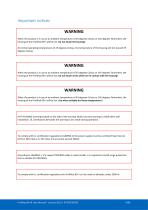
Important notices WARNING When the product is in use at an ambient temperature of 63 degrees Celsius or 145 degrees Fahrenheit, the housing of the ProfiHub B5+ will be hot. Do not touch the housing! At normal operating temperatures of 25 degrees Celsius, the temperature of the housing will not exceed 35 degrees Celsius. WARNING When the product is in use at an ambient temperature of 63 degrees Celsius or 145 degrees Fahrenheit, the housing of the ProfiHub B5+ will be hot. Do not touch wires which are in contact with the housing! WARNING When the product is in use at an ambient temperature of...
Open the catalog to page 4
ProfiHub B5+R User Manual | January 2019 | © PROCENTEC
Open the catalog to page 5
ProfiHub B5+R User Manual | January 2019 | © PROCENTEC
Open the catalog to page 6
1. Product Description ProfiHub B5+R is an advanced, flexible and robust network component for PROFIBUS DP installations, to create backbone structures and long multi-device star/tree segments. PROFIBUS DP is a high speed communication bus that must comply with strict rules concerning spur lines, because of possible reflections that could lead to communication disturbances. If spur lines or star segments are required, costly investments in repeaters have to be done. The innovative ProfiHub B5+R is the perfect component for such applications. It is an economic solution to realise reliable spur...
Open the catalog to page 7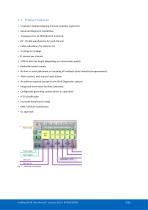
• 5 Galvanic isolated outgoing channels (repeater segments) • Advanced Diagnostic capabilities • Transparent for all PROFIBUS DP protocols • DP - RS 485 specifications for each channel • Cable redundancy for channel 4+5 • 9.6 Kbps to 12 Mbps. • 31 devices per channel • 1200 m spur line length (depending on transmission speed) • Redundant power supply • No limit in serial placement or cascading of ProfiHubs (only limited by busparameters) • Alarm contact, with manual reset button • No address required (except for the B5+R Diagnostics option) • Integrated termination facilities (switches) • Configurable...
Open the catalog to page 8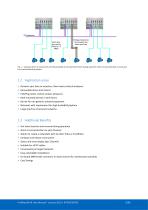
Each spur line can be 200m at 1,5 Mbps Wiring problems do not spread to the other spur lines Fig. 3 - Long spur lines to instruments and the possibility to remove/insert them during operation. Short circuit protection on each spur line is automatically provided. 1.2 Application areas • Dynamic spur lines to actuators, flow meters and pH analyzers • Removable drives and motors • Pull/Plug motor control centers (drawers) • Roof mounted devices in tank farms • Barrier for non galvanic isolated equipment • Networks with requirement for High Availability/uptime • Large star/tree structured networks...
Open the catalog to page 9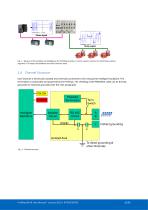
Fig. 4 - Because of the isolation and intelligence the ProfiHub provides, it can be used as a barrier for electrically sensitive segments. This keeps the backbone and other Channels clean. 1.4 Channel Structure Each Channel is electrically isolated and internally connected to the transparent intelligent backbone. The termination is switchable and powered by the ProfiHub. The shielding of the PROFIBUS cable can be directly grounded or indirectly grounded (see the next paragraph). RX-OK Powered Termination Intelligent Backbone Isolation Circuit Term. Switch Indirect grounding Isolated Area To direct...
Open the catalog to page 10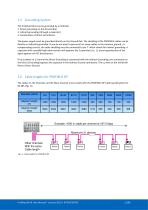
The ProfiHub B5+R can be grounded by 3 methods: 1. Direct grounding on the Ground Rail 2. Indirect grounding (through a capacitor) 3. Combination of direct and indirect. The power supply must be grounded directly on the Ground Rail. The shielding of the PROFIBUS cables can be directly or indirectly grounded. If you do not want to ground all or some cables to the common ground, i.e. compensating current, the cable shielding must be connected to pin 'I' which stands for Indirect grounding. A capacitor with a parallel high value resistor will separate the 2 potentials (Fig. 5), ensuring protection...
Open the catalog to page 11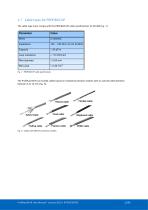
1.7 Cable types for PROFIBUS DP The cable type must comply with the PROFIBUS DP cable specifications for RS 485 (Fig. 7). Loop resistance Wire diameter Wire area Fig. 7 - PROFIBUS DP cable specifications The ProfiHub B5+R can handle cables based on multiple protection sheaths with an overall cable diameter between 6 to 12 mm (Fig. 8). Flexible cable Robust cable Hybrid cable Trailing cable Food cable Festoon cable Shipboard cable FRNC cable Fig. 8 - Cables with different protection sheaths. ProfiHub B5+R User Manual | January 2019 | © PROCENTEC
Open the catalog to page 12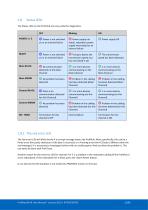
The Status LEDs on the ProfiHub are very useful for diagnostics. 1.8.1 The red error LED The red error LEDs will blink shortly if a corrupt message enters the ProfiHub. More specifically, this can be a Parity error (the parity checksum of the byte is incorrect) or a Framing error (the FCS byte is different than the real message). It is necessary to investigate further with an oscilloscope to find out what the problem is. This can easily be done with ProfiTrace. Another reason for the red error LED for channel 4 or 5 is a problem in the redundant cabling (if the ProfiHub is set to redundant)....
Open the catalog to page 13All PROCENTEC catalogs and technical brochures
 ProfiHub B4FO2+
61 Pages
 Profihub BxFOR+
60 Pages
 ComBricks
239 Pages
 ProfiTrace
151 Pages
 VPSwitch
4 Pages
 Mercury
6 Pages
 Atlas
Atlas6 Pages
 ProfiHub BFO+
2 Pages
 101-201210
4 Pages
 PROCENTEC ComBricks HE+
2 Pages
 124-301030A
4 Pages
 VPGate
4 Pages
 ComBricks HE+
2 Pages
 Profi Hub B5+R
2 Pages
 ProfiHub A5
2 Pages
 Profi Switch X5
2 Pages
 SCOPE Repeater
2 Pages



Archived catalogs
 Com Bricks
2 Pages
 Profitrace
4 Pages
- Connector
- Data connector
- Electrical power supply connector
- Automation software solution
- Analysis software solution
- Windows software
- Screw-in connector
- Industrial connector
- Touch screen tablet
- Wireless tablet
- Monitoring software solution
- Round plug
- Rugged tablet
- Industrial software
- Cable connector
- Threaded plug
- Industrial tablet
- Screw connector
- Windows tablet
- Network software