


ComBricks

ComBricks
- Supports up to 32 modules, including 10 communication modules.
- Hot swap capability and a powerful web server.
- 100 Mbps Ethernet and 12 Mbps PROFIBUS support.
- DIN-rail mounting and IP 20 protection.
Catalog excerpts

Com Bricks User Manual V6.5.6
Open the catalog to page 1
Monitoring, Networking and Control PROFIBUS data hub for repeaters and fiber optic modules Transparent for all PROFIBUS DP protocols ProfiTrace for monitoring 4 networks Drives 32 modules (10 communication modules) Hot swap Powerful web server 100 Mbps Ethernet 12 Mbps PROFIBUS DIN-rail IP 20 ComBricks User Manual V6.5.6 | November 2019 | © PROCENTEC
Open the catalog to page 2
Safety Guidelines This manual contains notices which you should observe to ensure your own personal safety, as well as to protect the product and connected equipment. These notices are highlighted in the manual by a warning sign and are marked as follows according to the level of danger: Draws your attention to important information on handling the product, a particular part of the documentation or the correct functioning of the product. Warning This device and its components may only be used for the applications described in this manual and only in connection with devices or components that...
Open the catalog to page 3
Purpose of the Manual This user manual provides information how to work with ComBricks. Recycling and Disposal The parts of the ComBricks can be recycled. For further information about environment-friendly recycling and the procedure for disposing of your old equipment, please contact: PROCENTEC Klopperman 16 2292 JD WATERINGEN The Netherlands Tel.: +31 (0)174 671 800 Fax: +31 (0)174 671 801 Email: [email protected] Document Updates You can obtain constantly updated information on PROCENTEC products on the Internet at www.procentec.com You can also contact PROCENTEC Customer Support: • by phone...
Open the catalog to page 4
ComBricks User Manual V6.5.6 | November 2019 | © PROCENTEC
Open the catalog to page 5
ComBricks User Manual V6.5.6 | November 2019 | © PROCENTEC
Open the catalog to page 6
ComBricks User Manual V6.5.6 | November 2019 | © PROCENTEC
Open the catalog to page 7
ComBricks User Manual V6.5.6 | November 2019 | © PROCENTEC
Open the catalog to page 8
ComBricks User Manual V6.5.6 | November 2019 | © PROCENTEC
Open the catalog to page 9
1 Product description 1.1 Introduction ComBricks™ - The first PROFIBUS and PROFINET-based automation system that unites network components, permanent monitoring with ProfiTrace and remote I/O. ComBricks is a modular system that allows a mix of automation components on a backplane. Repeater modules can be inserted next to a PROFIBUS slave and at the same time, in a web browser over Ethernet, the condition of the installation can be remotely inspected with ProfiTrace OE. 1.2 Application areas • Remote maintenance station with ProfiTrace OE • Modular repeater backbone with hot swap • Transparent...
Open the catalog to page 10
1.4 Modular PROFIBUS repeaters The current trend in PROFIBUS projects is to use segmentation with repeaters, fiber optic and ProfiHubs to bridge the common faults of the end-user concerning his cabling difficulties. ComBricks adds another important element; the creation of modular and random repeater hubs which can be maintained remotely with a permanent internal ProfiTrace (see Fig. 1). ComBricks is based on a backplane which can hold up to 10 hot swap repeater modules. Each module has one or two channels (so a total of max 20 galvanic isolated transparent segments). Every channel can handle...
Open the catalog to page 11
Maximum 10 modules (2 channel repeaters) 2 segments 20 segments Mix of 1 channel and 2 channel repeaters 3 segments Fig. 2 - Repeater configuration examples Cable Redundancy The bus redundancy technology of the repeater modules is very advanced. A redundant system can be built using 10 parallel cables. This architecture provides extremely high availability. Most suppliers only allow 2 cables (see Fig. 3). Maximum 10 redundant channels redundant channels Fig. 3 - Redundancy configuration example ComBricks User Manual V6.5.6 | November 2019 | © PROCENTEC
Open the catalog to page 12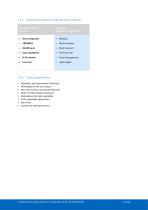
1.4.2 Comparison between ProfiHub and ComBricks ProfiHub A5 and B5 (simple) ComBricks (flexible and high-tech) • Multi interface • Multi network • Easy installation • Asset management • Light weight Typical applications Repeaters with permanent ProfiTrace Removable drives and motors Star, tree and bus structured networks Motor control centers (drawers) Redundancy for high availability EMC vulnerable applications Spur lines Isolator for sensitive devices ComBricks User Manual V6.5.6
Open the catalog to page 13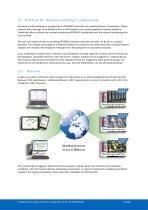
1.5 ProfiTrace OE - Remote monitoring in a web browser Permanent and simultaneous monitoring of 4 PROFIBUS networks is a powerful feature of ComBricks. Global projects and a shortage of (qualified) technical staff members are causing significant capacity problems. ComBricks offers a solution by remotely monitoring PROFIBUS installations over the Internet and alerting the user by email. The user can simply connect surrounding PROFIBUS networks and every network can be set to a unique baudrate. The modular technology of ComBricks enables the network to be monitored when multiple repeater modules...
Open the catalog to page 14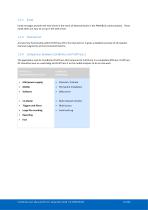
Email messages provide real-time alerts in the event of detected faults in the PROFIBUS communication. These email alerts are easy to set up in the web server. 1.5.3 Channel List A brand new functionality within ProfiTrace OE is the Channel List. It gives a detailed overview of all repeater channels (segments) and all connected stations. The application area for ComBricks (ProfiTrace OE) compared to ProfiTrace 2 is completely different. ProfiTrace OE should be seen as a watchdog and ProfiTrace 2 as the mobile analyzer to do on-site work. (troubleshooting on-site) (watchdog) • USB (power supply)...
Open the catalog to page 15
Offshore applications With satellite internet offshore PROFIBUS networks can be remotely monitored. Emails can inform the mainland about the status of the installation. These applications simplify maintenance and eliminate the hassle to fly an expert over to fix a possible problem. On the LAN local technicians can also monitor the networks. Mining applications Because of the depth, gasses and inaccessible areas, ComBricks is required to keep the control room and the experts on a distance to monitor the PROFIBUS installations. Multiple WLAN routers can bring Ethernet up to the surface. With DTM...
Open the catalog to page 16All PROCENTEC catalogs and technical brochures
 ProfiHub B4FO2+
61 Pages
 Profihub BxFOR+
60 Pages
 ProfiHub B5+R and B5+RD
60 Pages
 ProfiTrace
151 Pages
 VPSwitch
4 Pages
 Mercury
6 Pages
 Atlas
Atlas6 Pages
 ProfiHub BFO+
2 Pages
 101-201210
4 Pages
 PROCENTEC ComBricks HE+
2 Pages
 124-301030A
4 Pages
 VPGate
4 Pages
 ComBricks HE+
2 Pages
 Profi Hub B5+R
2 Pages
 ProfiHub A5
2 Pages
 Profi Switch X5
2 Pages
 SCOPE Repeater
2 Pages



Archived catalogs
 Com Bricks
2 Pages
 Profitrace
4 Pages
- Connector
- Data connector
- Electrical power supply connector
- Automation software solution
- Analysis software solution
- Windows software
- Screw-in connector
- Industrial connector
- Touch screen tablet
- Wireless tablet
- Monitoring software solution
- Round plug
- Rugged tablet
- Industrial software
- Cable connector
- Threaded plug
- Industrial tablet
- Screw connector
- Windows tablet
- Network software