
- Catalogs
- Primagest,Inc.
- RISECap

- Company
- Products
- Catalogs
- News & Trends
- Exhibitions
RISECap
RISECap
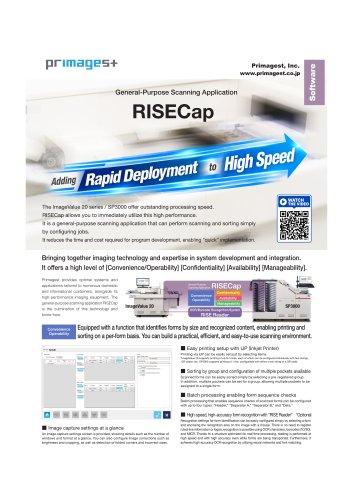
- Job Setting Screen: Allows scanning and classification without additional development, offering 'Scan only' and 'Classification' modes for flexibility.
- User Authority Management: Differentiates between general users and administrators, with password protection for critical settings to ensure security.
- Recovery Functions: Provides robust recovery options to restore data and job settings in case of errors or system interruptions.
- Statistics Gathering: Offers functions to obtain statistics on processed sheets, efficiency, and errors, aiding in operational management.
- Document Recognition: Utilizes OCR and barcode recognition for document discrimination without needing line information or logos.
- Batch Configuration: Supports batch configuration with multiple report types and flexible output settings.
- Printing and Output Settings: Allows easy configuration of print content and output destinations, supporting various formats like XML and CSV for metadata output.
- Data Editing and Scanner Settings: Facilitates data editing directly on the scanner screen and includes frequently used scanner settings for smooth operation.
- Recognition: Supports OCR for various fonts and handwritten numbers, and barcode recognition for 1D and 2D formats.
- Document Classification: Based on recognized data, field digits, and document dimensions. Supports sorting into specified pockets.
- Batch Configuration: Allows configuration of document types and batch levels with a mixing prevention function.
- IJP Printing: Compliant with device specifications for text and barcode printing, with customizable print data settings.
- Image Processing: Supports multiple image formats and resolutions, with features like auto-crop, rotation, and brightness adjustment.
- Metadata: Output in CSV or XML format with customizable delimiters and file names.
- Job Management: Includes creation, deletion, backup, and restoration of jobs, with permissions for different user roles.
- Image and Data Editing: Allows editing of image files and metadata settings using the Job Creation Tool.
- Consult with Primagest for handling more than 100 documents per job.
- Separate fees are required for operator and job creation training.
- Support is available via email with a separate contract.
Catalog excerpts
General purpose scanning application
Open the catalog to page 1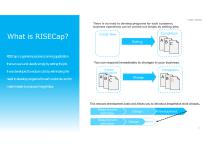
HWPT-D0003 There is no need to develop programs for each customer; business operations can be carried out simply by setting jobs. RISECapis a general-purpose scanning application that can scan and classify simply by setting the job. It was developed to reduce costs by eliminating the need to develop programs for each customer, and to You can respond immediately to changes in your business. Completion Original Configuration make it easier to propose ImageValue. This reduces development costs and allows you to introduce ImageValue more cheaply. Requirement definition Requirement definition © Primagest...
Open the catalog to page 2
RISECap Function Introduction We would like to introduce the features that have been introduced into RISECap to enable work without development. 1
Open the catalog to page 3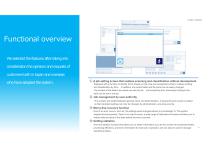
Functional overview We selected the features after taking into consideration the opinions and requests of customers both in Japan and overseas who have adopted the system. ① A job setting screen that realizes scanning and classification without development Equipped with a function to identify forms based on their size and recognized content, it allows printing and classification by form. In addition, the output folder and file name can be easily changed. The content of the data to be output can also be set, and everything from scanning to linking to the back can be set in one go. ② Job management...
Open the catalog to page 4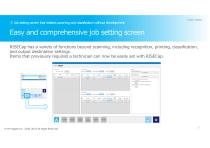
① Job setting screen that realizes scanning and classification without development Easy and comprehensive job setting screen RISECap has a variety of functions beyond scanning, including recognition, printing, classification, and output destination settings. Items that previously required a technician can now be easily set with RISECap. © Primagest Inc. 2020-2024 All Right Reserved
Open the catalog to page 5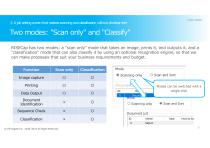
® A job setting screen that realizes scanning and classification without development © Primagest Inc. 2020-2024 All Right Reserved Document List
Open the catalog to page 6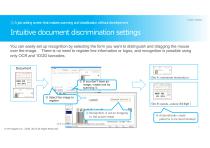
① A job setting screen that realizes scanning and classification without development Intuitive document discrimination settings You can easily set up recognition by selecting the form you want to distinguish and dragging the mouse over the image. There is no need to register line information or logos, and recognition is possible using only OCR and 1D/2D barcodes. Document Doc A:uuuuuuuu uuuuuuuu u ① If you don‘t have an image, create one by scanning it. ② Select the image to register Doc B:uuuuu…uuuuu(44 digit ) ③ Recognition is set by dragging to the actual image ④ Automatically create patterns...
Open the catalog to page 7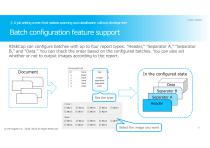
① A job setting screen that realizes scanning and classification without development Batch configuration feature support RISECap can configure batches with up to four report types: "Header," "Separator A," "Separator B," and "Data." You can check the order based on the configured batches. You can also set whether or not to output images according to the report. In the configured state Data Separator B Set the type © Primagest Inc. 2020-2024 All Right Reserved Select the image you want
Open the catalog to page 8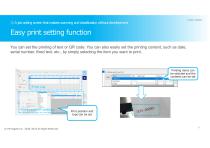
® A job setting screen that realizes scanning and classification without development You can set the printing of text or QR code. You can also easily set the printing content, such as date, serial number, fixed text, etc., by simply selecting the item you want to print. Printing items can be selected and the Digit Fixed text
Open the catalog to page 9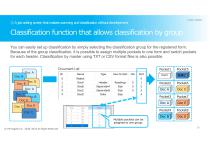
① A job setting screen that realizes scanning and classification without development Classification function that allows classification by group You can easily set up classification by simply selecting the classification group for the registered form. Because of the group classification, it is possible to assign multiple pockets to one form and switch pockets for each header. Classification by master using TXT or CSV format files is also possible. Pocket1 Doc E Doc C Multiple pockets can be assigned to one group. © Primagest Inc. 2020-2024 All Right Reserved
Open the catalog to page 10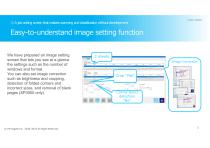
① A job setting screen that realizes scanning and classification without development Easy-to-understand image setting function We have prepared an image setting screen that lets you see at a glance the settings such as the number of windows and format. You can also set image correction such as brightness and cropping, detection of folded corners and incorrect sizes, and removal of blank pages (SP3000 only). © Primagest Inc. 2020-2024 All Right Reserved 2 sheets Image Correction Corner bend detection "No"
Open the catalog to page 11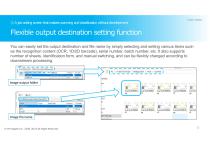
① A job setting screen that realizes scanning and classification without development Flexible output destination setting function You can easily set the output destination and file name by simply selecting and setting various items such as the recognition content (OCR, 1D/2D barcode), serial number, batch number, etc. It also supports number of sheets, identification form, and manual switching, and can be flexibly changed according to downstream processing. Image output folder Image file name © Primagest Inc. 2020-2024 All Right Reserved
Open the catalog to page 12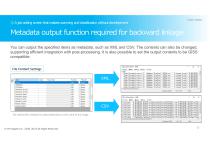
® A job setting screen that realizes scanning and classification without development You can output the specified items as metadata, such as XML and CSV. The contents can also be changed, supporting efficient integration with post-processing. It is also possible to set the output contents to be GISS compatible. <Page DocumentLocator-"!" JobName-"ScanTest" OCRValue-" " Fi Iename_Front1 -"D:¥RISECAP_ <Page DocumentLocator="2" JobName="ScanTest" 0CRValue=" " FiIename_Front1="D:¥RISECAP_ <Page Document Locator-"3" JobName-"ScanTest" OCRValue-" " FiIename_Front 1 -"D:¥RISECAP_' <Page Document Locator^"4"...
Open the catalog to page 13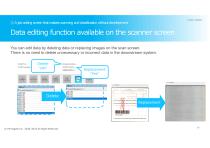
① A job setting screen that realizes scanning and classification without development Data editing function available on the scanner screen You can edit data by deleting data or replacing images on the scan screen. There is no need to delete unnecessary or incorrect data in the downstream system. Delete "yes" Delete Replacement © Primagest Inc. 2020-2024 All Right Reserved
Open the catalog to page 14All Primagest,Inc. catalogs and technical brochures
 ImageValue20P
2 Pages
 RISECap _ Summary
2 Pages
 SP3000
2 Pages
 HDP-4500CU
2 Pages