
- Catalogs
- Posiflex Technology
- TX-2300/E-G3 (DDR5 & DDR4)


- Company
- Products
- Catalogs
- News & Trends
- Exhibitions
TX-2300/E-G3 (DDR5 & DDR4)

TX-2300/E-G3 (DDR5 & DDR4)
Includes one POS box, one power adaptor, and one power cord.
Important Notes
FCC Compliance: The device complies with FCC Class A digital device standards, designed to prevent harmful interference in commercial environments. It may cause interference in residential areas, requiring user intervention.
CE Class A Warning: The equipment may cause radio interference in residential environments.
Warranty Limits
The warranty is void if the machine is opened by unauthorized personnel or if instructions are not followed. The manufacturer is not liable for damages from improper use.
Safety Instructions
The equipment is unsuitable for areas with children. The power cord must be connected to an earthed socket. Incorrect battery replacement poses an explosion risk.
Device Overview
The document provides detailed views of the TX-2300-G3 and TX-2300E-G3 models, including front, rear, and bottom views, and the rear I/O interface.
Connecting Power and I/O Cables
Instructions for connecting the power adapter and I/O cables are provided. Users are cautioned to handle connectors properly to avoid damage.
Mounting Instructions
Steps for wall mounting the device using WB-4200 kits are outlined.
Powering On/Off
Instructions for powering on and off the POS box, including forced shutdown procedures, are provided.
LED Indicators
The LED status indicators provide system status information, such as power on, standby, and data access.
Peripheral Device Installation
Guidance on installing optional peripherals, ensuring the system is powered off to prevent hazards.
Operating System Installation
Users are advised to seek professional help for OS installation to avoid system issues.
Driver Download and System Recovery
Instructions for downloading drivers and seeking assistance for system recovery are provided.
Operating Environment
Recommendations for positioning the device in a well-ventilated area to prevent overheating.
Specifications
Detailed specifications for the TX-2300-G3 and TX-2300E-G3 models, including CPU, memory, storage, power supply, ports, and environmental requirements.
Manufacturer Information
Contact details for Posiflex Technology Inc. are provided.
Catalog excerpts

TX-2300/E-G3 (DDR5 & DDR4) Fanless POS Box User Manual Package Contents POS box…………………………………..…………………………..(x 1) Power adaptor………………………………..…………………….…(x 1) Power cord………………………………………..…………………..(x 1) SOME IMPORTANT NOTES FCC NOTES This equipment has been tested and found to comply with the limits for a Class A digital device, pursuant to part 15 of the FCC Rules. These limits are designed to provide reasonable protection against harmful interference when the equipment is operated in a commercial environment. This equipment generates, uses, and can radiate radio frequency energy and, if not installed and used in accordance with the instruction manual, may cause harmful interference to radio communications. Operation of this equipment in a residential area is likely to cause harmful interference in which case the user will be required to correct the interference at his own expense. This device complies with part 15 of the FCC Rules. Operation is subject to the following two conditions: (1) This device may not cause harmful interference, and (2) this device must accept any interference received, including interference that may cause undesired operation. CE CLASS A WARNING This equipment is compliant with Class A of CISPR 32. In a residential environment this equipment may cause radio interference. AVERTISSEMENT CE CLASSE A Cet équipement est conforme à la classe A de CISPR 32. Dans un environnement résidentiel, cet équipement peut provoquer des interférences radio. WARRANTY LIMITS Warranty will terminate automatically when the machine is opened by any person other than the authorized technicians. The user should consult his/her dealer for the problem happening. Warranty voids if the user does not follow the instructions in application of this merchandise. The manufacturer is by no means responsible for any damage or hazard caused by improper application. LIMITES DE GARANTIE La garantie prend fin automatiquement lorsque la machine est ouverte par une personne autre que les techniciens autorisés. L'utilisateur doit consulter son revendeur pour le problème qui se produit. La garantie s'annule si l'utilisateur ne suit pas les instructions d'application de cette marchandise.
Open the catalog to page 1
警告使用者 為避免電磁干擾,本產品不應安裝或使用於住宅環境。 SAFETY INSTRUCTIONS This equipment is not suitable for use in locations where children are likely to be present. CONSIGNES DE SÉ CURITÉ Cet équipement ne convient pas à une utilisation dans des lieux pouvant accueillir des enfants. WARNING Power cord shall be connected to a socket-outlet with earthing connection. ATTENTION Le cordon d'alimentation doit être connecté à une prise de courant avec mise à la terre. BATTERY WARNING Risk of explosion if battery is replaced by an incorrect type. Dispose of expended battery in accordance with local disposal regulations....
Open the catalog to page 2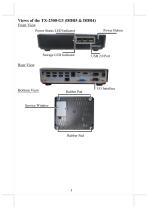
Views of the TX-2300-G3 (DDR5 & DDR4) Front View Power Status LED Indicator Power Button Rear View Bottom View Service Window
Open the catalog to page 3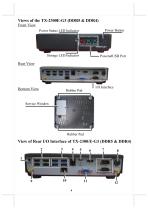
Views of the TX-2300E-G3 (DDR5 & DDR4) Front View Power Button Power Status LED Indicator PoweredUSB Port Rear View Bottom View Service Window View of Rear I/O Interface of TX-2300/E-G3 (DDR5 & DDR4) 2
Open the catalog to page 4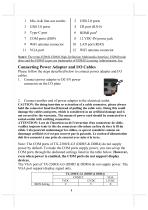
1 Mic-in & line-out combo 3 USB 3.0 ports 5 Type-C port 7 COM ports (DB9) 9 WiFi antenna connector 11 VGA port 6 HDMI port1 8 12 VDC-IN power jack 12 WiFi antenna connector Notel: The terms HDMI. HDMI High-Definition Multimedia Interface, HDMI trade dress and the HDMI Logos are trademarks of HDMI Licensing Administrator, Inc. Please follow the steps described below to connect power adapter and I/O cables. 1. Connect power adapter to DC-IN power connector on the I/O plate 2. Connect another end of power adapter to the electrical outlet. CAUTION: On doing insertion or extraction of a cable connector,...
Open the catalog to page 5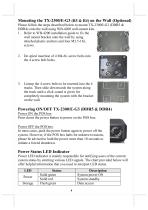
Please follow the steps described below to mount TX-2300E-G3 (DDR5 & DDR4) onto the wall using WB-4200 wall-mount kits. 1. Refer to WB -4200 installation guide to fix the wall mount bracket onto the wall by using attached plastic anchors and four M3.5-16L screws. 2. Do spiral insertion of 4 M4-6L screw bolts into the 4 screw bolt holes. 3. Lineup the 4 screw bolts to be inserted into the 4 tracks. Then slide downwards the system along the track until a click sound is given for completely mounting the system with the bracket on the wall. Press down the power button to power on the POS box. In...
Open the catalog to page 6
TX-2300/E-G3 (DDR5 & DDR4) can work with multiple optional peripheral devices, such as LCD monitor, cash drawer and the like. Before installing an optional peripheral device, make sure that the system is powered off and the external power source is removed from the POS box to prevent electric hazard. For the detailed instruction, refer to each of the user manuals of the optional peripheral devices. You are highly advised not to install an operating system on TX-2300/E-G3 (DDR5 & DDR4) without professional instructions. Improper installation could lead to system malfunction or failure. Please...
Open the catalog to page 7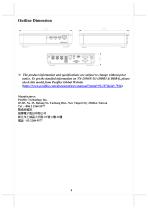
Outline Dimension ※ The product information and specifications are subject to change without prior notice. To get the detailed information on TX-2300/E-G3 (DDR5 & DDR4), please check this model from Posiflex Global Website (https://www.posiflex.com/document/user-manual/?pmid=92,107&pid=7946). Manufacturer: Posiflex Technology Inc. 4F-8F, No. 23, Datong St., Tucheng Dist., New Taipei City 236044, Taiwan Tel : +886 2 2268 5577 製造商資訊 振樺電子股份有限公司 新北市土
Open the catalog to page 9All Posiflex Technology catalogs and technical brochures
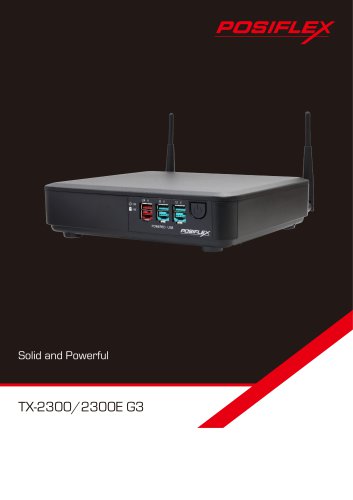 Solid and Powerful
2 Pages
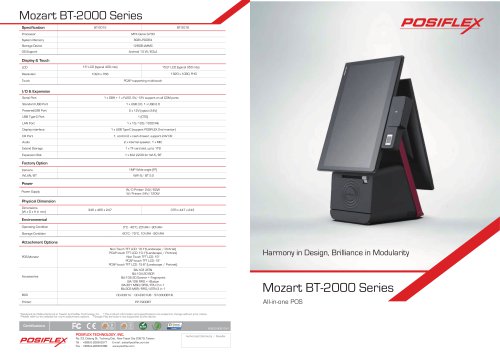 Mozart BT-2000 Series
2 Pages
 POS Peripherals Solution Guide
28 Pages
Archived catalogs
 POS Solution Guide
86 Pages
 Kiosk Solution Guide
26 Pages
 Haydn ZT Series
6 Pages