

PRB018 Programming Board for POSIC SMD encoders

PRB018 Programming Board for POSIC SMD encoders
The PRB018 Programming Board is designed for OTP programming of POSIC's 18-pin SMD encoders, specifically models IT5602 and AP5603. It is compatible with the Interface Board of the Evaluation and Programming Tool EPT002.
Key Specifications
- Supply Voltage: 5 V / 6.5 V
- Operating Temperature: 0 to 50°C
- Dimensions: 60 x 70 mm
Usage Instructions
To use the Programming Board, connect it to the ASSIST Interface Board, which is then connected to a PC via a USB cable. The encoder must be aligned correctly in the socket with the solder side facing down and the sensing side facing up. The round copper mark should be positioned at the upper right corner.
Jumper Settings
- Jumper J7: Present for power via ASSIST Interface Board; removed if powered via jumper-pin.
- Jumper J8: Must be removed.
- Jumper J9: Present for IT5602 operation; removed for AP5603 operation.
Technical Drawings and Pinout
Figures in the document provide dimensions and jumper explanations. The pinout for connectors J1 and J2 is detailed, showing connections for VDD, VSS, CLOCK, DATA, and NC pins.
Ordering Information
The PRB018 Programming Board includes a socket for 18-pin encoders and a flat cable for connection to the ASSIST Interface Board.
Legal and Safety Notices
The document includes standard legal disclaimers regarding the accuracy of information, liability, and restrictions on use, particularly noting that POSIC products are not intended for life-support or critical care applications.
Catalog excerpts

PRB018 Programming Board for POSIC SMD encoders BOARD I Description The Programming Board is intended for OTP-programming of POSIC’s 18-pin SMD encoders IT5602 and AP5603 prior to soldering. It is compatible to the Interface Board of the Evaluation and Programming Tool EPT002. Fig 1 shows how to connect the Programming Board to the ASSIST Interface Board. Fig 2 shows the opened socket containing an 18-pin encoder. To open the socket, the top side of the black lever must be pushed towards the center of the socket. Align the 18-pin encoder in the socket: - The solder side* (large copper pads) must be facing down. - The sensing side* (small copper pads) must be facing up. - The round copper mark must be at the upper right side in Error! Reference source not found.. In the socket, this corner has a larger recess/indent than the other 3 corners * See IT5602 or AP5603 datasheet Fig 3. Fig 3 shows the dimensions of the Programming Board and provides the explanations for the three jumpers. Please note that jumpers J8 and J9 (4 and 5 in Fig 3) must be set/removed according to the type of encoder (IT5602 or AP5602). Copper mark on package msiFD Fig 1 Programming Board (1) connected to ASSIST Interface Board (2), which is connected via USB cable (3) to PC with ASSIST software. Fig 2 Programming Board, socket with lid open. Ordering information PRB018 Programming board with socket for 18-pin encoders IT5602 and AP5603 including flat cable for connection to ASSIST Interface Board.
Open the catalog to page 1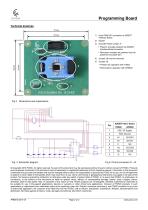
Programming Board 1) 8-pin DIN41651 connector to ASSIST Interface Board 3) Encoder Power jumper J7 • Present: encoder powered via ASSIST Interface Board connector • Removed: encoder not powered (can be powered via jumper-pin) 4) Jumper J8 must be removed 5) Jumper J9: • Present for operation with IT5602 • Removed for operation with AP5603 ENCODER POWER Fig 6 Pinout connectors J1, J2. © Copyright 2018 POSIC. All rights reserved. No part of this document may be reproduced without the prior written consent of POSIC. Products and companies mentioned in this document may be trademarks or registered...
Open the catalog to page 2All POSIC catalogs and technical brochures
 RSB001 RS422 Interface Board
4 Pages
 RSB001 - RS-4022 Driver
4 Pages


Archived catalogs


- Angular encoder
- Incremental encoder
- Incremental rotary encoder
- Absolute rotary encoder
- Industrial rotary encoder
- Hollow-shaft rotary encoder
- Magnetic rotary encoder
- Compact rotary encoder
- Linear encoder
- Single-turn rotary encoder
- Ultra-rugged rotary encoder
- High-resolution rotary encoder
- SSI angular encoder
- Digital rotary encoder
- Incremental linear encoder
- Mechanical rotary encoder
- Miniature rotary encoder
- RS-422 rotary encoder
- Motor rotary encoder
- Magnetic linear encoder