


- Company
- Products
- Catalogs
- News & Trends
- Exhibitions
MCO 2.0

MCO 2.0
MCO 2.0 is a centralized fluid monitoring system designed to enhance garage efficiency by enabling real-time control, monitoring, dispensing, and measurement of lubricants and fuels. It aims to streamline workflows and reduce human errors in fluid dispensing.
- Centralized Management: Manage all fluids from a single system for precise tracking of fluid usage and transactions.
- User Identification: Unique codes for operators to track fluid dispensing.
- Real-Time Monitoring: Provides a comprehensive overview of garage operations, including pending jobs and workflow organization.
- Software MCO 2.0: Manages work orders and garage operations.
- Control Unit 2.0: Touchscreen device for task management, available in wall-mounted and mobile versions.
- PIUSI Dongle 2.0: Remote Wi-Fi device for displaying garage activities on monitors.
- OCIO 2.0: Tank level indicator for real-time fluid level monitoring.
- Easy View 2.0: Dispensing nozzle with an integrated display for fluid measurement.
- Example A: Configuration for a workshop with 2 bays, 2 reels, and 1 type of oil.
- Example B: Configuration for a workshop with 4 bays, 4 reels, and 2 types of oil.
- Software Requirements: Vary based on the version (Business Entry or Business Suite), with specific hardware and OS requirements.
- Hardware Features: Include solenoid valves, control units, and dispensing nozzles with specific operational parameters.
- Versions: Available for oil, diesel, windscreen, and AdBlue® fluids.
- Accuracy: ±0.5% for all versions.
- Flow Rate: Varies by fluid type, e.g., 10/100 l/min for oil, 1/30 l/min for windscreen.
- Operating Pressure: Ranges from 10 to 70 bar depending on the fluid.
- Temperature Range: -5°C to +40°C.
- Power Supply: 24V DC continuous duty.
- Valve Options: Single or double solenoid valve versions available.
- Designed to manage any fluid with a pulse meter input and 24V output.
- Suitable for centralized dispensing systems with remote connectivity via Wi-Fi or LAN.
- Fluid monitoring system for workshops, compatible with various fluids like oil, diesel, and water.
- Features include hose reel management, tank level indication, and integration with DMS for data export.
- Available in different software versions (Client, Business Entry, Business Suite) with USB or web editions.
- Includes ticket printers, barcode readers, and Ethernet adapters.
- OCIO 2.0 for fluid level monitoring with LAN or Wi-Fi connectivity.
- Easy View 2.0 for oil flow monitoring with Zigbee connection.
PIUSI's GPV 2.0 and MCO 2.0 systems offer comprehensive solutions for fluid control and monitoring, suitable for various industrial applications, enhancing efficiency and management capabilities.
Catalog excerpts

THE TOP PERFORMING OIL MONITORING SYSTEM FOR YOUR GARAGE
Open the catalog to page 1
CENTRALIZED LUBRICATION: STEP INTO THE 2.0 ERA OF OIL MONITORING SYSTEM! Do you want to improve the efficiency of your garage? Do you want to maintain control over all the consumptions of lubricants, diesel, or AdBlue®? The solution for you is MCO 2.0! MCO 2.0 is a centralized fluid monitoring system that allows you to control, monitor, dispense and measure all the lubricants and fuels that are dispended in the garage during a normal working day. All this from a single equipment. All in real time. The system is designed for all workshops that need a centralized management of all fluids. This...
Open the catalog to page 2
MCO 2.0: MANAGE YOUR WORKSHOP IN A CLICK ORGANIZE Manage your garage from your desktop with a unique software. WORK Control the list of pending jobs and organize the whole works list. MONITOR Keep the progress of the garage constantly under control. CHECK Have always a complete overview from the PC.
Open the catalog to page 3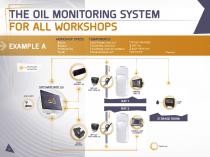
THE OIL MONITORING SYSTEM FOR ALL WORKSHOPS EXAMPLE A WORKSHOP SPECS: • 2 BAYS • 2 REELS • 1 TYPE OF OIL • 1 TANK • 1 SOFTWARE MCO 2.0 • 1 CONTROL UNIT 2.0* • 1 CONTROL UNIT 2.0 MOBILE* • 1 PIUSI DONGLE 2.0* Wi-Fi/LAN connection PIUSI DONGLE 2.0 GPV 2.0 • EASY VIEW 2.0 access point GPV 2.0 • EASY VIEW 2.0 TICKET PRINTER STORAGE ROOM
Open the catalog to page 4
The MCO 2.0 system network's fluid dispensing flows to allow optimal monitoring, while simultaneously offering a comprehensive set of tools and opportunities for the management and organization of each work process. • 1 SOFTWARE MCO 2.0 • 3 CONTROL UNIT 2.0* • 1 CONTROL UNIT 2.0 MOBILE* • 2 PIUSI DONGLE 2.0* Wi-Fi/LAN connection • 4 BAYS • 4 REELS • 2 TYPES OF OIL • 2 TANKS • Oil • Windscreen • AdBlue® • Diesel • Any WORKSHOP SPECS: A fully-fledged enterprise resource planning system. Flexible, simple and intuitive. Developed on the basis of your demands, by people involved daily in garage activities...
Open the catalog to page 5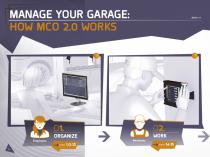
MANAGE YOUR GARAGE: HOW MCO 2.0 WORKS software - serbatoi
Open the catalog to page 6
A complete and state-of-the-art technology system that allows to manage the garage in an automatic way at all levels. Each key position has its own level of control and operation.
Open the catalog to page 7
GPV 2.0 Solenoid valve with integrated flow meter. pages 24-25 Dispenser nozzle with display. page 22 Touchscreen control device. SOFTWARE MCO 2.0 PC version main software. pages 10-13 pages 18-19
Open the catalog to page 8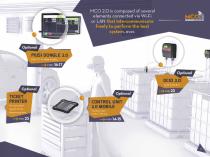
MCO 2.0 is composed of several elements connected via Wi-Fi or LAN that intercommunicate freely to perform the best system, ever. Optional PIUSI DONGLE 2.0 Mini PC for data display. OCIO 2.0 Level indicator. TICKET PRINTER For a printed report of the dispensing data. CONTROL UNIT 2.0 MOBILE Touchscreen control device.
Open the catalog to page 9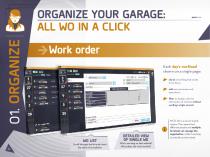
ORGANIZE YOUR GARAGE: ALL WO IN A CLICK Work order Each day's workload shown on a single page: check everything that needs to be done; add new processes and operations; filter to display only the information of interest without wasting a single second. Scroll through the list and check the state of completion. DETAILED VIEW OF SINGLE WO Who's working on that vehicle? What does the work involve? MCO 2.0 is a server based system. This means that different people and multiple terminals can manage the organization, while remaining constantly synchronized.
Open the catalog to page 10
PIUSI MCO 2.0 arises from the need to organize your work within your workshop. Starting right from your desk. From your office work station MCO 2.0 SOFTWARE allows you to enter, display and manage work orders for the entire garage, checking states of completion and deadlines. Thanks to the weekly agenda function, all it takes is a glance. Agenda Switch to agenda view to get a weekly and daily overview. How's the work organized on a specific vehicle? When can you return it to the customer? MON 18 MAY Which mechanic is available? MCO 2.0 Volksvagen Tiguan Volkswagen Tiguan LLOYD DAVID JARVIS CHARLES...
Open the catalog to page 11
Master data The garage customers database is extremely clear and easy to consult. Create an intuitive list of your staff, so you can always keep track of who handled which job. This helps you to optimally manage your daily workload. First Name Last Name 9 Choose an avatar or compose it Load Take a photo Client code* CUST_0004 Name* Registry Registry Working time Profile Pic B.Fish Philip CUST_0001 Brock Mark CUST_0002 Manage customers and vehicles. Add operators and set access level credentials and working hours. D.Gray Matthew CUST_0009 Finley Oliver CUST_0010 Fleming Alfie CUST_0011 9747 Jones...
Open the catalog to page 12
Areas IDENTIFY Define the work areas in your garage. Each hose reel can be assigned to one or more work areas and to a specific tank. So you can get the job done more efficiently. Each fluid with a different instantly-recognizable color. CONNECT Each hose reel to its tank. How your floor space is arranged.
Open the catalog to page 13
MANAGE YOUR WORK THANKS TO CONTROL UNIT 2.0 Work plan The touchscreen device allows the operator to scroll through the tasks list, which is constantly updated in real time. Particularly urgent work orders can be highlighted. LLOYD DAVID CONTROL UNIT 2.0 is available in a wallmounting version or in the mobile CONTROL UNIT 2.0 version. Display only the tasks assigned to you.
Open the catalog to page 14
To identify the operator who is performing a task at any time. With just a click the operator can: accept the work task, displaying all the details; specify which fluid will be used; TASK SELECTION All data relating to the task are displayed on one line. specify preset quantity. On completion, each work task is closed and recorded. MANAGEMENT Open and close a work task.
Open the catalog to page 15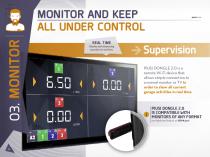
MONITOR AND KEEP ALL UNDER CONTROL REAL TIME Display each dispensing operation in real time. Supervision PIUSI DONGLE 2.0 is a remote Wi-Fi device that allows simple connection to a normal monitor or TV in order to show all current garage activities in real time. PIUSI DONGLE 2.0 IS COMPATIBLE WITH MONITORS OF ANY FORMAT, provided they feature an HDMI port.
Open the catalog to page 16
Check which vehicles are undergoing repairs during the day and which tasks are required. Monitor the proper functioning of your GPV 2.0 and tanks. The various possibilities of PIUSI DONGLE 2.0 allow you to display either the dispensing operations, work orders and tasks for the day, or the ongoing operations. AIRPORT VIEW The "airport" information board view shows pending work orders and those in progress. WORK ORDERS VIEW
Open the catalog to page 17All PIUSI catalogs and technical brochures
 FUEL CATALOGUE
28 Pages
 EDGARD FLYER EN
4 Pages
 Lube OERVIEW CATALOGUE-EN
44 Pages
 AdBlue® RANGE OVERVIEW
40 Pages
 ADBLUE CATALOGUE-ENGLISH
148 Pages
 SELF SERVICE MC 2.0
28 Pages
 MCO GO
24 Pages
 BSMART
32 Pages
 PIUSI_Brochure_Agricoltura
32 Pages
 BROCHURE_BIODIESEL_EN
12 Pages
 PIUSI_Brochure_OFFROAD
40 Pages
 LUBE CATALOGUE
192 Pages
 ADBLUE® CATALOGUE
156 Pages
 Self Service Management 2018
16 Pages
Archived catalogs
 CATALOGUE NEW PRODUCTS 2022-EN
48 Pages
- Pump
- Pump with electric motor
- Stationary pump
- Self-priming pump
- Volume flow monitor
- Liquid flow monitor
- Management software solution
- Automation software solution
- Real-time software
- Cloud-based software
- Control software
- Liquids filling line
- Monitoring software solution
- Industrial flow monitor
- Watertight pump
- Precision flow meter
- Industrial software
- Interface software