
- Catalogs
- PI Safety components GmbH & Co. KG
- SW.Nc + IR.Nc Manual


SW.Nc + IR.Nc Manual

SW.Nc + IR.Nc Manual
The document provides detailed instructions for the assembly, installation, and operation of the SW.Nc switching relay and IR.Nc sensors. It stresses the importance of adhering to the manual for proper handling and optimal performance, with safety notes indicating that only trained specialists should perform installation and maintenance.
The SW.Nc is a basic unit compatible with various IR.Nc sensors for tasks such as measuring temperature, humidity, differential pressure, and air flow. It is designed for high accuracy and easy assembly, featuring an integrated display and onsite parameterization. Its modular design facilitates easy installation and commissioning.
The SW.Nc operates within a voltage range of 20-28.8 V AC/DC and includes two relays with adjustable hysteresis. It has a robust housing with IP66 protection, resistant to corrosion. The IR.Nc sensors offer high accuracy and long-term stability across a range of measurements.
Detailed dimensions for the SW.Nc and various IR.Nc sensor models are provided to ensure proper installation and compatibility with different setups.
Instructions cover unlocking the electronic module, mounting the frame, and ensuring proper wall or duct mounting. Electrical connections are detailed with a wiring diagram, emphasizing the need for a secure and correct setup.
Before operation, ensure the device is correctly installed and connected to the power supply. The display should function normally, and the LED should indicate proper sensor connection.
Steps for safely dismantling the device include disconnecting power, removing the electronic module, and detaching cables.
The document outlines setting parameters such as language, sensor adjustments, measurement range, and output calibration, including instructions for saving settings and restoring factory defaults.
Regular maintenance is advised for device longevity, with repair instructions provided for potential issues. The device is maintenance-free, but annual function testing and regular cleaning with a damp cloth are recommended.
Guidelines for proper disposal and information on available accessories and spare parts are included to support device management and sustainability. The European Union's WEEE Directive ensures proper disposal or recovery of electronic components.
No Display/LED: Check power supply and connection of mounting frame and electronic. No output signal: Verify power supply, wiring, and parameterizing. Red LED: Indicates reading out of range or line break sensor.
The product conforms to European Directives 2014/35/EU (LVD), 2014/30/EU (EMC), 2012/19/EU (WEEE), and 2011/65/EU (RoHs) by applying harmonized standards.
Production and sales contact details for petz industries GmbH & Co. KG in Germany, including phone, fax, email, and website information.
Catalog excerpts

Easy plug-in mounting Quick and safe installation Junction box Ex e integrated No variants only one basic unit Enhanced temperature range -40 … +70 °C Degree of protection IP66 Switching outputs adjustable Adjustable hysteresis Integrated display Onsite parameterization LED status indication Low power input <3 W Cable length from the switch relay to the sensor up to 100 m Highly resistant against corrosion by use of high-tech polymer and stainless steel SW.Nc + IR.Nc Manual Assembly and Installation Instructions for safe use of switching relay SW.Nc with two relay outputs SPDT and sensor IR.Nc for temperature, humidity, differential pressure, air flow
Open the catalog to page 1
SW.Nc / IR.Nc normal conditions / Industrieanwendung Content 1. General __________________________________________________________________________________________________ 3 2. Product description _________________________________________________________________________________________ 3 3. Technical Data _____________________________________________________________________________________________ 4 4. Dimension ________________________________________________________________________________________________ 6 5. Assembly / Installation ______________________________________________________________________________________...
Open the catalog to page 2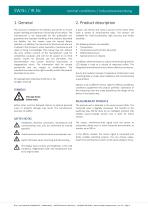
SW.Nc / IR.Nc normal conditions / Industrieanwendung The manual is included in the delivery and serves to ensure proper handling and optimum functioning of the device. The manufacturer is not responsible for this publication nor guarantee and improper handling of the products described any liability. For this reason, read the manual before operation. In addition, the manual is for all personnel who are involved in the transport, setup, operation, maintenance and repair to bring in knowledge. This manual may not, without the prior written consent of the manufacturer used for competition purposes...
Open the catalog to page 3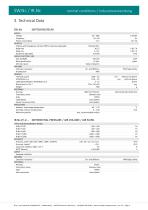
SW.Nc / IR.Nc normal conditions / Industrieanwendung 3. Technical Data SW.Nc SWITCHING RELAY SUPPLY Voltage Frequency Power consumption OUTPUTS 2 Relays with changeover contact (SPDT), hysteresis adjustable Relay max Relay min. Hysteresis adjustable DISPLAY / BUTTON / LED LCD, backlight Micro push button LED red / green HOUSING Corrosion resistance IP protection GENERAL Terminal square ATEX/IECEx Ex e Cable glands M20x1,5 ATEX/IECEx Ex e Dimensions H x B x T Weight MATERIALS Housing Front plate, srews Seals Cable glands Sensor connection M12 APPLICATION Ambient- and storage temperature Humidity,...
Open the catalog to page 4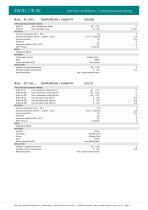
SW.Nc / IR.Nc IR.Nc -RT / RH-… normal conditions / Industrieanwendung TEMPERATURE / HUMIDITY TYPES AND MEASUREMENT RANGE IR.Nc-RT Room Temperature Probe IR.Nc-RH Room Humidity Probe ACCURACY Accuracy temperature @.0 … 60 °C Accuracy temperature @.-40 … 0, @ 60 … 125 °C Accuracy humidity Hysteresis Long term stability 1.000 h / 25 °C MTTF (Sensor) SUPPLY Powered by SW.Nc MATERIALS Thermowell, end cap Seals Sensor connection M12 APPLICATION Ambient-, storage temperature Humidity, without condensation Mounting position TEMPERATURE / HUMIDITY TYPES AND MEASUREMENT RANGE IR.Nc-DT-50 Duct Temperature...
Open the catalog to page 5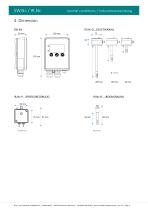
SW.Nc / IR.Nc normal conditions / Industrieanwendung © pi ▪ petz industries GmbH&Co.KG ▪ Mühlenweg 2 ▪ 96358 Teuschnitz / Germany ▪ +49 (0)911 658 18 60 ▪ www.pi-safety-components.de
Open the catalog to page 6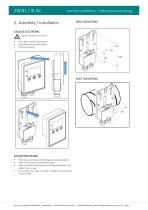
SW.Nc / IR.Nc normal conditions / Industrieanwendung WALL MOUNTING UNLOCK ELECTRONIC Switch off power and check Press down release tab carefully Slide electronic module up and Remove foreward 87 62 DUCT MOUNTING Drill holes according to the drilling plan (see illustration) Mount base frame with delivered screws. Make sure when mounting that the Mounting frame is not under strain or sags For outdoor use make sure that no water accumulates or can form frost. © pi ▪ petz industries GmbH&Co.KG ▪ Mühlenweg 2 ▪ 96358 Teuschnitz / Germany ▪ +49 (0)911 658 18 60 ▪ www.pi-safety-component
Open the catalog to page 7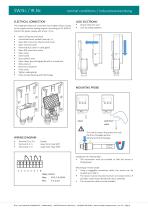
SW.Nc / IR.Nc normal conditions / Industrieanwendung ELECTRICAL CONNECTION LOCK ELECTRONIC The integrated electrical connection box enables direct contact to the supply and the analog outputs. According to IEC 61010-1 protect the power supply with a fuse < 10 A. Attach electronic part Lock by sliding together Switch off power and check Unlook electronic module (see cap. 5) Open M3 screw from the terminal cover Open terminal cover Removed dust cover in cable gland Open M3 screw from cover Open cover Insert cable Strip cable (6 mm) Open clamp by pressing gentle with a screwdriver Slide wire/s in...
Open the catalog to page 8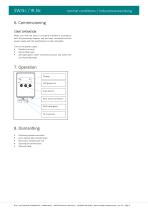
SW.Nc / IR.Nc normal conditions / Industrieanwendung 6. Commissioning START OPERATION Make sure that the device is properly installed in accordance with the preceding chapters and has been connected and the power supply with the specifications on the nameplate. Turn on the power supply. Display to normal Sensor data loads LED lights green when connected sensors and within the set measuring range. 7. Operation Display LED green red Push button M12 sensor connector M20 cable gland PE connector Disconnect power and check press release tab carefully down electronics module push out Opening...
Open the catalog to page 9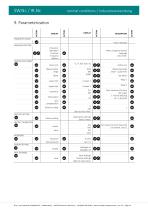
SW.Nc / IR.Nc normal conditions / Industrieanwendung PARAMETER MODE Push 3 Seconds LANGUAGE SETTING D Deutsch GB English F Francais E Espanol I Italiano Select using keys desired language press Enter SENSOR ADJUSTMENT Select unit Measurement range Offset Lower limit Upper limit Hysteresis Attenuation define unit Measuring range lower - upper limit Set Offset Relay 1 Relay 2 From measure end value (full scale) 1 = keine damping 50 = 5 Seconds Zero compensation Switch-on delay 0 240 Back to main menu FACTORY SETTING Factory setting Load factory settings Back to menu OUTPUT CALIBRATION output value...
Open the catalog to page 10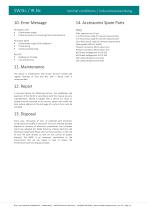
SW.Nc / IR.Nc normal conditions / Industrieanwendung 14. Accessories Spare Parts No Display / LED Check power supply Check connection of mounting frame and electronic No output signal Check power supply (LED red/green) Check wiring Check parameterizing Red LED Reading out of range Line break sensor Filter cap pore size 10 µm 1 m M12 sensor cable for remote measurement 5 m M12 sensor cable for remote measurement 10 m M12 sensor cable for remote measurement Cable glands M20x1,5 Ms/Ni Pressure connector M5 to tube 6 mm Pressure connector M5 to tube 4 mm M5 thread enlargement to 1/8...
Open the catalog to page 11All PI Safety components GmbH & Co. KG catalogs and technical brochures
 Product Overview 2024
19 Pages
 QT.Nc
QT.Nc16 Pages
 TR.Nc + IY.Nc Manual
16 Pages
 SW.Ex + IR.Ex Manual
16 Pages
 QT.Ex Manual
16 Pages
 TR.Ex + IY.Ex Manual
16 Pages
- Temperature probe
- Actuator
- Electric actuator
- Valve actuator
- Signal amplifying integrated circuit
- Industrial actuator
- Rotary actuator
- Flow controller
- 24-volt actuator
- Pneumatic flow regulator
- Control actuator
- Measuring amplifier
- Integrated actuator
- Gas flow regulator
- Volumetric flow regulator
- Actuator for medical applications
- Linear valve actuator
- Single-acting actuator
- Transducer
- Air flow regulator