
- Catalogs
- Phase Motion Control
- PX Power Supply Unit - 4 KW



- Company
- Products
- Catalogs
- News & Trends
- Exhibitions
PX Power Supply Unit - 4 KW
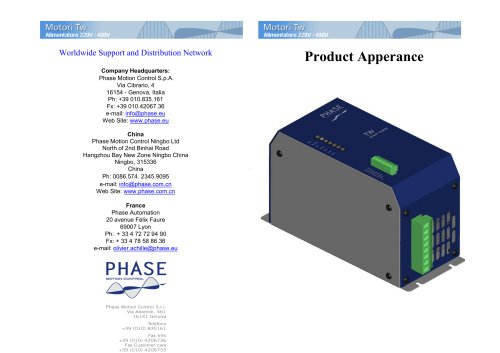
PX Power Supply Unit - 4 KW
Phase Motion Control S.p.A. is headquartered in Genova, Italy, with additional locations in Ningbo, China, and Lyon, France. The company specializes in motion control technologies.
Product Features
The product operates on a three-phase 220Vac or single-phase 220Vac supply. Key features include:
- Power on relay output for DCBus readiness and system readiness signals.
- Capability to charge external DCBus capacitors and automatic discharge when disabled.
- Dynamic braking with an external resistor, desaturation protection, and over-voltage, over-current, and over-temperature protection.
- Bluetooth monitoring and heat dissipation via a cooling fan.
Technical Specifications
- Main Power: 2 phase or 3 phase 220Vac.
- Rated Output Voltage: 310 Vdc.
- Rated Output Power: 4KW (2 phase), 8KW (3 phase).
- Peak Output Power: 5.5KW (2 phase), 16KW (3 phase).
- Overload Current: >27A.
- Brake Voltage: 375 Vdc.
- Recommended Braking Resistor: 20 Ohm, 1000W.
- Auxiliary Power Supply: 24 V, 0.5 A.
- Max. Working Temperature: 90°C.
Operating Instructions
- Ensure correct wiring according to the connections.
- Power on auxiliary power; LED “+24V (Yellow)” should be on.
- Power on main power; LED “AC (Yellow)” should blink and then stay on.
- Close the “Enable (Contact Input)” to enable DCBUS; LED “Sys.OK (Green)” should be on.
Braking Resistor
- Rated Power: 1000W.
- Rated Resistance: 20Ω ±5%.
Connections and LED Indicators
Connections are detailed for CN1 and CN2 terminals, specifying input and output configurations. LED indicators provide status for Bluetooth, system readiness, main power, auxiliary power, and alarms for over-voltage, over-current, and over-temperature.
Alarm Conditions
- Over Voltage Alarm: DCBUS > 425Vdc.
- Over Current Alarm: Current Value >=100A.
- Over Temperature Alarm: Temperature >= 90°C.
Catalog excerpts
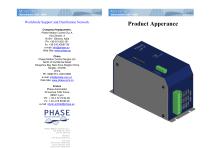
Worldwide Support and Distribution Network Company Headquarters: Phase Motion Control S.p.A. Via Cibrario, 4 16154 - Genova, Italia Ph: +39 010.835.161 Fx: +39 010.42067.36 e-mail: [email protected] Web Site: www.phase.eu China Phase Motion Control Ningbo Ltd North of 2nd Binhai Road Hangzhou Bay New Zone Ningbo China Ningbo, 315336 China Ph: 0086.574. 2345.9095 e-mail: [email protected] Web Site: www.phase.com.cn France Phase Automation 20 avenue Félix Faure 69007 Lyon Ph: + 33 4 72 72 94 90 Fx: + 33 4 78 58 86 36 e-mail: [email protected] Product Apperance
Open the catalog to page 1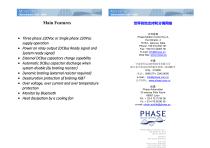
Main Features Three phase 220Vac or Single phase 220Vac supply operation Power on relay output (DCBus Ready signal and System ready signal) External DCBus capacitors charge capability Automatic DCBus capacitor discharge when system disable (by braking resistor) Dynamic braking (external resistor required) Desaturation protection of braking IGBT Over voltage, over current and over temperature protection Monitor by Bluetooth Heat dissipation by a cooling fan 世界各地支持和分销网络 公司总部 Phase Motion Control S.p.A. Via Cibrario, 4 16154 - Genova, Italia Phone: +39 010.835.161 Fax: +39 010.42067.36...
Open the catalog to page 2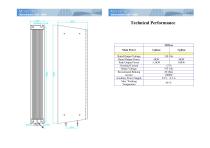
Technical Performance 220Vac Main Power Rated Output Voltage Rated Output Power Peak Output Power Overload Current Brake Voltage Recommend Braking resistor Auxiliary Power Supply Max. Working Temperature
Open the catalog to page 3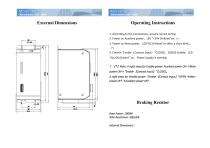
External Dimensions Operating Instructions 1. According to the Connections, ensure correct wiring. 2. Power on Auxiliary power,LED “+24V (Yellow)”on.(*) 3. Power on Main power,LED“AC (Yellow)”on after a short blink 。 (*) 4. Control “Enable(Contact Input)”CLOSED,DCBUS Enable,LED “Sys.OK (Green)” on,Power Supply is working. !(*)Note: A right steps for Enable power: Auxiliary power ON →Main power ON→ “Enable(Contact Input)”CLOSED。 A right steps for Disable power: “Enable(Contact Input)”OPEN →Main power OFF →Auxiliary power OFF.
Open the catalog to page 4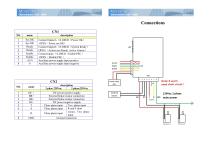
Sys.OK Sys.OK Ready Ready Enable Enable +24 V 0 description Contact Output1:CLOSED(Power OK) OPEN(Power not OK) Contact Output2:CLOSED(System Ready) OPEN (System not Ready, Active Alarms) Contact Input:CLOSED(Enable PSU) OPEN(Disable PSU) Auxiliary power supply Input positive Auxiliary power supply Input negative description 3 phae 220Vac 2 phase220Vac TW power positive supply External brake resistor connection External brake resistor connection TW power negative supply Three phase input Two phase input Three phase input R and S short cricuit,Two phase Three phase
Open the catalog to page 5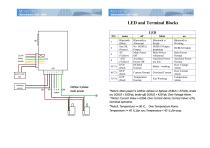
name Bluetooth (Blue) Sys.OK (Green) AC (Yellow) +24V (Yellow) OVP (Red) OCP (Red) OTP (Red) Bluetooth is Abnormal No DCBUS Output Main Power Off Auxiliary Power Off DCBUS Normal Bluetooth is Ready DCBUS Output preparing Main Power Abnormal Auxiliary Power too low Current Normal Overload Current Temperature Normal Brake working on Bluetooth is Working DCBUS Enable Main Power Normal Auxiliary Power Normal Over Voltage Alarm Over Current Alarm Temperature Alarm *Note1: Main power is 220Vac 2phase or 3phase: DCBUS > 375Vdc, brake on; DCBUS < 350Vdc, brake off; DCBUS > 425Vdc, Over Voltage Alarm....
Open the catalog to page 6All Phase Motion Control catalogs and technical brochures
 AxN Drives
24 Pages
 AxN Size 5
1 Page
 AxN Size 4
1 Page
 AXS 500
3 Pages
 Axs-500
3 Pages
 Tk Datasheet Catalog
5 Pages
 Axs EV Ruggedized Servo Drive
17 Pages
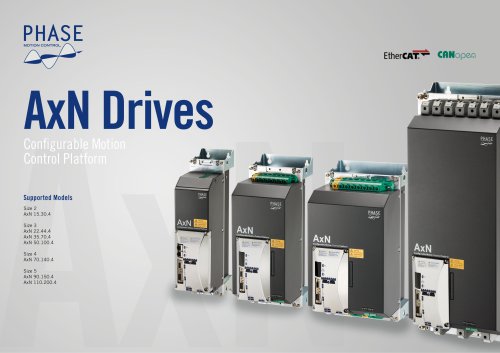 Axn Drive Catague
24 Pages
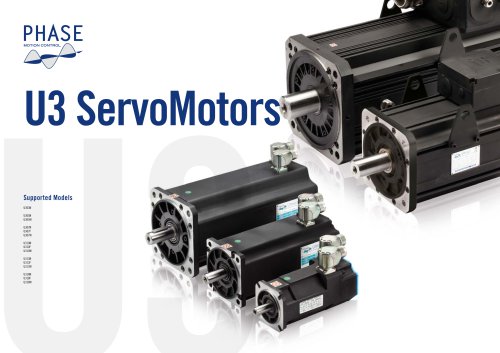 U3 Servo Motors
64 Pages
 TWX - Integrated Servo Motor
11 Pages

- DC power supply
- AC/DC power supply
- Servo-motor
- Single-output power supply
- Power supply for industrial applications
- Servo-amplifier
- High-performance servo motor
- AC servo-motor
- Power supply with overload protection
- DC servo-amplifier
- Single-phase power supply
- Fieldbus servo-drive
- Controller servomotor
- Multipole servomotor
- IP65 servomotor
- DC servo-motor
- Ultra-compact servomotor
- AC servo-amplifier
- BLDC servomotor