
- Catalogs
- Pertronic Industries Pty Ltd
- CP500 HANDHOLD PROGRAMMER


CP500 HANDHOLD PROGRAMMER
CP500 HANDHOLD PROGRAMMER
- Dimensions: 2.0˝H×5.1˝W×7.3˝L (51mm H×130mm W×186mm L)
- Battery Life: 200 hours (typical usage) with 2 AA batteries included
- Storage Temperature Range: 14ºF to 140ºF (-10ºC to 60ºC)
- Operating Temperature Range: 32ºF to 122ºF (0ºC to 50ºC)
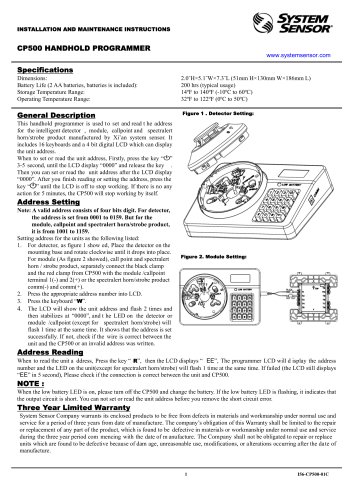
The CP500 Handhold Programmer is designed to set and read addresses for intelligent detectors, modules, callpoints, and Spectralert horn/strobe products by Xi’an System Sensor. It features 16 keyboards and a 4-bit digital LCD for displaying unit addresses.
- Press the key for 3-5 seconds until the LCD displays “0000”.
- For detectors, place on the mounting base and rotate clockwise. For modules, callpoints, and horn/strobe products, connect the black and red clamps to the respective terminals.
- Enter the appropriate address number on the LCD.
- Press the “W” key. The LCD will flash the unit address twice and stabilize at “0000”. The LED on the unit will flash once to confirm successful address setting.
Note: Valid addresses are 0001 to 0159 for detectors and 1001 to 1159 for other units.
- Press the “R” key. The LCD will display “EE” and then show the address number. The unit's LED will flash once.
- If the LCD continues to display “EE”, check the connection between the unit and CP500.
- Low battery LED indicates the need to replace batteries.
- Flashing low battery LED indicates a short circuit in the output circuit, preventing address setting or reading until resolved.
System Sensor Company offers a three-year limited warranty from the date of manufacture, covering defects in materials and workmanship under normal use. The warranty does not cover damage due to unreasonable use or modifications.
Catalog excerpts
INSTALLATION AND MAINTENANCE INSTRUCTIONS CP500 HANDHOLD PROGRAMMER www.systemsensor.com Dimensions: Battery Life (2 AA batteries, batteries is included): Storage Temperature Range: Operating Temperature Range: General Description This handhold programmer is used t o set and read t he address for the intelligent detector , module, callpoint and spectralert horn/strobe product manufactured by Xi’an system sensor. It includes 16 keyboards and a 4 bit digital LCD which can display the unit address. When to set or read the unit address, Firstly, press the key “ ” 3-5 second, until the LCD display “0000” and release the key . Then you can set or read the unit address after the LCD display “0000”. After you finish reading or setting the address, press the key “ ” until the LCD is off to stop working. If there is no any action for 5 minutes, the CP500 will stop working by itself. Address Setting Note: A valid address consists of four bits digit. For detector, the address is set from 0001 to 0159. But for the module, callpoint and spectralert horn/strobe product, it is from 1001 to 1159. Setting address for the units as the following listed: 1. For detector, as figure 1 show ed, Place the detector on the mounting base and rotate clockwise until it drops into place. For module (As figure 2 showed), call point and spectralert horn / strobe product, separately connect the black clamp and the red clamp from CP500 with the module /callpoint terminal 1(-) and 2(+) or the spectralert horn/strobe product comm(-) and comm(+). 2. Press the appropriate address number into LCD. 3. Press the keyboard “W”. 4. The LCD will sh ow the unit address and flash 2 times and then stabilizes at “0000”, and t he LED on the detector or module /callpoint (except for spectralert horn/strobe) will flash 1 time at the same time. It shows that the address is set successfully. If not, check if the wire is correct between the unit and the CP500 or an invalid address was written. Figure 2. Module Setting: Address Reading When to read the unit a ddress, Press the key “ R”, then the LCD displays “ EE”, The programmer LCD will d isplay the address number and the LED on the unit(except for spectralert horn/strobe) will flash 1 time at the same time. If failed (the LCD still displays “EE” in 5 second), Please check if the connection is correct between the unit and CP500. When the low battery LED is on, please turn off the CP500 and change the battery. If the low battery LED is flashing, it indicates that the output circuit is short. You can not set or read the unit address before you remove the short circuit error. Three Year Limited Warranty System Sensor Company warrants its enclosed products to be free from defects in materials and workmanship under normal use and service for a period of three years from date of manufacture. The company’s obligation of this Warranty shall be limited to the repair or replacement of any part of the product, which is found to be defective in materials or workmanship under normal use and service during the three year period com mencing with the date of m anufacture. The Company shall not be obligated to repair or replace units which are found to be defective because of dam age, unreasonable use, modifications, or alterations occurri
Open the catalog to page 1All Pertronic Industries Pty Ltd catalogs and technical brochures
 Outdoor Strobe SRHKRLFIRE
2 Pages
 PERTRONIC INDUSTRIES LTD
4 Pages


Archived catalogs
 B501AUS
2 Pages
 2251CTLE-34-IV
2 Pages
 NETCU-A
2 Pages
 COPTIR
6 Pages
 5251RB-WP
2 Pages
 22051TLE-34
2 Pages
 2251BPI
2 Pages
 NETCARD
2 Pages
 F120A
F120A4 Pages
 Petronic F 220
2 Pages
 PTIR
PTIR6 Pages



- Power supply unit
- DC power supply
- AC/DC power supply
- Digital I/O
- Real-time software
- Windows software
- IO module
- Computer-aided design software
- Single-output power supply
- Design software solution
- Digital IO module
- 3D software solution
- Communication gateway
- Interface software
- Signal amplifying integrated circuit
- Visualization software solution
- Fieldbus gateway
- Ethernet gateway
- Serial gateway
- Modular housing