


News NX10.0+

News NX10.0+
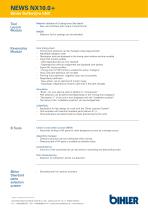
- New user interface with output available in Excel format.
- Coating selection list can be extended.
- Positions can be changed using drag-and-drop.
- Adjustable category order.
- Description texts are displayed and movable within the timing chart window.
- Import NC motion profiles with valid dependencies retained; unassigned dependencies are shown with dashes.
- Export NC motion profiles with timing chart in PDF format for active categories.
- Movable texts with path definition.
- Forming force definition allows negative value input.
- New dependency definition option to set start/end of motion range, maintaining validity even if the path changes.
- "Body" can be used in addition to "Component".
- Path selection based on "timing chart category".
- "Description 1" of the unit is displayed with the "installation position".
- The name of the "installation position" can be changed later.
- Application for fast design using the "Bihler Leantool System".
- Tool template with Leantool standard parts (Version E1.1).
- Tool parameters determined by positioning NC units.
- Automatic locking of NX parts for other designers upon changes.
- Directory structure maintained when cloning.
- Directory path of NX parts available as attribute value.
- Columns can be sorted in ascending and descending order.
- Supports selection of intersection points.
- Standard parts for Leantool solutions.
Otto Bihler Maschinenfabrik GmbH & Co. KG | Lechbrucker Str. 15 | D - 87642 Halblech
Tel.: +49(0)8368/18-0 | Fax: +49(0)8368/18-181 | [email protected] | www.bihler.de
(Subject to change without notice 01/18)
NEWS NX10.0+
Bihler Softw@re bNX
Tool Layout Module
Kinematics Module
B Tools
Bihler Standard parts selection system
Catalog excerpts
NEWS NX10.0+ Bihler Softw@re bNX Tool Layout Module Material utilization & Cutting force (flat blank) – New user interface with output in Excel format Kinematics Module Cam timing chart – Timing chart positions can be changed using drag-and-drop – Adjustable category order – Description texts are displayed in the timing chart window and are movable – Import NC motion profiles - Valid dependencies are now retained - Dependencies without assignment are displayed with dashes – Export NC motion profiles - Timing chart in PDF format is created for active “Category” – Texts with path definition are movable – Forming force definition: negative value input is possible – Dependency definition - New option: set to start/end of motion range - Advantage: Dependency remains valid even if the path changes MADIS – Selection list for coatings can be extended Simulation – “Body” can now also be used in addition to “Component“ – Path selection can be performed depending on the “timing chart category” – “Description 1” of the unit is now displayed with the “installation position” – The name of the “installation position” can be changed later LEANTOOL – Application for fast design of a tool with the “Bihler Leantool System” – Tool template with Leantool standard parts (Version E1.1) – Tool parameters are determined by simply positioning the NC units Check in and check out tool (NEW) – Automatic locking of NX parts for other designers as soon as a change occurs Assembly manager – Directory structure can be maintained when cloning. – Directory path of NX parts is available as attribute value Coordinate list – Columns of the coordinate list can be sorted in ascending and descending order Point dimensioning – Selection of intersection points is supported Bihler Standard parts selection system – Standard parts for Leantool solutions (Subject to change without notice 01/18) Otto Bihler Maschinenfabrik GmbH & Co. KG | Lechbrucker Str. 15 | D - 87642 Halblech Tel.: +49(0)836
Open the catalog to page 1All Otto Bihler Maschinenfabrik GmbH & Co. KG catalogs and technical brochures
 Image brochure Bihler
15 Pages
 Brochure BNC Series
7 Pages
 Brochure BIMERIC BM
11 Pages
 Imagebrochure Bihler
15 Pages
 Brochure Bihler LEANTOOL
7 Pages
 Flyer News NX 10+
1 Page
 Flyer Processing center BZ 1
2 Pages




Archived catalogs
 COMBITEC CC1 FORMING CENTER
14 Pages
 FMS FLEXIBLE ASSEMBLY SYSTEM
2 Pages
 RM 40 K
2 Pages
 RM 40KS
2 Pages
 RM 40P
2 Pages
 GRM 80E
2 Pages
 GRM 80B
2 Pages
 MCS 1 ? MCS 05
2 Pages
 GSE K1 K2 K3
4 Pages
 GSE KS1 / KS2
2 Pages
 VariControl VC 1
4 Pages
 TWINTEC
2 Pages
 HB 60E
2 Pages
 BIMERIC SP
5 Pages
 UNIVERSAL TOOL
1 Page
 RM-NC / GRM-NC
11 Pages
 COMBITEC CC 1 UMFORMCENTER
7 Pages
 BNC series
7 Pages
 Product Overview
26 Pages
 Forming center Combitec CC1
2 Pages



- Cutting system
- Industrial press
- Rail conveyor
- Metal cut-off machine
- CNC cutting center
- Welding system
- Forming press
- Hydraulic press
- Transport rail conveyor
- Belt conveyor
- Sheet metal cutting machine
- Horizontal conveyor
- Automatic welding machine
- Bender
- Automatic press
- Feeder
- 3D software solution
- Electric bending cell
- Vertical press
- Electric press