
- Catalogs
- Orbit Merret s.r.o.
- OMT 1550

OMT 1550

OMT 1550
The OMT 1550 is a device designed for online control of digital outputs, switching using rules at a given time, and responding to user inputs. It records actions into a database and internal memory and can be configured via a web browser. The device is powered over Ethernet (PoE) and is easy to install and start up.
There is a risk of electric shock; all power supplies and input lines must be disconnected before servicing. The device should not be used in safety-critical systems, disassembled, repaired, or modified. It must be operated within recommended conditions by qualified personnel only.
The OMT 1550 connects via a data cable with PoE and does not support PoE Auto Recovery. It requires deactivation of this function on the network device port. The device starts by connecting the data cable and synchronizes time via public NTP servers if accessible.
Configuration is accessible via WiFi or Ethernet. The device creates its own WiFi network for configuration, or it can be accessed through an assigned IP address on the network. Time synchronization is automatic with NTP servers, but manual setting is possible if necessary.
The OMT 1550 complies with EU regulations and must be installed according to applicable standards. It features Ethernet and WiFi connectivity, Bluetooth, and is powered by PoE. It has digital and optional inputs, relay outputs, and specific mechanical properties. Operating conditions include a temperature range of -30° to 85°C and a protection class of IP30.
The device dimensions are 80 x 25 x 85 mm and it is mounted on a DIN rail TS35. Adequate airflow around the casing is recommended to prevent heat buildup.
Catalog excerpts

z On-line control of digital outputs z Switching using rules at a given time z Response to user inputs fr z Actions recorderd into database and internal memory z Settings from PC via web browser z Powered over Ethernet (PoE) z Easy installation and first start-up ② ① Connector for data cable with PoE ② Input signal connector (optional) ③ Connectors ④ LED relay open relay closed DANGER RISK OF ELECTRIC SHOCK - Before servicing disconnect all power supplies and other supply and input lines. EQUIPMENT OPERATION HAZARD - Do not use this product in a safety critical system. - Do not disassemble, repair or modify the product. - Do not use the product outside the recommended operating conditions. Failure to follow this instruction may result in death, or serious injury. Failure to follow these instructions could result in death, serious injury or damage to the equipment. Electrical equipment may be installed, operated, and maintained only by qualified personnel. Company ORBIT MERRET accepts no liability for any consequences arising from the use of this material..
Open the catalog to page 1
Connector pitch Power 3 supply and start Power supply OMT 1550 is powered by Power over Ethernet (PoE) technology according to the 802.3af specification. OMT 1550 does not support PoE Auto Recovery. It is necessary to deactivate this function on the port of the network device (switch, router, etc.) to which OMT 1550 is connected (provided the conenctred device supports this functionality and it is enanbled) Start OMT 1550 is turned on by connecting the data cable with PoE. If OMT 1550 - XXXXXX has free access to public NTP servers for time synchronization, it retrieves the current time, logs...
Open the catalog to page 2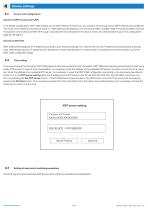
Access into configuration Access via WiFi access point (AP) In its default configuration, OMT 1550 creates its own WiFi network to which you can connect and through which OMT 1550 can be configured. The name of the network is the device name i.e.: OMT1550 and the password is in the format OMT * 123456 (refer to the device label). Connect the superior control device to WiFi AP through a procedure that is standard for this device. Then use a web browser to go to the configuration page at 192.168.4.1. Access via Ethernet OMT 1550 will be assigned an IP address according to your network settings....
Open the catalog to page 3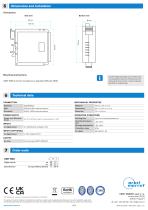
D imensions and installation 5 Dimensions Side view Bottom view Mounting instructions OMT 1550 is to be mounted on a standard DIN rail TS35. As OMT 1550 generates some limited heat, it is advisable to alow for air flow around its casing and not to mount it close to devices sensitive to ambient heat. T echnical data 6 CONNECTION MECHANICAL PROPERTIES AP/STA 2,4Ghz internal antenna POWER SUPPLY Power over Ethernet (PoE) OPERATING CONDITIONS 44 – 57V, 802.3af class 0, consumption 2 - 5 W INPUTS 1x digital input Operating temperature Storage temperature up to 3 minutes after power-on -30°…85°C -30°…80°C...
Open the catalog to page 4All Orbit Merret s.r.o. catalogs and technical brochures
 OM 403UNI
2 Pages
 OMT 1450
4 Pages
 MEASURING INSTRUMENTS
164 Pages
 Paperless Recorder OMR 700
12 Pages
 PLUG-IN CARDS OMR 700
58 Pages
 catalogueplc
12 Pages
 OMX 312UNI
2 Pages
 accessories20151
1 Page
 omp3820151
2 Pages

Archived catalogs
 0X+ Calibrator
1 Page
 1x+ Series Calibrator
1 Page


- Display module
- Measuring device
- Industrial display panel
- Digital I/O
- Single-pole switch
- IO module
- Color display panel
- Digital pyrometer
- Switching relay
- Digital indicator
- Analog I/O
- Digital IO module
- LED display panel
- Panel panel meter
- °C thermometer
- Control display system
- Electronic display panel
- Programmable logic controller
- Digital gauge
- Digital analyzer