


1165

1165
PC-based control systems offer advantages such as direct access to standard networks like Ethernet, use of familiar programming languages, easier integration with various systems, cost-effectiveness, enhanced performance for data-intensive applications, and the ability to run control programs and HMIs on the same hardware.
Considerations for PC-based control include the choice of programming language, network requirements, protocol needs, and the necessity of distributed control. Various system architectures are available, each with specific hardware and software requirements.
This setup involves developing a control program using PAC Control software, executed by SoftPAC on a PC. It supports multiple SNAP PAC brains and I/O modules over an Ethernet network.
Utilizes the SNAP PAC .NET OptoMMP SDK or OptoMMP Communication Toolkit for control programs, supporting a wide range of SNAP PAC brains and I/O modules, suitable for both newer and older Windows versions.
This configuration allows direct control of I/O without an I/O processor, using a PC with an AC5-type adapter card and the PC-Based Direct I/O SDK, suitable for high-speed control of I/O points.
For serial control, systems can use mistic or Optomux protocols with appropriate adapter cards and toolkits, supporting extensive I/O points over RS-485 networks.
PC-based control systems provide flexibility and integration capabilities for various industrial applications. The choice of system architecture depends on specific application requirements, including network, protocol, and control needs.
This document provides technical specifications and guidelines for using Opto 22's Pamux system for PC-based control via Brain (I/O Processor), including details on compatible hardware, software, and protocols for both digital and analog I/O applications.
The document outlines various product lines and protocols, including Pamux, Optomux, and G4 racks. It specifies the use of different PC bus adapter cards such as PCI-AC51 and PCIe-AC51 for connecting to the Pamux system. It also lists compatible software development toolkits like the PAMUX Systems SDK and OptoDriver Toolkit.
For high-speed control of multiple digital and/or analog I/O points, the document recommends using specific combinations of equipment, including SNAP-B4 and SNAP-B6 brains, along with compatible SNAP I/O modules. It provides guidance on accessing up to 512 I/O points located up to 500 feet away per adapter card.
The document details compatibility with various operating systems, including Windows 95/98/ME, 2000/XP, and Windows 7 and Vista (32-bit and 64-bit). It also mentions programming languages such as C#, VB.NET, Microsoft Visual Basic, and Microsoft Visual C++.
The document advises against using certain older designs and refers to the Legacy and Current Products Comparison and Compatibility Charts for further guidance. It emphasizes the importance of selecting the right combination of equipment based on specific I/O application requirements.
The document includes tables listing supported brains, I/O modules, and adapter cards, highlighting the integration of G4 and G1 I/O in various racks. It also notes the use of 50-pin ribbon cables for connectivity.
Catalog excerpts

PC-Based I/O Control Systems Why PC-Based Control? Automation engineers have argued for years over the place of PC-based control in the industry. Even as hardware controllers have become more PC-like and PCs have become more reliable, differences still remain. up a new system, how many points of I/O do you need to control? Options vary in terms of the network used for communicating with I/O, and networks vary in terms of how many I/O points or I/O units they can support. Your choice to use PC-based control depends on the needs of your specific situation. Here are some reasons you may want to choose PC-based control: Protocol—Like the network (and related to it), a specific protocol may be necessary for your application. Ethernet-based SNAP I/O uses the open OptoMMP protocol. Older serial-based I/O may use mistic or Optomux. Or perhaps you need high-speed Pamux for digital I/O. Check the options for the protocols they support, too. Direct access to standard computer networks and communication interfaces, such as Ethernet Ability to use standard programming languages you may already know, such as C++, VB.NET, or another object-oriented programming tool Easier integration with a variety of systems, including company computer networks, manufacturing, business, and facility systems Lower cost due to use of commercial off-the-shelf technology Better performance in applications that require rapid reading or writing to files, or complex calculations Extensive storage capacity for applications that accumulate large quantities of data Protection of intellectual property, such as control algorithms Ability to run the control program and the human-machine interface (HMI) on the same hardware Options for PC-Based Control So you’ve decided PC-based control is the way to go. What hardware and software do you need to make it work? This document shows examples of system architecture for PC-based control, followed by detailed tables listing the hardware and software you can use for each example. Here are some things to think about as you look at the options. Programming language—If you already know one or more programming languages (like flowchart-based PAC Control, or C#, or a .NET language), or have a specific one you need to work in, look for the options that support that language. Network—Have an existing serial I/O network? Need to connect with devices on Ethernet? Need the speed of a direct connection to digital I/O? Or if you’re setting Form 1165-130114 Distributed control—An Opto 22 I/O unit consists of I/O modules and an I/O processor (brain), mounted on a rack. Brains provide distributed control for many functions, including counting, latching, thermocouple linearization, ramping, and much more—even PID loop control. Any option that uses brains lets you take advantage of this distributed control, so that these functions continue even if the I/O unit loses communication with the PC. If you don’t want distributed control, look for the option that provides direct control of I/O without brains. Contents Ethernet: PC-based Control using SoftPAC • System example, page 2 • Details, page 3 Ethernet: PC-based Control using OptoMMP Protocol • System example, page 4 • Details, page 5 Direct Control of I/O—No Brain (I/O Processor) • System example, page 7 • Details, page 8 Serial: PC-based Control via Brain (I/O Processor) • System example, page 9 • Details, page 10 Pamux: PC-based Control via Brain (I/O Processor) • System example, page 12 • Details, page 13 © 2012–2013 Opto 22. All rights reserved. Dimensions and specifications are subject to change. Brand or product names used herein are trademarks or registered trademarks of their respective companies or organizations.
Open the catalog to page 1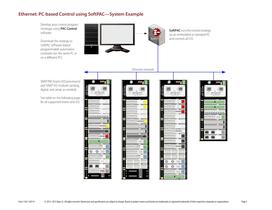
Ethernet: PC-based Control using SoftPAC—System Example Develop your control program (strategy) using PAC Control software. SoftPAC runs the control strategy on an embedded or standard PC and controls all I/O. Download the strategy to SoftPAC software-based programmable automation controller (on the same PC or on a different PC). Ethernet network SNAP PAC brains (I/O processors) and SNAP I/O modules (analog, digital, and serial, as needed) See table on the following page for all supported brains and I/O. © 2012–2013 Opto 22. All rights reserved. Dimensions and specifications are subject to change....
Open the catalog to page 2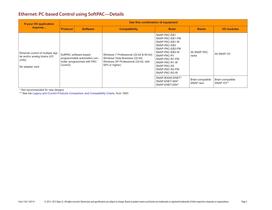
Ethernet: PC-based Control using SoftPAC—Details If your I/O application requires... Use this combination of equipment Protocol Windows 7 Professional (32-bit & 64-bit) Windows Vista Business (32-bit) Windows XP Professional (32-bit, with SP2 or higher) Ethernet control of multiple digiSoftPAC software-based tal and/or analog brains (I/O programmable automation conunits) troller (programmed with PAC Control) No adapter card Brain-compatible SNAP rack * Not recommended for new designs ** See the Legacy and Current Products Comparison and Compatibility Charts, form 1693 © 2012–2013 Opto 22. All...
Open the catalog to page 3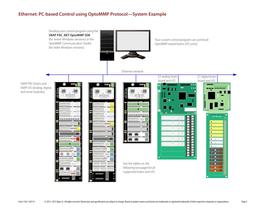
Ethernet: PC-based Control using OptoMMP Protocol—System Example Develop your control program using the SNAP PAC .NET OptoMMP SDK (for newer Windows versions) or the OptoMMP Communication Toolkit (for older Windows versions) Your custom control program can control all OptoMMP-based brains (I/O units). Ethernet network E2 analog brain board and I/O SNAP PAC brains and SNAP I/O (analog, digital, and serial modules) E1 digital brain board and I/O See the tables on the following two pages for all supported brains and I/O. © 2012–2013 Opto 22. All rights reserved. Dimensions and specifications are...
Open the catalog to page 4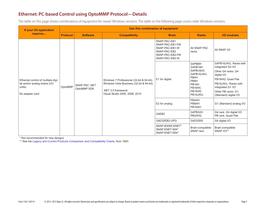
Ethernet: PC-based Control using OptoMMP Protocol—Details The table on this page shows combinations of equipment for newer Windows versions. The table on the following page covers older Windows versions. If your I/O application requires... Use this combination of equipment Protocol Ethernet control of multiple digital and/or analog brains (I/O SNAP PAC .NET units) OptoMMP OptoMMP SDK No adapter card Windows 7 Professional (32-bit & 64-bit) Windows Vista Business (32-bit & 64-bit) .NET 3.5 framework Visual Studio 2005, 2008, 2010 G4PB16J/K/L: Racks with integrated G4 I/O Other G4 racks: G4 digital...
Open the catalog to page 5All Opto 22 catalogs and technical brochures
 0491_PB
4 Pages
 1240_SNAP
6 Pages
 1556_SNAP
18 Pages
 1184_SNAP
5 Pages
 B3000-B
4 Pages
 1990_OptoEMU
8 Pages
 0859_Solid
23 Pages
 1936_OptoEMU
11 Pages
 1120_SNAP
13 Pages
 1065_SNAP
42 Pages
 1684_SNAP
7 Pages
 1594_SNAP_
16 Pages
 1662_OptoDataLink
4 Pages
Archived catalogs
 1487_OptoOPCServer
3 Pages
 1780_PAC
2 Pages
 1699_PAC
9 Pages

- Power supply unit
- DC power supply
- AC/DC power supply
- Automation software solution
- Management software solution
- Windows software
- Switching relay
- Digital IO module
- Monitoring software solution
- Industrial software
- Interface software
- Compact power supply
- Programmable logic controller
- Programming software
- Development software
- Analog IO module