

pressure data-logger

pressure data-logger
The HOBO U20 Water Level Logger is designed for monitoring water levels in various environments such as streams, lakes, wetlands, tidal areas, and groundwater. It is noted for its high accuracy and ease of use, without the need for vent tubes or desiccants.
The logger features a maintenance-free absolute pressure sensor and is available in stainless steel or titanium housing. It can record over 21,700 pressure and temperature measurements.
HOBOware Pro software is required for operation, converting pressure readings into water level readings and compensating for temperature, fluid density, and barometric pressure.
Data can be accessed using a laptop with HOBOware Pro and an Onset Optic USB Base Station or HOBO Waterproof Shuttle. The optical interface allows data offloading without compromising seal integrity.
Available models include U20-001-01, U20-001-01-Ti, U20-001-02, U20-001-03, and U20-001-04, each supporting different depth ranges.
The logger records absolute pressure, which includes atmospheric pressure. Barometric pressure changes can be compensated using a barometric reference logger.
Each logger is individually calibrated for pressure and temperature, with calibration coefficients stored in non-volatile memory.
Ensure full temperature equilibrium before recording reference levels. Avoid sudden temperature changes and ensure the well is vented to the atmosphere. Use a no-stretch wire for deployment.
Steps include cutting wire for suspension, attaching the logger, and measuring water depth. Allow 20 minutes for temperature equilibrium before measuring water depth.
Data can be collected using a laptop with HOBOware Pro or a HOBO Waterproof Shuttle. Barometric pressure data can be read out similarly.
Use the Barometric Compensation Assistant in HOBOware Pro to determine water levels using barometric pressure data.
The setup involves selecting a date/time post-deployment, using barometric data files, and generating a data file. Users can create new data series and plot water level data. Measurement errors can arise from manual errors, sensor drift, or changes in suspension cable length. Barometric data can be sourced from third-party weather stations or online sources, with specific formatting requirements for data files.
The logger should not be opened by users to avoid damage. It is sensitive to shock and should be handled carefully. Biofouling can affect sensor accuracy, so periodic inspections are recommended. The logger's materials are resistant to most solvents, but care should be taken with polar solvents.
Sensor drift is minimal but can be accounted for by taking reference level measurements. Drift is only significant when absolute pressure values are needed without recent reference measurements.
Accuracy can be verified by comparing readings at different depths or against a local barometer. Recalibration can be arranged through Onset for NIST standard verification.
The logger uses a 3.6 Volt lithium battery with a typical life of five years, depending on usage conditions. Battery replacement should be done by Onset to avoid damage.
The document details specifications for different models (U20-001-01, U20-001-02, etc.), including operation range, accuracy, resolution, and response times for pressure and temperature measurements. The logger features a real-time clock, memory capacity, and is compliant with EU directives.
Catalog excerpts

Onset Computer Corporation - 2 - LEDs > A light (LED) in the communications window of the logger confirms logger operation. The following table explains when the logger blinks during logger operation: Before you deploy the HOBO U20 Water Level Logger in the field, perform the following steps in the office: 1.Start HOBOware. 2.Connect the logger to the computer. See below. 3.Verify Status Click STATUS on toolbar and observe that the absolute pressure is near barometric pressure for the location and the temperature is near the actual temperature.4.Launch the logger. See the > The logger is logging...
Open the catalog to page 2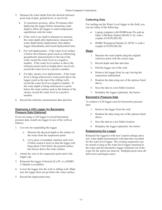
Onset Computer Corporation - 4 - 5.Measure the water depth from the desired reference point (top of pipe, ground level, or sea level). Collecting Data To maximize accuracy, allow 20 minutes after deploying the logger before measuring water depth to allow the logger to reach temperature equilibrium with the water. For reading out the Water Level logger in the field, you can use either of the following: If the well is too small in diameter to measure the water depth after deployment, measure the water depth before deployment, then deploy logger immediately and record deployment time. Laptop computer...
Open the catalog to page 4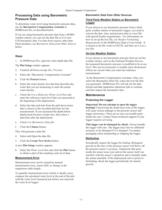
Onset Computer Corporation - 5 - Barometric Data from Other Sources Third Party Weather Station or Barometric > To determine water level using barometric pressure data, use the Logger Barometric Compensation Assistant in HOBOware Pro, as described below. If you are using barometric pressure data from a HOBO weather station, you can use the data file as if it were U20 barometric data. For data from sources other than Onset products, see If you choose to use barometric pressure from a third party weather station or barometric logger, you need to convert the date, time, and pressure data to a text...
Open the catalog to page 5
Onset Computer Corporation - 6 - Solvents of your HOBO Water Level Logger by comparing its ambient pressure readings to a second HOBO logger. Their readings should be within each others specified accuracy. Alternatively, you can check the pressure reading against an accurate local barometer. If you use a non-local source of barometric information, such as the NOAA website, adjust for altitude. Check a materials-compatibility chart before deploying the logger in locations where untested solvents are present: The logger is shipped with Viton O-rings installed. Viton has an excellent resistance...
Open the catalog to page 6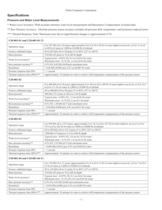
Operation range 0 to 207 kPa (0 to 30 psia); approximately 0 to 9 m (0 to 30 ft) of water depth at sea level, or 0 to 12 m (0 to 40 ft) of water at 3,000 m (10,000 ft) of altitude Factory calibrated range 69 to 207 kPa (10 to 30 psia), 0 to 40аC (32 to 104аF) Burst pressure 310 kPa (45 psia) or 18 m (60 ft) depth Water level accuracy* Typical error - 0.05% FS, 0.5 cm (0.015 ft) water Maximum error - 0.1% FS, 1.0 cm (0.03 ft) water Raw pressure accuracy** 0.3% FS, 0.62 kPa (0.09 psi) maximum error Resolution < 0.02 kPa (0.003 psi), 0.21 cm (0.007 ft) water Pressure response time 90% < 1 second...
Open the catalog to page 7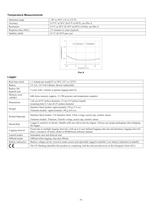
Operation range -20 to 50аC (-4 to 122аF) Accuracy 0.37C at 20аC (0.67F at 68аF), see Plot A Resolution 0.1C at 20аC (0.18F at 68аF) (10-bit), see Plot A Response time (90%) 3.5 minutes in water (typical) Stability (drift) 0.1C (0.18аF) per year > Accuracy Resolution ) Accuracy/Resolution (C 00.511.52 -2002040Temperature (аC) Plot A Real-time clock 1 minute per month 0Ѱ to 50C (32а to 122F) Battery 2/3 AA, 3.6 Volt Lithium, factory-replaceable Battery life (typical use) 5 years with 1 minute or greater logging interval Memory (non-volatile) 64K bytes memory (approx. 21,700 pressure and temperature...
Open the catalog to page 8All ONSET catalogs and technical brochures
 HOBO® MX1105 Data Logger
3 Pages
 HOBO® MX100 Data Logger
3 Pages
 HOBO UX90-004x
6 Pages
 HOBO UX90-005x/-006x
7 Pages
 HOBO UX100-002x
6 Pages
 HOBO UX100-003
8 Pages
 HOBO UX100-014M
8 Pages
 InTemp® CX403
3 Pages
 HOBO® MX2204 Data Logger
3 Pages
 InTemp® CX702 Data Logger
2 Pages
 InTemp® CX602 Data Logger
2 Pages
 InTemp® CX5000
2 Pages
 T-WNB-3D-240 Sensor
2 Pages
 S-FS-TRMSA Sensor
2 Pages
 S-RGF-M002 Sensor
2 Pages
 HOBO® Energy Logger
2 Pages
 S-THB-M008 Sensor
3 Pages
 T-VER-PX3UL Sensor
2 Pages
 S-WCF-M003 Sensor
3 Pages
 HOBO® MX2301A Data Logger
3 Pages
 HOBO® RX3000 Data Logger
3 Pages
 RXW-THC-xxx Sensor
3 Pages
 MX1102
2 Pages
 ZW series
2 Pages
 HOBO MX2300
2 Pages
 UX90
UX902 Pages
 HOBO USB Micro Station
2 Pages
 Catalog 2014
46 Pages


- Data logger
- Analysis software solution
- Windows software
- Cloud-based software
- Temperature datalogger
- Monitoring software solution
- Communication gateway
- USB datalogger
- Data-logger with screen
- Ethernet gateway
- Wireless datalogger
- Battery-powered datalogger
- Wireless gateway
- Monitoring datalogger
- Datalogger with LCD display
- Compact logger
- Humidity datalogger
- Condition monitoring module
- Multi-channel datalogger
- Datalogger for food applications