

humidity and temperature data-logger

humidity and temperature data-logger
The HOBO Pro v2 data logger is designed for outdoor applications, offering reliable and accurate measurements with a rugged case. It can store over 42,000 12-bit measurements and features user-replaceable RH sensors for certain models.
- Temperature Sensor: Operates from -40° to 70°C for internal sensors and up to 100°C for certain external sensors. Accuracy is 0.2°C over 0° to 50°C, with a resolution of 0.02°C at 25°C.
- Relative Humidity Sensor: Available on U23-001 and U23-002 models, operating from 0-100% RH and -40° to 70°C. Accuracy is +/- 2.5% from 10% to 90% RH.
- Logger: Operates from -40° to 70°C, with a battery life of approximately 3 years under typical use. It has a memory capacity of 64K bytes.
The logger uses an optical USB interface for data transfer, requiring HOBOware software version 2.2.1 or higher. It supports immediate and delayed start modes, with logging intervals from 1 second to 18 hours.
Includes a clamp for mounting and requires periodic inspection of desiccant packs. RH sensors can be replaced following specific instructions for each model. The battery is user-replaceable, with guidelines provided for safe replacement.
The product complies with EU directives and includes warnings regarding battery handling and disposal.
Catalog excerpts

Cables U23-001: No cables U23-002: One 184 cm (6 ft.) PVC cable; sensor diameter 1 cm (0.38 in.) U23-003: Two 184 cm (6 ft.) PVC cables; sensor diameter 0.5 cm (0.20 in.) U23-004: One 184 cm (6 ft.) PVC cable; sensor diameter 0.5 cm (0.20 in.) Environmental rating Electronics housing is NEMA 6P equivalent (tolerant of brief submergence); Units with RH sensors are NEMA 4 equivalent (splash-resistant) Launch modes Immediate start; delayed start Logging interval Fixed-rate or multiple logging intervals, with up to 8 user-defined logging intervals and durations; logging intervals from 1 second to...
Open the catalog to page 2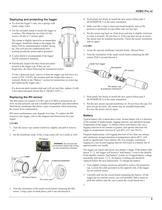
To clean the loggers case, use a sponge with warm, soapy water. Use the included clamp to mount the logger to a surface. The clamp has two holes for the screws, 44 mm (1.7 inches) apart. The clamp is slightly tapered to accommodate the logger. Install the clamp so the logger fits better with its communication window facing up. This will prevent condensation from pooling around the sensor and/or grommet. U23-002 1. Grasp the cap and membrane and pull firmly. Discard them. 2. Note the orientation of the small circuit board containing the RH sensor. Pull it out and discard it. A solar shield is...
Open the catalog to page 3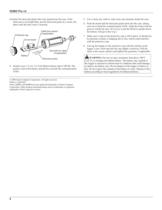
Examine the desiccant packs that were packed into the case. If the desiccant is not bright blue, put the desiccant packs in a warm, dry place until the blue color is restored. > Cable from sensor (if applicable) Protective cap Circuit board Grommet for cable(if applicable) Battery Desiccant packs WARNING: Do not cut open, incinerate, heat above 100C 4. Install a new 1/2 AA, 3.6 Volt lithium battery (part # HP-B). The positive end of the battery should face towards the communication LEDs. 5. Use a clean, dry cloth to wipe away any moisture inside the case. 6. Push the board and the desiccant packs...
Open the catalog to page 4All ONSET catalogs and technical brochures
 HOBO® MX1105 Data Logger
3 Pages
 HOBO® MX100 Data Logger
3 Pages
 HOBO UX90-004x
6 Pages
 HOBO UX90-005x/-006x
7 Pages
 HOBO UX100-002x
6 Pages
 HOBO UX100-003
8 Pages
 HOBO UX100-014M
8 Pages
 InTemp® CX403
3 Pages
 HOBO® MX2204 Data Logger
3 Pages
 InTemp® CX702 Data Logger
2 Pages
 InTemp® CX602 Data Logger
2 Pages
 InTemp® CX5000
2 Pages
 T-WNB-3D-240 Sensor
2 Pages
 S-FS-TRMSA Sensor
2 Pages
 S-RGF-M002 Sensor
2 Pages
 HOBO® Energy Logger
2 Pages
 S-THB-M008 Sensor
3 Pages
 T-VER-PX3UL Sensor
2 Pages
 S-WCF-M003 Sensor
3 Pages
 HOBO® MX2301A Data Logger
3 Pages
 HOBO® RX3000 Data Logger
3 Pages
 RXW-THC-xxx Sensor
3 Pages
 MX1102
2 Pages
 ZW series
2 Pages
 HOBO MX2300
2 Pages
 UX90
UX902 Pages
 HOBO USB Micro Station
2 Pages
 Catalog 2014
46 Pages
 pressure data-logger
8 Pages


- Data logger
- Analysis software solution
- Windows software
- Cloud-based software
- Temperature datalogger
- Monitoring software solution
- Communication gateway
- USB datalogger
- Data-logger with screen
- Ethernet gateway
- Wireless datalogger
- Battery-powered datalogger
- Wireless gateway
- Monitoring datalogger
- Datalogger with LCD display
- Compact logger
- Humidity datalogger
- Condition monitoring module
- Multi-channel datalogger
- Datalogger for food applications