

HOBO UX90-005x/-006x

HOBO UX90-005x/-006x
- Occupancy Sensor: UX90-005x detects up to 5 meters, UX90-006x up to 12 meters, with varying detection angles and zones.
- Light Sensor: Detects light above 65 lux from sources like LED and natural light.
- Logger: Offers memory options of 128 KB or 512 KB, with features like wrap or stop memory modes, multiple start/stop modes, and a 1-year battery life.
- Includes start/stop and calibration buttons, USB port, and mounting loops.
- LCD displays status symbols for battery, memory, occupancy, and light conditions.
- Connect to a computer via USB for configuration using HOBOware.
- Logging options include immediate, interval-based, or push-button start/stop.
- Light sensor calibration can be automatic or preset via software.
Catalog excerpts

UX90-005x The HOBO Occupancy/Light data logger monitors room occupancy up to 5 or 12 meters away (depending on the model) as well as indoor light changes with its integrated sensors. Using HOBOware®, you can easily configure both channels to record occupancy and light on and off conditions for building energy audits. This compact data logger has a built-in LCD screen for checking status, remaining battery level, and memory consumption. You can also use the LCD screen to quickly calibrate the logger to the light level in the room or select preset sensitivity thresholds with HOBOware. There are two models of both types of loggers: the UX90-005/-006 has a memory capacity of 128 KB while the UX90-005M/-006M has 512 KB. Specifications Occupancy Sensor Detection Range UX90-005x: maximum 5 m (16.4 ft) UX90-006x: maximum 12 m (39.4 ft) Detection Performance UX90-005x: 94° (±47°) Horizontal; 82° (±41°) Vertical (see Figure A) UX90-006x: 102° (±51°) Horizontal; 92° (±46°) Vertical (see Figure B) Detection Zones UX90-005x: 64 (see Figure A) HOBO Occupancy/Light Data Logger Models: UX90-005 UX90-005M UX90-006 UX90-006M Included Items: • Command™ strip • Double-sided tape • Hook & loop strap Required Items: • HOBOware 3.3 or later • USB cable (included with software) Accessories: • Light pipe (UX90-LIGHT-PIPE-1) • U-Shuttle (U-DT-1) Light Sensor Light Threshold > 65 lux Light Type LED, CFL, fluorescent, HID, incandescent, natural Logger Memory Modes Start Modes Stop Modes Time Accuracy Power Source Battery Life Memory Download Type Full Memory Download Time Operating Range LCD Size Weight Environmental Rating Wrap when full or stop when full Immediate, push button, date & time, or next interval When memory full, push button, or date & time ±1 minute per month at 25°C (77°F) (see Plot A) One 3V CR2032 lithium battery and USB cable 1 year typical use UX90-005/-006: 128 KB (84,650 measurements, maximum) UX90-005M/-006M: 512 KB (346,795 measurements, maximum) USB 2.0 interface 10 seconds for 128 KB, 30 seconds for 512 KB Logging: -20° to 70°C (-4° to 158°F); 0 to 95% RH (non-condensing) Launch/Readout: 0° to 50°C (32° to 122°F) per USB specification Occupancy Sensor Range: 20° to 60°C (-4° to 140°F); 15 to 85% RH (non-condensing) LCD is visible from: 0° to 50°C (32° to 122°F); the LCD may react slowly or go blank in temperatures outside this range UX90-005x: 3.66 x 8.48 x 2.36 cm (1.44 x 3.34 x 0.93 in.) UX90-006x: 3.66 x 8.48 x 2.87 cm (1.44 x 3.34 x 1.13 in.) 30 g (1.06 oz) IP50 The CE Marking identifies this product as complying with all relevant directives in the European Union (EU).
Open the catalog to page 1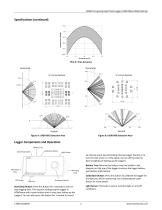
HOBO Occupancy/Light Data Logger (UX90-005x/-006x) Manual Specifications (continued) Plot A: Time Accuracy Horizontal Horizontal X-Y Cross Section Vertical Figure A: UX90-005 Detection Area Figure B: UX90-006 Detection Area Logger Components and Operation Battery Tray Start/Stop Button Calibration Button Light Sensor an internal event (see Recording Internal Logger Events) or to turn the LCD screen on if the option to turn off the LCD has been enabled (see Setting up the Logger). Mounting Loop Battery Tray: Remove the battery tray (not visible in the diagram) on the top of the logger to access...
Open the catalog to page 2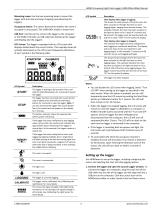
HOBO Occupancy/Light Data Logger (UX90-005x/-006x) Manual Mounting Loops: Use the two mounting loops to mount the logger with the hook-and-loop strapping (see Mounting the Logger). Occupancy Sensor: This sensor determines whether the room is occupied or unoccupied. The UX90-005x model is shown here. USB Port: Use this port to connect the logger to the computer or the HOBO U-Shuttle via USB cable (see Setting up the Logger and Reading Out the Logger). LCD Screen: This logger is equipped with an LCD screen that displays details about the current status. This example shows all symbols illuminated...
Open the catalog to page 3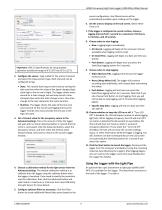
HOBO Occupancy/Light Data Logger (UX90-005x/-006x) Manual Important: USB 2.0 specifications do not guarantee operation outside the range of 0°C (32°F) to 50°C (122°F). 2. Configure the sensor. Type a label for the sensor if desired and select the measurement type. Both channels can be configured to log: • State. This records how long an event lasts by storing the date and time when the state of the signal changes (logic state high to low or low to high). The logger checks every second for a state change, but will only record a time-stamped value when the state change occurs. One state change...
Open the catalog to page 4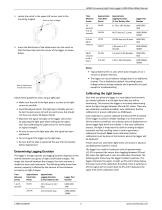
HOBO Occupancy/Light Data Logger (UX90-005x/-006x) Manual HOBO Occupancy/Light Data Logger (UX90-005x/-006x) Manual 2. Insert the black base of the attachment into the notch so that the base clips onto the corner of the logger as shown below. Follow these guidelines when using a light pipe: • Make sure the end of the light pipe is as close to the light source as possible. • Avoid 90-degree bends. The light pipe is flexible and can be bent to gain access to hard-to-reach areas, but should not have any sharp, 90-degree bends. • Maximize the signal strength on the logger LCD screen by adjusting...
Open the catalog to page 5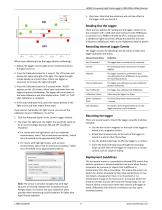
HOBO Occupancy/Light Data Logger (UX90-005x/-006x) Manual 1. Deploy the logger near the light to be monitored and turn the light source on. 2. Press the Calibrate button for 1 second. The LCD screen will display the signal strength of the light. The signal strength should ideally be at least 3 bars. Orient the logger as necessary to increase the signal strength. 3. Press the Calibrate button for 3 seconds while "HOLD" appears on the LCD screen. Move your hand away from the logger to prevent shadowing. The logger will count down to the auto-calibration and then display either "PASS" or "FAIL"...
Open the catalog to page 6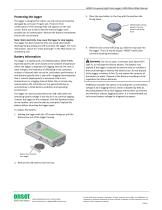
HOBO Occupancy/Light Data Logger (UX90-005x/-006x) Manual Protecting the logger The logger is designed for indoor use and can be permanently damaged by corrosion if it gets wet. Protect it from condensation. If the message FAIL CLK appears on the LCD screen, there was a failure with the internal logger clock possibly due to condensation. Remove the battery immediately and dry the circuit board. Note: Static electricity may cause the logger to stop logging. The logger has been tested to 8 KV, but avoid electrostatic discharge by grounding yourself to protect the logger. For more information, search...
Open the catalog to page 7All ONSET catalogs and technical brochures
 HOBO® MX1105 Data Logger
3 Pages
 HOBO® MX100 Data Logger
3 Pages
 HOBO UX90-004x
6 Pages
 HOBO UX100-002x
6 Pages
 HOBO UX100-003
8 Pages
 HOBO UX100-014M
8 Pages
 InTemp® CX403
3 Pages
 HOBO® MX2204 Data Logger
3 Pages
 InTemp® CX702 Data Logger
2 Pages
 InTemp® CX602 Data Logger
2 Pages
 InTemp® CX5000
2 Pages
 T-WNB-3D-240 Sensor
2 Pages
 S-FS-TRMSA Sensor
2 Pages
 S-RGF-M002 Sensor
2 Pages
 HOBO® Energy Logger
2 Pages
 S-THB-M008 Sensor
3 Pages
 T-VER-PX3UL Sensor
2 Pages
 S-WCF-M003 Sensor
3 Pages
 HOBO® MX2301A Data Logger
3 Pages
 HOBO® RX3000 Data Logger
3 Pages
 RXW-THC-xxx Sensor
3 Pages
 MX1102
2 Pages
 ZW series
2 Pages
 HOBO MX2300
2 Pages
 UX90
UX902 Pages
 HOBO USB Micro Station
2 Pages
 Catalog 2014
46 Pages
 pressure data-logger
8 Pages


- Data logger
- Analysis software solution
- Windows software
- Cloud-based software
- Temperature datalogger
- Monitoring software solution
- Communication gateway
- USB datalogger
- Data-logger with screen
- Ethernet gateway
- Wireless datalogger
- Battery-powered datalogger
- Wireless gateway
- Monitoring datalogger
- Datalogger with LCD display
- Compact logger
- Humidity datalogger
- Condition monitoring module
- Multi-channel datalogger
- Datalogger for food applications