

HOBO UX90-004x

HOBO UX90-004x
- Internal Motor Sensor: Detects AC magnetic fields greater than 40 mGauss at 60 Hz.
- External Input: Supports electronic solid state switch closure or logic driven voltage output, with a range of 0 to 3 V DC (USB powered) or 0 to 2.5 V DC (battery powered).
- Memory: UX90-004 has 128 KB, UX90-004M has 512 KB.
- Power Source: One 3V CR2032 lithium battery and USB cable, with a typical battery life of 1 year.
- Operating Range: Logging: -20° to 70°C; Launch/Readout: 0° to 50°C.
- Environmental Rating: IP50.
- Start/Stop Button: Initiates or halts logging, records events, or activates the LCD.
- Calibration Button: Calibrates the logger for the specific motor.
- LCD Screen: Displays status, battery life, memory usage, and logging information.
- USB Port: Connects the logger to a computer or HOBO U-Shuttle.
Catalog excerpts

onset HOBO Dataloggers HOBO Motor On/Off Data Logger Models: UX90-004 UX90-004M Included Items: • Command™ strip • Double-sided tape • Hook & loop strap Required Items: • HOBOware 3.3 or later • USB cable (included with software) Accessories: • Voltage Input Cable (CABLE-2.5-STEREO) • AC Current Switch (CSV-A8) • U-Shuttle (U-DT-1) Additional sensors and accessories available at www.onsetcomp.com. The HOBO Motor On/Off data logger records motor on and off conditions by detecting the AC magnetic fields given off by a rotating motor using its internal sensor. A second external input can be used to detect a variety of external contact closure type inputs. Using HOBOware®, you can easily configure the logger for equipment monitoring in a wide variety of applications. This compact data logger has a built-in LCD screen for checking status, battery usage, and memory consumption. You can also use the LCD screen to quickly calibrate the logger's motor sensor near the motor to be monitored or you can set calibration to preset sensitivity levels with HOBOware. There are two models of the HOBO Motor On/Off data logger: the UX90-004 has a memory capacity of 128 KB while the UX90-004M has 512 KB. Specifications Internal Motor Sensor AC Magnetic Field Threshold >40 mGauss at 60 Hz External Input External Contact Input Electronic solid state switch closure or logic driven voltage output Range 0 to 3 V DC (USB powered), 0 to 2.5 V DC (battery powered) Maximum State and Runtime 1 Hz Frequency Solid State Switch Closure Input Low: < 10 KQ; Input High: > 500 KQ Input Impedance Solid state switch closure: 100 KQ pull up Logger Resolution Memory Modes Start Modes Stop Modes Time Accuracy Power Source Battery Life Memory Download Type Full Memory Download Time Logger Operating Range LCD Size Weight Environmental Rating Pulse: 1 pulse, Runtime: 1 second, State and Event: 1 State or Event Wrap when full or stop when full Immediate, push button, date & time, or next interval When memory full, push button, or date & time ±1 minute per month at 25°C (77°F) (see Plot A) One 3V CR2032 lithium battery and USB cable 1 year, typical with logging intervals greater than 1 minute and normally open contacts UX90-004: 128 KB (84,650 measurements, maximum) UX90-004M: 512 KB (346,795 measurements, maximum) USB 2.0 interface 10 seconds for 128 KB; 30 seconds for 512 KB Logging: -20° to 70°C (-4° to 158°F); 0 to 95% RH (non-condensing) Launch/Readout: 0° to 50°C (32° to 122°F) per USB specification LCD is visible from: 0° to 50°C (32° to 122°F); the LCD may react slowly or go blank in temperatures outside this range 3.66 x 8.48 x 1.52 cm (1.44 x 3.34 x 0.6 in.) 30 g (1.06 oz) IP50 The CE Marking identifies this product as complying with all relevant directives in the European Union (EU).
Open the catalog to page 1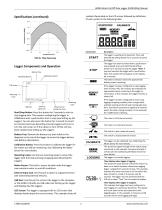
HOBO Motor On/Off Data Logger (UX90-004x) Manual symbols illuminated on the LCD screen followed by definitions of each symbol in the following table. Specifications (continued) The logger is waiting to be launched. Press and hold the Start/Stop button for 3 seconds to launch the logger. Plot A: Time Accuracy The logger has been launched with a push button stop enabled; press and hold the Start/Stop button for 3 seconds to stop the logger. Note: If you also launched the logger with a push button Start, this symbol will not appear on the display for 5 minutes. Logger Components and Operation Battery...
Open the catalog to page 2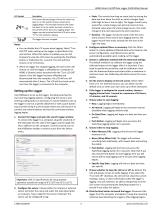
HOBO Motor On/Off Data Logger (UX90-004x) Manual HOBO Motor On/Off Data Logger (UX90-004x) Manual Important: USB 2.0 specifications do not guarantee operation outside the range of 0°C (32°F) to 50°C (122°F). Description This shows the percentage of time the motor has been on or the switch has been closed since logging began. This example indicates the motor has been on or the switch has been closed for a total of 24% of the time since logging began. The logger must be launched with the LCD set to show "%” for this symbol to display. The logger has been stopped. Notes: • You can disable the LCD...
Open the catalog to page 3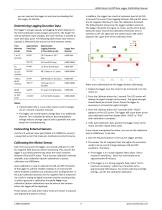
HOBO Motor On/Off Data Logger (UX90-004x) Manual HOBO Motor On/Off Data Logger (UX90-004x) Manual you can read out the logger at any time (see Reading Out the Logger for details). Determining Logging Duration Data The logger's storage capacity and logging duration depends on the interval between state changes and events. The longer the interval between state changes, the more memory is needed to store each data point. The following table shows how memory capacity is affected by the amount of time between events: Time Approximate Approximate Between Total Data Logging Duration Logger Part Events...
Open the catalog to page 4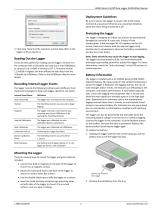
HOBO Motor On/Off Data Logger (UX90-004x) Manual 3. Click Save. Note that the selections will not take effect in the logger until you launch it. Reading Out the Logger There are two options for reading out the logger: connect it to the computer with a USB cable and read out it with HOBOware, or connect it to a HOBO U-Shuttle (U-DT-1, firmware version 1.15m030 or higher) and then offload the data files from the U-Shuttle to HOBOware. Refer to the HOBOware Help for more details. Recording Internal Logger Events The logger records the following internal events (different from state/event changes)...
Open the catalog to page 5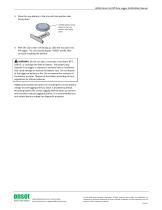
HOBO Motor On/Off Data Logger (UX90-004x) Manual 3. Place the new battery in the tray with the positive side facing down. CR2032 battery being placed in the tray, positive side facing down 4. With the LCD screen still facing up, slide the tray back into the logger. The LCD should display “HOBO” briefly after correctly installing the battery. WARNING: Do not cut open, incinerate, heat above 85°C (185°F), or recharge the lithium battery. The battery may explode if the logger is exposed to extreme heat or conditions that could damage or destroy the battery case. Do not dispose of the logger or battery...
Open the catalog to page 6All ONSET catalogs and technical brochures
 HOBO® MX1105 Data Logger
3 Pages
 HOBO® MX100 Data Logger
3 Pages
 HOBO UX90-005x/-006x
7 Pages
 HOBO UX100-002x
6 Pages
 HOBO UX100-003
8 Pages
 HOBO UX100-014M
8 Pages
 InTemp® CX403
3 Pages
 HOBO® MX2204 Data Logger
3 Pages
 InTemp® CX702 Data Logger
2 Pages
 InTemp® CX602 Data Logger
2 Pages
 InTemp® CX5000
2 Pages
 T-WNB-3D-240 Sensor
2 Pages
 S-FS-TRMSA Sensor
2 Pages
 S-RGF-M002 Sensor
2 Pages
 HOBO® Energy Logger
2 Pages
 S-THB-M008 Sensor
3 Pages
 T-VER-PX3UL Sensor
2 Pages
 S-WCF-M003 Sensor
3 Pages
 HOBO® MX2301A Data Logger
3 Pages
 HOBO® RX3000 Data Logger
3 Pages
 RXW-THC-xxx Sensor
3 Pages
 MX1102
2 Pages
 ZW series
2 Pages
 HOBO MX2300
2 Pages
 UX90
UX902 Pages
 HOBO USB Micro Station
2 Pages
 Catalog 2014
46 Pages
 pressure data-logger
8 Pages


- Data logger
- Analysis software solution
- Windows software
- Cloud-based software
- Temperature datalogger
- Monitoring software solution
- Communication gateway
- USB datalogger
- Data-logger with screen
- Ethernet gateway
- Wireless datalogger
- Wireless gateway
- Battery-powered datalogger
- Monitoring datalogger
- Datalogger with LCD display
- Compact logger
- Humidity datalogger
- Condition monitoring module
- Multi-channel datalogger
- Datalogger for food applications