

K8DS-PM

K8DS-PM
Catalog excerpts
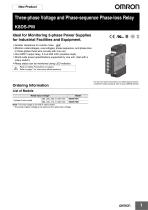
omRonThree-phase Voltage and Phase-sequence Phase-loss RelayK8DS-PM Ideal for Monitoring 3-phase Power Supplies for Industrial Facilities and Equipment. • Greater resistance to inverter noise. new • Monitor undervoltages, overvoltages, phase sequence, and phase loss in three-phase three-wire circuits with one unit. • One SpDt output relay, 5 A at 250 VAC (resistive load). •World-wide power specifications supported by one unit. (Set with a rotary switch.) •Relay status can be monitored using LED indicator. A Refer to Safety Precautions on page 9. Refer to page 7 for commonly asked questions. Ordering Information List of Models Note: The input range is set with a rotary switch. * The power supply voltage is the same as the rated input voltage.
Open the catalog to page 1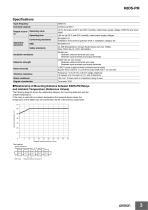
Specifications Input frequency •Relationship of Mounting Distance between K8DS-PM Relays and Ambient Temperature (Reference Values) The following diagram shows the relationship between the mounting distances and the ambient temperature. If the relay is used with an ambient temperature that exceeds these values, the temperature of the K8DS may rise and shorten the life of the internal components. DIN Track Distance between products: d
Open the catalog to page 3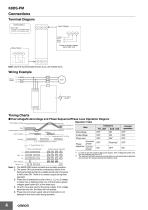
Connections Terminal Diagram Control Output L1 Relay output 250 VAC, 5 A (resistive load) 30 VDC, 5 A (resistive load) Input Voltages Note: Use the recommended ferrules if you use twisted wires. Power supply AC/DC Timing Charts ●Overvoltage/Undervoltage and Phase Sequence/Phase Loss Operation Diagram Operation Table Overvoltage set value Hysteresis: Fixed at 5% L1 Input L2 L3 Undervoltage set value Indicators RY_LED Contact operation Incorrect phase t1: Power ON lock (1 s) t1 Phase Loss Operation Undervoltage Phase loss Alarm indicator Flashing Flashing Alarm indicator Relay 11-14 Note: 1. The...
Open the catalog to page 4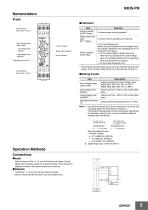
NomenclatureFront Terminal block (See notes 1 and 2.) Input voltage range rotary switch Overvoltage knob (OVER) Undervoltage knob (UNDER) Operating time knob (T) Terminal block (See notes 1 and 2.) Power indicator Relay status indicator Alarm indicator •Indicators Item * This indicator uses the input across L2 and L3 as the internal power supply. It will not light unless there is an input across L2 and L3. •Setting Knobs Item Note: 1. Use either a solid wire of 2.5 mm2 maximum or a ferrule with insulating sleeve for the terminal connection. The length of the exposed current-carrying part inserted...
Open the catalog to page 5
K8DS-PM Setting Methods ●Overvoltage The overvoltage knob (OVER) is used to set the overvoltage threshold. The overvoltage can be set to between −30% and 25% of the rated input voltage. Turn the knob while there is an input to the input terminals until the alarm indicator flashes (when the set value and the input have reached the same level.) Use this as a guide to set the voltage. The rated input depends on the model and the rotary switch setting. Example: K8DS-PM1 with Rotary Switch Set to 200 V The rated input is 200 VAC and the setting range is 140 to 250 V. ●Undervoltage Undervoltage is...
Open the catalog to page 6
Checking Operation How to Measure the Operating Time Overvoltage Change the input suddenly from 70% to 120% of the set value and measure the time until the Unit operates. Undervoltage Change the input suddenly from 120% to 70% of the set value and measure the time until the Unit operates. Operating Time Adjust the slide resistor so that the voltage applied to the K8DS terminals is 120% of the set value for overvoltage detection or 80% of the set value for undervoltage detection when the auxiliary relay in connection diagram 2 operates. Close the switch and use a cycle counter to measure the operating...
Open the catalog to page 7
Load-side Phase Loss In principle, phase loss cannot be detected on the load side because the K8DS-PM measures three-phase voltage to determine phase loss. Motor Load Phase Loss during Operation Motor load phase loss cannot be detected during operation. It can be used to detect phase loss at startup. Normally, three-phase motors will continue to rotate even if one phase is open. The three-phase voltage will be induced at the motor terminals. The diagram shows voltage induction at the motor terminals when phase R has been lost with a load applied to a three-phase motor. The horizontal axis shows...
Open the catalog to page 8
Safety Precautions Be sure to read the precautions for all models in the website at the following URL: http://www.ia.omron.com/. Warning Indications There is a risk of minor electrical shock, fire, or device failure. Do not allow any pieces of metal, conductors, or cutting chips that occur during the installation process to enter the product. Explosions may cause minor injuries. Do not use the product in locations with inflammable or explosive gases. There is a risk of minor electrical shock, fire, or device failure. Do not disassemble, modify, repair, or touch the inside of the product. Loose...
Open the catalog to page 9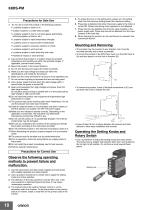
Precautions for Safe Use 1. Do not use or store the product in the following locations. • Locations subject to water or oil • Outdoor locations or under direct sunlight • Locations subject to dust or corrosive gases (particularly sulfurizing gases, ammonia, etc.) • Locations subject to rapid temperature changes 5. To reduce the error in the setting knob, always turn the setting knob from the minimum setting toward the maximum setting. 6. Phase loss is detected only when the power supply to the motor is turned ON. Phase loss during motor operation is not detected. 7. Phase loss can be detected...
Open the catalog to page 10
Terms and Conditions Agreement Read and understand this catalog. Please read and understand this catalog before purchasing the products. Please consult your OMRON representative if you have any questions or comments. Warranties. (a) Exclusive Warranty. Omron’s exclusive warranty is that the Products will be free from defects in materials and workmanship for a period of twelve months from the date of sale by Omron (or such other period expressed in writing by Omron). Omron disclaims all other warranties, express or implied. (b) Limitations. OMRON MAKES NO WARRANTY OR REPRESENTATION, EXPRESS OR...
Open the catalog to page 11All OMRON catalogs and technical brochures


Archived catalogs
 D4F
D4F8 Pages
 D4GS-N
11 Pages
 E4E2
E4E25 Pages
 Fiber SensorBest Selection Catalog
104 Pages
 Fiber Unit E32-LT/LD
4 Pages
 G9SE Series
20 Pages
 R87F / R87T AC Axial Fans
28 Pages
 Displacement Sensors
4 Pages
 Photomicro Sensors
7 Pages
 Switching Power Supplies
16 Pages
 DeviceNet Safety System
30 Pages
 Programmable Terminals NS Series
57 Pages
 Data Logger ZR-RX Series
12 Pages
 Switch Mode Power Supply S8VK-G
22 Pages
 E3FA PHOTOELECTRIC SENSORS
24 Pages
 Safety Controller G9SP
28 Pages
 Round Water-resistant Connectors
31 Pages
 NT series
18 Pages
 Air Particle Sensor ZN-PD-S
2 Pages
 Portable Multi-logger ZR-RX70
12 Pages
 Fiber Sensor Best Selection Catalog
100 Pages
 Code Reader/OCR
24 Pages
 F3SJ Series Safety Light Curtain
108 Pages
 CompoNet
28 Pages
 Vision System FH series
54 Pages
 E9NC-T
2 Pages
 ZW Series
24 Pages
 ZS Series
32 Pages
 ZG2
ZG216 Pages
 FZ4 Series
42 Pages
 VC-DL100
6 Pages
 MS4800
40 Pages
 CP1E
CP1E12 Pages
 CP1
CP112 Pages
 E5AC-T
8 Pages
 H8PS Cam Positioner
32 Pages
 OS32C Safety Laser Scanner
24 Pages
 FQ Vision Sensor
17 Pages
 ZN-PD Air Particle Sensor
16 Pages
 S8EX Switch Mode Power Supply
24 Pages
 CP1L CP series CP1L CPU Unit
36 Pages
 E2EF
E2EF8 Pages
 FQ2 Smart camera
24 Pages
 VT-X700
6 Pages
 Sysmac Catalog
410 Pages
 G5 Series
59 Pages
 E3T Series
6 Pages
 E3T Data Sheet
26 Pages
 E3ZM-C
14 Pages
 E3S-CL
9 Pages
 E3S-A
E3S-A21 Pages
 E3S-R
E3S-R11 Pages
 E3S-GS3E4
3 Pages
 D5A
D5A8 Pages
 D5F
D5F5 Pages
 SC
SC5 Pages
 VB
VB5 Pages
 NL
NL8 Pages
 E6A2-C
5 Pages
 E6B2-C
5 Pages
 E6D-C
E6D-C5 Pages
 E6F-C
E6F-C5 Pages
 E6H-C
E6H-C5 Pages
 E4C-UDA
5 Pages
 E4A-3K
9 Pages
 E4B
E4B12 Pages
 G7J
G7J10 Pages
 G7Z
G7Z9 Pages
 G4Q
G4Q6 Pages
 MMK
MMK14 Pages
 MM
MM17 Pages
 MK-S(X)
12 Pages
 MK-S
MK-S9 Pages
 G2AK
G2AK7 Pages
 G2A-434
7 Pages
 G2A
G2A9 Pages
 G7T
G7T7 Pages
![G2R-[]-S](https://img.directindustry.com/pdf/repository_di/15954/g2r-s-616653_1mg.jpg) G2R-[]-S
G2R-[]-S11 Pages
 LY
LY14 Pages
 NE0A-SCPU01
6 Pages
![NE1A-SCPU0[]-EIP](https://img.directindustry.com/pdf/repository_di/15954/ne1a-scpu0-eip-616667_1mg.jpg) NE1A-SCPU0[]-EIP
NE1A-SCPU0[]-EIP8 Pages
 NE1A-SCPU Series
8 Pages
 61F-GPN-BT / -BC
5 Pages
 E3NC-L/-S
16 Pages
 MY
MY35 Pages
 V680S Series
68 Pages
 V680 series
68 Pages
 TL-L
TL-L5 Pages
 GLS
GLS3 Pages
 F92A
F92A4 Pages
 XS2
XS229 Pages
 XS5
XS525 Pages
 APR-S
APR-S6 Pages
 SAO
SAO13 Pages
 SE
SE15 Pages
 K2CM
K2CM16 Pages
 K8AK-TH
12 Pages
 K8AK-LS
12 Pages
 K8AK-TS/PT
12 Pages
 K8DS-PZ
12 Pages
 K8DS-PU
12 Pages
 K8AK-PW
12 Pages
 K8DS-PA
12 Pages
 K8AK-PA
12 Pages
 K8AK-PM
16 Pages
 K8DS-PH
12 Pages
 K8AK-PH
12 Pages
 K8AK-VW
12 Pages
 K8AK-VS
12 Pages
 K8AK-AW
16 Pages
 K8AK-AS
12 Pages
 G9SA-300-SC
9 Pages
 WS02-CFSC1-E
3 Pages
 DST1 Series
5 Pages
 G9SA
G9SA16 Pages
 G9SB
G9SB10 Pages
 G9SX-LM
28 Pages
 G9SX/G9SX-GS
49 Pages
 G9SX-SM/LM
9 Pages
 G9SX-SM
24 Pages
 G9SP
G9SP28 Pages
 NX-SL/SI/SO
20 Pages
 REGULATION SOLUTIONS
24 Pages
 Sensor Accessories
38 Pages
 SMART REMOTE I/O
12 Pages
 SAFETY APPLICATION HANDBOOK
55 Pages
 Vision Systems
20 Pages


