

K8AK-AW

K8AK-AW
- Compatible with current transformers (CTs) with secondary currents of 0 to 1 A or 0 to 5 A.
- Supports manual and automatic resetting.
- Independent settings for startup lock and operating time.
- Equipped with two SPDT output contacts rated at 5 A at 250 VAC.
- LED indicators for output status monitoring.
- Isolated inputs from the power supply.
- K8AK-AW1: Input range of 2 to 20 mA, 10 to 100 mA, and 50 to 500 mA AC/DC. Power supply options: 24 VAC/DC and 100 to 240 VAC.
- K8AK-AW2: Input range of 0.1 to 1 A and 0.5 to 5 A AC/DC.
- K8AK-AW3: For use with OMRON K8AC-CT200L CT, input ranges of 10 to 100 A and 20 to 200 A AC.
- Power supply voltage: 24 VAC/DC and 100 to 240 VAC.
- Operating value setting range: 10% to 100% of the maximum setting range.
- Reset method: Manual or automatic, with a fixed reset value at 5% of the operating value.
- Operating time setting range: 0.1 to 30 seconds.
- Startup lock time setting range: 0 to 30 seconds for overcurrent operation.
- Operating temperature: -20 to 60°C.
- Storage temperature: -25 to 65°C.
- Humidity: 25% to 85% (no condensation).
- Altitude: Up to 2,000 meters.
- Mounts to DIN Track, dimensions: 22.5 × 90 × 100 mm.
- Terminal wiring supports solid wires up to 2.5 mm² and twisted wires with ferrules.
- Connections include input terminals (I1, I2, I3), power supply terminals (A1, A2), and relay output terminals (11, 12, 14 for AL1 and 21, 22, 24 for AL2).
- Settings adjusted using knobs; DIP switches configure resetting methods and modes.
- Indicators: power (green), relay status (yellow), alarm (red).
- Conforms to EN 60947-5-1 standards.
- Safety standards: UL 508, CSA C22.2 No.14, CCC GB14048.5.
- Insulation resistance: 20 MΩ minimum; dielectric strength: 2,000 VAC for one minute.
Catalog excerpts

omRonSingle-phase Overcurrent/Undercurrent RelayK8AK-AW Ideal for Current Monitoring for Industrial Facilities and Equipment. • Monitor for overcurrents and undercurrents simultaneously. Separate settings and outputs supported for overcurrents and undercurrents. • Use commercially available CTs (CT current on secondary side: 0 to 1 A or 0 to 5 A). • Manual resetting and automatically resetting supported by one Relay. • Startup lock and operating time can be set separately. • Two sets of SPDT output contacts, 5 A at 250 VAC (resistive load). • Output status can be monitored using LED indicator. • Inputs are isolated from the power supply. A Refer to Safety Precautions on page 11. Refer to page 10 for commonly asked questions. Ordering InformationList of Models Setting range * The K8AK-AW3 is designed to be used in combination with an OMRON K8AC-CT200L Current Transformer (CT). (Direct input is not possible.) Accessory (Order Separately) * If you use a commercially available CT, do not exceed the overload capacity of the K8AK-AW2.
Open the catalog to page 1
*1 The range is selected using connected terminals. *2 The K8AK-AW3 is designed to be used in combination with an OMRON K8AC-CT200L Current Transformer (CT). (Direct input is not possible.)
Open the catalog to page 2
•Relationship of Mounting Distance between K8AK-AW Relays and Input Current (Reference Values) The following diagram shows the relationship between the mounting distances and the input current. If the relay is used with an input current that exceeds these values, the temperature of the K8AK may rise and shorten the life of the internal components. DIN Track Distance between products: d
Open the catalog to page 4
Connections Terminal Diagram K8AK-AW1 100-240VAC A Relay Output Control Output Relay output 250 VAC, 5 A (resistive load) 30 VDC, 5 A (resistive load) B Power Supply Voltage 100 to 240 VAC Relay Output Common 11 Do not connect anything to terminals that are shaded in gray. There is no polarity for the DC power supply input. For the current input, you can input only from the C terminal and one other terminal. Refer to Setting Ranges and Wiring Connections on the I1, I2, and I3 current input terminals. Use the recommended ferrules if you use twisted wires. The K8AK-AW3 is designed to be used in...
Open the catalog to page 5
K8AK-AW Timing Charts ●Overcurrent and Undercurrent Operation Diagram ●Undercurrent and Undercurrent Operation Diagram (Undercurrent Pre-alarm Mode) DIP switch settings: SW3 OFF and SW4 ON. Power supply voltage Power supply voltage Overcurrent set value (AL1) Input Undercurrent set value (AL2) AL1 alarm indicator AL2 alarm indicator Flashing Flashing LOCK LOCK: Startup lock time (0 to 30 s) Delay: 250 ms (reference value) t Delay: 250 ms (reference value) ●Overcurrent and Overcurrent Operation Diagram (Overcurrent Pre-alarm Mode) DIP switch settings: SW3 ON and SW4 OFF. Power supply voltage Overcurrent...
Open the catalog to page 6
Nomenclature Front •Indicators Item •Setting Knobs Item Note: 1. Use either a solid wire of 2.5 mm2 maximum or a ferrule with insulating sleeve for the terminal connection. The length of the exposed current-carrying part inserted into the terminal must be 8 mm or less to maintain dielectric strength after connection. For 2.5 mm2 or For ferrules with smaller solid wires an insulation sleeve. Recommended ferrules Phoenix Contact • Al 1,5-8BK (for AWG16) • Al 1-8RD (for AWG18) • Al 0,75-8GY (for AWG18) 2. Tightening torque: 0.49 to 0.59 N-m
Open the catalog to page 7
Note: The DC input terminals have no polarity. * The K8AK-AW3 is designed to be used in combination with the OMRON K8AC-CT200L Current Transformer (CT). (Direct input is not possible.) •Input Connect the input between the I1-COM, I2-COM, or I3-COM terminals, according to the input current. Malfunctions may occur if the input is connected to unused terminals and the Unit will not operate correctly. Terminal I1 is not used by the K8AK-AW3. If using the OMRON K8AC-CT200L CT, connect to terminals k and l on the K8AC-CT200L. (Terminals kt and lt are not used.) •Power Supply Connect the power supply...
Open the catalog to page 8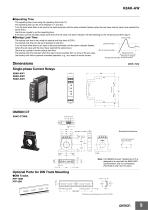
K8AK-AW ●Operating Time The operating time is set using the operating time knob (T). The operating time can be set to between 0.1 and 30 s. Turn the knob while there is an input to the input terminals until the alarm indicator flashes (when the set value and the input have reached the same level.) Use this as a guide to set the operating time. If the input current exceeds (drops lower than) the set value, the alarm indicator will start flashing for the set period and then stay lit. ●Startup Lock Time Inrush current The startup lock time is set using the startup lock time knob (LOCK). The startup...
Open the catalog to page 9
Checking Operation Overcurrents Gradually increase the input from 80% of the set value. The input will equal the operating value when the input exceeds the set value and the alarm indicator starts flashing. Operation can be checked by the relay outputs that will start after the operating time has passed. Undercurrent Gradually decrease the input from 120% of the set value and check the operation using the same method as for overcurrent. Example: Overcurrent Operating Mode, Normally Closed Relay Drive, and an Operating Time of 5 s. Set value Current input Lit Alarm indicator Can a motor with a...
Open the catalog to page 10
Safety Precautions Be sure to read the precautions for all models in the website at the following URL: http://www.ia.omron.com/. Warning Indications Explosions may cause minor injuries. Do not use the product in locations with inflammable or explosive gases. There is a risk of minor electrical shock, fire, or device failure. Do not disassemble, modify, repair, or touch the inside of the product. Loose screws may cause fires. Tighten terminal screws to the specified torque of 0.49 to 0.59 N-m. Use of excessive torque may damage the terminal screws. Tighten terminal screws to the specified torque...
Open the catalog to page 11
Precautions for Safe Use 1. Do not use or store the product in the following locations. • Locations subject to water or oil • Outdoor locations or under direct sunlight • Locations subject to dust or corrosive gases (particularly sulfurizing gases, ammonia, etc.) • Locations subject to rapid temperature changes • Locations prone to icing and dew condensation • Locations subject to excessive vibration or shock • Locations subject to wind and rain • Locations subject to static electricity and noise • Habitats of insects or small animals 2. Use and store the product in a location where the ambient...
Open the catalog to page 12All OMRON catalogs and technical brochures

Archived catalogs
 D4F
D4F8 Pages
 D4GS-N
11 Pages
 E4E2
E4E25 Pages
 Fiber SensorBest Selection Catalog
104 Pages
 Fiber Unit E32-LT/LD
4 Pages
 G9SE Series
20 Pages
 R87F / R87T AC Axial Fans
28 Pages
 Displacement Sensors
4 Pages
 Photomicro Sensors
7 Pages
 Switching Power Supplies
16 Pages
 DeviceNet Safety System
30 Pages
 Programmable Terminals NS Series
57 Pages
 Data Logger ZR-RX Series
12 Pages
 Switch Mode Power Supply S8VK-G
22 Pages
 E3FA PHOTOELECTRIC SENSORS
24 Pages
 Safety Controller G9SP
28 Pages
 Round Water-resistant Connectors
31 Pages
 NT series
18 Pages
 Air Particle Sensor ZN-PD-S
2 Pages
 Portable Multi-logger ZR-RX70
12 Pages
 Fiber Sensor Best Selection Catalog
100 Pages
 Code Reader/OCR
24 Pages
 F3SJ Series Safety Light Curtain
108 Pages
 CompoNet
28 Pages
 Vision System FH series
54 Pages
 E9NC-T
2 Pages
 ZW Series
24 Pages
 ZS Series
32 Pages
 ZG2
ZG216 Pages
 FZ4 Series
42 Pages
 VC-DL100
6 Pages
 MS4800
40 Pages
 CP1E
CP1E12 Pages
 CP1
CP112 Pages
 E5AC-T
8 Pages
 H8PS Cam Positioner
32 Pages
 OS32C Safety Laser Scanner
24 Pages
 FQ Vision Sensor
17 Pages
 ZN-PD Air Particle Sensor
16 Pages
 S8EX Switch Mode Power Supply
24 Pages
 CP1L CP series CP1L CPU Unit
36 Pages
 E2EF
E2EF8 Pages
 FQ2 Smart camera
24 Pages
 VT-X700
6 Pages
 Sysmac Catalog
410 Pages
 G5 Series
59 Pages
 E3T Series
6 Pages
 E3T Data Sheet
26 Pages
 E3ZM-C
14 Pages
 E3S-CL
9 Pages
 E3S-A
E3S-A21 Pages
 E3S-R
E3S-R11 Pages
 E3S-GS3E4
3 Pages
 D5A
D5A8 Pages
 D5F
D5F5 Pages
 SC
SC5 Pages
 VB
VB5 Pages
 NL
NL8 Pages
 E6A2-C
5 Pages
 E6B2-C
5 Pages
 E6D-C
E6D-C5 Pages
 E6F-C
E6F-C5 Pages
 E6H-C
E6H-C5 Pages
 E4C-UDA
5 Pages
 E4A-3K
9 Pages
 E4B
E4B12 Pages
 G7J
G7J10 Pages
 G7Z
G7Z9 Pages
 G4Q
G4Q6 Pages
 MMK
MMK14 Pages
 MM
MM17 Pages
 MK-S(X)
12 Pages
 MK-S
MK-S9 Pages
 G2AK
G2AK7 Pages
 G2A-434
7 Pages
 G2A
G2A9 Pages
 G7T
G7T7 Pages
![G2R-[]-S](https://img.directindustry.com/pdf/repository_di/15954/g2r-s-616653_1mg.jpg) G2R-[]-S
G2R-[]-S11 Pages
 LY
LY14 Pages
 NE0A-SCPU01
6 Pages
![NE1A-SCPU0[]-EIP](https://img.directindustry.com/pdf/repository_di/15954/ne1a-scpu0-eip-616667_1mg.jpg) NE1A-SCPU0[]-EIP
NE1A-SCPU0[]-EIP8 Pages
 NE1A-SCPU Series
8 Pages
 61F-GPN-BT / -BC
5 Pages
 E3NC-L/-S
16 Pages
 MY
MY35 Pages
 V680S Series
68 Pages
 V680 series
68 Pages
 TL-L
TL-L5 Pages
 GLS
GLS3 Pages
 F92A
F92A4 Pages
 XS2
XS229 Pages
 XS5
XS525 Pages
 APR-S
APR-S6 Pages
 SAO
SAO13 Pages
 SE
SE15 Pages
 K2CM
K2CM16 Pages
 K8AK-TH
12 Pages
 K8AK-LS
12 Pages
 K8AK-TS/PT
12 Pages
 K8DS-PZ
12 Pages
 K8DS-PU
12 Pages
 K8AK-PW
12 Pages
 K8DS-PA
12 Pages
 K8AK-PA
12 Pages
 K8DS-PM
12 Pages
 K8AK-PM
16 Pages
 K8DS-PH
12 Pages
 K8AK-PH
12 Pages
 K8AK-VW
12 Pages
 K8AK-VS
12 Pages
 K8AK-AS
12 Pages
 G9SA-300-SC
9 Pages
 WS02-CFSC1-E
3 Pages
 DST1 Series
5 Pages
 G9SA
G9SA16 Pages
 G9SB
G9SB10 Pages
 G9SX-LM
28 Pages
 G9SX/G9SX-GS
49 Pages
 G9SX-SM/LM
9 Pages
 G9SX-SM
24 Pages
 G9SP
G9SP28 Pages
 NX-SL/SI/SO
20 Pages
 REGULATION SOLUTIONS
24 Pages
 Sensor Accessories
38 Pages
 SMART REMOTE I/O
12 Pages
 SAFETY APPLICATION HANDBOOK
55 Pages
 Vision Systems
20 Pages


