

MAXIFLEX Bases

MAXIFLEX Bases
- Wall-mounting capability with system sizes ranging from 2 to 15 I/O modules per CPU.
- Secure and easy module mounting with hot plug-in capability.
- Automatic slot addressing and module type identification.
- Optional module keying and a 19” frame adapter available.
MAXIFLEX Bases are designed for surface mounting with an optional bracket for 19” frame installation. Two types of bases are available: Master Bases, which accept a CPU and I/O modules, and Expander Bases, which accept only I/O modules. The system can be expanded using Expander Bases connected via the M1811A Expander Cable, allowing up to 15 I/O modules per CPU.
| Model | Description | PSU Slot | CPU Slot | I/O Slots | Expand | Weight Unpacked | Weight Packed |
|---|---|---|---|---|---|---|---|
| M1001A | 2 I/O Master Base | 1 | 1 | 2 | No | 410g | 500g |
| M1021B | 3 I/O Master Base | 1 | 1 | 3 | Yes | 560g | 675g |
| M1023B | 5 I/O Master Base | 1 | 1 | 5 | Yes | 710g | 890g |
| M1022B | 7 I/O Master Base | 1 | 1 | 7 | Yes | 800g | 960g |
| M1031B | 5 I/O Expander Base | None | None | 5 | - | 560g | 675g |
| M1032B | 8 I/O Expander Base | 1 | None | 8 | - | 800g | 985g |
Environmental conditions include an operating temperature range of -25°C to +60°C and storage temperature range of -40°C to +70°C, with a maximum humidity of 95% at 40°C non-condensing.
Dimensions vary by model, with lengths ranging from 180.0 mm to 403.5 mm and widths from 202.4 mm to 425.9 mm. CAN Bus connectors are used for network connections.
Installation involves securing each module with a retaining clip and ensuring adequate spacing for module insertion/removal and field wiring. A logic power supply is required for each Master Base, with an additional supply needed for the 8-way expander base.
Catalog excerpts

DATASHEET FEATURES • Wall- mounting System sizes from 2 to 15 I/O modules per CPU Secure easy-to-use module mounting. Automatic I/O module slot addressing Automatic I/O module type identification Optional module keying 19” frame adapter available MAXIFLEX Bases are available in various sizes (for application flexibility and to cater for possible enclosure limitations). These bases are designed for surface mounting but a purpose designed mounting bracket (Model M1821A) facilitates mounting in a 19” frame. Two types of base are available in this range: Master Bases and Expander Bases. Every Master Base will accept a CPU module plus a number of I/O modules, while the Expander Bases accept only I/O modules. The number of I/O modules accessed by the CPU on any Master Base, (except the M1001A 2I/O base which does not have an expander socket), may be expanded using any one of the Expander Bases. A single Expander Base is connected to a Master Base using the M1811A Expander Cable. This allows a maximum of 15 I/O modules to be connected to a single CPU module. The M1811A Expander Cable is 400mm long, allowing a maximum of 180mm between the Master and Expander bases when mounted one above the other. A space of least 100mm must be allowed between bases when mounted to allow for module insertion/removal and field wiring. Each MAXIFLEX module is secured in position on the base by a retaining clip that is pressed to remove the module. Each Master base in the range requires a logic power supply to power the system. An additional logic power supply is required for the 8 way expander base. SPECIFICATIONS Model Weight Unpacked Weight Packed Expander Cable Environmental Operating Temperature: -25C to +60C (-13F to +140F) Copyright Omniflex Subject to change without notice
Open the catalog to page 1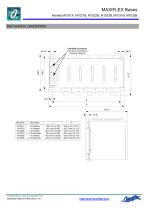
MECHANICAL DIMENSIONS CAN BUS Connectors Used for connecting to a CAN Bus Network 2 I/O Master 3 I/O Master 5 I/O Master 5 I/O Expander 7 I/O Master 8 I/O Expander Copyright Omniflex Subject to change without notice
Open the catalog to page 2
SYSTEM INSTALLATION Copyright Omniflex Subject to change without notice
Open the catalog to page 3All Omniflex catalogs and technical brochures
 CONET Local Area Network
8 Pages
 Model M1267B CPU P3e-R
8 Pages
 Model M1265A CPU A3e
8 Pages
 Model M1586A CONET PNIM
2 Pages
 Model M1588D HARWELL NIM
2 Pages
 Model M1711A HSC
2 Pages
 Model M1322A 16DI-24
2 Pages
 Model M1323A 16DI-48
2 Pages
 Model M1326A 32DI-24
2 Pages
 Model M1327A 64DI-24
2 Pages
 Model M1341B 16DO
2 Pages
 Model M1330A 8DI8RO
2 Pages
 Model M1342A 32DO
2 Pages
 Model M1372A 8RO
2 Pages
 Maxilarm
15 Pages
 Model C2321A Teleterm M2S
8 Pages
 Model C2330B-11-0
6 Pages
 Model C2330B-12-0
6 Pages
 Model M1403A 16AI
2 Pages
 Model M1412A 8AO
2 Pages
 Model M1431B 8 VC ISO
2 Pages
 Model M1432C 8 TC/mV ISO
3 Pages
 Model M1433B 6 RTD ISO
2 Pages
 Model C2360C-0-0 Teleterm M2
6 Pages
 Model C2360B-0-0 Teleterm M2
8 Pages
 C2404B
4 Pages
 C118xB series
4 Pages
 Model M1589D HART NIM
3 Pages
 Model M1580A Dual Serial NIM
2 Pages
 Model M1240B CPU T2
6 Pages
 Model MT8150x OIT 15 Inch
2 Pages
 Model MT8121x OIT 12.1 Inch
2 Pages
 Model MT8070iH OIT 7 Inch
2 Pages
 Model MT8100i OIT 10 Inch
2 Pages
 Model M1022B BASE
3 Pages
 Model C2475A OMNITERM LZD
6 Pages
 Model C2474A OMNITERM LZI
6 Pages
 Model C2166A PT-2000 24Vdc
3 Pages
 Model MT8104xh OIT 10.4 Inch
2 Pages
 Model M1102A PSU
2 Pages
 Model MT6070ih OIT 7 Inch
2 Pages
 Model MT6050i OIT 4.3 Inch
2 Pages
 Model M1023B BASE
3 Pages
 Model C2063B OMNITERM LPI
12 Pages
 Model M1021B BASE
3 Pages
 Model C2462A OT LPD
12 Pages
 Next Generation Signal Conditioners
12 Pages
 Industry Standard Alarm Annunciators
10 Pages


Archived catalogs

- Digital I/O
- Junction block
- Analog I/O
- Digital IO module
- Communication gateway
- Battery charger
- Screw connection terminal block
- Ethernet gateway
- HMI
- Fieldbus I/O module
- HMI with touch screen
- Serial gateway
- Analog IO module
- DIN rail-mounted terminal block
- Serial I/O
- Panel-mount HMI
- Remote I/O
- LCD HMI
- Lead battery charger