
- Catalogs
- ODOT Automation
- ODOT-PNM02


ODOT-PNM02

ODOT-PNM02
- Function: The ODOT-PNM02 is a protocol converter that enables data conversion between Modbus-RTU/ASCII and Profinet protocols, supporting devices with RS485/RS232/RS422 connectors.
- Technical Parameters: It operates on 9-36VDC, supports Profinet I/O Device V2.3, with a data area of up to 1440 bytes for both input and output, and supports up to 50 slots and dual serial ports.
- Appearance: Includes two Profinet ports with switch functions for device access.
- Indicators: Six LED indicators display power, device fault, system fault, network status, and data transmission status for serial ports.
- Terminal Definition: A 10-pin terminal is used for RS485, RS232, and RS422 connections, with specific wiring definitions.
- External Terminal Resistance: A 120Ω resistor is required for RS485 and RS422 modes to prevent signal reflection.
- Shows master and slave mode configurations for network setup.
- Configuration: Provides detailed steps for configuring the gateway in Siemens TIA V14, including network setup, GSD file installation, and module parameter configuration.
- Module Parameters: Parameters are categorized into general, serial port 1, and serial port 2 settings, with options for baud rate, parity, stop bits, etc.
- Diagnostic Modules: Optional modules for monitoring gateway and slave station status, including error codes for troubleshooting.
- Illegal Function Code (0x01): Unsupported function code by the slave station. Refer to the manual for the correct function code module.
- Illegal Data Address (0x02): Data address is out of range. Modify the data starting address or length as per the manual.
- Illegal Data Value (0x03): Data length exceeds the maximum allowable value. Adjust accordingly.
- Slave Device Failure (0x04): Check the status of the slave device.
- Slave Device Busy (0x06): Check the status of the slave device.
- Parity Error (0x07): Verify parity, baud rate, stop bit, and hardware connection.
- CRC Check Error (0x09): CRC calculation error in the slave response message. Check the working status of the slave station.
- Unsolicited Slave Reply (0x0A): Increase timeout time and check hardware connection and communication parameters.
- Slave Device Response Timeout (0x0B): Increase timeout time and verify hardware connection and communication parameters.
- Response Message Length Error (0x0E): Increase the received character interval.
- Write Slave Device Response Error (0x0F): Check hardware connection status.
- Frame Format Error (0x31): Check communication parameters.
- ASCII Length Error (0x32): Slave reply length error.
- ASCII Value Error (0x33): Data contains non-hexadecimal ASCII codes.
- Polling Time: Monitor the polling time of the serial port. Serial ports 1 and 2 are independent.
- Module Control Output: Optional 8~48 channels. When enabled, the Module Control Output command is effective for reading and writing channels.
- Modbus Function Codes Supported: 01/02/03/04/15/16 for both Master and Slave modes.
- Read/Write Commands: Add commands to the hardware catalog and set module parameters such as serial port number, slave station ID, and data start address.
- Hardware Configuration: Save and compile the project. Check for errors before downloading.
- Modbus Slave Mode: Set gateway mode to Modbus Slave, configure serial port parameters, and add diagnostic modules if needed.
- Device Name Modification: Use TIA software to update accessible devices and assign a new PROFINET device name for the gateway.
Catalog excerpts

ODOT Series Gateways ODOT-PNM02 User Manual Modbus-RTU/ASCll to Profinet Protocol Converter Sichuan Odot Automation System Co., Ltd. 2018-01 Copyright©2018 All rights reserved by Odot
Open the catalog to page 1
Version information Revision records: Ownership information Without the consent of the copyright owner, part or all of this document are not allowed to be republished in paper or electronic document. Disclaimer This document shall only be used to assist readers for the using of our products and the company shall not be responsible for any loss or error caused by the information in this document. The text and product described in this document is constantly developing and improving. Sichuan Odot Automation System Co., Ltd. has the right to modify this document without notifying users.
Open the catalog to page 2
Chapter 1 Product Description 1.1 Product Function ODOT-PNM02 gateway is a protocol converter from Modbus-RTU/ASCII to Profinet.It can realize the data interconversion from Modbus-RTU/ASCII to Profinet protocol. Any devices with the connector of RS485/RS232/ RS422 and supporting for Modbus-RTU can be used to realize the interconnection with Profinet. Such as PLC、DCS、Distributed IO、Frequency converter, motor start-up protection device, smart high and low voltage electrical apparatus, electric quantity measuring device, smart field measuring equipment,meters and etc. remarks:the gateway RS485 connector...
Open the catalog to page 4
nrf.t Sichuan Odot Automation System Co.. Lid._ Modbus-RTU/ASCII slave station 9. serial port parameters: support 1200 -115200 baud rate, support no, odd and even check 10. quantity of Modbus station supported: 62 pcs 11. supported Modubs function codes:01/02/03/04/05/06/15/16 12. installation: 35mm standard Din-rail indicator! lights reset button upgrade interface!
Open the catalog to page 5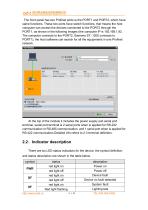
orf.t Sichuan Odot Automation System Co.. Lid. The front panel has two Profinet ports ie the PORT1 and PORT2, which have same functions. These two ports have switch functions, that means the host computer can access the devices connected to the PORT2 through the PORT 1, as shown in the following images (the computer IP is 192.168.1.92. The computer connects to the PORT2, Siemens S7 -1200 connects to PORT1), the host software can search for all the equipments in one Profinet network. At the top of the module it includes the power supply and serial port terminal, serial port terminal is 2 serial...
Open the catalog to page 6
nrf.t HJIW&MifcWWUHOT * Sichuan Odot Automation System Co., Ltd. 2.4> External terminal resistance When in use, if 120 Q terminal resistance needs to be added to prevent the reflection of serial signals. Only one 120 Q resistor needs to be connected between terminals 1 and 2 (or 4 and 5) of the serial port RS485. Connects one 120 Q resistors each between terminals 1 and 2 & 4 and 5 of the serial port RS422. See the picture below. Note: only communication in RS485 and RS422 mode is allowed to connect 120 Q resistors, RS232 mode is not allowed to connect resistors. Note: 120 Q resistors is packed...
Open the catalog to page 7
Modbus RTU/proFinet Protoosl Cwwbfiw ODOT-PNM02 Pijww s.ppl(; 9-36 VK Qpeslipj T4nu?r»tira: -M’SilC Humaty. SynftoJ (eKJftti"1 PWR ptrwrsIMii! pFiOevici! Fault SFiJ/stpi1 Fault UF:Fut Fault c03:litfi8fi*lS,a",S Its*"*'*’"1*
Open the catalog to page 8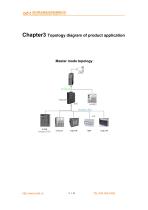
Chapter3 Topology diagram of product application Master mode topology
Open the catalog to page 9
Slave mode topology Chapter 4 Use this gateway in Siemens TIA V14 In this chapter, S7 315-2 PN/DP of SIEMENS will be used as Controller of PROFINET, and TIA will be used as configuration software to illustrate the configuration method of ODOT-PNM02.。 4.1、Configuration of master mode 1.Find the XML folder on the product CD and confirm that there are the following files in the folder. If not, please contact the supplier for it. If the following files is existed, copy them to the C:\Program Files\Siemens\Step7\S7DATA\GSD.
Open the catalog to page 10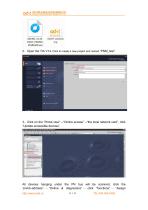
2、Open the TIA V14, Click to create a new project and named “PNM_test”. 3、Click on the “Portal view” --“Online access” --“the local network card”, click “Update accessible devices”. All devices hanging under the PN bus will be scanned, click the “pnmb-address” — “Online & diagnostics” — click “functions” — “Assign http
Open the catalog to page 11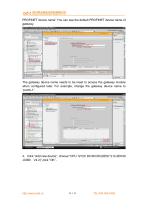
PROFINET device name” You can see the default PROFINET device name of gateway. The gateway device name needs to be reset to access the gateway module when configured later. For example, change the gateway device name to “pnmb-1”.
Open the catalog to page 12
5、 Click“PLC_1 ”—“Device configuration”—“Network view”, Select the PLC port and set the PN port Profinet network and IP address of the PLC. 6、 Click “Option”→“Manage general station description files(GSD)”, click find source path of ODOT-PNM02’GSD file, Select the GSD file and click “install”.
Open the catalog to page 13
After successful installation, click close to exit the add GSD dialog box. 7 、 Click“PLC_1 ” — “Device configuration” — “Network view”,in Hardware catalog interface on the right side of TIA,click“PROFINET IO→Gateway→Profi Net Gateway→Serial Gateway→ModbusGateway”,to find “PNM02 V1.0”, meaning the GSD file installed successfully. 8、 Drag the module PNM02 V1.0 from the “Hardware catalog interface” into the network view.
Open the catalog to page 14
9^ Assigned the gateway’s network to CPU 1212C's PN network J U Save project M A *1] -si X *51 (* i a J! JI i 0 ^ ^ Totally Integrated Automatic Project tree E® Technology ob|ects § External source file* [3 PLCtags Qj PLC data types WBtch and force tBblf Online backups S Tra ces "rjj. Device proxy data | gp Topology view |s§a Network view ||[|Y Pc Network overview [g Control I tgjHMI [g PC syste | -cjj Properties j^llnfo ij || Diagnostic ibject selected or the selected object dc [g Additions I Ethernet 1 [g PROFINET IO [g Encoders [g Gateway ► [g BEIJING TTSF Techno logy, a [g LATCOS The project...
Open the catalog to page 15All ODOT Automation catalogs and technical brochures
 C3351
C33518 Pages
 ODOT C series remote IO
4 Pages
 BOXIO 64
4 Pages
 ODOT remote IO catalogue
20 Pages
 PLC
PLC59 Pages
 New small ODOT brochure
16 Pages
 CN-8034
2 Pages
 CN-8033
2 Pages
 CN-8032
2 Pages
 CN-8012
2 Pages
 CN-8011
2 Pages
 CN-8031
2 Pages
 Remote I/O C Series
376 Pages
 ODOT-MS100T Serial User Manual
15 Pages
 Remote I/O module
36 Pages
 CT-7221
17 Pages
 CT5800
15 Pages
 CT4234
20 Pages
 CT3804
21 Pages
 CT-3713
19 Pages
 CT3238
19 Pages
 CT-3158
19 Pages
 CT2718
18 Pages
 CT2228
18 Pages
 CT623F
23 Pages
 CT-222F
19 Pages
 CT-121F
21 Pages
 ODOT-PNM02 User Manual_V1.5.
37 Pages
 MG-IOT03 User Manual_V1
24 Pages
 ODOT AIOBOX - Integrated IO module
149 Pages
 ODOT-S7PPIV2.0
31 Pages
 ODOT-S4E2
56 Pages
 ODOT-IOT01
79 Pages
 ODOT-IOT02
44 Pages


Archived catalogs
 ODOT-S1E1 User Manual 20200720
30 Pages

- ODOT network switch
- ODOT industrial network switch
- ODOT digital I/O
- ODOT I/O module
- Gigabit Ethernet ethernet switch
- ODOT analog I/O
- ODOT RJ45 network switch
- ODOT digital I/O module
- ODOT DIN rail network switch
- Waterproof network switch
- Communication gateway
- ODOT unmanaged switch
- Redundant network switch
- Industrial gateway
- Fieldbus gateway
- ODOT Fieldbus I/O module
- ODOT analog I/O module
- ODOT serial I/O
- ODOT DIN rail converter